
Upload‑Lift Image Upload Shopify App
by CloudliftLet customers upload files with their orders and empower them to edit images to make custom products. Accept uploaded image files for custom orders.
4.8
(169)
Ascension custom prints, United Kingdom
the fact this is a free app and so easy to use well worth using
Install in your Shopify Store

Upload‑Lift Image Upload Charts
Track Upload‑Lift Image Upload's ranking, reviews, and performance over time with interactive charts. See how it compares to similar apps in the same category.
Pros and Cons
Pros and Cons of Upload‑Lift Image Upload
Pros
Reliable Performance: The app functions smoothly and efficiently, meeting user needs without significant issues.
Exceptional Customer Support: Support team is highly responsive, helpful, and often resolves issues quickly, even for free plan users.
User-Friendly Interface: The app is intuitive and easy to set up, with a clean design that integrates well with store themes.
Customization Options: Offers extensive customization for branding and functionality, including color adjustments and field types.
Cons
Learning Curve: Some users find the app’s advanced features confusing initially, requiring time to master.
Theme Compatibility Issues: Occasional conflicts with certain Shopify themes, leading to functionality gaps.
Screenshots
About the App
Accept uploaded image files for custom orders.
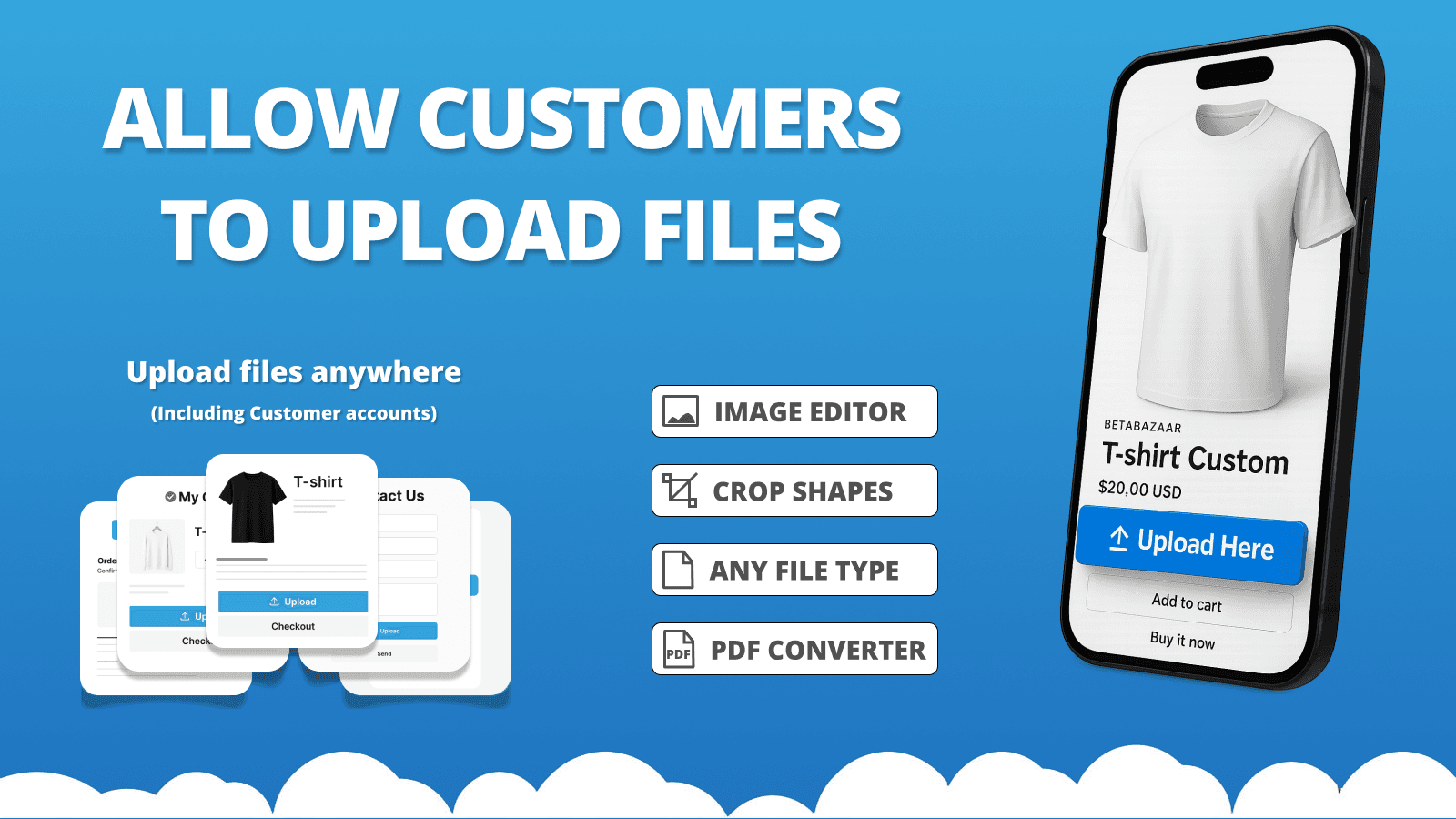
- High-speed file upload: You can quickly upload any kind of file up to 5GB.
- Predefined Crop Options: Photo editing tool that lets you crop pictures with set ratios and shapes.
- Image Preview: Display of the uploaded image in the upload area and shopping cart page.
- File Validations: Set up file checks. Set minimum/maximum file size and picture size.
- Advanced File Conversion: Converting complex files like PDF/AI into images.
Keywords
Key Features
- Upload files up to 5GB in size with high-speed processing.
- Crop images using predefined ratios and custom shapes.
- Preview uploaded images directly on the upload field and cart.
Pricing
Upload‑Lift Image Upload Pricing Plans
FREE
$0/month
Unlimited file uploads
50 uploads linked to orders
Max. 10MB upload file size
File uploads stored for 30 days
STARTUP
$9/month
Unlimited file uploads
500 uploads linked to orders
Max. 50MB upload file size
10GB archive space
File type conversion (+9$)
BASIC
$19/month
Unlimited file uploads
2,000 uploads linked to orders
Max. 200MB upload file size
50GB archive space
File type conversion (+9$)
PRO
$29/month
Unlimited file uploads
Unlimited uploads linked to orders
Max. 5GB upload file size
100GB archive space
File type conversion (+9$)
Not sure which plan to pick? Discuss FREE or STARTUP plans with us, learn about custom pricing, or get a demo.
Here's an overview of Upload‑Lift Image Upload costs for each of the plan(s):
The app has 4 pricing plans: 1 free and 3 paid. The free plan(s) offered by Upload‑Lift Image Upload: (FREE). The paid plan(s) offered by Upload‑Lift Image Upload: (STARTUP, BASIC, PRO).
The details of the plan(s) are outlined below:
FREE: This plan is free forever, incurring no subscription costs. It offers a wide range of features like Unlimited file uploads, 50 uploads linked to orders, Max. 10MB upload file size, File uploads stored for 30 days.
STARTUP: The STARTUP plan costs $9 and comes with a 7-day free trial period. The plan offers a host of features, including Unlimited file uploads, 500 uploads linked to orders, Max. 50MB upload file size, 10GB archive space, File type conversion (+9$), Advanced Image Editor (+9$), Customer account integration (+9$).
BASIC: The BASIC plan costs $19 and comes with a 7-day free trial period. The plan offers a host of features, including Unlimited file uploads, 2,000 uploads linked to orders, Max. 200MB upload file size, 50GB archive space, File type conversion (+9$), Advanced Image Editor (+9$), Customer account integration (+9$).
PRO: The PRO plan costs $29 and comes with a 7-day free trial period. The plan offers a host of features, including Unlimited file uploads, Unlimited uploads linked to orders, Max. 5GB upload file size, 100GB archive space, File type conversion (+9$), Advanced Image Editor (+9$), Customer account integration (+9$).
Upload‑Lift Image Upload Price Summary
| Pricing summary | Free plan available. Free trial available. |
| Total Pricing Plan(s) | 4 |
| Number of free plan(s) | 1 |
| Number of paid plan(s) | 3 |
| Cost of Paid Plan(s) | $9, $19, $29 |
| Free trial available | Yes, for 7 day(s) |
For further information regarding Upload‑Lift Image Upload app pricing plans, see the official website.
Upload‑Lift Image Upload Shopify App Discounts
If you are looking for discounts on Upload‑Lift Image Upload app pricing plans, feel free to contact our team - we'd be happy to help! Additionally, if you are an agency or a shop merchant with multiple Shopify stores, we can work directly with Cloudlift to secure better deals on the Upload‑Lift Image Upload app exclusively for you.
*Disclaimer: Please note that ShopDigest doesn't guarantee discounts on apps as any changes to the pricing plans are ultimately up to the discretion of the developer.
Testimonials
What our users say about Upload‑Lift Image Upload
“the fact this is a free app and so easy to use well worth using ”
“its easy to use. if your new and looking for something simple this is it”
“Tanmay was very instructive and patient. He provided valuable information which will greatly improve my website and storefront. I would recommend.”
Trusted By
Trusted by the best Shopify stores
Ascension custom prints
United Kingdom
She Hustles Creations
United States
Only in Clev
United States
Tail Stories
United Kingdom
Verdant Table Store
United States
Astro City
United States
Stickershop
Serbia
The Personal Touch Co
United Kingdom
Let customers upload files with their orders and empower them to edit images to make custom products.
Quickly uploading big files
Allow your customers to upload files up to 5GB. Enjoy unlimited file uploads with any plan.
Preview of uploaded image
Display picture previews on the product and shopping cart page. Generate image thumbnails automatically.
Photo editing tool
Allow your customer to modify and review images before they upload them.
Comparison
Top Upload‑Lift Image Upload Alternatives Detailed Comparison
The table below highlights the crucial differences between Upload‑Lift Image Upload and similar other Shopify apps based on parameters like ratings, reviews, features, pricing, etc.
Add App | |||
|---|---|---|---|
| General Information | |||
| Ratings | 4.8(167 reviews) | 4.8(1,212 reviews) | |
| Developed by | Cloudlift | HulkApps | |
| Launch Date | 1/13/2020 | 3/1/2018 | |
| Pricing | Free, $9/month, $19/month, $29/month | Free, $10/month, $20/month, $49.90/month | |
| Objective | Accept uploaded image files for custom orders. | Create option sets and apply them to all your products in a batch. | |
| Categories | Product variants, Custom file upload | Product variants, Custom file upload | |
| Key Features & Highlights | |||
| Purpose | Let customers upload files with their orders and empower them to edit images to make custom products. | The Product Options app will help all businesses by offering more ways to customize products. | |
| Features List |
|
| |
| Highlights | - | - | |
| User Reviews and Ratings | |||
| Recommended % | 95.3% | 92.2% | |
| Pros |
|
| |
| Cons |
|
| |
| Pricing and Plans | |||
| Total Pricing Plans | 4 | 4 | |
| Free Plan | Available | Available | |
| Free Trial | Yes, for 7 day(s) | Yes, for 7 day(s) | |
| Technical Information | |||
| Rating | 4.8 | 4.8 | |
| Total Reviews | 169 | 1,210 | |
| Launch Date | 1/13/2020 | 3/1/2018 | |
| SD Points | 29 | 152 | |
More Details About Upload‑Lift Image Upload
Product Description
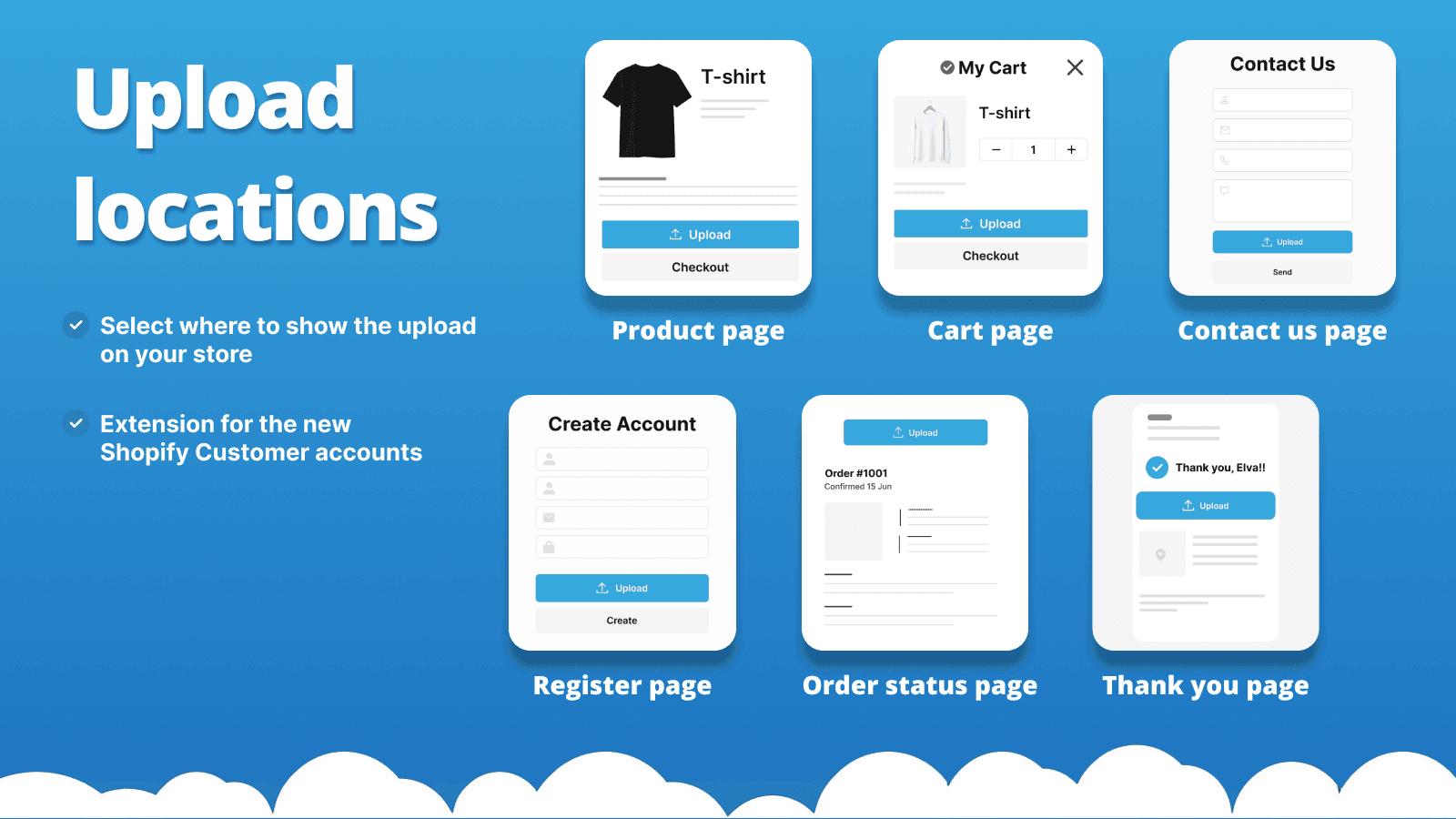
Upload-Lift is a customer-centric app that permits file uploads on various pages and includes an image editor for image adjustments. It's simple to implement without theme modifications and allows the configuration of acceptable file types.
AI Summary
The app enables Shopify store owners to integrate a customizable file upload feature, allowing customers to submit images or documents directly during checkout or product customization. Its strengths include seamless integration with various themes, a user-friendly interface, and extensive customization options for branding alignment, such as color adjustments and field configurations. The app supports multiple file uploads, preview functionality, and compatibility with diverse product types, including personalized or print-on-demand items. A notable advantage is the responsive and highly praised customer support, which often resolves issues quickly, including theme-specific fixes, even for free-tier users. However, some limitations include occasional challenges with theme compatibility, particularly concerning file upload reliability or cart display adjustments, which may require developer intervention. Advanced features, such as bulk file downloads or conditional upload visibility based on cart contents, are currently unavailable. While the app is generally intuitive, its extensive options can initially overwhelm users unfamiliar with its settings. Despite these minor drawbacks, it remains a robust solution for businesses requiring reliable file-upload functionality.
Support
For any questions, concerns, or assistance with Upload‑Lift Image Upload, the dedicated support team is readily available to help.To reach out to the support team, users can send an email to [email protected]. Additionally, Upload‑Lift Image Upload offers a comprehensive FAQ section to address common inquiries and provide self-help resources in their app FAQ section.
Language Support
Details of the Upload‑Lift Image Upload app are available in various languages on the Shopify app store, including Spanish, German, French, Dutch, and Japanese.
Upload‑Lift Image Upload Support Information In A Nutshell:
| Support Email: | [email protected] |
| Contact Number(s): | Not available |
| FAQ Page: | FAQ details |
| Privacy Policy: | Privacy details |
| Language Support: | English, Spanish, German, French, Dutch, and Japanese |
Integration
The list of top Shopify apps or features or software tools that Upload‑Lift Image Upload seamlessly integrates are given below:
Developer
Looking to install Upload‑Lift Image Upload app on your store?
ShopDigest helps businesses upgrade their Shopify stores by offering easy app installation services.
Why Choose ShopDigest?
- Highly experienced and vetted team for successful app installation
- Assured support and guidance throughout the installation and beyond
- Customized services to meet unique business needs
- 30-day no questions asked refund policy
- Lowest pricing guaranteed (starts at just $10/hour)
Customer Reviews
Upload‑Lift Image Upload has an overall rating of 4.8 stars from a total of 169 reviews on the Shopify app store. Of these, 161 (95.3%) are positive, 1 (0.6%) are neutral, and 7 (4.1%) are negative*.
*Ratings above four stars fall under positive review, three stars reviews fall under neutral, and anything less than two stars falls under negative.
the fact this is a free app and so easy to use well worth using
its easy to use. if your new and looking for something simple this is it
Tanmay was very instructive and patient. He provided valuable information which will greatly improve my website and storefront. I would recommend.
Really useful app, and rapid customer service response. I'd definitely recommend!
What impressed us most is how reliable it has been. Customers can upload their images without confusion, and everything stays linked to the correct order, which saves us a lot of manual work. The interface is clean, and the setup was much faster than we expected.
Video Demo and Screenshots
Product Screenshots
Installation Steps
How to install Upload‑Lift Image Upload on your Shopify store
Find your app
Use filters like pricing, availability, and features to find the perfect match for your store's needs.
Get a personalized setup plan
Our team will create an installation plan based on your current store setup, goals, and requirements.
Install at your own pace
Perfect your store's functionality without the pressure to move on until you're ready.
Install in your Shopify Store
Upload‑Lift Image Upload FAQ's
How do I install the Upload‑Lift Image Upload Shopify app?
To install Upload‑Lift Image Upload app on your Shopify store, click on the Upload‑Lift Image Upload installation link. Login to the Shopify store on which you want to install the app and follow the onboarding process.
If you need our expert guidance to help you install Upload‑Lift Image Upload on your Shopify store, then contact us now.
What are the key features of Upload‑Lift Image Upload?
The key features offered by Upload‑Lift Image Upload to Shopify store owners are:
- ✅Fast upload of any file type up to 5GB in size.
- ✅Image editor that allows cropping with predefined ratios and crop shapes.
- ✅Preview of the uploaded image on the upload field and cart page.
- ✅File Validations. Configure min/max file size and image dimensions.
- ✅File conversion of advanced file formats e.g (PDF/Ai) into images.
Does Upload‑Lift Image Upload integrate with other Shopify apps or tools?
Yes, Upload‑Lift Image Upload seamlessly integrates with other Shopify apps or tools, such as You can quickly upload any kind of file up to 5GB., Photo editing tool that lets you crop pictures with set ratios and shapes., Display of the uploaded image in the upload area and shopping cart page..
Is there a free trial available for Upload‑Lift Image Upload?
Yes, Upload‑Lift Image Upload offers 7 days free trial on all its paid plans.
What are the pricing plans for Upload‑Lift Image Upload?
The app has 4 pricing plans: 1 free and 3 paid. The paid plans cost $9/month, $19/month, $29/month, and come with a 7-day free trial period.
How does billing work for Upload‑Lift Image Upload?
Upload‑Lift Image Upload uses USD for billing, with recurring and usage-based charges invoiced usually every 30 days.
Can I cancel or upgrade my subscription plan at any time?
Yes, Upload‑Lift Image Upload allows its subscribers to cancel or upgrade their subscription plan at any time.
Does Upload‑Lift Image Upload offer customer support? How can I get assistance?
Yes, Upload‑Lift Image Upload offers a dedicated support team for any kind of app-related assistance. To reach out to the support team, users can send an email to [email protected].
Additionally, Upload‑Lift Image Upload offers a comprehensive FAQ section to address common inquiries and provide self-help resources.
Is Upload‑Lift Image Upload compatible with my Shopify theme?
Please reach out to their support team at [email protected] to confirm its compatibility with your specific Shopify theme.
Alternatives
See all Alternatives to Upload‑Lift Image Upload Shopify App.






Most Popular
Most popular Shopify apps on the market




