
Shopify Store Migration Shopify App
by ShopifyImport data from other platforms with Shopify’s Store Migration app
3.1
(77)
Finger Lakes Hidden Gems, United States
Migration worked great once I completed all of the required steps. At first, I thought my photos and other product information had not migrated, and I was honestly frustrated. I later realized I still needed to accept the migration access/request in Shopify. Once I accepted it and the migration was completed, my product photos, descriptions, and information were there. If you think information is missing, make sure you have accepted any pending migration request before assuming the migration didn’t work. I almost made the same mistake! Overall, the migration worked well for me and saved me a lot of time moving from Square to Shopify. Customer Support got right back to me immediately and once they asked if I accepted the migration, which I had not done, then it worked.
Install in your Shopify Store

Shopify Store Migration Charts
Track Shopify Store Migration's ranking, reviews, and performance over time with interactive charts. See how it compares to similar apps in the same category.
Pros and Cons
Pros and Cons of Shopify Store Migration
Pros
Cost Savings: The app provides a free service that eliminates additional monthly fees for similar functionalities.
Partial Migration Success: Most information is successfully migrated, though minor manual adjustments are sometimes needed.
Cons
Duplicate Uploads: The app frequently uploads items multiple times, requiring manual checks and corrections.
Limited Functionality: Some users find the app redundant as it doesn’t offer features beyond what Shopify already provides.
Screenshots
About the App
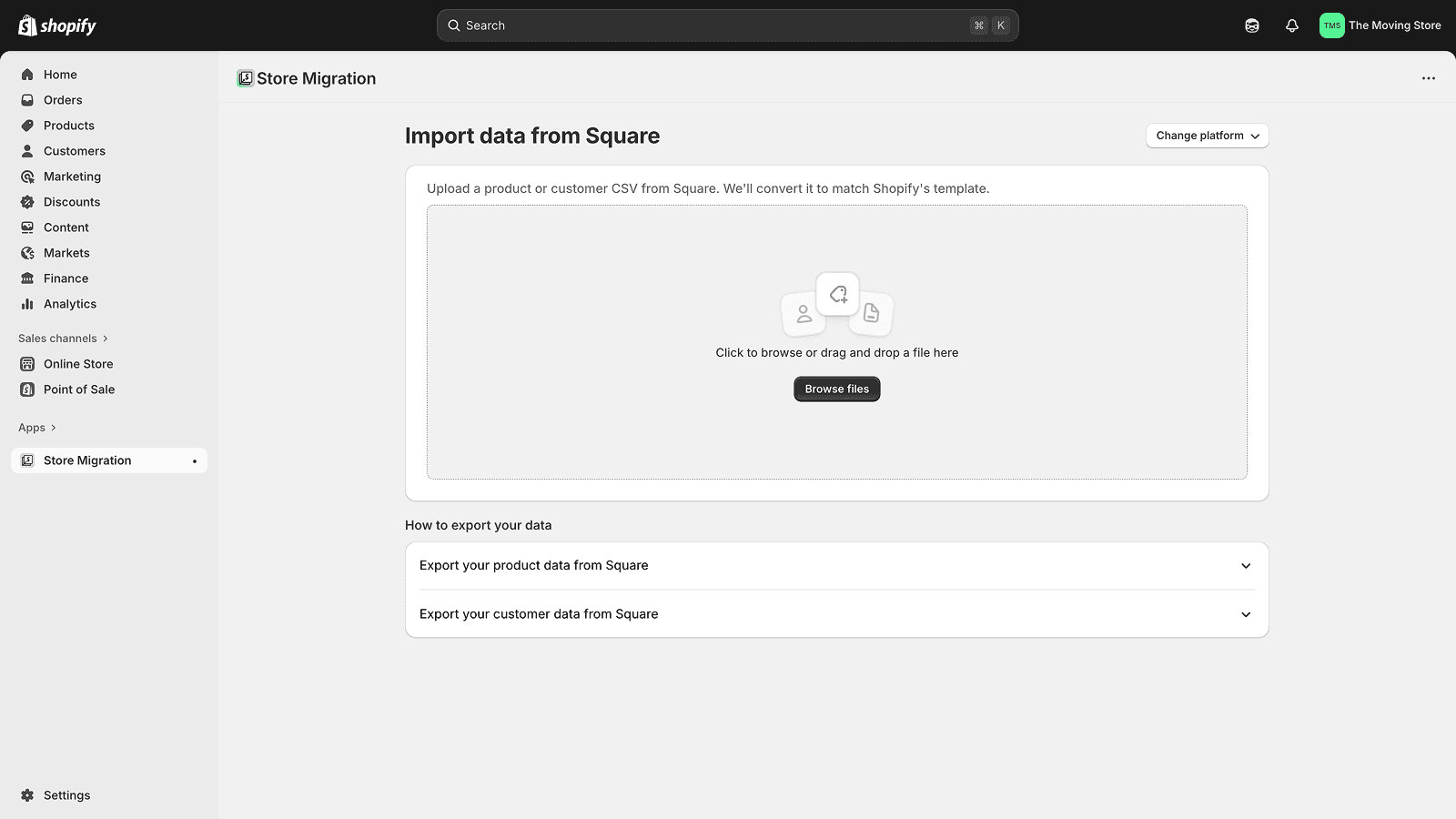
- Upload product and customer data using CSV files from your previous platform
- Import automatically by connecting your source account (where supported)
- Review and adjust imported data directly in Shopify before publishing
- Enjoy quick and secure data transfers, powered by Shopify
Keywords
Key Features
- Import product and customer data from multiple platforms seamlessly.
- Upload and convert CSV files for easy data migration.
- Connect directly with supported platforms for automated imports.
Pricing
Shopify Store Migration Pricing Plans
$0/month
Here's an overview of Shopify Store Migration costs for each of the plan(s):
The app offers 1 free plan(s). The free plan(s) offered by Shopify Store Migration: ().
The plan encompasses all the features provided by the app.
Shopify Store Migration Price Summary
| Pricing summary | Free |
| Total Pricing Plan(s) | 1 |
| Number of free plan(s) | 1 |
| Number of paid plan(s) | 0 |
| Free trial available | No |
Shopify Store Migration Shopify App Discounts
If you are looking for discounts on Shopify Store Migration app pricing plans, feel free to contact our team - we'd be happy to help! Additionally, if you are an agency or a shop merchant with multiple Shopify stores, we can work directly with Shopify to secure better deals on the Shopify Store Migration app exclusively for you.
*Disclaimer: Please note that ShopDigest doesn't guarantee discounts on apps as any changes to the pricing plans are ultimately up to the discretion of the developer.
Testimonials
What our users say about Shopify Store Migration
“Migration worked great once I completed all of the required steps. At first, I thought my photos and other product information had not migrated, and I was honestly frustrated. I later realized I still needed to accept the migration access/request in Shopify. Once I accepted it and the migration was completed, my product photos, descriptions, and information were there. If you think information is missing, make sure you have accepted any pending migration request before assuming the migration didn’t work. I almost made the same mistake! Overall, the migration worked well for me and saved me a lot of time moving from Square to Shopify. Customer Support got right back to me immediately and once they asked if I accepted the migration, which I had not done, then it worked.”
“I had just started my Woocommerce shop through Wordpress and only had 10 items. It was a cludgy experience on that platform. As an old PhP programmer, it reminded me of OSCommerce. I decided to switch to Shopify seeing how professional all the shops looked that I previewed. I thought I was going to have to move each entry at a time and grateful I only had 10 items. I found the import option and figured I had nothing to lose. It was so great!! Saved me so much time. I had make active and update a few fields but it was all because of how bad woocommerce was in expecting the fields to be filled in. So grateful for this feature!”
“The store migration from square was very smooth, however, I have to insert 500 stock pictures.”
Trusted By
Trusted by the best Shopify stores
Finger Lakes Hidden Gems
United States
Inside the Pickle Jar
United States
My Store
Canada
Green Wood Creative Goods
United States
RAVE EDC JEWELRY
United States
Lynn Beauty Supply
United States
amylacombehandmadewhimsiclay
United States
LOCKPICKTOOL
China
Comparison
Top Shopify Store Migration Alternatives Detailed Comparison
The table below highlights the crucial differences between Shopify Store Migration and similar other Shopify apps based on parameters like ratings, reviews, features, pricing, etc.
Add App | |||
|---|---|---|---|
| General Information | |||
| Ratings | 3.1(76 reviews) | 4.1(2,115 reviews) | |
| Developed by | Shopify | Shopify | |
| Launch Date | 7/17/2024 | 9/19/2017 | |
| Pricing | Free | Free | |
| Objective | - | A single app for top-selling platforms worldwide. | |
| Categories | Store data importer | Marketplaces, Store data importer | |
| Key Features & Highlights | |||
| Purpose | Import data from other platforms with Shopify’s Store Migration app | Sell on the largest marketplaces. Handle and complete all orders within Shopify. | |
| Features List |
|
| |
| Highlights |
| - | |
| User Reviews and Ratings | |||
| Recommended % | 48.1% | 81.7% | |
| Pros |
|
| |
| Cons |
|
| |
| Pricing and Plans | |||
| Total Pricing Plans | 0 | 1 | |
| Free Plan | Not available | Available | |
| Free Trial | No | No | |
| Technical Information | |||
| Rating | 3.1 | 4.1 | |
| Total Reviews | 77 | 2,123 | |
| Launch Date | 7/17/2024 | 9/19/2017 | |
| SD Points | 23 | 1113 | |
More Details About Shopify Store Migration
Product Description
Import data from other platforms with Shopify’s Store Migration app. Easily move your product and customer data into Shopify from Square, WooCommerce, Etsy, Wix, Amazon, eBay, Clover, and Lightspeed R/X (Vend). Upload a CSV file or, on supported platforms, connect your account to import automatically with guided setup. Note: some platforms don’t export all data or use compatible formats, so small edits in Shopify may be required.
AI Summary
The app facilitates data migration to Shopify by importing and exporting CSV files, though it lacks support for certain platforms like OpenCart. While it successfully transfers most data, inconsistencies arise, such as duplicate item uploads, requiring manual verification and corrections. The app’s free tier offers cost savings compared to paid alternatives, but its monthly pricing may be perceived as high relative to its current functionality. The tool streamlines bulk data handling but does not significantly reduce manual effort due to these reliability issues. Improvements in accuracy and platform compatibility would enhance its utility.
Support
For any questions, concerns, or assistance with Shopify Store Migration, the dedicated support team is readily available to help.To reach out to the support team, users can send an email to [email protected].
Shopify Store Migration Support Information In A Nutshell:
| Support Email: | [email protected] |
| Contact Number(s): | Not available |
| FAQ Page: | Not available |
| Privacy Policy: | Privacy details |
| Language Support: | English |
Integration
The list of top Shopify apps or features or software tools that Shopify Store Migration seamlessly integrates are given below:
Developer
Looking to install Shopify Store Migration app on your store?
ShopDigest helps businesses upgrade their Shopify stores by offering easy app installation services.
Why Choose ShopDigest?
- Highly experienced and vetted team for successful app installation
- Assured support and guidance throughout the installation and beyond
- Customized services to meet unique business needs
- 30-day no questions asked refund policy
- Lowest pricing guaranteed (starts at just $10/hour)
Shopify Store Migration Q&A
How does the app help migrate store data?
It imports product and customer data from platforms like WooCommerce or Etsy via CSV upload or direct connection, converting it for Shopify use with optional editing.
Which platforms are supported for migration?
It supports Square, WooCommerce, Etsy, Wix, Amazon, Clover, and Lightspeed R & X Series, with CSV uploads or direct account linking for some.
Is manual data editing required after migration?
Yes, some platforms export incomplete data or use incompatible formats, so Shopify’s editor helps polish the imported information afterward.
Can I transfer both products and customers?
Yes, the app migrates product catalogs and customer databases from your old platform, ensuring essential data is carried over seamlessly.
How secure is the data transfer process?
Data transfers are quick and secure, leveraging Shopify’s infrastructure to protect your information during migration.
Does the app support bulk imports?
Yes, bulk imports via CSV files are supported, making it efficient to transfer large volumes of products or customer data at once.
What if my platform isn’t directly supported?
You can still upload a CSV file from unsupported platforms, though manual adjustments in Shopify may be needed for compatibility.
How fast is the migration process?
Speed depends on data volume, but transfers are optimized for efficiency, with most migrations completing in minutes to hours.
Can I preview data before finalizing import?
While the app doesn’t specify previews, imported data can be edited in Shopify afterward to correct any inconsistencies.
Customer Reviews
Shopify Store Migration has an overall rating of 3.1 stars from a total of 77 reviews on the Shopify app store. Of these, 37 (48.1%) are positive, 11 (14.3%) are neutral, and 29 (37.7%) are negative*.
*Ratings above four stars fall under positive review, three stars reviews fall under neutral, and anything less than two stars falls under negative.
Migration worked great once I completed all of the required steps. At first, I thought my photos and other product information had not migrated, and I was honestly frustrated. I later realized I still needed to accept the migration access/request in Shopify. Once I accepted it and the migration was completed, my product photos, descriptions, and information were there. If you think information is missing, make sure you have accepted any pending migration request before assuming the migration didn’t work. I almost made the same mistake! Overall, the migration worked well for me and saved me a lot of time moving from Square to Shopify. Customer Support got right back to me immediately and once they asked if I accepted the migration, which I had not done, then it worked.
I had just started my Woocommerce shop through Wordpress and only had 10 items. It was a cludgy experience on that platform. As an old PhP programmer, it reminded me of OSCommerce. I decided to switch to Shopify seeing how professional all the shops looked that I previewed. I thought I was going to have to move each entry at a time and grateful I only had 10 items. I found the import option and figured I had nothing to lose. It was so great!! Saved me so much time. I had make active and update a few fields but it was all because of how bad woocommerce was in expecting the fields to be filled in. So grateful for this feature!
The store migration from square was very smooth, however, I have to insert 500 stock pictures.
I used this app to migrate my Etsy shop to Shopify, and the process was incredibly easy. The setup was straightforward, and my products, listings, and information transferred smoothly with very little effort on my part. This app saved me a lot of time and made the transition stress-free. Highly recommended for anyone moving from Etsy to Shopify!
I used this app to migrate all of my items from my Etsy shop and OMG did this app make my day! Very simple and quick and I literally saved dozens of hours of my time! Shopify never disappoints and I've been in business online over 20 years now
Video Demo and Screenshots
Product Screenshots
Installation Steps
How to install Shopify Store Migration on your Shopify store
Find your app
Use filters like pricing, availability, and features to find the perfect match for your store's needs.
Get a personalized setup plan
Our team will create an installation plan based on your current store setup, goals, and requirements.
Install at your own pace
Perfect your store's functionality without the pressure to move on until you're ready.
Install in your Shopify Store
Shopify Store Migration FAQ's
How do I install the Shopify Store Migration Shopify app?
To install Shopify Store Migration app on your Shopify store, click on the Shopify Store Migration installation link. Login to the Shopify store on which you want to install the app and follow the onboarding process.
If you need our expert guidance to help you install Shopify Store Migration on your Shopify store, then contact us now.
What are the key features of Shopify Store Migration?
The key features offered by Shopify Store Migration to Shopify store owners are:
- ✅Upload product and customer data using CSV files from your previous platform
- ✅Import automatically by connecting your source account (where supported)
- ✅Review and adjust imported data directly in Shopify before publishing
- ✅Enjoy quick and secure data transfers, powered by Shopify
Does Shopify Store Migration integrate with other Shopify apps or tools?
Shopify Store Migration has not made any official mention of integrating with other Shopify apps or tools. To obtain further information, kindly reach out to their support team or consult your Shopify developer.
Is there a free trial available for Shopify Store Migration?
No, Shopify Store Migration does not offer any free trial.
What are the pricing plans for Shopify Store Migration?
The app offers 0 plans that are forever-free.
How does billing work for Shopify Store Migration?
Shopify Store Migration is completely free to install and use. Additional charges may or may not apply.
Can I cancel or upgrade my subscription plan at any time?
Yes, Shopify Store Migration allows its subscribers to cancel or upgrade their subscription plan at any time.
Does Shopify Store Migration offer customer support? How can I get assistance?
Yes, Shopify Store Migration offers a dedicated support team for any kind of app-related assistance. To reach out to the support team, users can send an email to [email protected].
Is Shopify Store Migration compatible with my Shopify theme?
Please reach out to their support team at [email protected] to confirm its compatibility with your specific Shopify theme.
Alternatives
See all Alternatives to Shopify Store Migration Shopify App.






Most Popular
Most popular Shopify apps on the market




