
Rewind Staging Shopify App
by RewindRewind Staging is designed for sellers who aim to keep a rehearsal setting for their shop. Simplify Setting up. Check Changes Before Making them Live.
4.2
(64)
True Refrigeration Store, United States
I was looking for this functionality within base Shopify and was very disappointed to see that it wasn't included out of the box. Thankfully Rewind Staging exists! Easy to use with it's intuitive UI, transparent pricing and great customer service makes this a 5 star app for me!
Install in your Shopify Store

Rewind Staging Charts
Track Rewind Staging's ranking, reviews, and performance over time with interactive charts. See how it compares to similar apps in the same category.
Pros and Cons
Pros and Cons of Rewind Staging
Pros
Efficient Store Copying: The app quickly duplicates stores, saving significant time compared to manual methods.
Responsive Customer Support: Many users highlight prompt and helpful assistance from the support team.
Intuitive UI: The interface is user-friendly, with straightforward navigation and setup.
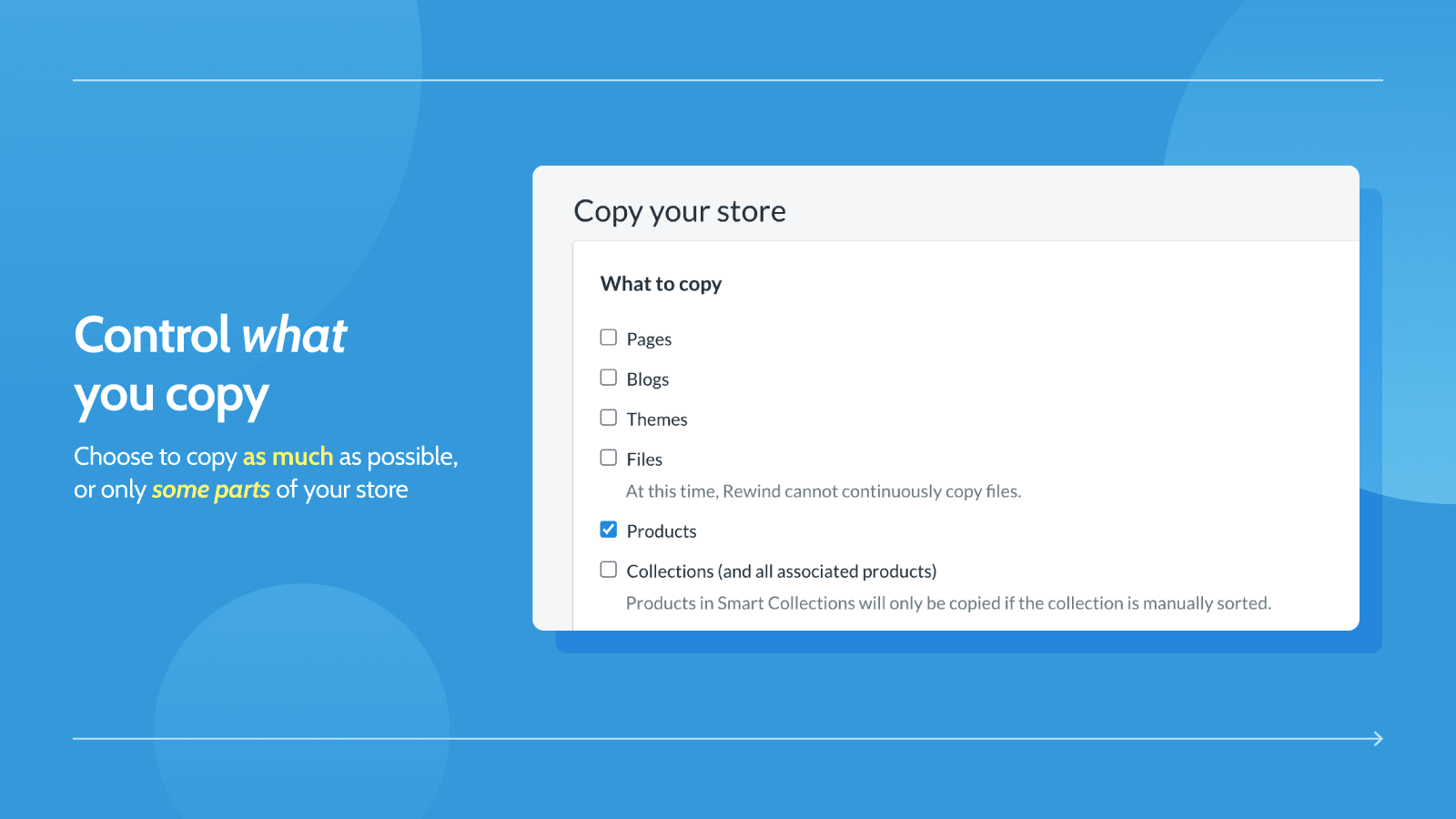
Granular Control: Users appreciate the ability to select specific items (e.g., products, collections) for copying.
Cons
High Subscription Cost: Many users criticize the $99/month pricing as excessive, especially for smaller businesses.
Incomplete Copying: Some reviews note missing elements like metafields, navigation, or theme settings after copying.
Screenshots
About the App
Simplify Setting up. Check Changes Before Making them Live.
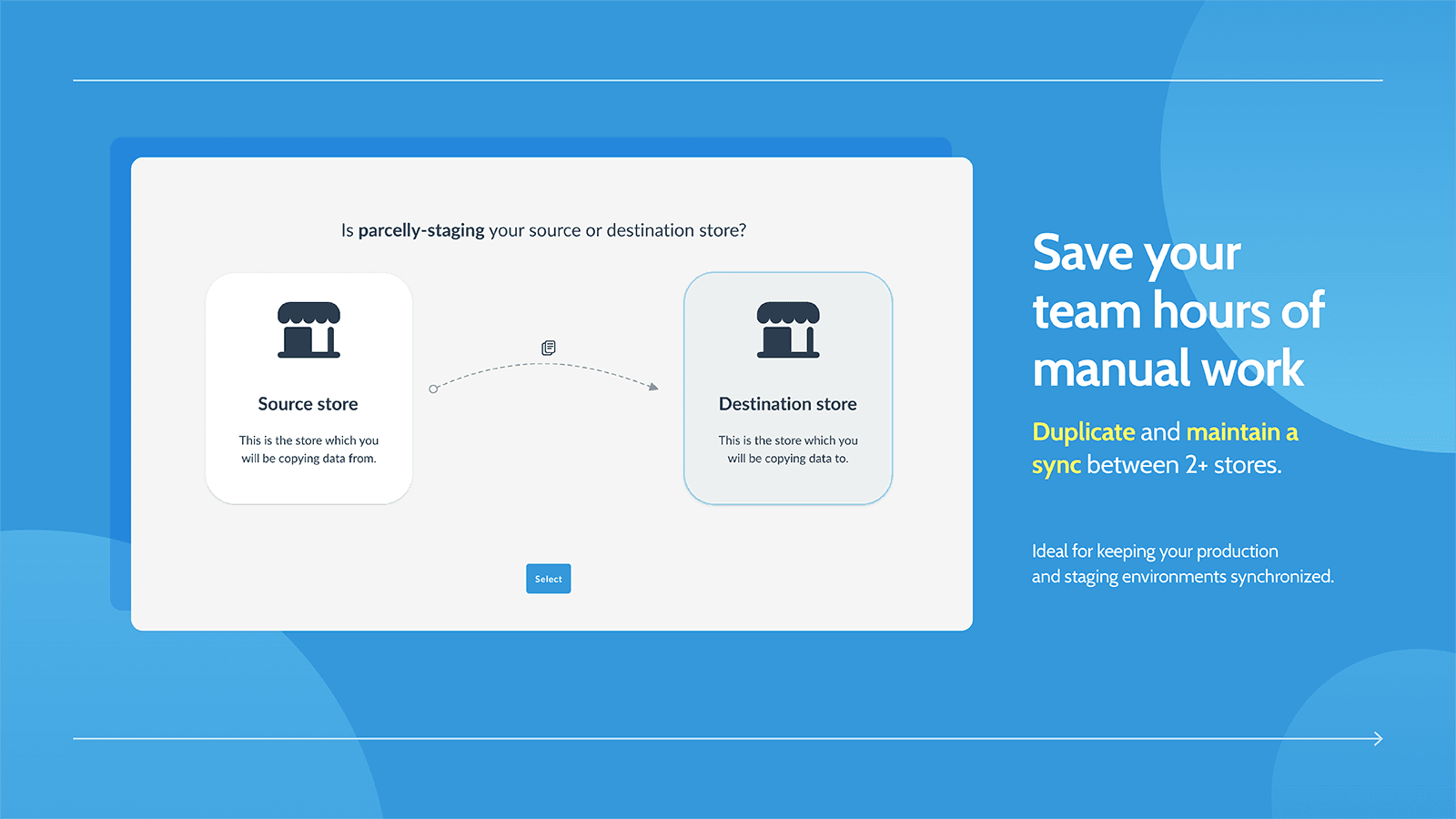
- Store Duplication: Simply create a duplicate of your store for use as a staging environment.
- Store Duplication: Every feature of your store, including product pictures and metadata, will be duplicated.
- Preview Modifications: Quickly view changes made for comments.
- Quick Deployment: Make updates to your live store fast and simply.
- Customer Satisfaction: Excellent customer service. Our reviews prove it.
Keywords
Key Features
- Create an exact duplicate of your store for safe testing and development.
- Copy all store elements, including products, images, and metadata, effortlessly.
- Preview and refine changes before applying them to your live store.
Pricing
Rewind Staging Pricing Plans
Unlimited
$99/month
For unlimited copies and/or ongoing sync
Copy product metafields
Exclude attributes from store sync
Supports up to 100,000 products
Here's an overview of Rewind Staging costs for each of the plan(s):
The app offers 1 paid plan(s). The paid plan(s) offered by Rewind Staging: (Unlimited).
The details of the plan(s) are outlined below:
Unlimited: The Unlimited plan costs $99 and has no free trial period. The plan offers a host of features, including For unlimited copies and/or ongoing sync, Copy product metafields, Exclude attributes from store sync, Supports up to 100,000 products.
Rewind Staging Price Summary
| Pricing summary | $99/month |
| Total Pricing Plan(s) | 1 |
| Number of free plan(s) | 0 |
| Number of paid plan(s) | 1 |
| Cost of Paid Plan(s) | $99 |
| Free trial available | No |
Rewind Staging Shopify App Discounts
If you are looking for discounts on Rewind Staging app pricing plans, feel free to contact our team - we'd be happy to help! Additionally, if you are an agency or a shop merchant with multiple Shopify stores, we can work directly with Rewind to secure better deals on the Rewind Staging app exclusively for you.
*Disclaimer: Please note that ShopDigest doesn't guarantee discounts on apps as any changes to the pricing plans are ultimately up to the discretion of the developer.
Testimonials
What our users say about Rewind Staging
“I was looking for this functionality within base Shopify and was very disappointed to see that it wasn't included out of the box. Thankfully Rewind Staging exists! Easy to use with it's intuitive UI, transparent pricing and great customer service makes this a 5 star app for me!”
“Great service! One of our themes wasn't being properly copied to the destination store and Noah helped us a lot!”
“Simple, easy to use, Needed to copy meta fields, emailed help on a Sunday afternoon, within 1 hr got resolution ON A SUNDAY!! Well done, Brittney! thank you”
Trusted By
Trusted by the best Shopify stores
True Refrigeration Store
United States
Madesa MX HOMOLOG
Mexico
PAD_DEV
United States
CheetahWrap
United States
Apothecary's Garden
Canada
Lounge Wagon
United States
Newfoundland Coffee Company
United States
Dandelion Chocolate
United States
Rewind Staging is designed for sellers who aim to keep a rehearsal setting for their shop.
Increase your customer base
Duplicate products, blogs, themes, pages, collections, etc to make stores that support multiple currencies and languages.
Set Up a Test Environment
Use a test store to experiment with themes, codes, and other updates without worrying about damaging your live store.
Making Store Copies Easy
Ideal for Shopify and Shopify Plus. Copy is created by Rewind's team, known for developing the highest-rated backup app for Shopify.
Comparison
Top Rewind Staging Alternatives Detailed Comparison
The table below highlights the crucial differences between Rewind Staging and similar other Shopify apps based on parameters like ratings, reviews, features, pricing, etc.
Add App | |||
|---|---|---|---|
| General Information | |||
| Ratings | 4.2(64 reviews) | 4.1(42 reviews) | |
| Developed by | Rewind | Thalia Tech | |
| Launch Date | 2/27/2017 | 4/7/2020 | |
| Pricing | $99/month | $6/month | |
| Objective | Simplify Setting up. Check Changes Before Making them Live. | Simply import products from almost any online store. | |
| Categories | Store data importer, Product content | Store data importer, Product content | |
| Key Features & Highlights | |||
| Purpose | Rewind Staging is designed for sellers who aim to keep a rehearsal setting for their shop. | Simply import products from almost any online shop. | |
| Features List |
|
| |
| Highlights | - | - | |
| User Reviews and Ratings | |||
| Recommended % | 82.8% | 77.8% | |
| Pros |
|
| |
| Cons |
|
| |
| Pricing and Plans | |||
| Total Pricing Plans | 1 | 1 | |
| Free Plan | Not available | Not available | |
| Free Trial | No | Yes, for 3 day(s) | |
| Technical Information | |||
| Rating | 4.2 | 4.1 | |
| Total Reviews | 64 | 45 | |
| Launch Date | 2/27/2017 | 4/7/2020 | |
| SD Points | 1 | 24 | |
More Details About Rewind Staging
Product Description
A staging store is a private copy of your website for testing new apps or custom codes. It ensures your live site remains unaffected if experiments fail. Rewind Staging helps set up such stores fast and easily.
AI Summary
The app facilitates efficient duplication of Shopify stores, enabling users to copy products, collections, pages, themes, and metadata between stores with granular control over selected elements. Its intuitive interface and transparent pricing—including pay-per-item and subscription options—cater to varying needs, from one-time transfers to ongoing syncs. Key strengths include significant time savings, responsive customer support, and reliable performance for bulk transfers, even with large inventories. However, limitations exist, such as incomplete theme and navigation transfers, occasional sync errors, and no free tier. Some users find the pricing model expensive, particularly for recurring subscriptions. While the app excels in core functionality, certain edge cases—like metafield handling or selective syncing—may require manual intervention or additional tools. Overall, it serves as a robust solution for store duplication, though cost and partial feature coverage may deter budget-conscious users or those needing full automation.
Support
For any questions, concerns, or assistance with Rewind Staging, the dedicated support team is readily available to help.To reach out to the support team, users can send an email to [email protected]. Additionally, Rewind Staging offers a comprehensive FAQ section to address common inquiries and provide self-help resources in their app FAQ section.
Rewind Staging Support Information In A Nutshell:
| Support Email: | [email protected] |
| Contact Number(s): | Not available |
| FAQ Page: | FAQ details |
| Privacy Policy: | Privacy details |
| Language Support: | English |
Integration
The list of top Shopify apps or features or software tools that Rewind Staging seamlessly integrates are given below:
Developer
Looking to install Rewind Staging app on your store?
ShopDigest helps businesses upgrade their Shopify stores by offering easy app installation services.
Why Choose ShopDigest?
- Highly experienced and vetted team for successful app installation
- Assured support and guidance throughout the installation and beyond
- Customized services to meet unique business needs
- 30-day no questions asked refund policy
- Lowest pricing guaranteed (starts at just $10/hour)
Rewind Staging Q&A
What is a staging store?
A staging store is a private copy of your live website where you can safely test new apps, themes, or code changes without affecting your actual store.
Who should use this app?
It’s ideal for merchants who want to experiment with store changes risk-free, especially developers, designers, or teams testing updates before deployment.
How does this app help with testing?
It creates an exact duplicate of your store, allowing you to preview and refine changes before applying them to your live site.
Can I sync changes to my live store?
Yes, the app lets you quickly deploy tested modifications from your staging environment to your live store with minimal effort.
Does it support large product catalogs?
Yes, the unlimited plan supports up to 100,000 products, making it suitable for stores with extensive inventories.
What if something goes wrong during testing?
Since changes are made in a staging environment, your live store remains unaffected, eliminating risks from failed experiments.
Is customer support available?
The app offers top-tier customer service, backed by positive reviews, ensuring prompt assistance for any issues.
Can I test multi-language stores?
Yes, you can duplicate products, blogs, and themes to simulate multi-language or multi-currency setups before going live.
Customer Reviews
Rewind Staging has an overall rating of 4.4 stars from a total of 64 reviews on the Shopify app store. Of these, 53 (82.8%) are positive, 3 (4.7%) are neutral, and 8 (12.5%) are negative*.
*Ratings above four stars fall under positive review, three stars reviews fall under neutral, and anything less than two stars falls under negative.
I was looking for this functionality within base Shopify and was very disappointed to see that it wasn't included out of the box. Thankfully Rewind Staging exists! Easy to use with it's intuitive UI, transparent pricing and great customer service makes this a 5 star app for me!
Great service! One of our themes wasn't being properly copied to the destination store and Noah helped us a lot!
Simple, easy to use, Needed to copy meta fields, emailed help on a Sunday afternoon, within 1 hr got resolution ON A SUNDAY!! Well done, Brittney! thank you
We have been using Rewind Staging for about 1-2 weeks now. The initial setup between our live store and staging store was surprisingly simple. Literally, a handful of clicks I think. I appreciate the granularity that Rewind gives you when determining which parts of my site I want to sync. Today I also had to reach out to support for a little help getting the Rewind task notification emails switched over to come to me, the developer, instead of the store owner. Bianca was super helpful. I had a reply and solution in under an hour or so. Very nice. Would recommend it for sure.
Great app! Does exactly what it says it does, and does it well! Customer service is 5 stars.
Video Demo and Screenshots
Product Video

Product Screenshots
Installation Steps
How to install Rewind Staging on your Shopify store
Find your app
Use filters like pricing, availability, and features to find the perfect match for your store's needs.
Get a personalized setup plan
Our team will create an installation plan based on your current store setup, goals, and requirements.
Install at your own pace
Perfect your store's functionality without the pressure to move on until you're ready.
Install in your Shopify Store
Rewind Staging FAQ's
How do I install the Rewind Staging Shopify app?
To install Rewind Staging app on your Shopify store, click on the Rewind Staging installation link. Login to the Shopify store on which you want to install the app and follow the onboarding process.
If you need our expert guidance to help you install Rewind Staging on your Shopify store, then contact us now.
What are the key features of Rewind Staging?
The key features offered by Rewind Staging to Shopify store owners are:
- ✅Quickly and easily create a copy of your store to act as a staging environment.
- ✅From product images to metadata. All aspects of your store will be copied.
- ✅Preview AI app integrations and theme changes before they touch your live store.
- ✅Deploy changes to live store quickly and easily.
- ✅Top-tier customer service. Our reviews speak for themselves.
Does Rewind Staging integrate with other Shopify apps or tools?
Yes, Rewind Staging seamlessly integrates with other Shopify apps or tools, such as Simply create a duplicate of your store for use as a staging environment., Every feature of your store, including product pictures and metadata, will be duplicated., Quickly view changes made for comments..
Is there a free trial available for Rewind Staging?
No, Rewind Staging does not offer any free trial.
What are the pricing plans for Rewind Staging?
The app offers 1 paid plan, which costs $99/month and has no free trial period.
How does billing work for Rewind Staging?
Rewind Staging uses USD for billing, with recurring and usage-based charges invoiced usually every 30 days.
Can I cancel or upgrade my subscription plan at any time?
Yes, Rewind Staging allows its subscribers to cancel or upgrade their subscription plan at any time.
Does Rewind Staging offer customer support? How can I get assistance?
Yes, Rewind Staging offers a dedicated support team for any kind of app-related assistance. To reach out to the support team, users can send an email to [email protected].
Additionally, Rewind Staging offers a comprehensive FAQ section to address common inquiries and provide self-help resources.
Is Rewind Staging compatible with my Shopify theme?
Please reach out to their support team at [email protected] to confirm its compatibility with your specific Shopify theme.
Alternatives
See all Alternatives to Rewind Staging Shopify App.






Most Popular
Most popular Shopify apps on the market




