
Stocky Shopify App
by ShopifyManaging Inventory for Shopify Point of Sale Pro Managing Inventory for Shopify Point of Sale Pro
3.0
(250)
Highly Tuned Athletes, Australia
Been using for 6 years without issue, however lately, data feed and particulary the vendor list is not aligned. Shopify (owners of the stocky app) have attempted to assist but largely disconnected from the problems. Become a liabilty of late, rather than a help to stock management.Update: Higher level devs got involved and have identified an error which requires a patch. Refreshing to get propoer support after going through the AI bots and low level help.
Install in your Shopify Store

Stocky Charts
Track Stocky's ranking, reviews, and performance over time with interactive charts. See how it compares to similar apps in the same category.
Pros and Cons
Pros and Cons of Stocky
Pros
Efficient Inventory Management: Streamlines stock tracking, forecasting, and purchase order generation across multiple locations.
Responsive Customer Support: Quick and helpful responses from the support team, often addressing feature requests promptly.
Seamless Shopify Integration: Syncs inventory and purchase orders with Shopify in real-time, reducing manual updates.
Powerful Forecasting Tools: Accurately predicts stock needs based on sales patterns, improving order efficiency.
Cons
Limited Accounting Integration: Lacks synchronization with accounting software like QuickBooks or Xero, requiring manual data entry.
Barcode Scanner Issues: Inconsistent functionality for inventory transfers and stocktakes, frustrating users.
Screenshots
About the App
Managing Inventory for Shopify Point of Sale Pro
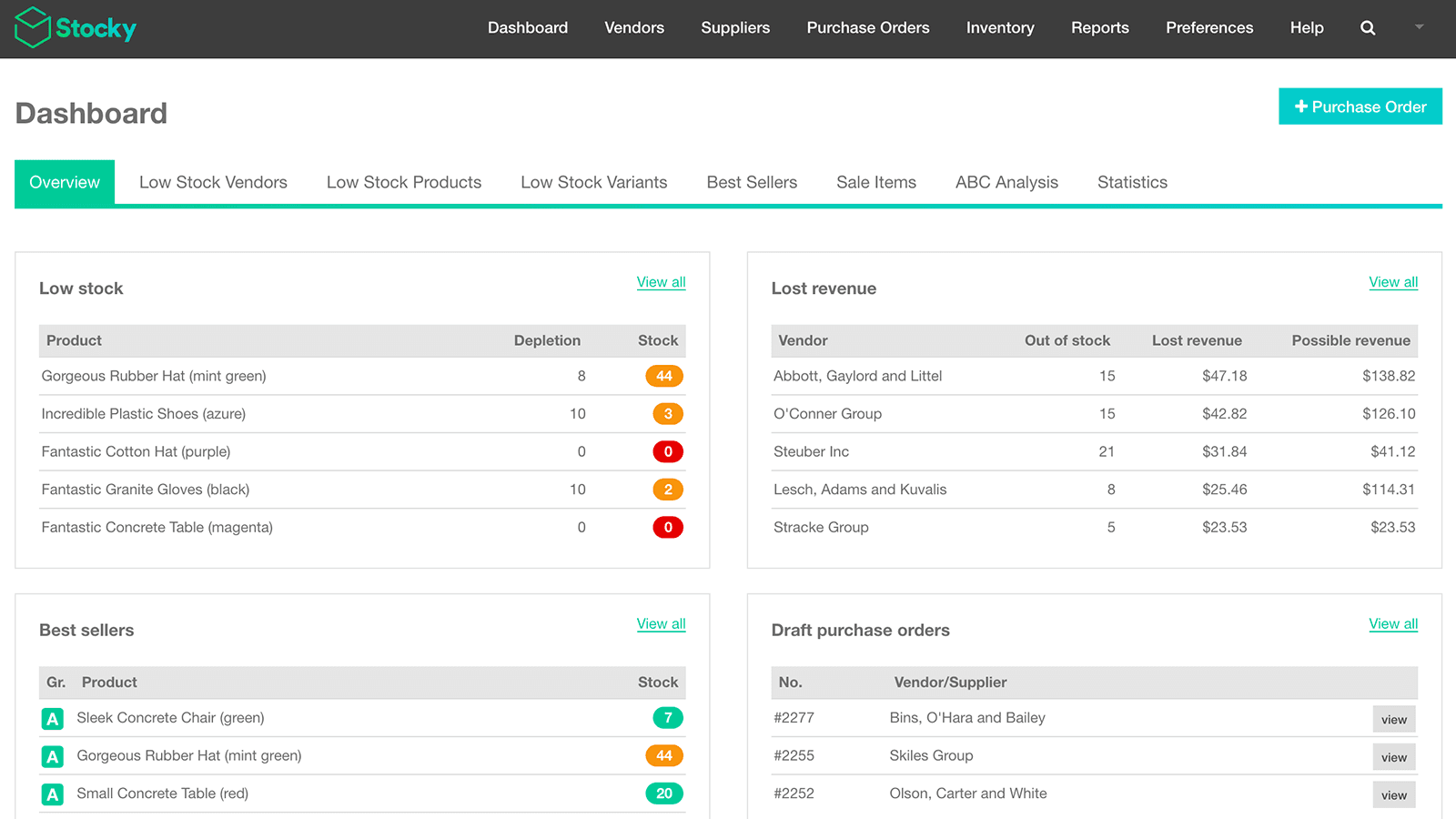
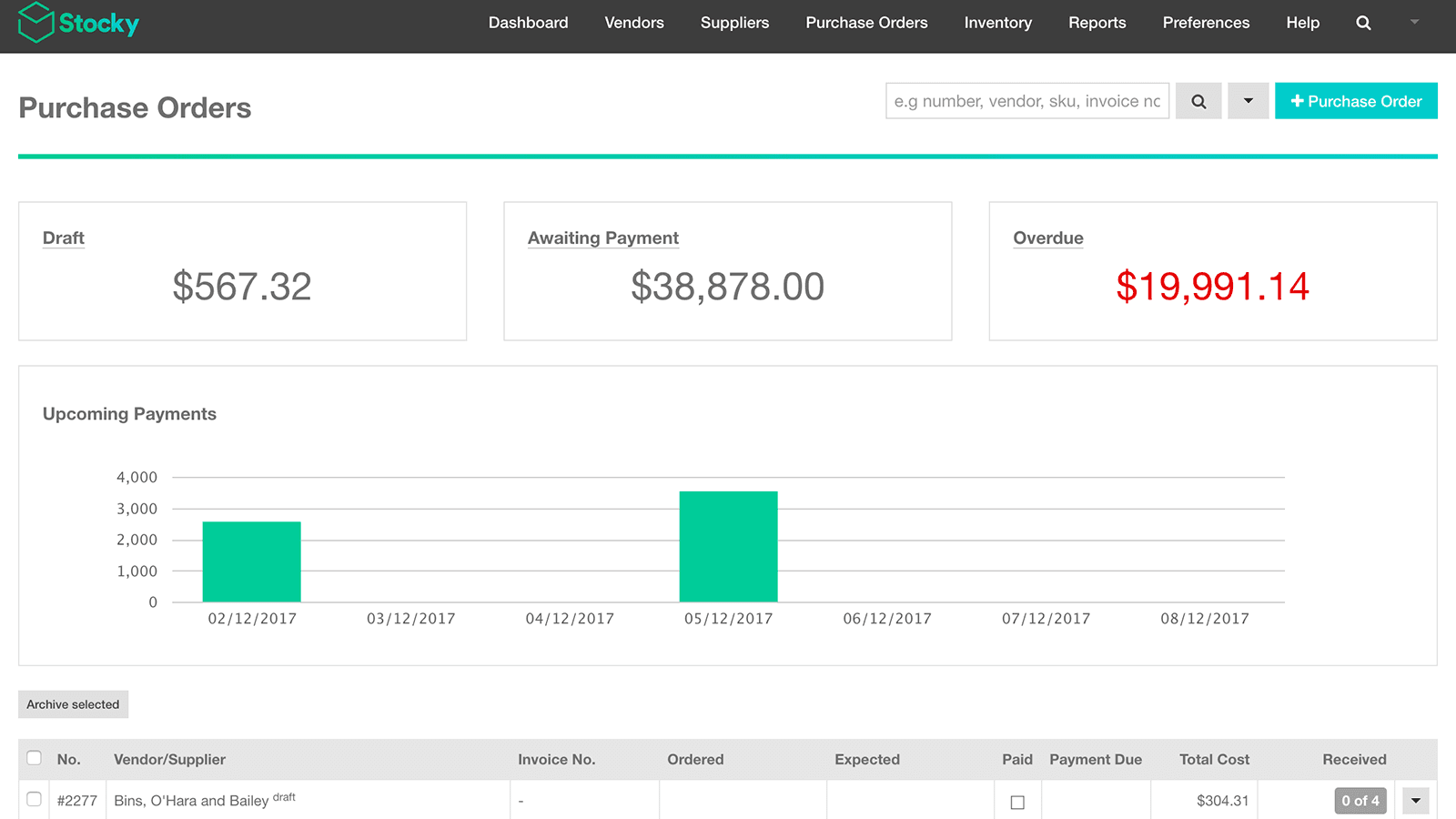
- Purchase Order Management: Make and handle buying orders, and talk to suppliers.
- Profit-Based Recommendations: Get product suggestions based on which are the most profitable.
- Inventory Management: Restock items fast to meet needs and move products between places.
- Stock adjustments: Perform inventory checks by counting or scanning the available stock and make necessary changes.
- Data-driven Inventory Decisions: Use detailed reports to make smart choices about inventory through stock analysis.
Keywords
Key Features
- Create and manage purchase orders to streamline supplier communication.
- Conduct stocktakes by counting or scanning inventory for accurate adjustments.
- Use detailed stock analytics to make data-driven inventory decisions.
Pricing
Stocky Pricing Plans
Free
$0/month
Here's an overview of Stocky costs for each of the plan(s):
The app offers 1 free plan(s). The free plan(s) offered by Stocky: (Free).
The plan encompasses all the features provided by the app.
Stocky Price Summary
| Pricing summary | Free to install. Additional charges may apply. |
| Total Pricing Plan(s) | 1 |
| Number of free plan(s) | 1 |
| Number of paid plan(s) | 0 |
| Free trial available | No |
For further information regarding Stocky app pricing plans, see the official website.
Stocky Shopify App Discounts
If you are looking for discounts on Stocky app pricing plans, feel free to contact our team - we'd be happy to help! Additionally, if you are an agency or a shop merchant with multiple Shopify stores, we can work directly with Shopify to secure better deals on the Stocky app exclusively for you.
*Disclaimer: Please note that ShopDigest doesn't guarantee discounts on apps as any changes to the pricing plans are ultimately up to the discretion of the developer.
Testimonials
What our users say about Stocky
“Been using for 6 years without issue, however lately, data feed and particulary the vendor list is not aligned. Shopify (owners of the stocky app) have attempted to assist but largely disconnected from the problems. Become a liabilty of late, rather than a help to stock management.Update: Higher level devs got involved and have identified an error which requires a patch. Refreshing to get propoer support after going through the AI bots and low level help.”
“this has been a great app - we are using 6500 skus and 70 suppliers and very happy ”
“Works perfectly and makes year end inventory so easy. ”
Trusted By
Trusted by the best Shopify stores
Highly Tuned Athletes
Australia
Everything Caravans
Australia
LandyLane Boutique
United States
Clean Nectarine
Australia
Velvet Desert
Kuwait
Equip2clean
United Kingdom
Pomp & Co. Trade Store
Ireland
The Vapory
Canada
Managing Inventory for Shopify Point of Sale Pro
Boost profits
Boost sales and gain insight into which products to order, depending on their performance and the season.
Cut down on lost inventory
Monitor what you get and what leaves your shop. Stay aware of low stock levels so you can make orders or shift items.
Save time and minimize mistakes
Stop juggling spreadsheets or different systems. Use a single tool to monitor your products in all your locations.
Comparison
Top Stocky Alternatives Detailed Comparison
The table below highlights the crucial differences between Stocky and similar other Shopify apps based on parameters like ratings, reviews, features, pricing, etc.
Add App | |||
|---|---|---|---|
| General Information | |||
| Ratings | 3.0(211 reviews) | 5.0(373 reviews) | |
| Developed by | Shopify | 506 | |
| Launch Date | 3/12/2015 | 1/24/2020 | |
| Pricing | Free | $9.99/month, $39.99/month, $79.99/month, $129.99/month | |
| Objective | Managing Inventory for Shopify Point of Sale Pro | Make and complete orders, check inventory, print barcodes and SKUs. | |
| Categories | Inventory optimization | SKU and barcodes, Inventory optimization | |
| Key Features & Highlights | |||
| Purpose | Managing Inventory for Shopify Point of Sale Pro | Easily handle your orders and inventory using barcodes and SKUs. | |
| Features List |
|
| |
| Highlights | - | - | |
| User Reviews and Ratings | |||
| Recommended % | 52.1% | 99.5% | |
| Pros |
|
| |
| Cons |
|
| |
| Pricing and Plans | |||
| Total Pricing Plans | 1 | 4 | |
| Free Plan | Available | Not available | |
| Free Trial | No | Yes, for 10 day(s) | |
| Technical Information | |||
| Rating | 3.0 | 5.0 | |
| Total Reviews | 250 | 300 | |
| Launch Date | 3/12/2015 | 1/24/2020 | |
| SD Points | 14 | 121 | |
More Details About Stocky
Product Description
Inventory management is crucial for your retail business as too much stock can drain resources and selling out can affect sales. By using Stocky by Shopify, you can optimize your inventory and focus more on maximizing profits with the most suitable product mix for your business.
AI Summary
Stocky is a Shopify app designed for advanced inventory management, offering features such as stock forecasting, purchase order generation, multi-location tracking, and automated inventory syncing with Shopify. Its strengths include robust functionality for high-volume businesses, intuitive reporting tools for sales and profit analysis, and responsive customer support, often highlighted for quick issue resolution and feature implementation. The app excels in streamlining inventory workflows, reducing manual errors, and providing actionable insights through demand forecasting and ABC analysis. However, limitations include occasional syncing issues with Shopify, lack of integration with accounting software, and inconsistent performance for partial purchase order processing. Some users report challenges with barcode scanning, location-specific adjustments, and UI changes that complicate workflows. While praised for its core inventory capabilities, the app’s dependency on Shopify POS Pro and occasional downtime have drawn criticism. Overall, Stocky is a powerful tool for businesses with complex inventory needs, though its effectiveness may vary depending on specific operational requirements.
Support
For any questions, concerns, or assistance with Stocky, the dedicated support team is readily available to help.To reach out to the support team, users can send an email to [email protected]. Additionally, Stocky offers a comprehensive FAQ section to address common inquiries and provide self-help resources in their app FAQ section.
Stocky Support Information In A Nutshell:
| Support Email: | [email protected] |
| Contact Number(s): | Not available |
| FAQ Page: | FAQ details |
| Privacy Policy: | Privacy details |
| Language Support: | English |
Integration
The list of top Shopify apps or features or software tools that Stocky seamlessly integrates are given below:
Developer
Looking to install Stocky app on your store?
ShopDigest helps businesses upgrade their Shopify stores by offering easy app installation services.
Why Choose ShopDigest?
- Highly experienced and vetted team for successful app installation
- Assured support and guidance throughout the installation and beyond
- Customized services to meet unique business needs
- 30-day no questions asked refund policy
- Lowest pricing guaranteed (starts at just $10/hour)
Stocky Q&A
How does this app help manage inventory?
It tracks stock levels, generates purchase orders, and provides analytics to optimize inventory, reducing overstocking or shortages while saving time.
Can it integrate with Shopify POS?
Yes, it syncs with Shopify POS, allowing staff to receive inventory, scan barcodes, and adjust stock directly from the point-of-sale system.
Does it help decide which products to order?
Yes, it analyzes sales data and profitability to recommend the best products to restock, improving revenue and reducing excess inventory.
How does it reduce inventory errors?
By automating stock tracking, barcode scanning, and real-time adjustments, it minimizes manual entry mistakes and keeps records accurate.
Can I track inventory across multiple locations?
Yes, it centralizes inventory management, allowing transfers between stores and providing visibility into stock levels at all locations.
Does it alert me when stock is low?
Yes, it sends low-stock notifications and generates reports to help you reorder products before they run out.
Is it suitable for brick-and-mortar stores?
Absolutely—it’s designed for retail businesses, helping them optimize stock levels, reduce losses, and streamline in-store workflows.
Can I create purchase orders for suppliers?
Yes, it simplifies supplier communication by generating and managing purchase orders directly within the app.
Customer Reviews
Stocky has an overall rating of 3.5 stars from a total of 250 reviews on the Shopify app store. Of these, 146 (58.4%) are positive, 18 (7.2%) are neutral, and 86 (34.4%) are negative*.
*Ratings above four stars fall under positive review, three stars reviews fall under neutral, and anything less than two stars falls under negative.
Been using for 6 years without issue, however lately, data feed and particulary the vendor list is not aligned. Shopify (owners of the stocky app) have attempted to assist but largely disconnected from the problems. Become a liabilty of late, rather than a help to stock management.Update: Higher level devs got involved and have identified an error which requires a patch. Refreshing to get propoer support after going through the AI bots and low level help.
Been using for 6 years without issue, however lately, data feed and particulary the vendor list is not aligned. Shopify (owners of the stocky app) have attempted to assist but largely disconnected from the problems. Become a liabilty of late, rather than a help to stock management.Update: Higher level devs got involved and have identified an error which requires a patch. Refreshing to get propoer support after going through the AI bots and low level help.
this has been a great app - we are using 6500 skus and 70 suppliers and very happy
Works perfectly and makes year end inventory so easy.
I almost didn't install this app due to the overall rating but it is actually brilliant and should be a 5/5. It is the only cost effective app on the market that not only directly links to the Shopify 'cost price' but adjusts that cost price according to the different buy prices across multiple PO's. You do not need a POS retail location to use this app for ecommerce only, there is no better app to manage cost prices in Shopify if you buy stock at different prices. Just brilliant.
When doing a transfer in stocky, Please show origin and Destination quantities to make it easier for us to check and tranfer
Video Demo and Screenshots
Product Video

Product Screenshots
Installation Steps
How to install Stocky on your Shopify store
Find your app
Use filters like pricing, availability, and features to find the perfect match for your store's needs.
Get a personalized setup plan
Our team will create an installation plan based on your current store setup, goals, and requirements.
Install at your own pace
Perfect your store's functionality without the pressure to move on until you're ready.
Install in your Shopify Store
Stocky FAQ's
How do I install the Stocky Shopify app?
To install Stocky app on your Shopify store, click on the Stocky installation link. Login to the Shopify store on which you want to install the app and follow the onboarding process.
If you need our expert guidance to help you install Stocky on your Shopify store, then contact us now.
What are the key features of Stocky?
The key features offered by Stocky to Shopify store owners are:
- ✅Create and manage purchase orders and communicate with suppliers.
- ✅Conduct stocktakes by counting or scanning stock on hand and make adjustments.
- ✅Use in-depth reporting to make good inventory decisions through stock analytics.
- ✅Review and receive incoming inventory in Shopify POS.
- ✅Use barcode scanning to speed up receiving inventory in Shopify POS.
Does Stocky integrate with other Shopify apps or tools?
Yes, Stocky seamlessly integrates with other Shopify apps or tools, such as Make and handle buying orders, and talk to suppliers., Get product suggestions based on which are the most profitable., Restock items fast to meet needs and move products between places..
Is there a free trial available for Stocky?
No, Stocky does not offer any free trial.
What are the pricing plans for Stocky?
The app offers 1 plan that is forever-free.
How does billing work for Stocky?
Stocky is completely free to install and use. Additional charges may or may not apply.
Can I cancel or upgrade my subscription plan at any time?
Yes, Stocky allows its subscribers to cancel or upgrade their subscription plan at any time.
Does Stocky offer customer support? How can I get assistance?
Yes, Stocky offers a dedicated support team for any kind of app-related assistance. To reach out to the support team, users can send an email to [email protected].
Additionally, Stocky offers a comprehensive FAQ section to address common inquiries and provide self-help resources.
Is Stocky compatible with my Shopify theme?
Please reach out to their support team at [email protected] to confirm its compatibility with your specific Shopify theme.
Alternatives
See all Alternatives to Stocky Shopify App.






Most Popular
Most popular Shopify apps on the market




