
Stockeo Shopify App
by SolveniumAutomatically import products and synchronize inventory from your supplier feeds. Automatic product listing updates
5.0
(58)
CuriousUniverse, United Kingdom
Stockeo has helped us out massively. We had a stock report with multiple duplicate sku's due to the way inventory is managed in bin receipts. They customised a way for us to have these SKUs combine and then override the total SKU number. This allows us to make this an automated process and not a manual one, big help.
Install in your Shopify Store

Stockeo Charts
Track Stockeo's ranking, reviews, and performance over time with interactive charts. See how it compares to similar apps in the same category.
Pros and Cons
Pros and Cons of Stockeo
Pros
Reliable Performance: The app functions smoothly and consistently without glitches or crashes.
Exceptional Customer Support: Quick, detailed, and personalized assistance, often highlighted by name (e.g., Dominik, Paulina).
Time-Saving Automation: Efficiently handles inventory and pricing updates, reducing manual work.
Flexible Integration: Supports multiple feed formats (FTP, JSON, XML) and adapts to complex workflows.
Cons
Initial Setup Complexity: Some users reported difficulties configuring the app initially.
Limited Feature Requests: A few users noted missing features like "compare at price" updates or Google Sheets integration.
Screenshots
About the App
Automatic product listing updates
- Product imports: Bring in goods
- Inventory Management: Update stock
- Update Automation: Automatically update
- Price Calculation: Determine costs
- Data Formats: Comma-Separated Values (CSV), JavaScript Object Notation (JSON), Extensible Markup Language (XML).
Keywords
Key Features
- Automatically sync inventory levels from supplier feeds in real-time.
- Schedule updates hourly, daily, or at custom intervals for efficiency.
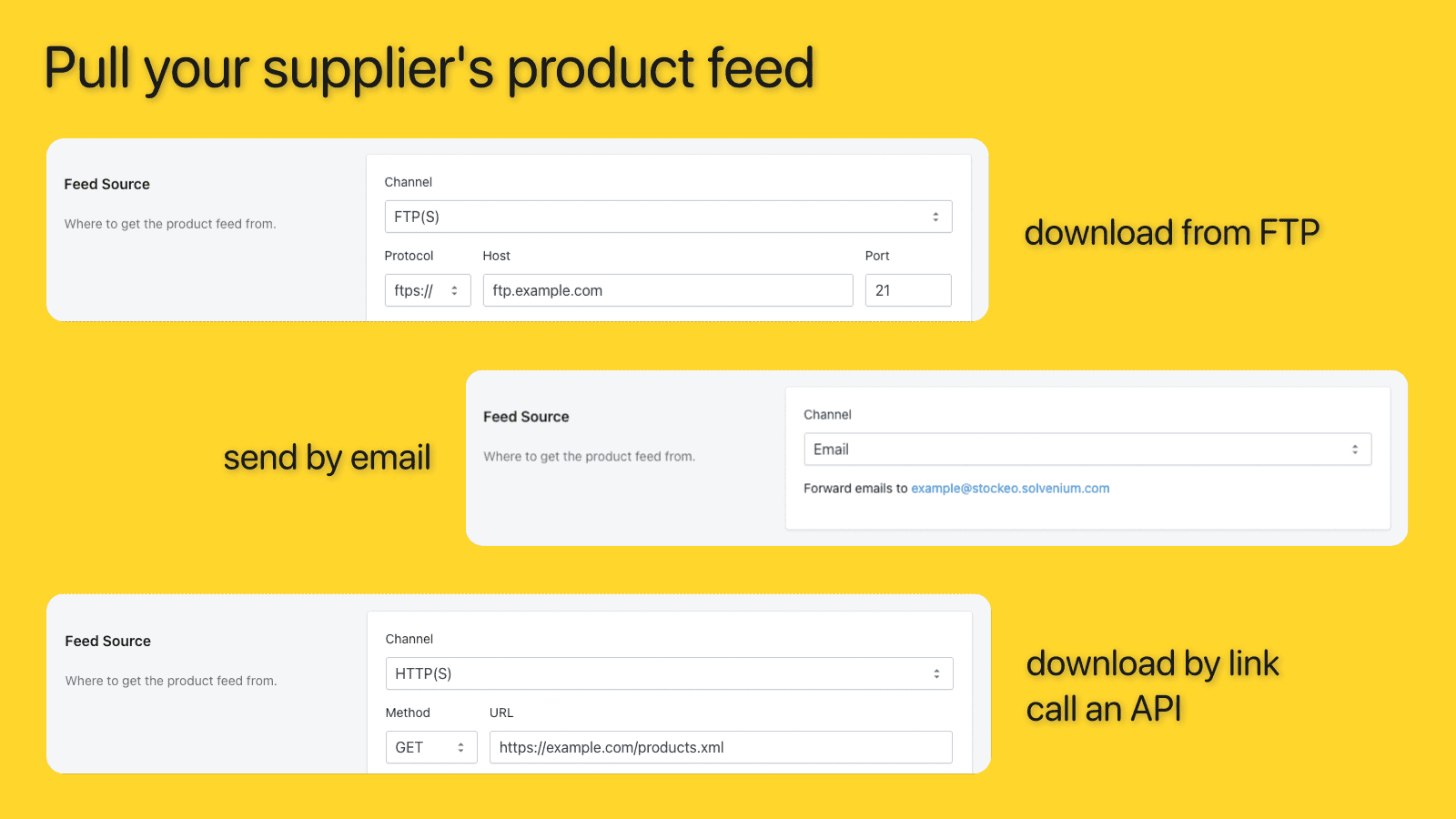
- Import products seamlessly from CSV, JSON, or XML file formats.
Pricing
Stockeo Pricing Plans
Free
$0/month
2 500 variants/SKUs
25 MB max file size
tigger manually
Standard
$9.99/month
10 000 variants/SKUs
50 MB max file size
hourly schedule
5 active automations
Pro
$19.99/month
25 000 variants/SKUs
100 MB max file size
hourly schedule
10 active automations
Pro+
$39.99/month
50 000 variants/SKUs
200 MB max file size
hourly schedule
20 active automations
Not sure which plan to pick? Discuss Free or Standard plans with us, learn about custom pricing, or get a demo.
Here's an overview of Stockeo costs for each of the plan(s):
The app has 4 pricing plans: 1 free and 3 paid. The free plan(s) offered by Stockeo: (Free). The paid plan(s) offered by Stockeo: (Standard, Pro, Pro+).
The details of the plan(s) are outlined below:
Free: This plan is free forever, incurring no subscription costs. It offers a wide range of features like 2 500 variants/SKUs, 25 MB max file size, tigger manually.
Standard: The Standard plan costs $9.99 and has no free trial period. The plan offers a host of features, including 10 000 variants/SKUs, 50 MB max file size, hourly schedule, 5 active automations.
Pro: The Pro plan costs $19.99 and has no free trial period. The plan offers a host of features, including 25 000 variants/SKUs, 100 MB max file size, hourly schedule, 10 active automations.
Pro+: The Pro+ plan costs $39.99 and has no free trial period. The plan offers a host of features, including 50 000 variants/SKUs, 200 MB max file size, hourly schedule, 20 active automations.
Stockeo Price Summary
| Pricing summary | Free plan available |
| Total Pricing Plan(s) | 4 |
| Number of free plan(s) | 1 |
| Number of paid plan(s) | 3 |
| Cost of Paid Plan(s) | $9.99, $19.99, $39.99 |
| Free trial available | No |
Stockeo Shopify App Discounts
If you are looking for discounts on Stockeo app pricing plans, feel free to contact our team - we'd be happy to help! Additionally, if you are an agency or a shop merchant with multiple Shopify stores, we can work directly with Solvenium to secure better deals on the Stockeo app exclusively for you.
*Disclaimer: Please note that ShopDigest doesn't guarantee discounts on apps as any changes to the pricing plans are ultimately up to the discretion of the developer.
Testimonials
What our users say about Stockeo
“Stockeo has helped us out massively. We had a stock report with multiple duplicate sku's due to the way inventory is managed in bin receipts. They customised a way for us to have these SKUs combine and then override the total SKU number. This allows us to make this an automated process and not a manual one, big help.”
“Stockeo has been brilliant! We use the majority of their apps on our site and couldn’t fault them. Dominik has been fantastic, providing great support throughout and always happy to help whenever we’ve needed it. Highly recommend!”
“I switched over from BulkFlow and have been really impressed so far. Setup was straightforward, the field mapping was easy to understand, and I had both my inventory feeds running in no time.What really stands out is the speed and transparency. I love that I can actually see the progress while it's syncing instead of wondering if anything is happening. The detailed completion reports also make it easy to see what was updated, what was already up to date, and if any SKUs weren't found.It's also a much better value for the price. I'm paying less while getting the features I actually need for managing multiple supplier feeds. For stores with large catalogs, this has been a huge improvement to my workflow.So far, it's been reliable, easy to use, and exactly what I was looking for.”
Trusted By
Trusted by the best Shopify stores
CuriousUniverse
United Kingdom
Your Sports Performance
United Kingdom
Puppy's Aesthetics
United States
Brass Monkey
United States
Woofshack
Austria
Pronat
Romania
GerasDaiktas.lt
Lithuania
CPH Bike Shop
Denmark
Automatically import products and synchronize inventory from your supplier feeds.
Automatic updates of stock
Update your stock quantities, item prices, and other product information from your supplier's product feed.
Multiple sellers
Combine stock from various suppliers.
Minimum inventory limit
Avoid selling out by creating rules for low stock.
Comparison
Top Stockeo Alternatives Detailed Comparison
The table below highlights the crucial differences between Stockeo and similar other Shopify apps based on parameters like ratings, reviews, features, pricing, etc.
Add App | |||
|---|---|---|---|
| General Information | |||
| Ratings | 5.0(46 reviews) | 4.6(1,163 reviews) | |
| Developed by | Solvenium | CedCommerce | |
| Launch Date | 7/22/2022 | 6/18/2021 | |
| Pricing | Free, $9.99/month, $19.99/month, $39.99/month | Free, $19/month, $49/month, $99/month | |
| Objective | Automatic product listing updates | Selling on Amazon is simple using the Amazon sales channel. | |
| Categories | Inventory sync | Marketplaces, Inventory sync | |
| Key Features & Highlights | |||
| Purpose | Automatically import products and synchronize inventory from your supplier feeds. | Manage and organize sales operations both in your store and on Amazon. | |
| Features List |
|
| |
| Highlights | - |
| |
| User Reviews and Ratings | |||
| Recommended % | 100.0% | 91.7% | |
| Pros |
|
| |
| Cons |
|
| |
| Pricing and Plans | |||
| Total Pricing Plans | 4 | 4 | |
| Free Plan | Available | Available | |
| Free Trial | No | No | |
| Technical Information | |||
| Rating | 5.0 | 4.6 | |
| Total Reviews | 58 | 1,034 | |
| Launch Date | 7/22/2022 | 6/18/2021 | |
| SD Points | 22 | 262 | |
More Details About Stockeo
Product Description
Stockeo allows you to import products from various suppliers and auto-sync inventory levels through scheduled automations. It supports reading data from any CSV, JSON, or XML feed, allowing ease of setup for stock updates from different vendors based on specific product tags.
AI Summary
Stockeo is a robust Shopify app designed to automate inventory and price updates by syncing supplier feeds with a store’s product catalog. It supports multiple feed formats, including CSV, XML, JSON, and FTP, and offers flexible configuration options to handle diverse supplier requirements. The app excels in reliability, with seamless automation for hourly or daily updates, reducing manual effort and minimizing stock discrepancies. Its intuitive interface and clear documentation simplify setup, while advanced features like metafield support and location-based updates cater to complex workflows. A standout strength is the responsive, knowledgeable support team, which provides prompt assistance for customization and troubleshooting. However, initial setup may require technical guidance for less common feed formats or intricate use cases. While the free tier is functional, some advanced features necessitate a paid plan. Minor limitations include the inability to update "compare at price" fields or integrate directly with Google Sheets. Overall, Stockeo is a powerful solution for businesses needing efficient, accurate inventory synchronization, particularly those with large or multi-supplier catalogs.
Support
For any questions, concerns, or assistance with Stockeo, the dedicated support team is readily available to help.To reach out to the support team, users can send an email to [email protected].
Stockeo Support Information In A Nutshell:
| Support Email: | [email protected] |
| Contact Number(s): | Not available |
| FAQ Page: | Not available |
| Privacy Policy: | Privacy details |
| Language Support: | English |
Integration
The list of top Shopify apps or features or software tools that Stockeo seamlessly integrates are given below:
No integration details available.
Developer
Looking to install Stockeo app on your store?
ShopDigest helps businesses upgrade their Shopify stores by offering easy app installation services.
Why Choose ShopDigest?
- Highly experienced and vetted team for successful app installation
- Assured support and guidance throughout the installation and beyond
- Customized services to meet unique business needs
- 30-day no questions asked refund policy
- Lowest pricing guaranteed (starts at just $10/hour)
Stockeo Q&A
How does the app help manage inventory?
It automatically syncs stock levels, prices, and product details from supplier feeds, reducing manual updates and preventing overselling with low-stock alerts.
Can I use multiple supplier feeds?
Yes, you can set up separate automations for different vendors and filter updates by product tags or vendor-specific criteria.
What file formats does the app support?
It reads CSV, JSON, and XML feeds, making it compatible with most supplier data formats for seamless inventory imports.
How often can inventory updates run?
Updates can be scheduled hourly, daily, or at custom intervals, ensuring real-time or frequent stock synchronization.
Is there a limit on product variants?
Depending on your plan, variant limits range from 5,000 to 50,000, with higher tiers supporting unlimited automations.
Does the app prevent overselling?
Yes, you can set low-stock thresholds to halt sales when inventory runs out, avoiding order fulfillment issues.
Can I automate price adjustments?
The app calculates costs from supplier feeds, allowing automatic price updates to reflect changes in product costs.
Who is this app best suited for?
Ecommerce stores with multiple suppliers benefit from automated inventory syncs, saving time on manual stock management.
Customer Reviews
Stockeo has an overall rating of 5.0 stars from a total of 58 reviews on the Shopify app store. Of these, 58 (100.0%) are positive, 0 (0.0%) are neutral, and 0 (0.0%) are negative*.
*Ratings above four stars fall under positive review, three stars reviews fall under neutral, and anything less than two stars falls under negative.
Stockeo has helped us out massively. We had a stock report with multiple duplicate sku's due to the way inventory is managed in bin receipts. They customised a way for us to have these SKUs combine and then override the total SKU number. This allows us to make this an automated process and not a manual one, big help.
Stockeo has been brilliant! We use the majority of their apps on our site and couldn’t fault them. Dominik has been fantastic, providing great support throughout and always happy to help whenever we’ve needed it. Highly recommend!
I switched over from BulkFlow and have been really impressed so far. Setup was straightforward, the field mapping was easy to understand, and I had both my inventory feeds running in no time.What really stands out is the speed and transparency. I love that I can actually see the progress while it's syncing instead of wondering if anything is happening. The detailed completion reports also make it easy to see what was updated, what was already up to date, and if any SKUs weren't found.It's also a much better value for the price. I'm paying less while getting the features I actually need for managing multiple supplier feeds. For stores with large catalogs, this has been a huge improvement to my workflow.So far, it's been reliable, easy to use, and exactly what I was looking for.
I switched over from BulkFlow and have been really impressed so far. Setup was straightforward, the field mapping was easy to understand, and I had both my inventory feeds running in no time.What really stands out is the speed and transparency. I love that I can actually see the progress while it's syncing instead of wondering if anything is happening. The detailed completion reports also make it easy to see what was updated, what was already up to date, and if any SKUs weren't found.It's also a much better value for the price. I'm paying less while getting the features I actually need for managing multiple supplier feeds. For stores with large catalogs, this has been a huge improvement to my workflow.So far, it's been reliable, easy to use, and exactly what I was looking for.
Very simple and stable app. Does exactly what it needs to do without all the fluffy features that nobody uses. I manage 7 Shopify websites and use Exporteo, Fulfilleo, and Stockeo for all of them. With a little help from Lukasz and Dominik at Solvenium to tweak a bit of the code we have exactly what we need. They are very responsive and we are grateful for their expertise.
Outstanding app and support! Dominik was very helpful and was incredibly patient in helping us get set up and deal with any special situations. Keep up the great work! Get the app, it changed our everyday office life ;-)
Video Demo and Screenshots
Product Screenshots
Installation Steps
How to install Stockeo on your Shopify store
Find your app
Use filters like pricing, availability, and features to find the perfect match for your store's needs.
Get a personalized setup plan
Our team will create an installation plan based on your current store setup, goals, and requirements.
Install at your own pace
Perfect your store's functionality without the pressure to move on until you're ready.
Install in your Shopify Store
Stockeo FAQ's
How do I install the Stockeo Shopify app?
To install Stockeo app on your Shopify store, click on the Stockeo installation link. Login to the Shopify store on which you want to install the app and follow the onboarding process.
If you need our expert guidance to help you install Stockeo on your Shopify store, then contact us now.
What are the key features of Stockeo?
The key features offered by Stockeo to Shopify store owners are:
- ✅Import products
- ✅Sync inventory
- ✅Automate updates
- ✅Calculate prices
- ✅CSV, JSON, XML
Does Stockeo integrate with other Shopify apps or tools?
Yes, Stockeo seamlessly integrates with other Shopify apps or tools, such as Bring in goods, Update stock, Automatically update.
Is there a free trial available for Stockeo?
No, Stockeo does not offer any free trial.
What are the pricing plans for Stockeo?
The app has 4 pricing plans: 1 free and 3 paid. The paid plans cost $9.99/month, $19.99/month, $39.99/month and have no free trial period.
How does billing work for Stockeo?
Stockeo uses USD for billing, with recurring and usage-based charges invoiced usually every 30 days.
Can I cancel or upgrade my subscription plan at any time?
Yes, Stockeo allows its subscribers to cancel or upgrade their subscription plan at any time.
Does Stockeo offer customer support? How can I get assistance?
Yes, Stockeo offers a dedicated support team for any kind of app-related assistance. To reach out to the support team, users can send an email to [email protected].
Is Stockeo compatible with my Shopify theme?
Please reach out to their support team at [email protected] to confirm its compatibility with your specific Shopify theme.
Alternatives
See all Alternatives to Stockeo Shopify App.






Most Popular
Most popular Shopify apps on the market




