
syncX: Stock Sync & Inventory Shopify App
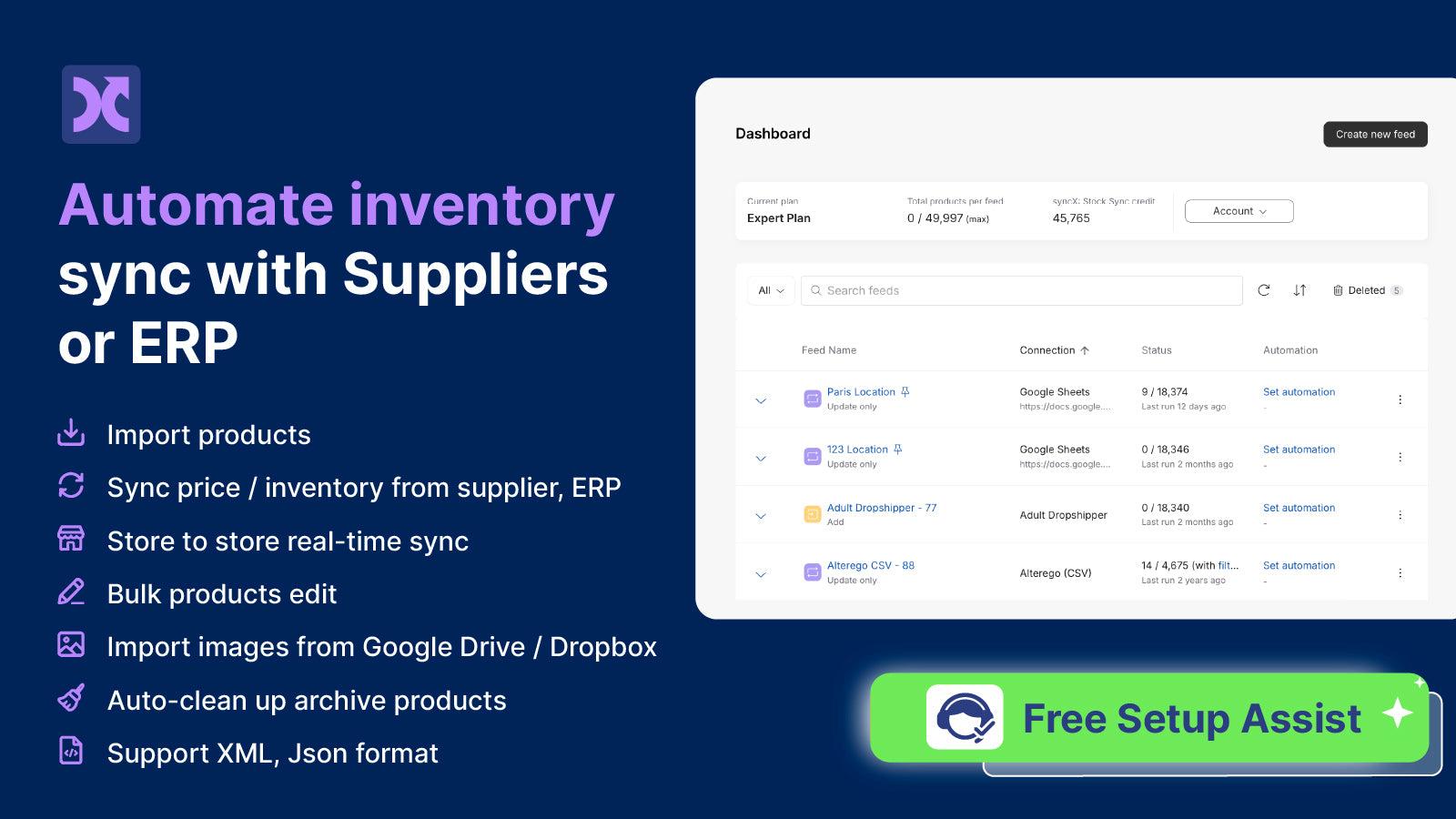
by SyncXAutomate the process of importing new products and updating inventory levels from several suppliers. Set up automatic synchronization for current and new inventory products.
4.7
(827)
Mama's & Papa's, United States
"Great app with powerful, flexible field mapping. We needed some custom setup for our Instacart export, and their support team was responsive and got everything sorted quickly. Highly recommend!"
Install in your Shopify Store

syncX: Stock Sync & Inventory Charts
Track syncX: Stock Sync & Inventory's ranking, reviews, and performance over time with interactive charts. See how it compares to similar apps in the same category.
Pros and Cons
Pros and Cons of syncX: Stock Sync & Inventory
Pros
Efficient Inventory Management: Automates and simplifies coordination of large inventories, saving significant time for users.
Exceptional Customer Support: Highly responsive and problem-solving support team, frequently praised for quick resolutions.
Multi-Platform Integration: Seamlessly syncs inventory across multiple marketplaces and physical stores.
User-Friendly Setup: Easy to configure with helpful tutorials and live support for initial setup.
Cons
Setup Complexity for Beginners: New users may find initial configuration challenging without expert assistance.
Occasional Sync Delays: A few users experienced stock update delays leading to out-of-stock orders.
Screenshots
About the App
Set up automatic synchronization for current and new inventory products.
- Automated Inventory Updating: Save time by automating the inventory update process safely.
- Inventory Management: Don't oversell: Quantity rules help users to manage their inventory levels appropriately.
- Product Cleanup: Take out any products from the store that are no longer needed or no longer available.
- Inventory Export for Tracking Stock: Send inventory list to supplier or vendor to monitor store stock.
- Dropshipping Collaboration: Become a dropshipper with Stock Sync and share your product list with other sellers.
Keywords
Key Features
- Automate inventory updates to save time and reduce manual errors.
- Set quantity rules to prevent overselling and maintain stock accuracy.
- Remove discontinued products automatically to keep your store current.
Pricing
syncX: Stock Sync & Inventory Pricing Plans
Free Plan
$0/month
Unlimited user trigger updates
Limit 2,000 products
1 update feed/supplier
Only manual update
Duplicate SKU sync
Starter
$7/month
60+ connection method
Limit 500 - 2,500 products
1 to 5 update feed/supplier
Schedule 1 times daily (24 hr min)
Duplicate SKU sync
Expert
$10/month
60+ connection method
Limit 5,000 - 100,000 products
1 - 25 update feeds/suppliers
Schedule 24 times daily (1 hr min)
Duplicate SKU sync
Scale
$300/month
60+ connection method
Unlimited products sync
Unlimited update feeds/suppliers
Unlimited Real-time sync priority
Up to every 10 min
Not sure which plan to pick? Discuss Free Plan or Starter plans with us, learn about custom pricing, or get a demo.
Here's an overview of syncX: Stock Sync & Inventory costs for each of the plan(s):
The app has 4 pricing plans: 1 free and 3 paid. The free plan(s) offered by syncX: Stock Sync & Inventory: (Free Plan). The paid plan(s) offered by syncX: Stock Sync & Inventory: (Starter, Expert, Scale).
The details of the plan(s) are outlined below:
Free Plan: This plan is free forever, incurring no subscription costs. It offers a wide range of features like Unlimited user trigger updates, Limit 2,000 products, 1 update feed/supplier, Only manual update, Duplicate SKU sync, Low stock alert, Support, Import new products.
Starter: The Starter plan costs $7 and comes with a 3-day free trial period. The plan offers a host of features, including 60+ connection method, Limit 500 - 2,500 products, 1 to 5 update feed/supplier, Schedule 1 times daily (24 hr min), Duplicate SKU sync, Low stock alert, Support, Import new products.
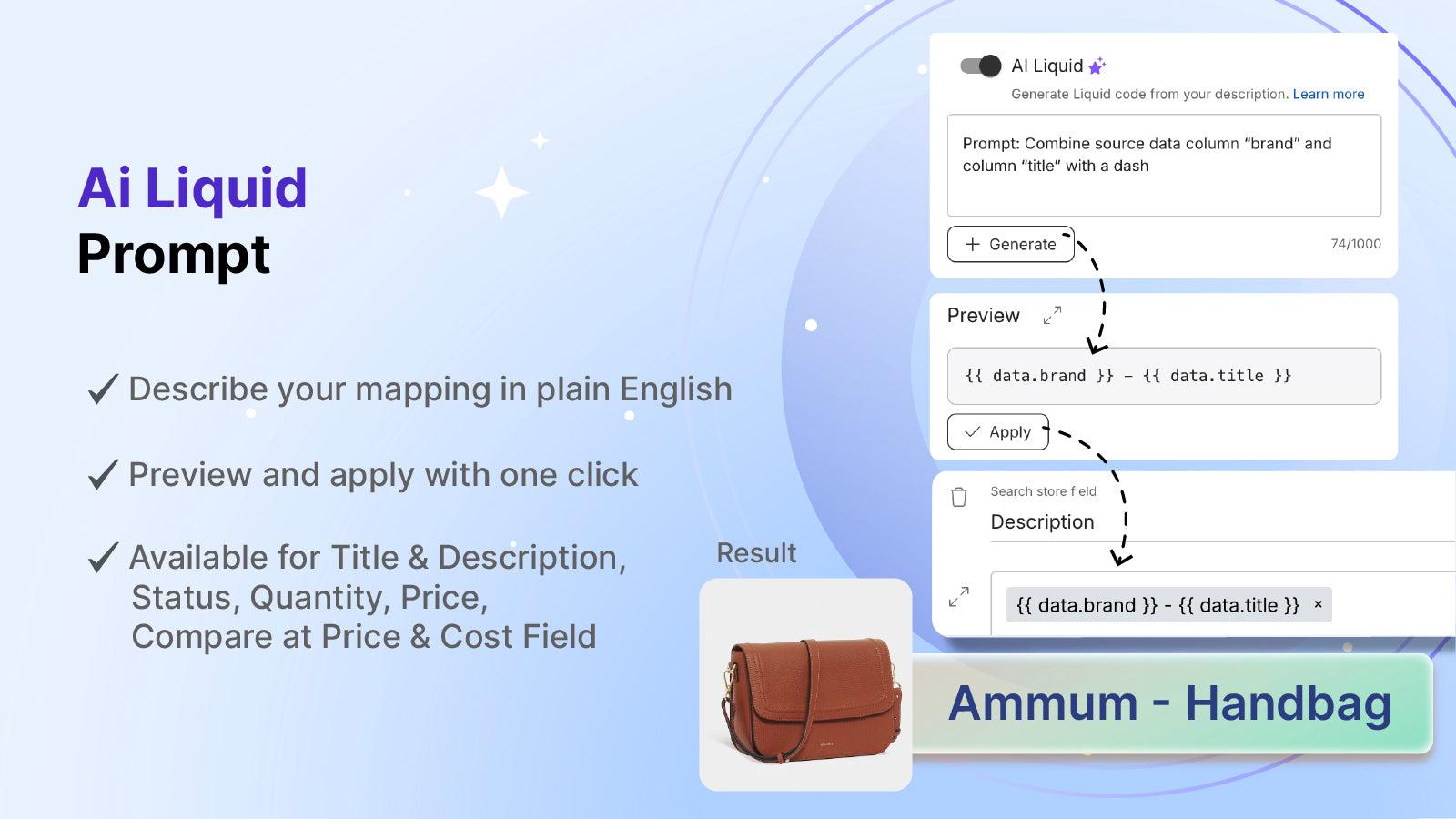
Expert: The Expert plan costs $10 and comes with a 3-day free trial period. The plan offers a host of features, including 60+ connection method, Limit 5,000 - 100,000 products, 1 - 25 update feeds/suppliers, Schedule 24 times daily (1 hr min), Duplicate SKU sync, AI generated content, Advance pricing rules, Metafields.
Scale: The Scale plan costs $300 and comes with a 3-day free trial period. The plan offers a host of features, including 60+ connection method, Unlimited products sync, Unlimited update feeds/suppliers, Unlimited Real-time sync priority, Up to every 10 min, Custom API integration & setup, Full-stack ERP sync tailored, 300,000 import new products.
syncX: Stock Sync & Inventory Price Summary
| Pricing summary | Free plan available. Free trial available. |
| Total Pricing Plan(s) | 4 |
| Number of free plan(s) | 1 |
| Number of paid plan(s) | 3 |
| Cost of Paid Plan(s) | $7, $10, $300 |
| Free trial available | Yes, for 3 day(s) |
For further information regarding syncX: Stock Sync & Inventory app pricing plans, see the official website.
syncX: Stock Sync & Inventory Shopify App Discounts
If you are looking for discounts on syncX: Stock Sync & Inventory app pricing plans, feel free to contact our team - we'd be happy to help! Additionally, if you are an agency or a shop merchant with multiple Shopify stores, we can work directly with SyncX to secure better deals on the syncX: Stock Sync & Inventory app exclusively for you.
*Disclaimer: Please note that ShopDigest doesn't guarantee discounts on apps as any changes to the pricing plans are ultimately up to the discretion of the developer.
Testimonials
What our users say about syncX: Stock Sync & Inventory
“"Great app with powerful, flexible field mapping. We needed some custom setup for our Instacart export, and their support team was responsive and got everything sorted quickly. Highly recommend!"”
“Great experience and program. I hit a brick wall and needed assistance with building something. They were Johnny on the spot and got we all figured out quickly and efferently. You will not only get everything done you need but have a great support team to help you. ”
“very happy with the app... very happy with the service, they understand what i want and give answers very fast... realy good app”
Trusted By
Trusted by the best Shopify stores
Mama's & Papa's
United States
Appalachia Freeze Dried N Knives
United States
Happytoys Sexshop: online sex shop for Feeling Happy & Easy 😊
Netherlands
Chronenwerk
Germany
Trail.nl
Netherlands
HÉRNI
Japan
Equipo
New Zealand
Värnhems Cyklar
Sweden
Automate the process of importing new products and updating inventory levels from several suppliers.
CSV, XML, Excel, EDI, .TXT
Supports formats like CSV, Rest API, SOAP, HTML, JSON, and supplier download links that need vendor login.
Dropbox, REST API, FTP, Email
Connect with SFTP, get emails, download online, use QuickBooks, Google Spreadsheet, Dropbox, Rest API, FTP, Email, Dropbox & more.
Schedule inventory automatically
Set Stock Sync to automatically update your inventory feed either hourly or daily, depending on when your file is processed.
Comparison
Top syncX: Stock Sync & Inventory Alternatives Detailed Comparison
The table below highlights the crucial differences between syncX: Stock Sync & Inventory and similar other Shopify apps based on parameters like ratings, reviews, features, pricing, etc.
Add App | |||
|---|---|---|---|
| General Information | |||
| Ratings | 4.7(923 reviews) | 4.9(408 reviews) | |
| Developed by | SyncX | InfoShore | |
| Launch Date | 5/15/2014 | 10/20/2017 | |
| Pricing | Free, $7/month, $10/month, $300/month | Free, $19.99/month, $29.99/month, $69.99/month | |
| Objective | Set up automatic synchronization for current and new inventory products. | Import from eBay seller account with live inventory update. | |
| Categories | Store data importer, Inventory sync | Inventory sync, Store data importer | |
| Key Features & Highlights | |||
| Purpose | Automate the process of importing new products and updating inventory levels from several suppliers. | eBay Professional Importer helps to bring in eBay products and keeps inventory updated in real time. | |
| Features List |
|
| |
| Highlights | - |
| |
| User Reviews and Ratings | |||
| Recommended % | 92.5% | 94.0% | |
| Pros |
|
| |
| Cons |
|
| |
| Pricing and Plans | |||
| Total Pricing Plans | 4 | 4 | |
| Free Plan | Available | Available | |
| Free Trial | Yes, for 3 day(s) | No | |
| Technical Information | |||
| Rating | 4.7 | 4.9 | |
| Total Reviews | 827 | 319 | |
| Launch Date | 5/15/2014 | 10/20/2017 | |
| SD Points | 217 | 105 | |
More Details About syncX: Stock Sync & Inventory
Product Description
Stock Sync is a tool that enables businesses to manage and update their inventory across multiple sales channels. It supports a variety of file formats and data sources for easy import and export of inventory data, enhancing business efficiency and customer satisfaction.
AI Summary
Stock Sync is a Shopify app designed to automate inventory management by syncing stock levels, prices, and product data across multiple sales channels, suppliers, and physical stores. It supports various file formats and APIs, enabling seamless integration with external feeds, including dropshipping suppliers, marketplaces like eBay, and POS systems. Key features include scheduled updates (hourly, daily, etc.), bulk product imports, and customizable rules for pricing and inventory adjustments. The app is praised for its intuitive interface, robust automation capabilities, and significant time savings, particularly for businesses with complex or large-scale inventory needs. A notable strength is the highly responsive and knowledgeable customer support team, which assists with setup, troubleshooting, and even custom feature requests. Many users highlight the app’s reliability and efficiency in preventing out-of-stock orders and streamlining multi-platform operations. However, a few limitations include occasional delays in support response times, particularly for stores with high-volume or complex feed requirements, and a learning curve for initial setup, which may require assistance for less technical users. While most reviews emphasize seamless performance, isolated reports mention sync errors or scalability challenges for advanced use cases. Overall, Stock Sync is a powerful solution for inventory automation, particularly valued for its support and flexibility, though some users may encounter occasional hurdles with setup or scaling.
Support
For any questions, concerns, or assistance with syncX: Stock Sync & Inventory, the dedicated support team is readily available to help.To reach out to the support team, users can send an email to [email protected]. Additionally, syncX: Stock Sync & Inventory offers a comprehensive FAQ section to address common inquiries and provide self-help resources in their app FAQ section.
Language Support
Details of the syncX: Stock Sync & Inventory app are available in various languages on the Shopify app store, including Japanese, Chinese (Simplified), Chinese (Traditional), German, French, Polish, Dutch, Spanish, Portuguese (Brazil), and Portuguese (Portugal).
syncX: Stock Sync & Inventory Support Information In A Nutshell:
| Support Email: | [email protected] |
| Contact Number(s): | Not available |
| FAQ Page: | FAQ details |
| Privacy Policy: | Privacy details |
| Language Support: | English, Japanese, Chinese (Simplified), Chinese (Traditional), German, French, Polish, Dutch, Spanish, Portuguese (Brazil), and Portuguese (Portugal) |
Integration
The list of top Shopify apps or features or software tools that syncX: Stock Sync & Inventory seamlessly integrates are given below:
Developer
Name: SyncX
Website: /partners/syncx
Address: 5-13-05, Block 5, VSQ @ PJ City Centre, Jln Utara, Petaling Jaya, SGR, 46200
Looking to install syncX: Stock Sync & Inventory app on your store?
ShopDigest helps businesses upgrade their Shopify stores by offering easy app installation services.
Why Choose ShopDigest?
- Highly experienced and vetted team for successful app installation
- Assured support and guidance throughout the installation and beyond
- Customized services to meet unique business needs
- 30-day no questions asked refund policy
- Lowest pricing guaranteed (starts at just $10/hour)
syncX: Stock Sync & Inventory Q&A
How does the app help prevent overselling?
It automatically syncs inventory levels across suppliers and sets quantity rules, ensuring stock accuracy in real-time to avoid selling unavailable products.
Can I schedule inventory updates automatically?
Yes, updates can be scheduled hourly or daily, with higher-tier plans offering more frequent syncs to keep stock data current.
Does it support dropshipping businesses?
Absolutely—it lets you share inventory feeds with other sellers and syncs product data from global suppliers across multiple categories.
What file formats are supported for inventory feeds?
It works with CSV, XML, Excel, JSON, and more, along with API integrations like FTP, Dropbox, and Google Sheets.
Is there a way to remove outdated products easily?
Yes, discontinued or unavailable products can be automatically cleaned up to maintain an accurate store catalog.
Can I sync inventory across multiple stores?
The app supports multi-store sync, updating prices, variants, and stock levels across all connected sales channels.
Are low-stock alerts available?
Yes, automated alerts notify you when stock runs low, helping you replenish inventory before items sell out.
What’s the difference between free and paid plans?
Free plans have SKU limits and manual updates, while paid tiers offer more suppliers, frequent auto-syncs, and priority support.
Customer Reviews
syncX: Stock Sync & Inventory has an overall rating of 4.7 stars from a total of 827 reviews on the Shopify app store. Of these, 756 (91.4%) are positive, 9 (1.1%) are neutral, and 62 (7.5%) are negative*.
*Ratings above four stars fall under positive review, three stars reviews fall under neutral, and anything less than two stars falls under negative.
"Great app with powerful, flexible field mapping. We needed some custom setup for our Instacart export, and their support team was responsive and got everything sorted quickly. Highly recommend!"
Great experience and program. I hit a brick wall and needed assistance with building something. They were Johnny on the spot and got we all figured out quickly and efferently. You will not only get everything done you need but have a great support team to help you.
very happy with the app... very happy with the service, they understand what i want and give answers very fast... realy good app
firts i thought great app, can connect a lot of feeds in different shedules. but now in my shop variants are marked as sold out even if there are some available. maybe its a theme problem, maybe not. but i try to create another feed and support didnt really support at this one. i deleted the app a few times and installed it again. i also dont want to buy a allways a new plan just to find out that the feed doesnt work. pls support just help me to finish the feed, then you get a subscription again an a 5 star rating. kind regards. received 30 days trial to fix that. thx to support
firts i thought great app, can connect a lot of feeds in different shedules. but now in my shop variants are marked as sold out even if there are some available. maybe its a theme problem, maybe not. but i try to create another feed and support didnt really support at this one. i deleted the app a few times and installed it again. i also dont want to buy a allways a new plan just to find out that the feed doesnt work. pls support just help me to finish the feed, then you get a subscription again an a 5 star rating. kind regards. received 30 days trial to fix that. thx to support
It works really well. Happy with the tool for our external warehouse.
Video Demo and Screenshots
Product Screenshots
Installation Steps
How to install syncX: Stock Sync & Inventory on your Shopify store
Find your app
Use filters like pricing, availability, and features to find the perfect match for your store's needs.
Get a personalized setup plan
Our team will create an installation plan based on your current store setup, goals, and requirements.
Install at your own pace
Perfect your store's functionality without the pressure to move on until you're ready.
Install in your Shopify Store
syncX: Stock Sync & Inventory FAQ's
How do I install the syncX: Stock Sync & Inventory Shopify app?
To install syncX: Stock Sync & Inventory app on your Shopify store, click on the syncX: Stock Sync & Inventory installation link. Login to the Shopify store on which you want to install the app and follow the onboarding process.
If you need our expert guidance to help you install syncX: Stock Sync & Inventory on your Shopify store, then contact us now.
What are the key features of syncX: Stock Sync & Inventory?
The key features offered by syncX: Stock Sync & Inventory to Shopify store owners are:
- ✅Import/Update products from WooCommerce, BigCommerce, Square, or CSV/XLSX files.
- ✅Auto-sync stock from Google Sheets, FTP feeds, Dropbox, APIs, or custom URLs.
- ✅Real-time stock sync across multiple stores and channels to stop overselling.
- ✅Sort collections: push out-of-stock items down and move best-sellers up.
- ✅Custom Data (Metafield) - Add extra product info like dimension, materials & ETA
Does syncX: Stock Sync & Inventory integrate with other Shopify apps or tools?
Yes, syncX: Stock Sync & Inventory seamlessly integrates with other Shopify apps or tools, such as Save time by automating the inventory update process safely., Don't oversell: Quantity rules help users to manage their inventory levels appropriately., Take out any products from the store that are no longer needed or no longer available..
Is there a free trial available for syncX: Stock Sync & Inventory?
Yes, syncX: Stock Sync & Inventory offers 3 days free trial on all its paid plans.
What are the pricing plans for syncX: Stock Sync & Inventory?
The app has 4 pricing plans: 1 free and 3 paid. The paid plans cost $7/month, $10/month, $300/month, and come with a 3-day free trial period.
How does billing work for syncX: Stock Sync & Inventory?
syncX: Stock Sync & Inventory uses USD for billing, with recurring and usage-based charges invoiced usually every 30 days.
Can I cancel or upgrade my subscription plan at any time?
Yes, syncX: Stock Sync & Inventory allows its subscribers to cancel or upgrade their subscription plan at any time.
Does syncX: Stock Sync & Inventory offer customer support? How can I get assistance?
Yes, syncX: Stock Sync & Inventory offers a dedicated support team for any kind of app-related assistance. To reach out to the support team, users can send an email to [email protected].
Additionally, syncX: Stock Sync & Inventory offers a comprehensive FAQ section to address common inquiries and provide self-help resources.
Is syncX: Stock Sync & Inventory compatible with my Shopify theme?
Please reach out to their support team at [email protected] to confirm its compatibility with your specific Shopify theme.
Alternatives
See all Alternatives to syncX: Stock Sync & Inventory Shopify App.






Most Popular
Most popular Shopify apps on the market




