
CS ‑ Smart Bulk Image Upload Shopify App
by CraftshiftUpload product images in bulk and save time. Uploading images is no longer a lengthy task! Upload multiple product images at once and save time!
5.0
(103)
Heal's, United Kingdom
We've migrated 60k+ SKUs into Shopify and this app has saved us so much work, couldn't have managed without it. And the team have been super responsive. I asked about seeing more upload history and within 24 hours this was available within the app for everyone. Amazing :)
Install in your Shopify Store

CS ‑ Smart Bulk Image Upload Charts
Track CS ‑ Smart Bulk Image Upload's ranking, reviews, and performance over time with interactive charts. See how it compares to similar apps in the same category.
Pros and Cons
Pros and Cons of CS ‑ Smart Bulk Image Upload
Pros
Exceptional Customer Support: Rapid, personalized, and solution-oriented assistance, often exceeding expectations.
Efficient Bulk Image Handling: Streamlines large-scale image uploads, saving significant time and effort.
User-Friendly Interface: Intuitive design simplifies complex tasks like bulk uploads and matching.
Customization Flexibility: Adapts to unique user needs, including on-the-fly feature adjustments.
Cons
High Pricing: Some users noted the app’s cost as steep despite its value.
Strict Matching Parameters: Occasional missed matches due to rigid filename requirements.
Screenshots
About the App
Upload multiple product images at once and save time!
- Image-Specific Connectivity: Simple and secure connection to Google Drive for images only.
- Image Uploading: You can upload several images to the same product or different products.
- Image Ordering: You can arrange images using numbers and underscores.
- Preview Verification: You can preview images before you upload them.
- Upload Reports: Detailed upload reports are available! They are sent to your email.
Keywords
Key Features
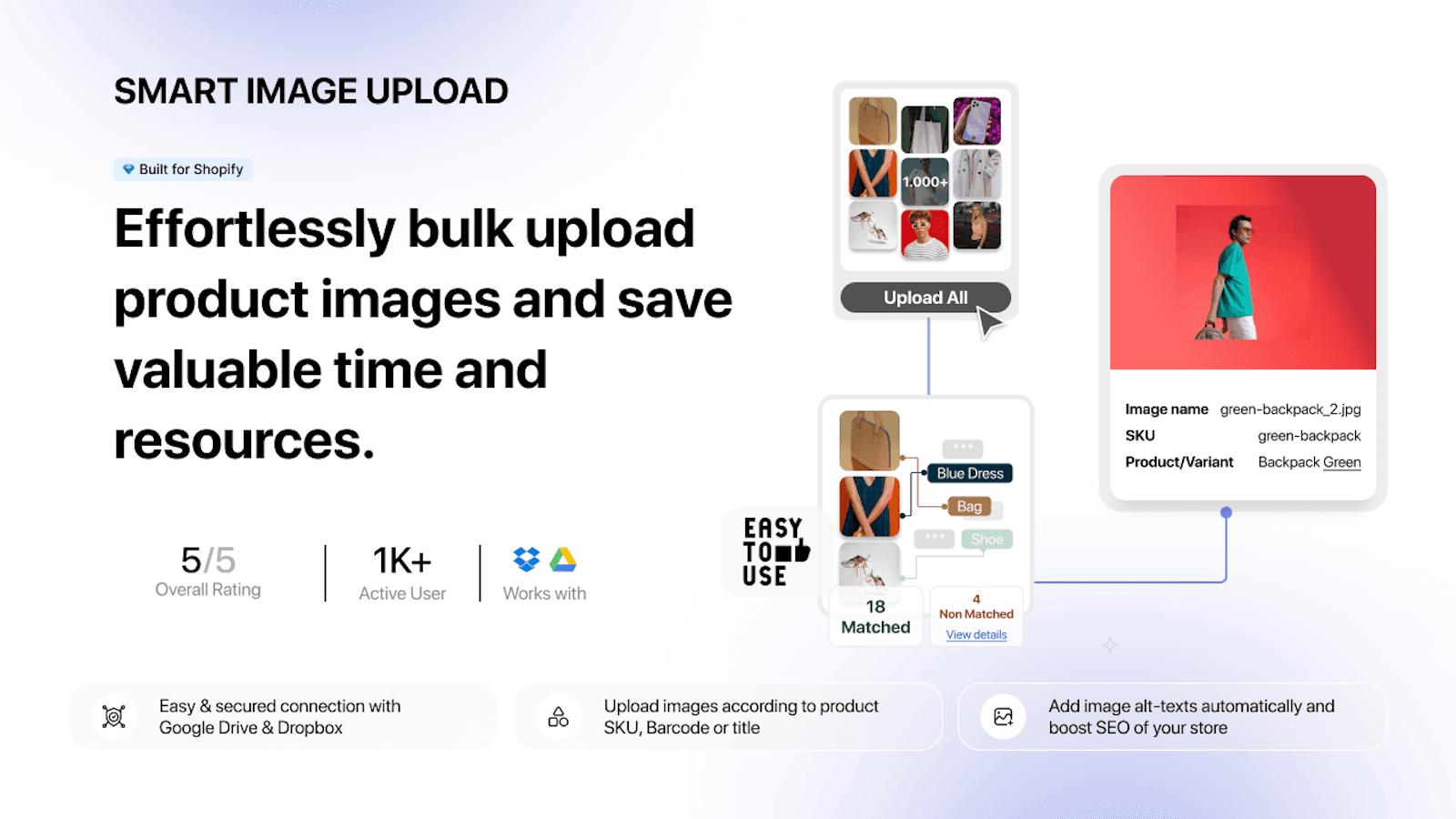
- Bulk upload thousands of product images at once to save time.
- Import images directly from Google Drive or Dropbox securely.
- Automatically match images to products using SKU, barcode, or title.
Pricing
CS ‑ Smart Bulk Image Upload Pricing Plans
Free Plan
$0/month
Bulk image upload up to 25 images
Match by SKU,Barcode, Title or METAFIELD
Seamlessly Replace Existing Images
SEO-Optimized Automatic Alt Texts
Google Drive & Dropbox Integration
Premium
$69/month
For Shopify Basic, Grow & Lower Plans
Unlimited Bulk Image Upload
Match by SKU,Barcode, Title or METAFIELD
Seamlessly Replace Existing Images
SEO-Optimized Automatic Alt Texts
Premium PRO
$99/month
For Shopify Advanced Plans
Unlimited Bulk Image Upload
Match by SKU,Barcode, Title or METAFIELD
Seamlessly Replace Existing Images
SEO-Optimized Automatic Alt Texts
Enterprise
$149/month
For Shopify Plus Plans
Unlimited Bulk Image Upload
Match by SKU,Barcode, Title or METAFIELD
Seamlessly Replace Existing Images
SEO-Optimized Automatic Alt Texts
Not sure which plan to pick? Discuss Free Plan or Premium plans with us, learn about custom pricing, or get a demo.
Here's an overview of CS ‑ Smart Bulk Image Upload costs for each of the plan(s):
The app has 4 pricing plans: 1 free and 3 paid. The free plan(s) offered by CS ‑ Smart Bulk Image Upload: (Free Plan). The paid plan(s) offered by CS ‑ Smart Bulk Image Upload: (Premium, Premium PRO, Enterprise).
The details of the plan(s) are outlined below:
Free Plan: This plan is free forever, incurring no subscription costs. It offers a wide range of features like Bulk image upload up to 25 images, Match by SKU,Barcode, Title or METAFIELD, Seamlessly Replace Existing Images, SEO-Optimized Automatic Alt Texts, Google Drive & Dropbox Integration.
Premium: The Premium plan costs $69 and has no free trial period. The plan offers a host of features, including For Shopify Basic, Grow & Lower Plans, Unlimited Bulk Image Upload, Match by SKU,Barcode, Title or METAFIELD, Seamlessly Replace Existing Images, SEO-Optimized Automatic Alt Texts, Personalized Initial Setup Guidance, Priority Access in Image Uploader Queue, Tailored, Store Specific Image Matching.
Premium PRO: The Premium PRO plan costs $99 and has no free trial period. The plan offers a host of features, including For Shopify Advanced Plans, Unlimited Bulk Image Upload, Match by SKU,Barcode, Title or METAFIELD, Seamlessly Replace Existing Images, SEO-Optimized Automatic Alt Texts, Personalized Initial Setup Guidance, Priority Access in Image Uploader Queue, Tailored, Store Specific Image Matching.
Enterprise: The Enterprise plan costs $149 and has no free trial period. The plan offers a host of features, including For Shopify Plus Plans, Unlimited Bulk Image Upload, Match by SKU,Barcode, Title or METAFIELD, Seamlessly Replace Existing Images, SEO-Optimized Automatic Alt Texts, Personalized Initial Setup Guidance, Priority Access in Image Uploader Queue, Tailored, Store Specific Image Matching.
CS ‑ Smart Bulk Image Upload Price Summary
| Pricing summary | Free plan available |
| Total Pricing Plan(s) | 4 |
| Number of free plan(s) | 1 |
| Number of paid plan(s) | 3 |
| Cost of Paid Plan(s) | $69, $99, $149 |
| Free trial available | No |
CS ‑ Smart Bulk Image Upload Shopify App Discounts
If you are looking for discounts on CS ‑ Smart Bulk Image Upload app pricing plans, feel free to contact our team - we'd be happy to help! Additionally, if you are an agency or a shop merchant with multiple Shopify stores, we can work directly with Craftshift to secure better deals on the CS ‑ Smart Bulk Image Upload app exclusively for you.
*Disclaimer: Please note that ShopDigest doesn't guarantee discounts on apps as any changes to the pricing plans are ultimately up to the discretion of the developer.
Testimonials
What our users say about CS ‑ Smart Bulk Image Upload
“We've migrated 60k+ SKUs into Shopify and this app has saved us so much work, couldn't have managed without it. And the team have been super responsive. I asked about seeing more upload history and within 24 hours this was available within the app for everyone. Amazing :) ”
“Excellent app that has saved us countless hours managing product images. The bulk upload process is fast, reliable, and easy to use. It has significantly streamlined our Shopify workflow and made large image updates effortless. Highly recommended.”
“good for uploading the pictures if you upload new products then it is very good ”
Trusted By
Trusted by the best Shopify stores
Heal's
United Kingdom
Gordon Harris - The Art & Graphic Store
New Zealand
ELUNO
India
Papenbreer
Germany
Limelight Diamonds
India
Liquid Collection
Hong Kong SAR
Milk
Chile
Choose Your Shoes!
Japan
Upload product images in bulk and save time. Uploading images is no longer a lengthy task!
Save time, it's like saving money!
Smart Image Upload can manage all your product images at once, so you don't have to worry about uploading them yourself.
No more errors made by people!
You might mess up during manual upload, but Smart Image Upload won't! Just begin the automatic upload and enjoy your coffee.
Please help!
We want you to do well! If you need our assistance or have any queries, we're eager to help you!
Comparison
Top CS ‑ Smart Bulk Image Upload Alternatives Detailed Comparison
The table below highlights the crucial differences between CS ‑ Smart Bulk Image Upload and similar other Shopify apps based on parameters like ratings, reviews, features, pricing, etc.
Add App | |||
|---|---|---|---|
| General Information | |||
| Ratings | 5.0(97 reviews) | 4.9(1,446 reviews) | |
| Developed by | Craftshift | ITissible | |
| Launch Date | 12/24/2020 | 7/7/2017 | |
| Pricing | Free, $69/month, $99/month, $149/month | Free, $20/month, $50/month, $200/month | |
| Objective | Upload multiple product images at once and save time! | Easily transfer, update or move large data amounts. | |
| Categories | Image gallery, Store data importer | Bulk editor, Store data importer | |
| Key Features & Highlights | |||
| Purpose | Upload product images in bulk and save time. Uploading images is no longer a lengthy task! | The Matrixify app lets you handle large amounts of store data by allowing you to import, export, update, and transfer it. | |
| Features List |
|
| |
| Highlights | - |
| |
| User Reviews and Ratings | |||
| Recommended % | 99.1% | 97.3% | |
| Pros |
|
| |
| Cons |
|
| |
| Pricing and Plans | |||
| Total Pricing Plans | 4 | 4 | |
| Free Plan | Available | Available | |
| Free Trial | No | No | |
| Technical Information | |||
| Rating | 5.0 | 4.9 | |
| Total Reviews | 103 | 598 | |
| Launch Date | 12/24/2020 | 7/7/2017 | |
| SD Points | 56 | 1421 | |
More Details About CS ‑ Smart Bulk Image Upload
Product Description
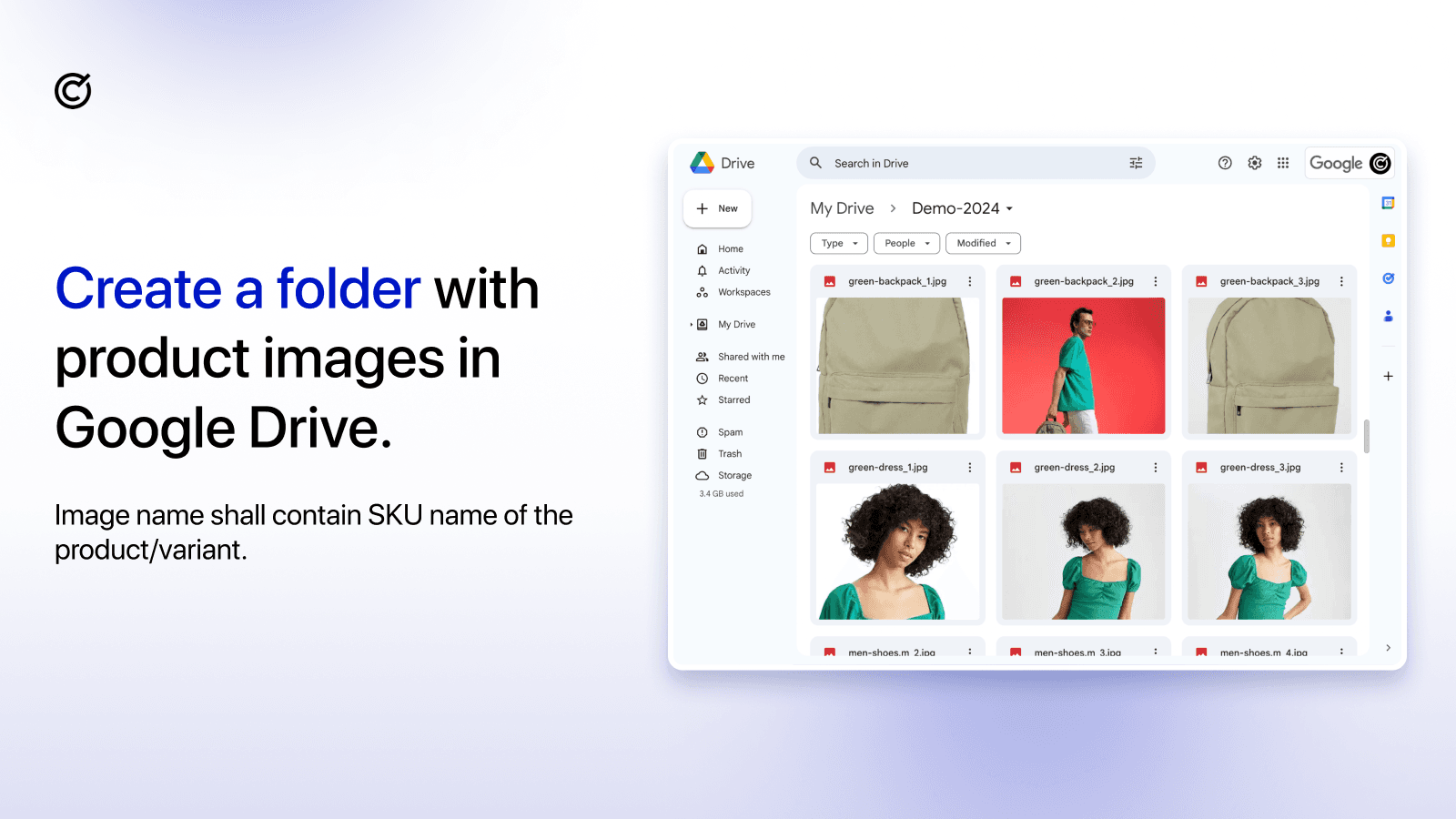
Smart Bulk Image Upload is a tool designed to assist in uploading product images. You just need to ensure the image names and product SKUs are identical and the tool manages the rest.
AI Summary
The app specializes in bulk image uploads for Shopify stores, enabling efficient management of large volumes of product images by matching files to SKUs or other identifiers. Its key strengths include a user-friendly interface, seamless integration with platforms like Google Drive and Dropbox, and robust support for high-volume uploads with minimal errors. The app significantly reduces manual effort, automating processes that would otherwise be time-consuming. A standout feature is the responsive and highly personalized customer support, which often provides rapid solutions, including custom adjustments to meet specific store requirements. However, limitations include occasional strict matching parameters that may require filename adjustments, and the monthly pricing may be perceived as high for some users. Despite these minor drawbacks, the app is widely regarded as a reliable and indispensable tool for stores handling extensive image libraries.
Support
For any questions, concerns, or assistance with CS ‑ Smart Bulk Image Upload, the dedicated support team is readily available to help.To reach out to the support team, users can send an email to [email protected]. Additionally, CS ‑ Smart Bulk Image Upload offers a comprehensive FAQ section to address common inquiries and provide self-help resources in their app FAQ section.
CS ‑ Smart Bulk Image Upload Support Information In A Nutshell:
| Support Email: | [email protected] |
| Contact Number(s): | Not available |
| FAQ Page: | FAQ details |
| Privacy Policy: | Privacy details |
| Language Support: | English |
Integration
The list of top Shopify apps or features or software tools that CS ‑ Smart Bulk Image Upload seamlessly integrates are given below:
Developer
Looking to install CS ‑ Smart Bulk Image Upload app on your store?
ShopDigest helps businesses upgrade their Shopify stores by offering easy app installation services.
Why Choose ShopDigest?
- Highly experienced and vetted team for successful app installation
- Assured support and guidance throughout the installation and beyond
- Customized services to meet unique business needs
- 30-day no questions asked refund policy
- Lowest pricing guaranteed (starts at just $10/hour)
CS ‑ Smart Bulk Image Upload Q&A
How does bulk image uploading save time?
It automates uploading thousands of images at once, eliminating manual work. Simply match filenames to SKUs or barcodes, and the app handles the rest efficiently.
Can I preview images before uploading?
Yes, the app lets you verify photo matches before finalizing the bulk import, reducing errors and ensuring correct product-image associations.
Does it support large image files?
Absolutely! The app automatically resizes images larger than 20 MB or 20 megapixels, ensuring smooth uploads without manual adjustments.
Which cloud platforms can I import from?
You can securely bulk import images directly from Google Drive or Dropbox, streamlining workflows without extra file transfers.
Is it suitable for seasonal inventory updates?
Yes! It’s ideal for mass updates, like seasonal stock changes, by quickly matching and replacing product images in bulk.
How does it minimize product return errors?
By ensuring accurate image-to-product matching via SKUs or barcodes, it reduces returns caused by incorrect or mismatched visuals.
Are there SEO benefits for uploaded images?
Yes, the app auto-generates SEO-friendly alt-texts for images, improving search visibility without extra effort.
Can I customize how images are matched?
Premium users get customization options for matching criteria, like SKUs or metafields, ensuring flexibility for unique store needs.
What’s the difference between free and premium plans?
The free plan allows 25 uploads/month, while premium offers unlimited uploads, priority processing, and advanced matching customization.
Who is this app best suited for?
Store owners managing large inventories, seasonal updates, or new setups benefit most from automated, error-free bulk image uploads.
Customer Reviews
CS ‑ Smart Bulk Image Upload has an overall rating of 5.0 stars from a total of 103 reviews on the Shopify app store. Of these, 102 (99.0%) are positive, 0 (0.0%) are neutral, and 1 (1.0%) are negative*.
*Ratings above four stars fall under positive review, three stars reviews fall under neutral, and anything less than two stars falls under negative.
We've migrated 60k+ SKUs into Shopify and this app has saved us so much work, couldn't have managed without it. And the team have been super responsive. I asked about seeing more upload history and within 24 hours this was available within the app for everyone. Amazing :)
Excellent app that has saved us countless hours managing product images. The bulk upload process is fast, reliable, and easy to use. It has significantly streamlined our Shopify workflow and made large image updates effortless. Highly recommended.
good for uploading the pictures if you upload new products then it is very good
good for uploading the pictures if you upload new products then it is very good
This app is absolutely amazing. It saves us a lot of time, has worked perfectly so far and the response to questions and ideas is quick, solution-orientated and friendly. It has enabled us to significantly optimise our photo process. Great customer service as well. Yagiz always has an answer for every question or problem!
This app is absolutely amazing. It saves us a lot of time, has worked perfectly so far and the response to questions and ideas is quick, solution-orientated and friendly. It has enabled us to significantly optimise our photo process. Great customer service as well. Yagiz always has an answer for every question or problem!
Great customer service and quick response. Really appreciate the help.
Video Demo and Screenshots
Product Screenshots
Installation Steps
How to install CS ‑ Smart Bulk Image Upload on your Shopify store
Find your app
Use filters like pricing, availability, and features to find the perfect match for your store's needs.
Get a personalized setup plan
Our team will create an installation plan based on your current store setup, goals, and requirements.
Install at your own pace
Perfect your store's functionality without the pressure to move on until you're ready.
Install in your Shopify Store
CS ‑ Smart Bulk Image Upload FAQ's
How do I install the CS ‑ Smart Bulk Image Upload Shopify app?
To install CS ‑ Smart Bulk Image Upload app on your Shopify store, click on the CS ‑ Smart Bulk Image Upload installation link. Login to the Shopify store on which you want to install the app and follow the onboarding process.
If you need our expert guidance to help you install CS ‑ Smart Bulk Image Upload on your Shopify store, then contact us now.
What are the key features of CS ‑ Smart Bulk Image Upload?
The key features offered by CS ‑ Smart Bulk Image Upload to Shopify store owners are:
- ✅Easy & secured connection with Google Drive , Dropbox for product photo uploader
- ✅Multiple image bulk uploader to the products or variants. Bulk image upload
- ✅Order product images with underscores and numbers. Example: SKU_1.jpg, SKU_2.jpg
- ✅Photo matching results can be checked before product image importer in bulk
- ✅Bulk image upload with Automatic resize images larger than 20MB or 20 megapixels
Does CS ‑ Smart Bulk Image Upload integrate with other Shopify apps or tools?
Yes, CS ‑ Smart Bulk Image Upload seamlessly integrates with other Shopify apps or tools, such as Simple and secure connection to Google Drive for images only., You can upload several images to the same product or different products., You can arrange images using numbers and underscores..
Is there a free trial available for CS ‑ Smart Bulk Image Upload?
No, CS ‑ Smart Bulk Image Upload does not offer any free trial.
What are the pricing plans for CS ‑ Smart Bulk Image Upload?
The app has 4 pricing plans: 1 free and 3 paid. The paid plans cost $69/month, $99/month, $149/month and have no free trial period.
How does billing work for CS ‑ Smart Bulk Image Upload?
CS ‑ Smart Bulk Image Upload uses USD for billing, with recurring and usage-based charges invoiced usually every 30 days.
Can I cancel or upgrade my subscription plan at any time?
Yes, CS ‑ Smart Bulk Image Upload allows its subscribers to cancel or upgrade their subscription plan at any time.
Does CS ‑ Smart Bulk Image Upload offer customer support? How can I get assistance?
Yes, CS ‑ Smart Bulk Image Upload offers a dedicated support team for any kind of app-related assistance. To reach out to the support team, users can send an email to [email protected].
Additionally, CS ‑ Smart Bulk Image Upload offers a comprehensive FAQ section to address common inquiries and provide self-help resources.
Is CS ‑ Smart Bulk Image Upload compatible with my Shopify theme?
Please reach out to their support team at [email protected] to confirm its compatibility with your specific Shopify theme.
Alternatives
See all Alternatives to CS ‑ Smart Bulk Image Upload Shopify App.






Most Popular
Most popular Shopify apps on the market




