
Retail Barcode Labels Shopify App
by ShopifyMake and print barcode tags for your items. Make and print out barcode stickers for your items.
2.3
(477)
Benchborne, United States
Can you possibly add support for Avery Presta 94219 or even 69992 (1.5" x 1" label size).
Install in your Shopify Store

Retail Barcode Labels Charts
Track Retail Barcode Labels's ranking, reviews, and performance over time with interactive charts. See how it compares to similar apps in the same category.
Pros and Cons
Pros and Cons of Retail Barcode Labels
Pros
Ease of Barcode Generation: Simplifies the process of creating and printing barcodes, reducing manual effort.
Bulk Printing Capability: Supports printing multiple labels at once, improving efficiency for large inventories.
Customizable Label Templates: Allows users to personalize label layouts with fields like SKU, price, and product name.
Fast Printing Performance: Operates quickly once configured, saving time during high-volume printing.
Cons
Inconsistent Barcode Generation: Frequently fails to create or recognize barcodes, requiring repeated attempts.
Limited Label Size Support: Restricts printing to specific brands/sizes, excluding custom or widely used labels.
Screenshots
About the App
Make and print out barcode stickers for your items.
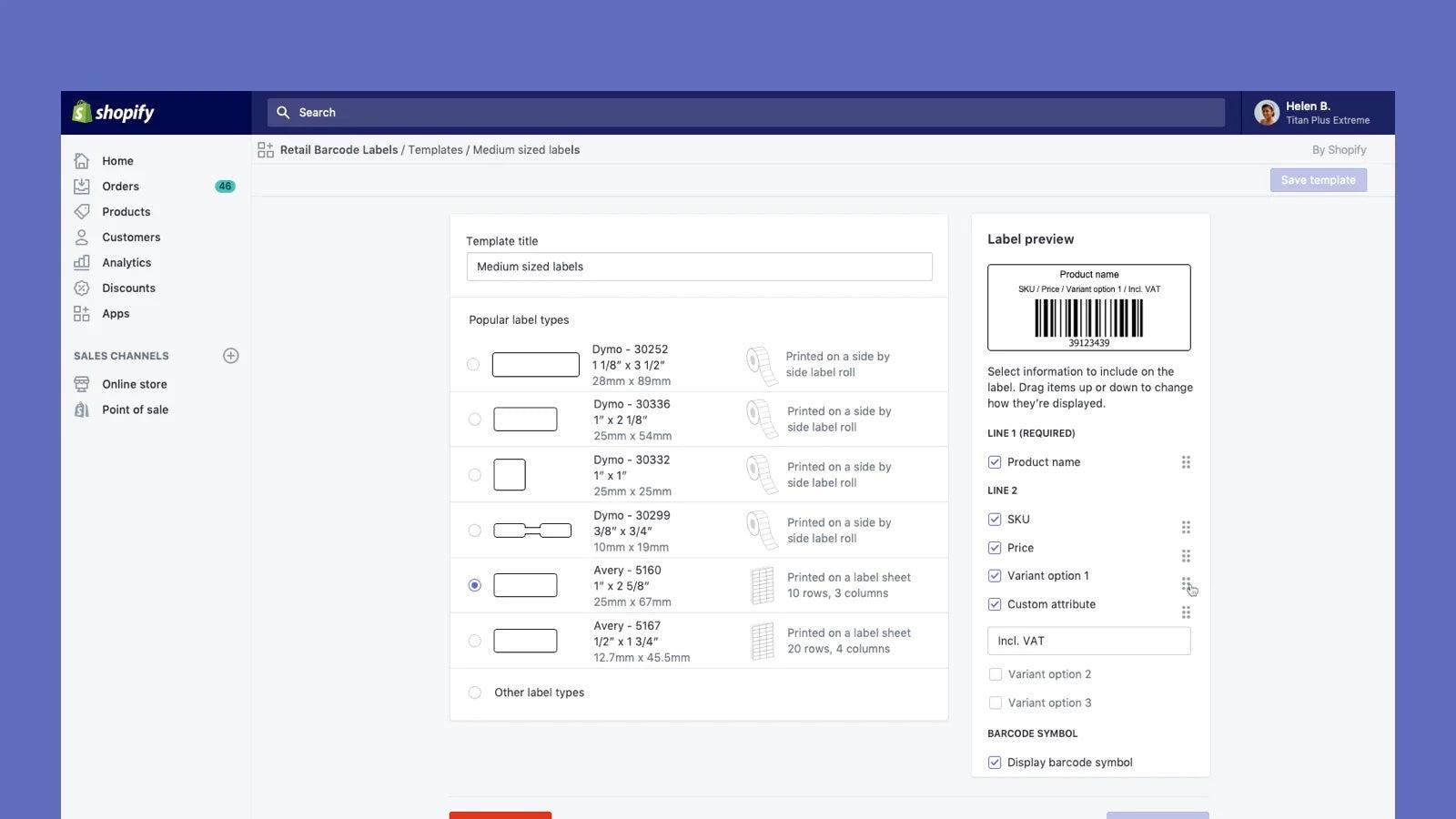
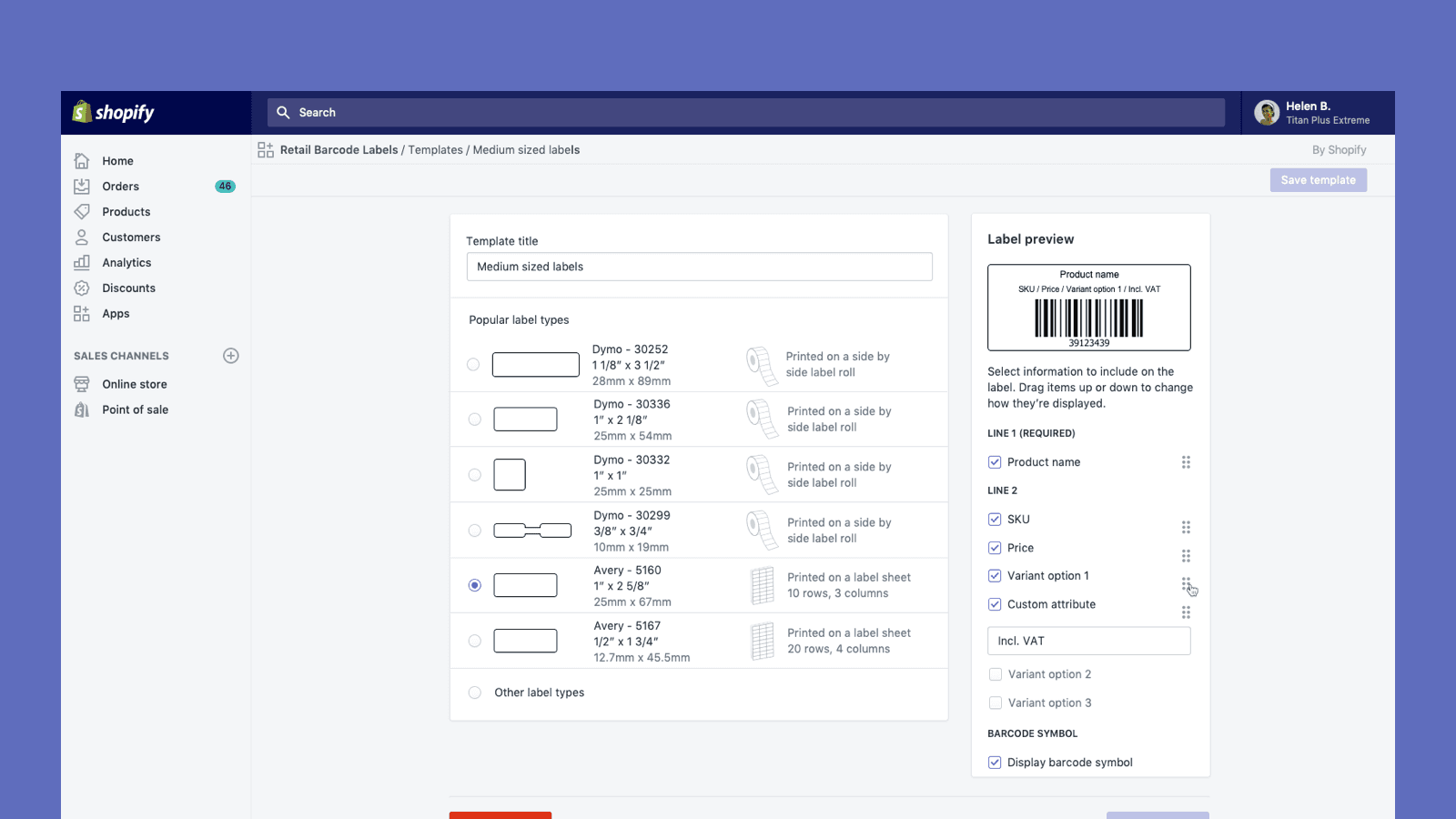
- Barcode Generation: Automatically create Code-128 barcodes for all or any of your products.
- Barcode Customization: Make personalized barcode labels with prices, product codes, variations, and more.
- Printer Compatibility: Compatible with Dymo Label, Zebra printers, and Avery Labels on laser/inkjet printers.
Keywords
Key Features
- Automatically generate Code-128 barcodes for products in bulk.
- Customize labels with prices, SKUs, and product variations.
- Print labels using Dymo, Zebra, or laser/inkjet printers.
Pricing
Retail Barcode Labels Pricing Plans
$0/month
Here's an overview of Retail Barcode Labels costs for each of the plan(s):
The app offers 1 free plan(s). The free plan(s) offered by Retail Barcode Labels: ().
The plan encompasses all the features provided by the app.
Retail Barcode Labels Price Summary
| Pricing summary | Free |
| Total Pricing Plan(s) | 1 |
| Number of free plan(s) | 1 |
| Number of paid plan(s) | 0 |
| Free trial available | No |
Retail Barcode Labels Shopify App Discounts
If you are looking for discounts on Retail Barcode Labels app pricing plans, feel free to contact our team - we'd be happy to help! Additionally, if you are an agency or a shop merchant with multiple Shopify stores, we can work directly with Shopify to secure better deals on the Retail Barcode Labels app exclusively for you.
*Disclaimer: Please note that ShopDigest doesn't guarantee discounts on apps as any changes to the pricing plans are ultimately up to the discretion of the developer.
Testimonials
What our users say about Retail Barcode Labels
“Can you possibly add support for Avery Presta 94219 or even 69992 (1.5" x 1" label size). ”
“Worked better than expected. The reviews, cautions, and compatibility notes made me concerned. However, The ability to filter and select specific products or ANY products to generate barcodes worked well. I didn't have any to start with so overwriting wasn't an issue. The ability to select what will print on each barcode based on the size of the label was helpful and easy to modify and test different templates. Definitely test and learn the character length of product titles, SKUs, and variants for your label size. The app does a decent job at resizing the text to fit the best it can up to a certain point. And I have a Rollo printer that I typically use for 4x6 shipping labels. We purchased 2x1 labels, used the Zebra settings in the app, selected the products we needed barcodes for, and generated a PDF. I printed the PDF using my Rollo thermal printer and they were perfectly aligned every time. I'm glad I didn't need to buy a new label maker. My only wish is that I could change the font (because I'm a designer and we just like to do that). I love that the app is free and ended up being exactly what I needed. We used the labels on the back of custom tags for our in-store merchandise to be sold using the Shopify POS system.”
“WORKS GREAT FOR SIMPLE LABELS AND WILL ASSIGN BARCODE SKU #'S FOR YOU IF YOU HAVENT ALREADY ASSIGNED YOUR OWN. JUST CONNECT YOUR THERMAL PRINTER AND SELECT THE PRODUCTS YOU WANT TO PRINT THE TAGS FOR AND BAM...YOU GOT TAGS!! WITHOUT HAVING TO DO ALL THE WORK ON YOUR OWN.”
Trusted By
Trusted by the best Shopify stores
Benchborne
United States
Window World Store
United States
FABitOUT Merch
United States
Buffalo Seamery
United States
Running Roan Tack
United States
Bendix Coffee Roasters
United States
Needs
Switzerland
Birdie's
United States
Make and print barcode tags for your items.
Give products barcodes.
Create Code-128 barcodes for your products automatically.
Make personalized barcode tags
Make personalized barcode stickers with prices, product numbers, different versions, and more.
Create tags
Use Dymo Label or Zebra printers (ZD220, ZD240, ZSB-DP12) to print barcode labels. You can also use any laser or inkjet printer with Avery Label sheets.
Comparison
Top Retail Barcode Labels Alternatives Detailed Comparison
The table below highlights the crucial differences between Retail Barcode Labels and similar other Shopify apps based on parameters like ratings, reviews, features, pricing, etc.
Add App | |||
|---|---|---|---|
| General Information | |||
| Ratings | 2.3(466 reviews) | 4.6(141 reviews) | |
| Developed by | Shopify | Thalia Tech | |
| Launch Date | 12/3/2018 | 6/12/2020 | |
| Pricing | Free | Free, $1.67/month, $3.33/month, $5/month | |
| Objective | Make and print out barcode stickers for your items. | Edit all prices at once, plan large discounts, and undo changes whenever you want. | |
| Categories | Bulk editor, Workflow automation | Bulk editor, Workflow automation | |
| Key Features & Highlights | |||
| Purpose | Make and print barcode tags for your items. | Edit prices in large amounts, plan sales and reverse changes whenever you want. Automate tasks to save time. | |
| Features List |
|
| |
| Highlights |
| - | |
| User Reviews and Ratings | |||
| Recommended % | 22.6% | 85.4% | |
| Pros |
|
| |
| Cons |
|
| |
| Pricing and Plans | |||
| Total Pricing Plans | 0 | 4 | |
| Free Plan | Not available | Available | |
| Free Trial | No | Yes, for 5 day(s) | |
| Technical Information | |||
| Rating | 2.3 | 4.6 | |
| Total Reviews | 477 | 169 | |
| Launch Date | 12/3/2018 | 6/12/2020 | |
| SD Points | 36 | 17 | |
More Details About Retail Barcode Labels
Product Description
Retail Barcode Labels is an app that lets you generate and print custom barcode labels for various products. It supports numerous paper types from brands like Avery, Dymo, and Zebra, and can be used with any printer on your computer or network. This app also allows bulk printing, improving your inventory management process.
AI Summary
The Shopify barcode label app facilitates the generation and printing of retail barcodes for inventory management, supporting select label sizes from brands like Dymo, Avery, and Zebra. Its strengths include streamlined PDF generation for bulk printing, customizable label templates, and integration with Shopify POS, improving efficiency for businesses with high-volume labeling needs. However, the app has significant limitations, including inconsistent barcode generation, frequent glitches (e.g., failing to recognize pre-assigned barcodes or overwriting existing data), and unreliable performance with certain printers or label sizes. It lacks support for custom label dimensions, non-standard currencies, and multilingual text, forcing manual adjustments. Workflow inefficiencies, such as excessive steps for bulk printing and no direct transfer-page integration, further hinder productivity. While functional under ideal conditions, the app’s technical instability and narrow compatibility often disrupt operations, particularly for businesses relying on precise or high-volume labeling.
Support
For any questions, concerns, or assistance with Retail Barcode Labels, the dedicated support team is readily available to help.To reach out to the support team, users can send an email to [email protected]. Additionally, Retail Barcode Labels offers a comprehensive FAQ section to address common inquiries and provide self-help resources in their app FAQ section.
Language Support
Details of the Retail Barcode Labels app are available in various languages on the Shopify app store, including Danish, German, Finnish, French, Italian, Japanese, Korean, Dutch, Norwegian, Polish, Portuguese (Brazil), Portuguese (Portugal), Swedish, Thai, Turkish, Vietnamese, Chinese (Simplified), Chinese (Traditional), Spanish, and Czech.
Retail Barcode Labels Support Information In A Nutshell:
| Support Email: | [email protected] |
| Contact Number(s): | Not available |
| FAQ Page: | FAQ details |
| Privacy Policy: | Privacy details |
| Language Support: | English, Danish, German, Finnish, French, Italian, Japanese, Korean, Dutch, Norwegian, Polish, Portuguese (Brazil), Portuguese (Portugal), Swedish, Thai, Turkish, Vietnamese, Chinese (Simplified), Chinese (Traditional), Spanish, and Czech |
Integration
The list of top Shopify apps or features or software tools that Retail Barcode Labels seamlessly integrates are given below:
Developer
Looking to install Retail Barcode Labels app on your store?
ShopDigest helps businesses upgrade their Shopify stores by offering easy app installation services.
Why Choose ShopDigest?
- Highly experienced and vetted team for successful app installation
- Assured support and guidance throughout the installation and beyond
- Customized services to meet unique business needs
- 30-day no questions asked refund policy
- Lowest pricing guaranteed (starts at just $10/hour)
Retail Barcode Labels Q&A
How does this app help with inventory management?
It simplifies stock tracking by generating scannable barcodes for products, enabling bulk label printing and reducing manual errors in inventory processes.
Can I customize barcode labels with product details?
Yes, you can add prices, SKUs, variants, and other product-specific information to labels for better organization and sales tracking.
What printers are compatible with this app?
It works with Dymo, Zebra, and standard laser/inkjet printers using Avery label sheets, plus any network-connected or air-print-enabled device.
Is bulk printing supported for large inventories?
Absolutely—generate and print labels in bulk to save time, whether for new stock or relabeling existing products.
Do I need special paper for printing barcodes?
No, it supports common label sheets from Avery, Dymo, and Zebra, so you can use readily available materials.
Can I edit barcodes for multiple products at once?
Yes, the bulk editor lets you update SKUs or barcodes across many products simultaneously, streamlining workflow.
Does this app work with mobile devices?
Yes, you can securely print labels from mobile via air-printing, ideal for on-the-go or warehouse use.
Who would benefit most from this app?
Retailers, warehouses, or small businesses needing efficient barcode labeling to improve stock accuracy and save time.
Customer Reviews
Retail Barcode Labels has an overall rating of 2.3 stars from a total of 477 reviews on the Shopify app store. Of these, 112 (23.5%) are positive, 74 (15.5%) are neutral, and 291 (61.0%) are negative*.
*Ratings above four stars fall under positive review, three stars reviews fall under neutral, and anything less than two stars falls under negative.
Can you possibly add support for Avery Presta 94219 or even 69992 (1.5" x 1" label size).
Worked better than expected. The reviews, cautions, and compatibility notes made me concerned. However, The ability to filter and select specific products or ANY products to generate barcodes worked well. I didn't have any to start with so overwriting wasn't an issue. The ability to select what will print on each barcode based on the size of the label was helpful and easy to modify and test different templates. Definitely test and learn the character length of product titles, SKUs, and variants for your label size. The app does a decent job at resizing the text to fit the best it can up to a certain point. And I have a Rollo printer that I typically use for 4x6 shipping labels. We purchased 2x1 labels, used the Zebra settings in the app, selected the products we needed barcodes for, and generated a PDF. I printed the PDF using my Rollo thermal printer and they were perfectly aligned every time. I'm glad I didn't need to buy a new label maker. My only wish is that I could change the font (because I'm a designer and we just like to do that). I love that the app is free and ended up being exactly what I needed. We used the labels on the back of custom tags for our in-store merchandise to be sold using the Shopify POS system.
WORKS GREAT FOR SIMPLE LABELS AND WILL ASSIGN BARCODE SKU #'S FOR YOU IF YOU HAVENT ALREADY ASSIGNED YOUR OWN. JUST CONNECT YOUR THERMAL PRINTER AND SELECT THE PRODUCTS YOU WANT TO PRINT THE TAGS FOR AND BAM...YOU GOT TAGS!! WITHOUT HAVING TO DO ALL THE WORK ON YOUR OWN.
They updated the app and made it very inconvenient to print 1 variant sticker at a time but it seems like they heard the feedback from their customers and changed it back. This morning I printed some labels and it was set up how it used to be.
They updated the app and made it very inconvenient to print 1 variant sticker at a time but it seems like they heard the feedback from their customers and changed it back. This morning I printed some labels and it was set up how it used to be.
This app does with a Rollo printer! I found a tutorial on YouTube to help me get barcode labels to print from this app on my Rollo printer. My laptop is quite ancient, so I have to use the Shopify app on my phone to create the labels and send them to my bluetooth Rollo. It's a little cumbersome, but it works and it's FREE!
Video Demo and Screenshots
Product Screenshots
Installation Steps
How to install Retail Barcode Labels on your Shopify store
Find your app
Use filters like pricing, availability, and features to find the perfect match for your store's needs.
Get a personalized setup plan
Our team will create an installation plan based on your current store setup, goals, and requirements.
Install at your own pace
Perfect your store's functionality without the pressure to move on until you're ready.
Install in your Shopify Store
Retail Barcode Labels FAQ's
How do I install the Retail Barcode Labels Shopify app?
To install Retail Barcode Labels app on your Shopify store, click on the Retail Barcode Labels installation link. Login to the Shopify store on which you want to install the app and follow the onboarding process.
If you need our expert guidance to help you install Retail Barcode Labels on your Shopify store, then contact us now.
What are the key features of Retail Barcode Labels?
The key features offered by Retail Barcode Labels to Shopify store owners are:
- ✅Automatically generate Code-128 barcodes for any or all of your products.
- ✅Create custom barcode labels with prices, SKUs, variants, and much more.
- ✅Works with Dymo Label, Zebra printers or laser/inkjet printer with Avery Labels.
Does Retail Barcode Labels integrate with other Shopify apps or tools?
Yes, Retail Barcode Labels seamlessly integrates with other Shopify apps or tools, such as Automatically create Code-128 barcodes for all or any of your products., Make personalized barcode labels with prices, product codes, variations, and more., Compatible with Dymo Label, Zebra printers, and Avery Labels on laser/inkjet printers..
Is there a free trial available for Retail Barcode Labels?
No, Retail Barcode Labels does not offer any free trial.
What are the pricing plans for Retail Barcode Labels?
The app offers 0 plans that are forever-free.
How does billing work for Retail Barcode Labels?
Retail Barcode Labels is completely free to install and use. Additional charges may or may not apply.
Can I cancel or upgrade my subscription plan at any time?
Yes, Retail Barcode Labels allows its subscribers to cancel or upgrade their subscription plan at any time.
Does Retail Barcode Labels offer customer support? How can I get assistance?
Yes, Retail Barcode Labels offers a dedicated support team for any kind of app-related assistance. To reach out to the support team, users can send an email to [email protected].
Additionally, Retail Barcode Labels offers a comprehensive FAQ section to address common inquiries and provide self-help resources.
Is Retail Barcode Labels compatible with my Shopify theme?
Please reach out to their support team at [email protected] to confirm its compatibility with your specific Shopify theme.
Alternatives
See all Alternatives to Retail Barcode Labels Shopify App.




Most Popular
Most popular Shopify apps on the market




