
QuickEdit: Bulk Product Edit Shopify App
by QuickBulkEditDon't spend hours editing your products and variants. Use our simple bulk editor to save time! Edit descriptions, prices, metafields, SEO, etc., all at once.
4.9
(104)
Dipples, United Kingdom
Awesome app. We use for a lot of editing after my EPOS sends to Shopify. Saves us no end of time.
Install in your Shopify Store

QuickEdit: Bulk Product Edit Charts
Track QuickEdit: Bulk Product Edit's ranking, reviews, and performance over time with interactive charts. See how it compares to similar apps in the same category.
Pros and Cons
Pros and Cons of QuickEdit: Bulk Product Edit
Pros
Efficiency in Bulk Editing: Enables rapid and large-scale product updates, saving significant time for users with extensive inventories.
User-Friendly Interface: Intuitive design and straightforward navigation make the app easy to use.
Exceptional Customer Support: Prompt, knowledgeable, and personalized assistance, often highlighted by users.
Powerful Features: Offers advanced capabilities like conditional rules, metafield editing, and simultaneous actions.
Cons
Limited Free Plan Functionality: Restrictions on editing more than 50 products at once frustrate some users.
Bugs and Technical Issues: Occasional reports of glitches, such as settings not saving or SEO score drops.
Screenshots
About the App
Edit descriptions, prices, metafields, SEO, etc., all at once.
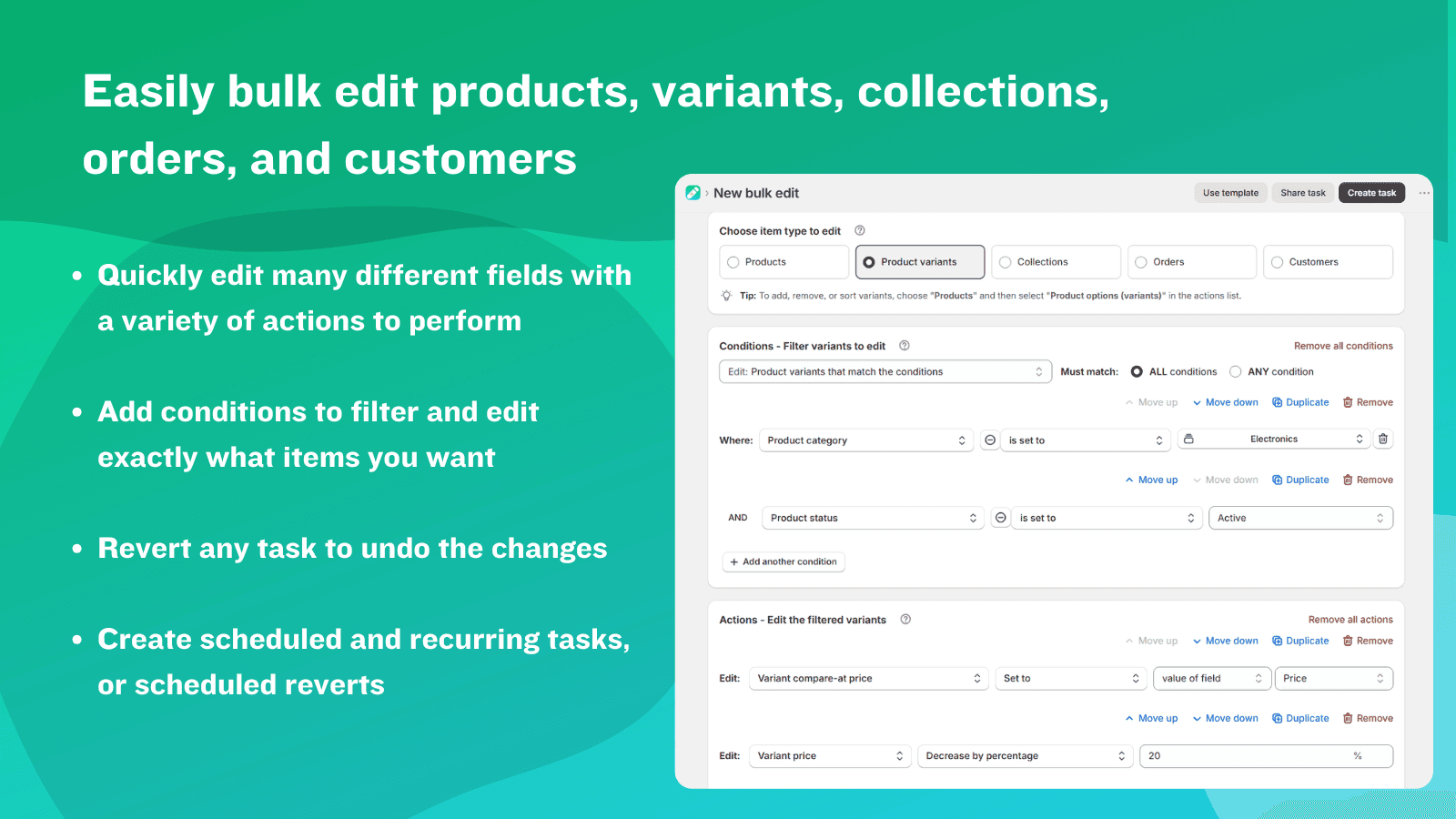
- Mass Product Edit: Easily make edits to thousands of products or variants at once.
- Product Editing: Modify various fields of products and variants using different actions.
- Task Management: Plan large-scale edits and reversions, or set up regular tasks.
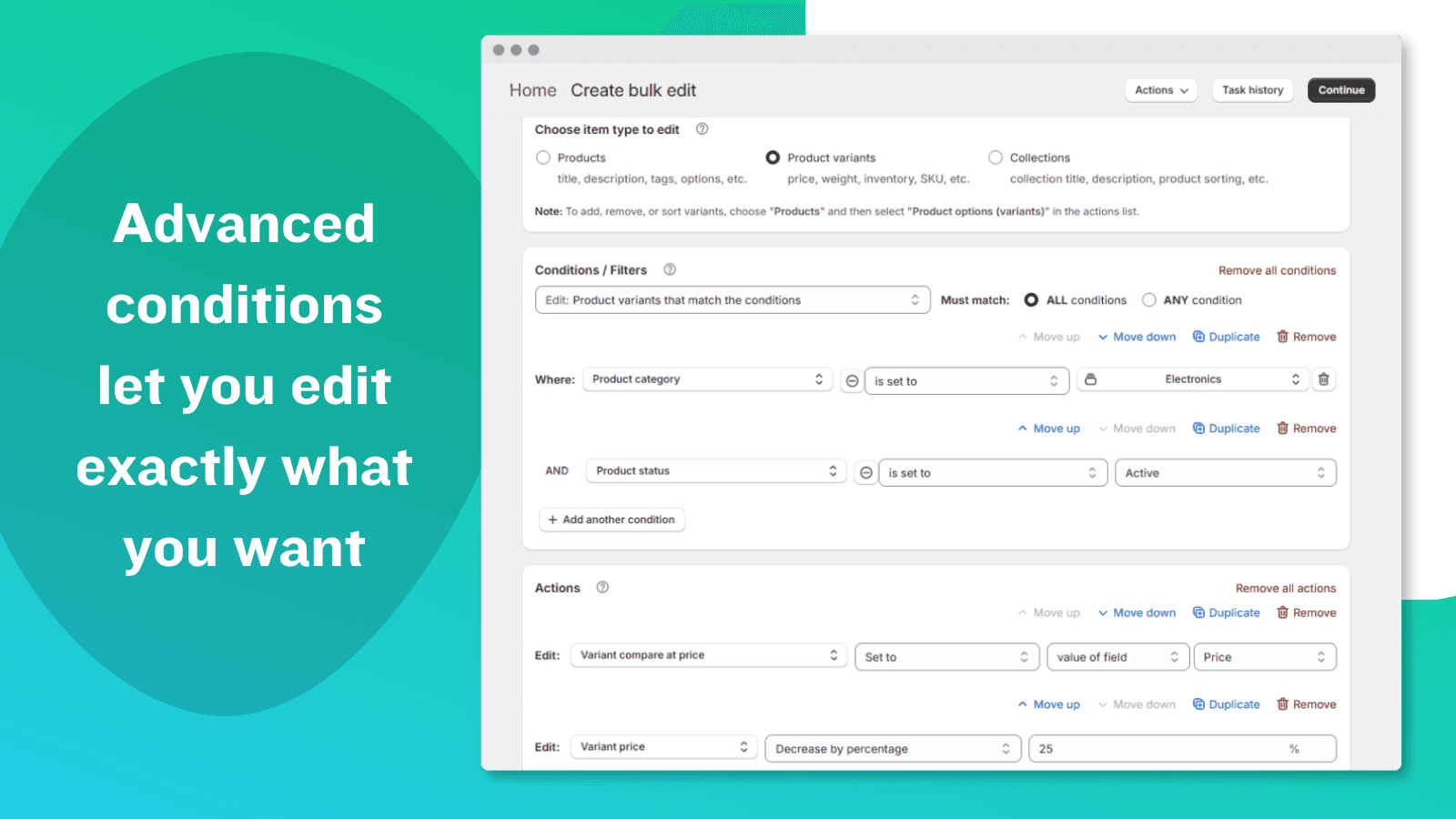
- Product Filtering: Filter products or versions easily with clear conditions.
- Advanced Bulk Edits: Use liquidlike variables and filters within any field to perform complicated mass edits.
Keywords
Key Features
- Edit thousands of products, variants, or collections simultaneously in bulk.
- Modify descriptions, titles, prices, inventory, and tags with ease.
- Schedule bulk edits or reversions to run automatically at set times.
Pricing
QuickEdit: Bulk Product Edit Pricing Plans
Demo
$0/month
10 bulk edits per month
50 products / 500 variants per task
10 collections per task
30 orders / customers per task
30-day task history and backup
Basic
$9/month
Unlimited bulk edits
500 products / 5,000 variants per task
100 collections per task
300 orders / customers per task
60-day task history and backup
Advanced
$19/month
Unlimited bulk edits
5000 products / 50,000 variants per task
1000 collections per task
3000 orders / customers per task
90-day task history and backup
Professional
$39/month
Unlimited bulk edits
Unlimited products and variants per task
Unlimited collections per task
Unlimited orders / customers per task
180-day task history and backup
Not sure which plan to pick? Discuss Demo or Basic plans with us, learn about custom pricing, or get a demo.
Here's an overview of QuickEdit: Bulk Product Edit costs for each of the plan(s):
The app has 4 pricing plans: 1 free and 3 paid. The free plan(s) offered by QuickEdit: Bulk Product Edit: (Demo). The paid plan(s) offered by QuickEdit: Bulk Product Edit: (Basic, Advanced, Professional).
The details of the plan(s) are outlined below:
Demo: This plan is free forever, incurring no subscription costs. It offers a wide range of features like 10 bulk edits per month, 50 products / 500 variants per task, 10 collections per task, 30 orders / customers per task, 30-day task history and backup.
Basic: The Basic plan costs $9 and has no free trial period. The plan offers a host of features, including Unlimited bulk edits, 500 products / 5,000 variants per task, 100 collections per task, 300 orders / customers per task, 60-day task history and backup, Save tasks.
Advanced: The Advanced plan costs $19 and has no free trial period. The plan offers a host of features, including Unlimited bulk edits, 5000 products / 50,000 variants per task, 1000 collections per task, 3000 orders / customers per task, 90-day task history and backup, Save tasks, Schedule bulk edits.
Professional: The Professional plan costs $39 and has no free trial period. The plan offers a host of features, including Unlimited bulk edits, Unlimited products and variants per task, Unlimited collections per task, Unlimited orders / customers per task, 180-day task history and backup, Save tasks, Schedule bulk edits, Recurring tasks.
QuickEdit: Bulk Product Edit Price Summary
| Pricing summary | Free plan available |
| Total Pricing Plan(s) | 4 |
| Number of free plan(s) | 1 |
| Number of paid plan(s) | 3 |
| Cost of Paid Plan(s) | $9, $19, $39 |
| Free trial available | No |
For further information regarding QuickEdit: Bulk Product Edit app pricing plans, see the official website.
QuickEdit: Bulk Product Edit Shopify App Discounts
If you are looking for discounts on QuickEdit: Bulk Product Edit app pricing plans, feel free to contact our team - we'd be happy to help! Additionally, if you are an agency or a shop merchant with multiple Shopify stores, we can work directly with QuickBulkEdit to secure better deals on the QuickEdit: Bulk Product Edit app exclusively for you.
*Disclaimer: Please note that ShopDigest doesn't guarantee discounts on apps as any changes to the pricing plans are ultimately up to the discretion of the developer.
Testimonials
What our users say about QuickEdit: Bulk Product Edit
“Awesome app. We use for a lot of editing after my EPOS sends to Shopify. Saves us no end of time.”
“This is the best app I've ever used! It has so many incredible tools that our shop utilizes on a daily basis to help keep things nice and organized. We love it! ”
“I love this app because it saves me a lot of time.Great idea and well implemented.”
Trusted By
Trusted by the best Shopify stores
Dipples
United Kingdom
STAG Provisions
United States
Venga Store
Spain
Custom Decor Direct
United States
Adelaide Electrical Salvage
Australia
Canvas & Curio
United States
That Auto Parts Warehouse
Australia
Altramoda
Italy
Don't spend hours editing your products and variants. Use our simple bulk editor to save time!
Reduce time
Edit thousands of products or variants quickly, freeing up your time for more important tasks.
Gain control
Select specific product and variant fields to edit by using numerous complex rules, or just manually choose products.
Mental Calmness
You can undo any mass editing task you do, so if you mess up, you can quickly reverse the changes.
Comparison
Top QuickEdit: Bulk Product Edit Alternatives Detailed Comparison
The table below highlights the crucial differences between QuickEdit: Bulk Product Edit and similar other Shopify apps based on parameters like ratings, reviews, features, pricing, etc.
Add App | |||
|---|---|---|---|
| General Information | |||
| Ratings | 4.9(105 reviews) | 4.6(157 reviews) | |
| Developed by | QuickBulkEdit | Thalia Tech | |
| Launch Date | 2/7/2022 | 6/12/2020 | |
| Pricing | Free, $9/month, $19/month, $39/month | Free, $1.67/month, $3.33/month, $5/month | |
| Objective | Edit descriptions, prices, metafields, SEO, etc., all at once. | Edit all prices at once, plan large discounts, and undo changes whenever you want. | |
| Categories | Bulk editor, Workflow automation | Bulk editor, Workflow automation | |
| Key Features & Highlights | |||
| Purpose | Don't spend hours editing your products and variants. Use our simple bulk editor to save time! | Edit prices in large amounts, plan sales and reverse changes whenever you want. Automate tasks to save time. | |
| Features List |
|
| |
| Highlights | - | - | |
| User Reviews and Ratings | |||
| Recommended % | 99.0% | 84.8% | |
| Pros |
|
| |
| Cons |
|
| |
| Pricing and Plans | |||
| Total Pricing Plans | 4 | 4 | |
| Free Plan | Available | Available | |
| Free Trial | No | Yes, for 5 day(s) | |
| Technical Information | |||
| Rating | 4.9 | 4.6 | |
| Total Reviews | 104 | 158 | |
| Launch Date | 2/7/2022 | 6/12/2020 | |
| SD Points | 39 | 17 | |
More Details About QuickEdit: Bulk Product Edit
Product Description
The bulk edit app allows you to swiftly modify numerous products or variants simultaneously, saving significant time. It not only allows for diverse product adjustments like descriptions, prices, and inventory but also facilitates scheduling advanced changes and the ability to revert any changes if needed.
AI Summary
This Shopify app specializes in bulk editing product data, offering a robust solution for managing large inventories efficiently. Its core features include bulk updates for product titles, descriptions, prices, variants, metafields, and SEO attributes, with support for conditional rules and simultaneous actions. The app excels in speed, ease of use, and flexibility, enabling complex edits—such as mass variant adjustments or automated sales scheduling—that would otherwise require manual effort or spreadsheet imports. It integrates seamlessly with Shopify’s interface and handles high-volume tasks, such as editing thousands of products or variants, with minimal downtime. Strengths include exceptional customer support, often cited for its responsiveness and problem-solving assistance, as well as a free tier with useful functionality. However, limitations include a 50-product edit cap on the free plan, which some find restrictive compared to Shopify’s native bulk editor, and occasional reports of bugs affecting SEO scores or settings persistence. Pricing, while deemed reasonable by many, is noted as a potential barrier for smaller stores. The app is particularly valuable for stores with extensive catalogs, significantly reducing time spent on repetitive tasks.
Support
For any questions, concerns, or assistance with QuickEdit: Bulk Product Edit, the dedicated support team is readily available to help.To reach out to the support team, users can send an email to [email protected].
QuickEdit: Bulk Product Edit Support Information In A Nutshell:
| Support Email: | [email protected] |
| Contact Number(s): | Not available |
| FAQ Page: | Not available |
| Privacy Policy: | Privacy details |
| Language Support: | English |
Integration
The list of top Shopify apps or features or software tools that QuickEdit: Bulk Product Edit seamlessly integrates are given below:
Developer
Looking to install QuickEdit: Bulk Product Edit app on your store?
ShopDigest helps businesses upgrade their Shopify stores by offering easy app installation services.
Why Choose ShopDigest?
- Highly experienced and vetted team for successful app installation
- Assured support and guidance throughout the installation and beyond
- Customized services to meet unique business needs
- 30-day no questions asked refund policy
- Lowest pricing guaranteed (starts at just $10/hour)
QuickEdit: Bulk Product Edit Q&A
How does bulk editing save time?
It lets you modify thousands of products or variants simultaneously—updating fields like prices, tags, or inventory in minutes instead of hours, streamlining store management.
Can I undo bulk edits if needed?
Yes, every edit can be reverted with a single click, ensuring mistakes are easily corrected without manual backtracking, providing peace of mind.
Who benefits most from this app?
Store owners with large inventories or frequent updates, as it automates repetitive edits across products, variants, or collections efficiently.
Are scheduled bulk edits possible?
Yes, you can plan edits in advance—like seasonal price changes—and set them to run automatically or recur at specific intervals.
What fields can I edit in bulk?
Descriptions, prices, tags, inventory, SEO fields, and more. You can even use advanced filters for precise, conditional edits.
Is there a free trial available?
A demo plan allows 10 edits monthly for up to 50 items per task, ideal for testing core functionality risk-free.
How does filtering work for bulk edits?
Apply intuitive conditions (e.g., price ranges or tags) to target specific products, ensuring only relevant items are modified.
Can I save frequently used edit tasks?
Yes, favorite tasks can be stored and reused, eliminating repetitive setup for common workflows like monthly inventory updates.
Customer Reviews
QuickEdit: Bulk Product Edit has an overall rating of 5.0 stars from a total of 104 reviews on the Shopify app store. Of these, 103 (99.0%) are positive, 1 (1.0%) are neutral, and 0 (0.0%) are negative*.
*Ratings above four stars fall under positive review, three stars reviews fall under neutral, and anything less than two stars falls under negative.
Awesome app. We use for a lot of editing after my EPOS sends to Shopify. Saves us no end of time.
This is the best app I've ever used! It has so many incredible tools that our shop utilizes on a daily basis to help keep things nice and organized. We love it!
I love this app because it saves me a lot of time.Great idea and well implemented.
7 dollars to edit 500 variants, cancel it right after, and be done with it? Sign me up, was so easy and amazing, great 7$ spend!
Its fantastic! Makes editing collections a dream! PLus heaps more!
Video Demo and Screenshots
Product Screenshots
Installation Steps
How to install QuickEdit: Bulk Product Edit on your Shopify store
Find your app
Use filters like pricing, availability, and features to find the perfect match for your store's needs.
Get a personalized setup plan
Our team will create an installation plan based on your current store setup, goals, and requirements.
Install at your own pace
Perfect your store's functionality without the pressure to move on until you're ready.
Install in your Shopify Store
QuickEdit: Bulk Product Edit FAQ's
How do I install the QuickEdit: Bulk Product Edit Shopify app?
To install QuickEdit: Bulk Product Edit app on your Shopify store, click on the QuickEdit: Bulk Product Edit installation link. Login to the Shopify store on which you want to install the app and follow the onboarding process.
If you need our expert guidance to help you install QuickEdit: Bulk Product Edit on your Shopify store, then contact us now.
What are the key features of QuickEdit: Bulk Product Edit?
The key features offered by QuickEdit: Bulk Product Edit to Shopify store owners are:
- ✅Bulk edit many products, orders, and more, and revert edits with ease.
- ✅Edit various fields with many different actions, and preview the task changes.
- ✅Schedule bulk edits and reverts to run once or repeat automatically.
- ✅Filter items to edit with intuitive conditions.
- ✅Save your favorite tasks so you can find and run them again easily.
Does QuickEdit: Bulk Product Edit integrate with other Shopify apps or tools?
Yes, QuickEdit: Bulk Product Edit seamlessly integrates with other Shopify apps or tools, such as Easily make edits to thousands of products or variants at once., Modify various fields of products and variants using different actions., Plan large-scale edits and reversions, or set up regular tasks..
Is there a free trial available for QuickEdit: Bulk Product Edit?
No, QuickEdit: Bulk Product Edit does not offer any free trial.
What are the pricing plans for QuickEdit: Bulk Product Edit?
The app has 4 pricing plans: 1 free and 3 paid. The paid plans cost $9/month, $19/month, $39/month and have no free trial period.
How does billing work for QuickEdit: Bulk Product Edit?
QuickEdit: Bulk Product Edit uses USD for billing, with recurring and usage-based charges invoiced usually every 30 days.
Can I cancel or upgrade my subscription plan at any time?
Yes, QuickEdit: Bulk Product Edit allows its subscribers to cancel or upgrade their subscription plan at any time.
Does QuickEdit: Bulk Product Edit offer customer support? How can I get assistance?
Yes, QuickEdit: Bulk Product Edit offers a dedicated support team for any kind of app-related assistance. To reach out to the support team, users can send an email to [email protected].
Is QuickEdit: Bulk Product Edit compatible with my Shopify theme?
Please reach out to their support team at [email protected] to confirm its compatibility with your specific Shopify theme.
Alternatives
See all Alternatives to QuickEdit: Bulk Product Edit Shopify App.






Most Popular
Most popular Shopify apps on the market




