
StockIQ ‑ Out‑of‑Stock Manager Shopify App
by EGNITIONAutomatically lower the placement of out-of-stock products in collections or hide them instantly and more. Lower the visibility or hide products that are out of stock in real-time.
4.9
(169)
Kadoland Home, Netherlands
StockIQ is essential for our inventory management. The Back-in-Stock feature works flawlessly now, ensuring we never miss a sale when items are restocked. It integrates smoothly with our store and handles out-of-stock products exactly as we need.
Install in your Shopify Store

StockIQ ‑ Out‑of‑Stock Manager Charts
Track StockIQ ‑ Out‑of‑Stock Manager's ranking, reviews, and performance over time with interactive charts. See how it compares to similar apps in the same category.
Pros and Cons
Pros and Cons of StockIQ ‑ Out‑of‑Stock Manager
Pros
Here is the cleaned-up output after resolving overlapping or conflicting themes based on the reviews:
Ease of Use: The app is straightforward to install and operate, with intuitive navigation.
Automated Stock Management: Effectively pushes out-of-stock items to the bottom of collections, saving manual effort.
Customization Options: Allows selective application of features to specific collections for tailored use.
Cons
Limited Sorting Control: Lacks flexibility in manual sorting or restoring original positions after restocking.
Inconsistent Performance: Some users report delays or failures in updating collections, especially on homepages.
Screenshots
About the App
Lower the visibility or hide products that are out of stock in real-time.
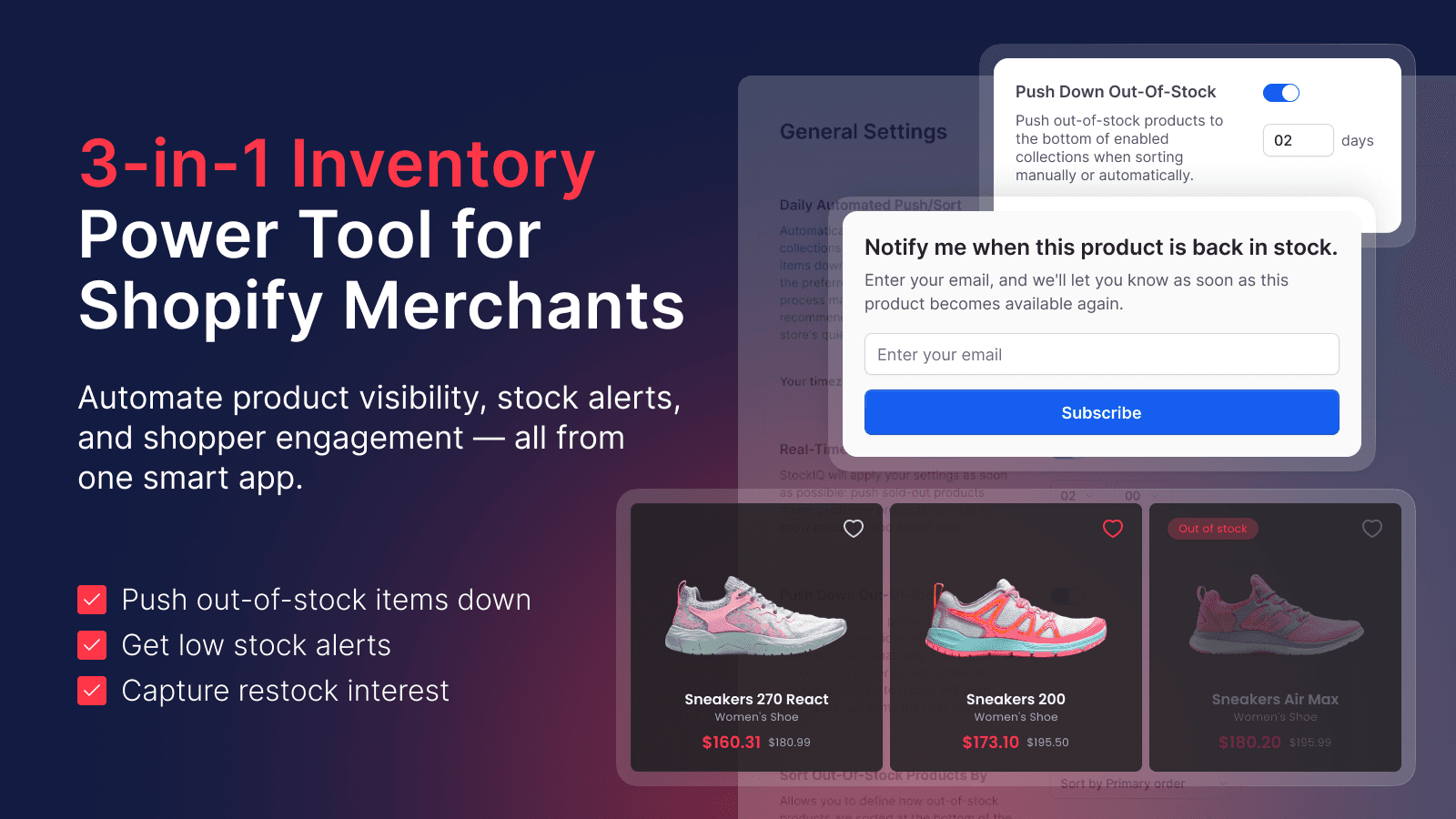
- Real-time product pushing: Automatically move out-of-stock items in collections instantly.
- Smart Inventory Strategy: Smartly hide products that are out of stock to maintain organic traffic.
- Inventory Notifications: Get notifications by email or in-app when stock is low or out.
- Inventory Management: Download and export data of products with low or no stock for restocking plans.
- SEO Conversions: Boost SEO and increase assisted conversions by utilizing out-of-stock products.
Keywords
Key Features
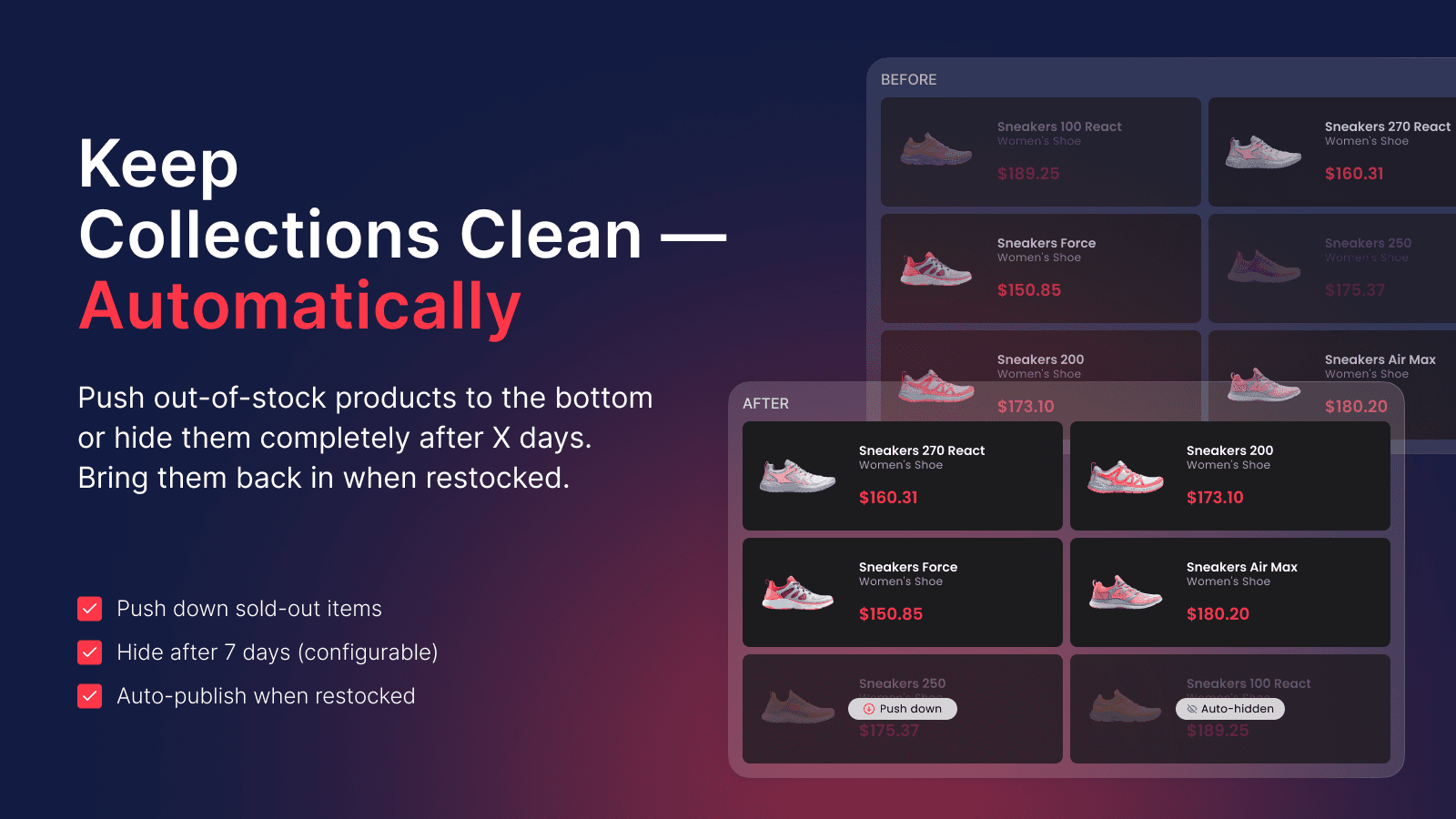
- Automatically push out-of-stock products down in collections in real time.
- Hide out-of-stock products across all channels or just the online store.
- Receive low-stock and out-of-stock alerts via email or in-app.
Pricing
StockIQ ‑ Out‑of‑Stock Manager Pricing Plans
Bronze
$0/month
Real-time add-on (paid option)
Advanced OOS Conditions (paid option)
Hide, push down, and republish products
Low and out-of-stock alerts
Embedded Notify Me with GDPR opt-in
Silver
$5.99/month
Real-time add-on (paid option)
Advanced OOS Conditions (paid option)
Hide, push down, and republish products
Low and out-of-stock alerts
Embedded Notify Me with GDPR opt-in
Gold
$11.99/month
Real-time add-on (included)
Advanced OOS Conditions (paid option)
Hide, push down, and republish products
Low and out-of-stock alerts
Embedded Notify Me with GDPR opt-in
Platinum
$16.99/month
Real-time add-on (included)
Advanced OOS Conditions (paid option)
Hide, push down, and republish products
Low and out-of-stock alerts
Embedded Notify Me with GDPR opt-in
Not sure which plan to pick? Discuss Bronze or Silver plans with us, learn about custom pricing, or get a demo.
Here's an overview of StockIQ ‑ Out‑of‑Stock Manager costs for each of the plan(s):
The app has 4 pricing plans: 1 free and 3 paid. The free plan(s) offered by StockIQ ‑ Out‑of‑Stock Manager: (Bronze). The paid plan(s) offered by StockIQ ‑ Out‑of‑Stock Manager: (Silver, Gold, Platinum).
The details of the plan(s) are outlined below:
Bronze: This plan is free forever, incurring no subscription costs. It offers a wide range of features like Real-time add-on (paid option), Advanced OOS Conditions (paid option), Hide, push down, and republish products, Low and out-of-stock alerts, Embedded Notify Me with GDPR opt-in, Scheduled, manual, market-based alerts, Inventory reports and waitlist demand, 24/7 Support.
Silver: The Silver plan costs $5.99 and comes with a 7-day free trial period. The plan offers a host of features, including Real-time add-on (paid option), Advanced OOS Conditions (paid option), Hide, push down, and republish products, Low and out-of-stock alerts, Embedded Notify Me with GDPR opt-in, Scheduled, manual, market-based alerts, Inventory reports and waitlist demand, 24/7 Support.
Gold: The Gold plan costs $11.99 and comes with a 7-day free trial period. The plan offers a host of features, including Real-time add-on (included), Advanced OOS Conditions (paid option), Hide, push down, and republish products, Low and out-of-stock alerts, Embedded Notify Me with GDPR opt-in, Scheduled, manual, market-based alerts, Inventory reports and waitlist demand, 24/7 Support.
Platinum: The Platinum plan costs $16.99 and comes with a 7-day free trial period. The plan offers a host of features, including Real-time add-on (included), Advanced OOS Conditions (paid option), Hide, push down, and republish products, Low and out-of-stock alerts, Embedded Notify Me with GDPR opt-in, Scheduled, manual, market-based alerts, Inventory reports and waitlist demand, 24/7 Support.
StockIQ ‑ Out‑of‑Stock Manager Price Summary
| Pricing summary | Free to install. Free trial available. |
| Total Pricing Plan(s) | 4 |
| Number of free plan(s) | 1 |
| Number of paid plan(s) | 3 |
| Cost of Paid Plan(s) | $5.99, $11.99, $16.99 |
| Free trial available | Yes, for 7 day(s) |
For further information regarding StockIQ ‑ Out‑of‑Stock Manager app pricing plans, see the official website.
StockIQ ‑ Out‑of‑Stock Manager Shopify App Discounts
If you are looking for discounts on StockIQ ‑ Out‑of‑Stock Manager app pricing plans, feel free to contact our team - we'd be happy to help! Additionally, if you are an agency or a shop merchant with multiple Shopify stores, we can work directly with EGNITION to secure better deals on the StockIQ ‑ Out‑of‑Stock Manager app exclusively for you.
*Disclaimer: Please note that ShopDigest doesn't guarantee discounts on apps as any changes to the pricing plans are ultimately up to the discretion of the developer.
Testimonials
What our users say about StockIQ ‑ Out‑of‑Stock Manager
“StockIQ is essential for our inventory management. The Back-in-Stock feature works flawlessly now, ensuring we never miss a sale when items are restocked. It integrates smoothly with our store and handles out-of-stock products exactly as we need.”
“very good and responsible team. recommend this app”
“Absolutely wonderful experience with the app development team! They responded to my messages very quickly and were extremely responsive throughout the whole process. Even after working hours, they were still willing to help me check things and address my concerns. They also listened to my feedback patiently and made me feel truly valued as a user. I really appreciate their professionalism, dedication, and kindness. If I could, I would give them ten stars!”
Trusted By
Trusted by the best Shopify stores
Kadoland Home
Netherlands
Alcohol Please
Hong Kong SAR
河马爸爸绘本
United States
NovaKoja
Bulgaria
Kids 'N Kribs
United States
Detique Collections
United States
Pool & Hot Tub Depot
Canada
Fitness Essence
United States
Automatically lower the placement of out-of-stock products in collections or hide them instantly and more.
Quickly hide or remove sold-out items.
Don't display your sold-out products at the top of collections. The app automatically lowers and hides these items in real-time.
Improve SEO using sold-out products.
Keep products that are out of stock indexed by search engines to increase targeted traffic and drive sales. However, ensure these sold out items are not prioritized.
Powerful all-in-one inventory tracking app
1. Lower the priority of products that are out of stock. 2. Strategically conceal products that are out of stock. 3. Get notifications for products low in stock or out of stock.
Comparison
Top StockIQ ‑ Out‑of‑Stock Manager Alternatives Detailed Comparison
The table below highlights the crucial differences between StockIQ ‑ Out‑of‑Stock Manager and similar other Shopify apps based on parameters like ratings, reviews, features, pricing, etc.
Add App | |||
|---|---|---|---|
| General Information | |||
| Ratings | 4.9(136 reviews) | 5.0(23 reviews) | |
| Developed by | EGNITION | PH Group Limited | |
| Launch Date | 7/10/2017 | 12/5/2023 | |
| Pricing | Free, $5.99/month, $11.99/month, $16.99/month | Free, $3.95/month, $8.95/month, $13.95/month | |
| Objective | Lower the visibility or hide products that are out of stock in real-time. | Push down, redirect or hide out of stock items w/ rules & tags | |
| Categories | Inventory optimization, Collections | Inventory optimization, Collections | |
| Key Features & Highlights | |||
| Purpose | Automatically lower the placement of out-of-stock products in collections or hide them instantly and more. | Push down, redirect, hide, & sort out of stock & republish back in stock SKUs. Alerts / tags / rules | |
| Features List |
|
| |
| Highlights | - | - | |
| User Reviews and Ratings | |||
| Recommended % | 94.2% | 96.2% | |
| Pros |
|
| |
| Cons |
|
| |
| Pricing and Plans | |||
| Total Pricing Plans | 4 | 4 | |
| Free Plan | Available | Available | |
| Free Trial | Yes, for 7 day(s) | Yes, for 5 day(s) | |
| Technical Information | |||
| Rating | 4.9 | 5.0 | |
| Total Reviews | 169 | 55 | |
| Launch Date | 7/10/2017 | 12/5/2023 | |
| SD Points | 24 | 13 | |
More Details About StockIQ ‑ Out‑of‑Stock Manager
Product Description
This tool enables efficient management of out-of-stock items by pushing them to the bottom of collections in real time or hiding them if not restocked within a set time period. It also provides low-stock and out-of-stock alerts through email and detailed inventory data, all with the support of a 24/7 customer service team.
AI Summary
The app automates the management of out-of-stock products in Shopify stores by pushing them to the bottom of collections or hiding them entirely, ensuring in-stock items remain prominently visible. It offers customizable rules for specific collections, preserves product links for SEO, and provides automated updates to streamline inventory organization. Key strengths include ease of use, reliable performance, and responsive customer support that quickly addresses issues or implements feature requests. The app is particularly beneficial for stores with fluctuating stock or unique, one-off items, as it reduces manual sorting efforts and improves customer browsing experiences. However, limitations include occasional delays in updates, lack of automatic sorting for filtered collections or search results, and challenges with presale items or archived products in reports. Some users note the pricing may be high for smaller stores, and advanced sorting options, such as manual or best-selling prioritization, are unavailable. Overall, the app efficiently solves inventory visibility issues but has room for refinement in handling edge cases and dynamic sorting scenarios.
Support
For any questions, concerns, or assistance with StockIQ ‑ Out‑of‑Stock Manager, the dedicated support team is readily available to help.To reach out to the support team, users can send an email to [email protected].
StockIQ ‑ Out‑of‑Stock Manager Support Information In A Nutshell:
| Support Email: | [email protected] |
| Contact Number(s): | Not available |
| FAQ Page: | Not available |
| Privacy Policy: | Privacy details |
| Language Support: | English |
Integration
The list of top Shopify apps or features or software tools that StockIQ ‑ Out‑of‑Stock Manager seamlessly integrates are given below:
Developer
Looking to install StockIQ ‑ Out‑of‑Stock Manager app on your store?
ShopDigest helps businesses upgrade their Shopify stores by offering easy app installation services.
Why Choose ShopDigest?
- Highly experienced and vetted team for successful app installation
- Assured support and guidance throughout the installation and beyond
- Customized services to meet unique business needs
- 30-day no questions asked refund policy
- Lowest pricing guaranteed (starts at just $10/hour)
StockIQ ‑ Out‑of‑Stock Manager Q&A
How does the app handle out-of-stock products?
It automatically pushes sold-out items down in collections or hides them based on customizable rules, ensuring better store organization and reducing manual inventory management.
Can I get alerts for low stock items?
Yes, you’ll receive email or in-app notifications when stock runs low or sells out, helping you restock efficiently and avoid missed sales.
Does this app help with SEO for out-of-stock products?
Yes, it keeps out-of-stock items indexed by search engines while pushing them down, maintaining SEO rankings and driving targeted traffic.
Can I customize how products are hidden?
Absolutely! Set delays before hiding, choose visibility per collection, and decide whether to hide items store-wide or online-only.
Is inventory reporting included?
Yes, export detailed low-stock reports with variant-level data to streamline restocking and inventory planning.
Does it work in real time?
Yes, it instantly adjusts product visibility based on stock status, ensuring collections stay updated without manual intervention.
Is there a free plan available?
Yes, a free tier includes basic features like pushing down out-of-stock items and alerts, with paid upgrades for advanced options.
How does it help with sales conversions?
By optimizing collections and maintaining SEO, it ensures shoppers see available products first, improving user experience and sales potential.
Customer Reviews
StockIQ ‑ Out‑of‑Stock Manager has an overall rating of 4.7 stars from a total of 169 reviews on the Shopify app store. Of these, 158 (93.5%) are positive, 5 (3.0%) are neutral, and 6 (3.6%) are negative*.
*Ratings above four stars fall under positive review, three stars reviews fall under neutral, and anything less than two stars falls under negative.
StockIQ is essential for our inventory management. The Back-in-Stock feature works flawlessly now, ensuring we never miss a sale when items are restocked. It integrates smoothly with our store and handles out-of-stock products exactly as we need.
StockIQ is essential for our inventory management. The Back-in-Stock feature works flawlessly now, ensuring we never miss a sale when items are restocked. It integrates smoothly with our store and handles out-of-stock products exactly as we need.
very good and responsible team. recommend this app
Absolutely wonderful experience with the app development team! They responded to my messages very quickly and were extremely responsive throughout the whole process. Even after working hours, they were still willing to help me check things and address my concerns. They also listened to my feedback patiently and made me feel truly valued as a user. I really appreciate their professionalism, dedication, and kindness. If I could, I would give them ten stars!
So far so good! I had an issue with the app not restoring product positions after restock. The support team was very helpful and guided me through a test. Everything is working well now!
I had an issue with my manually sorted collections in StockIQ. The support team helped me identify the problem and guided me through the necessary adjustments. I'm now able to manage my collections effectively!
Video Demo and Screenshots
Product Screenshots
Installation Steps
How to install StockIQ ‑ Out‑of‑Stock Manager on your Shopify store
Find your app
Use filters like pricing, availability, and features to find the perfect match for your store's needs.
Get a personalized setup plan
Our team will create an installation plan based on your current store setup, goals, and requirements.
Install at your own pace
Perfect your store's functionality without the pressure to move on until you're ready.
Install in your Shopify Store
StockIQ ‑ Out‑of‑Stock Manager FAQ's
How do I install the StockIQ ‑ Out‑of‑Stock Manager Shopify app?
To install StockIQ ‑ Out‑of‑Stock Manager app on your Shopify store, click on the StockIQ ‑ Out‑of‑Stock Manager installation link. Login to the Shopify store on which you want to install the app and follow the onboarding process.
If you need our expert guidance to help you install StockIQ ‑ Out‑of‑Stock Manager on your Shopify store, then contact us now.
What are the key features of StockIQ ‑ Out‑of‑Stock Manager?
The key features offered by StockIQ ‑ Out‑of‑Stock Manager to Shopify store owners are:
- ✅Push down or auto-hide products by collection, then republish after restock.
- ✅Embed Notify Me; add GDPR opt-in; send scheduled, manual or market-based alerts.
- ✅Get low-stock and out-of-stock alerts via email or in-app notifications.
- ✅Get daily stock reports for the collections you choose and see waitlist demand.
- ✅Set flexible out-of-stock rules using inventory or product option thresholds.
Does StockIQ ‑ Out‑of‑Stock Manager integrate with other Shopify apps or tools?
Yes, StockIQ ‑ Out‑of‑Stock Manager seamlessly integrates with other Shopify apps or tools, such as Automatically move out-of-stock items in collections instantly., Smartly hide products that are out of stock to maintain organic traffic., Get notifications by email or in-app when stock is low or out..
Is there a free trial available for StockIQ ‑ Out‑of‑Stock Manager?
Yes, StockIQ ‑ Out‑of‑Stock Manager offers 7 days free trial on all its paid plans.
What are the pricing plans for StockIQ ‑ Out‑of‑Stock Manager?
The app has 4 pricing plans: 1 free and 3 paid. The paid plans cost $5.99/month, $11.99/month, $16.99/month, and come with a 7-day free trial period.
How does billing work for StockIQ ‑ Out‑of‑Stock Manager?
StockIQ ‑ Out‑of‑Stock Manager uses USD for billing, with recurring and usage-based charges invoiced usually every 30 days.
Can I cancel or upgrade my subscription plan at any time?
Yes, StockIQ ‑ Out‑of‑Stock Manager allows its subscribers to cancel or upgrade their subscription plan at any time.
Does StockIQ ‑ Out‑of‑Stock Manager offer customer support? How can I get assistance?
Yes, StockIQ ‑ Out‑of‑Stock Manager offers a dedicated support team for any kind of app-related assistance. To reach out to the support team, users can send an email to [email protected].
Is StockIQ ‑ Out‑of‑Stock Manager compatible with my Shopify theme?
Please reach out to their support team at [email protected] to confirm its compatibility with your specific Shopify theme.
Alternatives
See all Alternatives to StockIQ ‑ Out‑of‑Stock Manager Shopify App.






Most Popular
Most popular Shopify apps on the market




