Printout Designer Shopify App
by Actual Reports OÜMake and automatically generate invoices, packing slips, labels, and other documents. Make professional bills, shipping notes, and tags.
4.9
(83)
Nature's Flavors, United States
Great technical support. If I can't figure out how to show some fields, i.e. Shopify store credit used, payment charged, the team is able to add that for me. Saved me time digging around.
Install in your Shopify Store

Printout Designer Charts
Track Printout Designer's ranking, reviews, and performance over time with interactive charts. See how it compares to similar apps in the same category.
Screenshots
About the App
Make professional bills, shipping notes, and tags.
- Automated Printing: Print invoices, packing slips, and other documents automatically to any printer.
- Document Creation: Make different types of documents such as invoices, packing slips, and barcode labels.
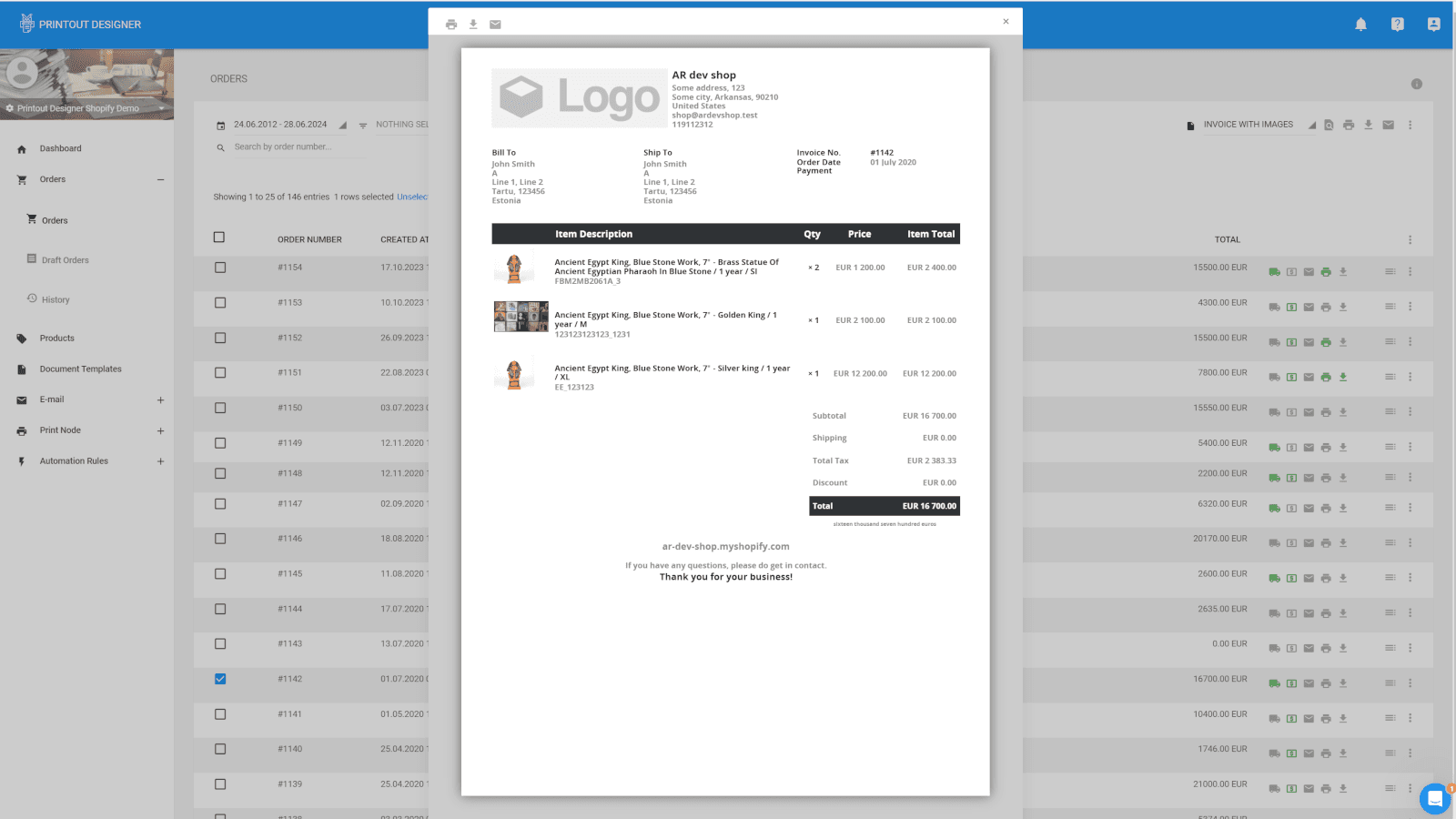
- Print and share convenience: Quickly print, download, and send all your documents with just a few clicks.
Keywords
Key Features
- Instantly print invoices, packing slips, and other documents to any connected printer automatically.
- Design and customize any document type including invoices, shipping labels, and barcode tags.
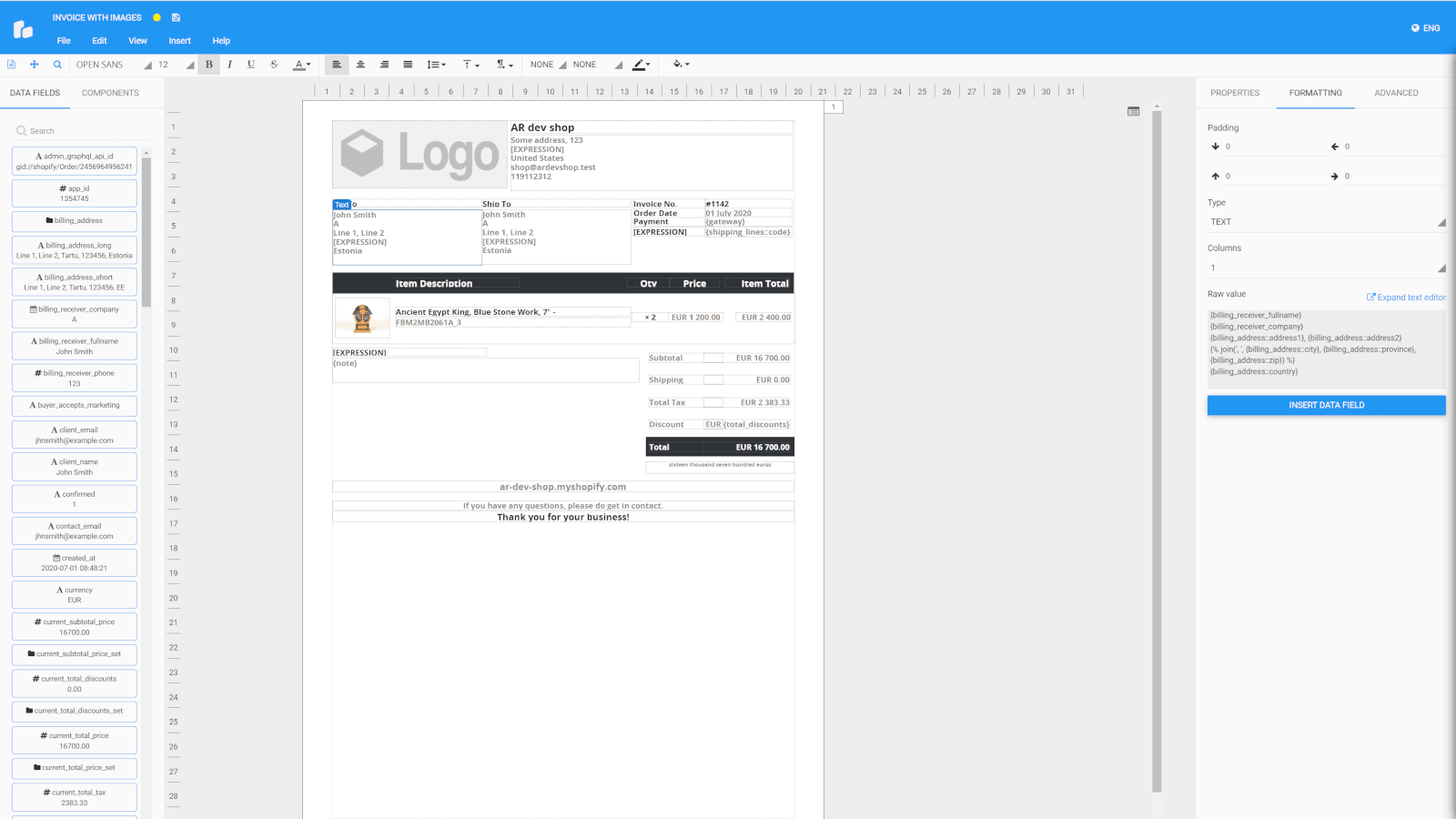
- Use an intuitive drag-and-drop template builder to create professional printouts quickly and easily.
Pricing
Printout Designer Pricing Plans
Micro
$4.99/month
Process 50 orders/mo
Process 50 products/mo
Starter
$9.99/month
Process 300 orders/mo
Process 300 products/mo
Batch fulfil
Automated emails
Basic
$19.99/month
Process 1000 orders/mo
Process 1000 products/mo
Batch fulfil
Automated emails & printing
PrintNode integration for auto-printing
Professional
$59.99/month
Unlimited orders/mo
Unlimited products/mo
Batch fulfil
Automated emails & printing
PrintNode integration for auto-printing
Not sure which plan to pick? Discuss Micro or Starter plans with us, learn about custom pricing, or get a demo.
Here's an overview of Printout Designer costs for each of the plan(s):
The app offers 4 paid plan(s). The paid plan(s) offered by Printout Designer: (Micro, Starter, Basic, Professional).
The details of the plan(s) are outlined below:
Micro: The Micro plan costs $4.99 and comes with a 14-day free trial period. The plan offers a host of features, including Process 50 orders/mo, Process 50 products/mo.
Starter: The Starter plan costs $9.99 and comes with a 14-day free trial period. The plan offers a host of features, including Process 300 orders/mo, Process 300 products/mo, Batch fulfil, Automated emails.
Basic: The Basic plan costs $19.99 and comes with a 14-day free trial period. The plan offers a host of features, including Process 1000 orders/mo, Process 1000 products/mo, Batch fulfil, Automated emails & printing, PrintNode integration for auto-printing.
Professional: The Professional plan costs $59.99 and comes with a 14-day free trial period. The plan offers a host of features, including Unlimited orders/mo, Unlimited products/mo, Batch fulfil, Automated emails & printing, PrintNode integration for auto-printing.
Printout Designer Price Summary
| Pricing summary | From $4.99/month. Free trial available. |
| Total Pricing Plan(s) | 4 |
| Number of free plan(s) | 0 |
| Number of paid plan(s) | 4 |
| Cost of Paid Plan(s) | $4.99, $9.99, $19.99, $59.99 |
| Free trial available | Yes, for 14 day(s) |
For further information regarding Printout Designer app pricing plans, see the official website.
Printout Designer Shopify App Discounts
If you are looking for discounts on Printout Designer app pricing plans, feel free to contact our team - we'd be happy to help! Additionally, if you are an agency or a shop merchant with multiple Shopify stores, we can work directly with Actual Reports OÜ to secure better deals on the Printout Designer app exclusively for you.
*Disclaimer: Please note that ShopDigest doesn't guarantee discounts on apps as any changes to the pricing plans are ultimately up to the discretion of the developer.
Testimonials
What our users say about Printout Designer
“Great technical support. If I can't figure out how to show some fields, i.e. Shopify store credit used, payment charged, the team is able to add that for me. Saved me time digging around.”
“We're really happy with the tool. We have customized packing lists and they come out of the printer automatically. Really useful!”
“"A truly outstanding experience in every way. The support was quick and accurate in understanding and delivering the requirements, with a clear creative flair in the design. The work was completed efficiently and professionally, communication was smooth, and the final outcome exceeded all expectations. Highly recommended."”
Trusted By
Trusted by the best Shopify stores
Nature's Flavors
United States
Trail.nl
Netherlands
Alkuwaity Al Awal الكويتي الأول
Kuwait
Diva Lady ديفا ليدي
Kuwait
AIRJO COFFEE ROASTERS
Australia
KOBE RIBBON
Japan
Fusion Scale Graphics
United States
Modern K9
Canada
Make and automatically generate invoices, packing slips, labels, and other documents.
Quick Order Handling
Make your shipping process easier by quickly creating invoices, picking slips and labels.
Simple Setup
Make different documents like invoices, packing slips, and barcode labels. You can include text, pictures, barcodes, QR codes and many more options.
Consistent Brand Image
Change printouts to match your brand and store. No need for manual editing to suit your style and preferences.
Comparison
Top Printout Designer Alternatives Detailed Comparison
The table below highlights the crucial differences between Printout Designer and similar other Shopify apps based on parameters like ratings, reviews, features, pricing, etc.
Add App | |||
|---|---|---|---|
| General Information | |||
| Ratings | 4.9(45 reviews) | 4.9(2,750 reviews) | |
| Developed by | Actual Reports OÜ | Order Printer | |
| Launch Date | 10/7/2013 | 12/2/2014 | |
| Pricing | $4.99/month, $9.99/month, $19.99/month, $59.99/month | Free, $10/month, $20/month, $40/month | |
| Objective | Make professional bills, shipping notes, and tags. | Print and automatically send invoices, packing slips, quotes and more. | |
| Categories | Invoices and receipts | Invoices and receipts, Orders - Other | |
| Key Features & Highlights | |||
| Purpose | Make and automatically generate invoices, packing slips, labels, and other documents. | Arrange automatic printing and delivery of branded invoices, packing slips, return forms, and receipts. | |
| Features List |
|
| |
| Highlights | - |
| |
| User Reviews and Ratings | |||
| Recommended % | 96.1% | 98.4% | |
| Pros | - |
| |
| Cons | - |
| |
| Pricing and Plans | |||
| Total Pricing Plans | 4 | 4 | |
| Free Plan | Not available | Available | |
| Free Trial | Yes, for 14 day(s) | Yes, for 14 day(s) | |
| Technical Information | |||
| Rating | 4.9 | 4.9 | |
| Total Reviews | 83 | 1,593 | |
| Launch Date | 10/7/2013 | 12/2/2014 | |
| SD Points | 1 | 828 | |
More Details About Printout Designer
Product Description
The drag-and-drop template builder allows you to create and customize various printouts like invoices and packing slips. It also offers an automatic printing feature, integrated with your ordering process, that triggers on order creation, payment or fulfillment.
Support
For any questions, concerns, or assistance with Printout Designer, the dedicated support team is readily available to help.To reach out to the support team, users can send an email to [email protected]. Additionally, Printout Designer offers a comprehensive FAQ section to address common inquiries and provide self-help resources in their app FAQ section.
Printout Designer Support Information In A Nutshell:
| Support Email: | [email protected] |
| Contact Number(s): | Not available |
| FAQ Page: | FAQ details |
| Privacy Policy: | Privacy details |
| Language Support: | English |
Integration
The list of top Shopify apps or features or software tools that Printout Designer seamlessly integrates are given below:
Developer
Looking to install Printout Designer app on your store?
ShopDigest helps businesses upgrade their Shopify stores by offering easy app installation services.
Why Choose ShopDigest?
- Highly experienced and vetted team for successful app installation
- Assured support and guidance throughout the installation and beyond
- Customized services to meet unique business needs
- 30-day no questions asked refund policy
- Lowest pricing guaranteed (starts at just $10/hour)
Printout Designer Q&A
How can this app help streamline my shipping process?
The app lets you quickly create and automatically print all necessary shipping documents, such as packing slips and labels, saving you manual effort and ensuring your orders are processed and shipped faster.
Is it possible to match printouts with my store’s branding?
Yes, you can fully customize documents by adding your own logo, colors, fonts, and layout so all invoices, labels, and slips consistently reflect your unique brand identity.
Can multiple document types be created for different needs?
The app allows you to easily design and generate a variety of documents, including invoices, receipts, shipping labels, and more, fitting every stage of the order process and customer requirement.
Who would benefit most from using this app?
Store owners and fulfillment teams seeking to automate manual paperwork, speed up order processing, and present professional documents will find this app especially valuable in managing daily operations.
What is the main benefit of the automation feature?
Automating printing and emailing tasks reduces time spent on repetitive work, improves order accuracy, and ensures that required documents are always created and delivered at the correct stage of order fulfillment.
Does the app support bulk actions for large stores?
Yes, you can quickly print, download, or email documents in bulk, which is ideal for stores handling high order volumes and seeking to cut down on routine administrative work.
How are templates designed and modified?
With the intuitive drag-and-drop builder, you can easily create, edit, and personalize templates without needing any coding knowledge, making professional document design accessible to everyone on your team.
Can the app integrate with my current order processing flow?
Integration is seamless, allowing documents to be automatically generated and managed as part of your existing workflow, so you don’t need to change how you process or fulfill orders.
Customer Reviews
Printout Designer has an overall rating of 4.8 stars from a total of 83 reviews on the Shopify app store. Of these, 79 (95.2%) are positive, 1 (1.2%) are neutral, and 3 (3.6%) are negative*.
*Ratings above four stars fall under positive review, three stars reviews fall under neutral, and anything less than two stars falls under negative.
Great technical support. If I can't figure out how to show some fields, i.e. Shopify store credit used, payment charged, the team is able to add that for me. Saved me time digging around.
We're really happy with the tool. We have customized packing lists and they come out of the printer automatically. Really useful!
"A truly outstanding experience in every way. The support was quick and accurate in understanding and delivering the requirements, with a clear creative flair in the design. The work was completed efficiently and professionally, communication was smooth, and the final outcome exceeded all expectations. Highly recommended."
An excellent experience in every aspect. The work was handled professionally and smoothly, with great accuracy and attention to detail. Communication was clear and fast throughout all stages, and the final result exceeded expectations. I highly recommend working with them and will definitely do so again in the future.
Great product with amazing ability and helpful options. The support team are also 10/10 - we have built an incredibly efficient fulfilment system on the back of the functionality of the Printout Designer app. Just ask the team how they can solve your challenge and they are onto it. Highly recommend.
Great product with amazing ability and helpful options. The support team are also 10/10 - we have built an incredibly efficient fulfilment system on the back of the functionality of the Printout Designer app. Just ask the team how they can solve your challenge and they are onto it. Highly recommend.
Video Demo and Screenshots
Product Video

Product Screenshots
Installation Steps
How to install Printout Designer on your Shopify store
Find your app
Use filters like pricing, availability, and features to find the perfect match for your store's needs.
Get a personalized setup plan
Our team will create an installation plan based on your current store setup, goals, and requirements.
Install at your own pace
Perfect your store's functionality without the pressure to move on until you're ready.
Install in your Shopify Store
Printout Designer FAQ's
How do I install the Printout Designer Shopify app?
To install Printout Designer app on your Shopify store, click on the Printout Designer installation link. Login to the Shopify store on which you want to install the app and follow the onboarding process.
If you need our expert guidance to help you install Printout Designer on your Shopify store, then contact us now.
What are the key features of Printout Designer?
The key features offered by Printout Designer to Shopify store owners are:
- ✅Automatically print invoices, packing slips and other printouts to any printer
- ✅Create any kind of document from invoices to packing slips and barcode labels.
- ✅Easily print, download and email all your printouts with a couple of clicks
Does Printout Designer integrate with other Shopify apps or tools?
Yes, Printout Designer seamlessly integrates with other Shopify apps or tools, such as Print invoices, packing slips, and other documents automatically to any printer., Make different types of documents such as invoices, packing slips, and barcode labels., Quickly print, download, and send all your documents with just a few clicks..
Is there a free trial available for Printout Designer?
Yes, Printout Designer offers 14 days free trial on all its paid plans.
What are the pricing plans for Printout Designer?
The app offers 4 paid plans, which cost $4.99/month, $9.99/month, $19.99/month, $59.99/month. The paid plans also come with a 14-day free trial period.
How does billing work for Printout Designer?
Printout Designer uses USD for billing, with recurring and usage-based charges invoiced usually every 30 days.
Can I cancel or upgrade my subscription plan at any time?
Yes, Printout Designer allows its subscribers to cancel or upgrade their subscription plan at any time.
Does Printout Designer offer customer support? How can I get assistance?
Yes, Printout Designer offers a dedicated support team for any kind of app-related assistance. To reach out to the support team, users can send an email to [email protected].
Additionally, Printout Designer offers a comprehensive FAQ section to address common inquiries and provide self-help resources.
Is Printout Designer compatible with my Shopify theme?
Please reach out to their support team at [email protected] to confirm its compatibility with your specific Shopify theme.
Alternatives
See all Alternatives to Printout Designer Shopify App.





Most Popular
Most popular Shopify apps on the market




