
PIX ‑ Image Optimizer Shopify App
by ImpactPixelBoost your websites speed with SEO - Image Optimizer. Picture Enhancer & website speed enhancer
3.7
(142)
Levesphere, Jordan
Am just getting started , but am feeling good about it , thank you for serving immediately
Install in your Shopify Store

PIX ‑ Image Optimizer Charts
Track PIX ‑ Image Optimizer's ranking, reviews, and performance over time with interactive charts. See how it compares to similar apps in the same category.
Pros and Cons
Pros and Cons of PIX ‑ Image Optimizer
Pros
Effective Image Optimization: Significant reduction in image size without noticeable quality loss, improving website speed.
Free Service: Many users appreciate the app being free, especially for startups and small businesses.
Ease of Use: Simple, intuitive interface with quick setup and one-click optimization.
Performance Improvement: Reports of faster page load times and enhanced store performance.
Cons
Poor Customer Support: Frequent complaints about unresponsive or nonexistent support.
Bugs and Glitches: Issues like duplicate image creation, crashes, and freezing during use.
Screenshots
About the App
Picture Enhancer & website speed enhancer
- Image Optimization: Using lighter images can improve speed, user experience, and even SEO.
- Automated Image Optimization: No need to adjust your images, they are now automatically optimized.
- Image Optimization: Lower your images' size without losing their quality.
Keywords
Key Features
- Automatically optimizes images to improve website speed and user experience.
- Compresses images without sacrificing visual quality for better performance.
- Enhances SEO rankings by reducing image weight and loading times.
Pricing
PIX ‑ Image Optimizer Pricing Plans
FREE
$0/month
Manual optimization
24-hour support
Images Backup
beginner
$7.99/month
Manual optimization
Automatic optimizations
10000 FREE images every month
30 day image backup
24-hour support
advanced
$8.99/month
Manual optimization
Automatic optimizations
30000 FREE images every month
30 day image backup
24-hour support
yearly
$2.2399999999999998/month
Manual optimization
Automatic optimizations
50000 FREE images every month
30 day image backup
24-hour support
Not sure which plan to pick? Discuss FREE or beginner plans with us, learn about custom pricing, or get a demo.
Here's an overview of PIX ‑ Image Optimizer costs for each of the plan(s):
The app has 4 pricing plans: 1 free and 3 paid. The free plan(s) offered by PIX ‑ Image Optimizer: (FREE). The paid plan(s) offered by PIX ‑ Image Optimizer: (beginner, advanced, yearly).
The details of the plan(s) are outlined below:
FREE: This plan is free forever, incurring no subscription costs. It offers a wide range of features like Manual optimization, 24-hour support, Images Backup.
beginner: The beginner plan costs $7.99 and comes with a 3-day free trial period. The plan offers a host of features, including Manual optimization, Automatic optimizations, 10000 FREE images every month, 30 day image backup, 24-hour support.
advanced: The advanced plan costs $8.99 and comes with a 3-day free trial period. The plan offers a host of features, including Manual optimization, Automatic optimizations, 30000 FREE images every month, 30 day image backup, 24-hour support.
yearly: The yearly plan costs $2.2399999999999998 and has no free trial period. The plan offers a host of features, including Manual optimization, Automatic optimizations, 50000 FREE images every month, 30 day image backup, 24-hour support.
PIX ‑ Image Optimizer Price Summary
| Pricing summary | Free plan available. Free trial available. |
| Total Pricing Plan(s) | 4 |
| Number of free plan(s) | 1 |
| Number of paid plan(s) | 3 |
| Cost of Paid Plan(s) | $2.2399999999999998, $7.99, $8.99 |
| Free trial available | Yes, for 3 day(s) |
For further information regarding PIX ‑ Image Optimizer app pricing plans, see the official website.
PIX ‑ Image Optimizer Shopify App Discounts
If you are looking for discounts on PIX ‑ Image Optimizer app pricing plans, feel free to contact our team - we'd be happy to help! Additionally, if you are an agency or a shop merchant with multiple Shopify stores, we can work directly with ImpactPixel to secure better deals on the PIX ‑ Image Optimizer app exclusively for you.
*Disclaimer: Please note that ShopDigest doesn't guarantee discounts on apps as any changes to the pricing plans are ultimately up to the discretion of the developer.
Testimonials
What our users say about PIX ‑ Image Optimizer
“Am just getting started , but am feeling good about it , thank you for serving immediately ”
“Stop looking and just use this app. It's completely free and perfectly optimizes images without quality loss. My site got much quicker! Thank you to the dev for this beautiful gift of an app!”
“Fast and easy to use. Recommended application to download. ”
Trusted By
Trusted by the best Shopify stores
Levesphere
Jordan
Wholesome Boy
United States
OFFICE RESALE
Singapore
Gimsto
Belgium
WizardFire
United States
Brutal Cities
Australia
Alexa Martha Designs
United States
ShopSavers
United States
Boost your websites speed with SEO - Image Optimizer.
Make your websites faster
Using lighter images will improve speed, user experience, and even SEO.
Spare time
Quit adjusting your pictures, they are now optimized automatically.
Do not compromise on quality
Lower your images' size without losing their quality. They will still look great.
Comparison
Top PIX ‑ Image Optimizer Alternatives Detailed Comparison
The table below highlights the crucial differences between PIX ‑ Image Optimizer and similar other Shopify apps based on parameters like ratings, reviews, features, pricing, etc.
Add App | |||
|---|---|---|---|
| General Information | |||
| Ratings | 3.7(85 reviews) | 5.0(2,520 reviews) | |
| Developed by | ImpactPixel | TinyIMG | |
| Launch Date | 11/15/2021 | 6/12/2019 | |
| Pricing | Free, $7.99/month, $8.99/month, $2.24/month | Free, $14/month, $23/month, $49/month | |
| Objective | Picture Enhancer & website speed enhancer | Improve webpage speed, compress images, optimize SEO, use ALT text, apply JSON. | |
| Categories | Image editor | SEO, Image editor | |
| Key Features & Highlights | |||
| Purpose | Boost your websites speed with SEO - Image Optimizer. | A sitemap SEO tool that optimizes images, enhances page speed with redirects and lazy load to increase website speed. | |
| Features List |
|
| |
| Highlights | - |
| |
| User Reviews and Ratings | |||
| Recommended % | 83.7% | 99.5% | |
| Pros |
|
| |
| Cons |
|
| |
| Pricing and Plans | |||
| Total Pricing Plans | 4 | 4 | |
| Free Plan | Available | Available | |
| Free Trial | Yes, for 3 day(s) | No | |
| Technical Information | |||
| Rating | 3.7 | 5.0 | |
| Total Reviews | 142 | 1,862 | |
| Launch Date | 11/15/2021 | 6/12/2019 | |
| SD Points | 38 | 1257 | |
More Details About PIX ‑ Image Optimizer
Product Description
The SEO - image optimizer utilizes advanced optimization and lossy compression techniques to minimize the size of JPEG, GIF, and PNG images. It ensures the highest possible quality is maintained despite size reduction.
AI Summary
The app is an image optimization tool designed to compress and resize images on Shopify stores, improving website loading speeds and reducing storage usage. It offers automated and bulk optimization, with some versions providing free compression for a limited number of images. Key strengths include noticeable improvements in page speed, significant reductions in image file sizes without apparent quality loss, and ease of use for basic functions. However, several limitations exist, including inconsistent customer support, technical glitches such as duplicate image generation and incomplete compression, and unclear pricing structures that have led to unexpected charges. Some users report crashes, slow processing times, and a lack of documentation on advanced features. While the app performs well for many, reliability issues and poor responsiveness to troubleshooting requests detract from its overall effectiveness.
Support
For any questions, concerns, or assistance with PIX ‑ Image Optimizer, the dedicated support team is readily available to help.To reach out to the support team, users can send an email to [email protected].
PIX ‑ Image Optimizer Support Information In A Nutshell:
| Support Email: | [email protected] |
| Contact Number(s): | Not available |
| FAQ Page: | Not available |
| Privacy Policy: | Privacy details |
| Language Support: | English |
Integration
The list of top Shopify apps or features or software tools that PIX ‑ Image Optimizer seamlessly integrates are given below:
Developer
Looking to install PIX ‑ Image Optimizer app on your store?
ShopDigest helps businesses upgrade their Shopify stores by offering easy app installation services.
Why Choose ShopDigest?
- Highly experienced and vetted team for successful app installation
- Assured support and guidance throughout the installation and beyond
- Customized services to meet unique business needs
- 30-day no questions asked refund policy
- Lowest pricing guaranteed (starts at just $10/hour)
PIX ‑ Image Optimizer Q&A
How does this app improve my website speed?
It automatically optimizes and compresses images without losing quality, reducing load times and enhancing user experience while boosting SEO performance.
Can I optimize images in bulk?
Yes, the app supports bulk editing, allowing you to compress, resize, and add alt text to multiple images simultaneously for efficiency.
Is there a free plan available?
Yes, the free plan includes manual optimization, 24-hour support, and image backup, making it ideal for testing basic features.
Who should use this app?
Ecommerce store owners, bloggers, and marketers who need faster-loading images to improve site performance and SEO rankings effortlessly.
Does it affect image quality?
No, it uses smart compression to reduce file size while maintaining high visual quality, ensuring images remain sharp and clear.
What file types does it support?
It optimizes JPEG, GIF, and PNG files, covering the most common image formats used on websites.
Are automatic optimizations included?
Yes, paid plans offer automatic optimizations, saving time by processing images without manual adjustments.
How does it help with SEO?
Faster-loading images improve page speed, a key SEO factor, while alt text features enhance accessibility and search rankings.
What’s the difference between pricing tiers?
Higher tiers offer more monthly image optimizations (10K–50K) and longer backup retention, scaling with your business needs.
Can I revert optimized images?
Yes, backups are stored for 30 days (or 24 hours on free plans), allowing you to restore original files if needed.
Customer Reviews
PIX ‑ Image Optimizer has an overall rating of 4.4 stars from a total of 142 reviews on the Shopify app store. Of these, 121 (85.2%) are positive, 2 (1.4%) are neutral, and 19 (13.4%) are negative*.
*Ratings above four stars fall under positive review, three stars reviews fall under neutral, and anything less than two stars falls under negative.
Am just getting started , but am feeling good about it , thank you for serving immediately
Stop looking and just use this app. It's completely free and perfectly optimizes images without quality loss. My site got much quicker! Thank you to the dev for this beautiful gift of an app!
Fast and easy to use. Recommended application to download.
This app is amazing as it saved me so much space by compressing my images. I couldn't tell the difference on the before and after pictures. Outstanding!
The app has crunched my images, they seem to load nice and fast now, without any noticeable loss in quality. I had a question for support and they helped me out right away.
The app has crunched my images, they seem to load nice and fast now, without any noticeable loss in quality. I had a question for support and they helped me out right away.
Video Demo and Screenshots
Product Video

Product Screenshots
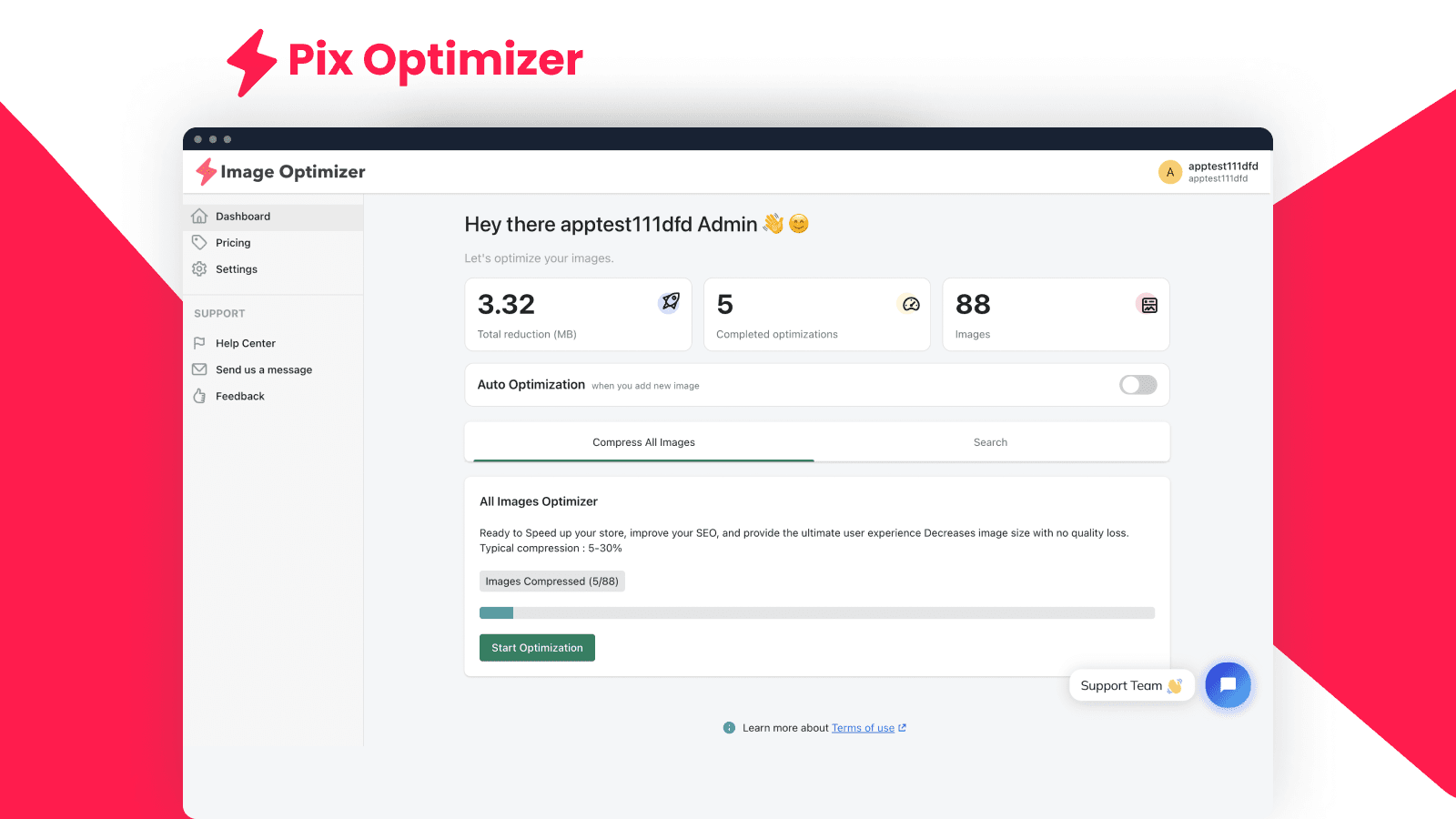
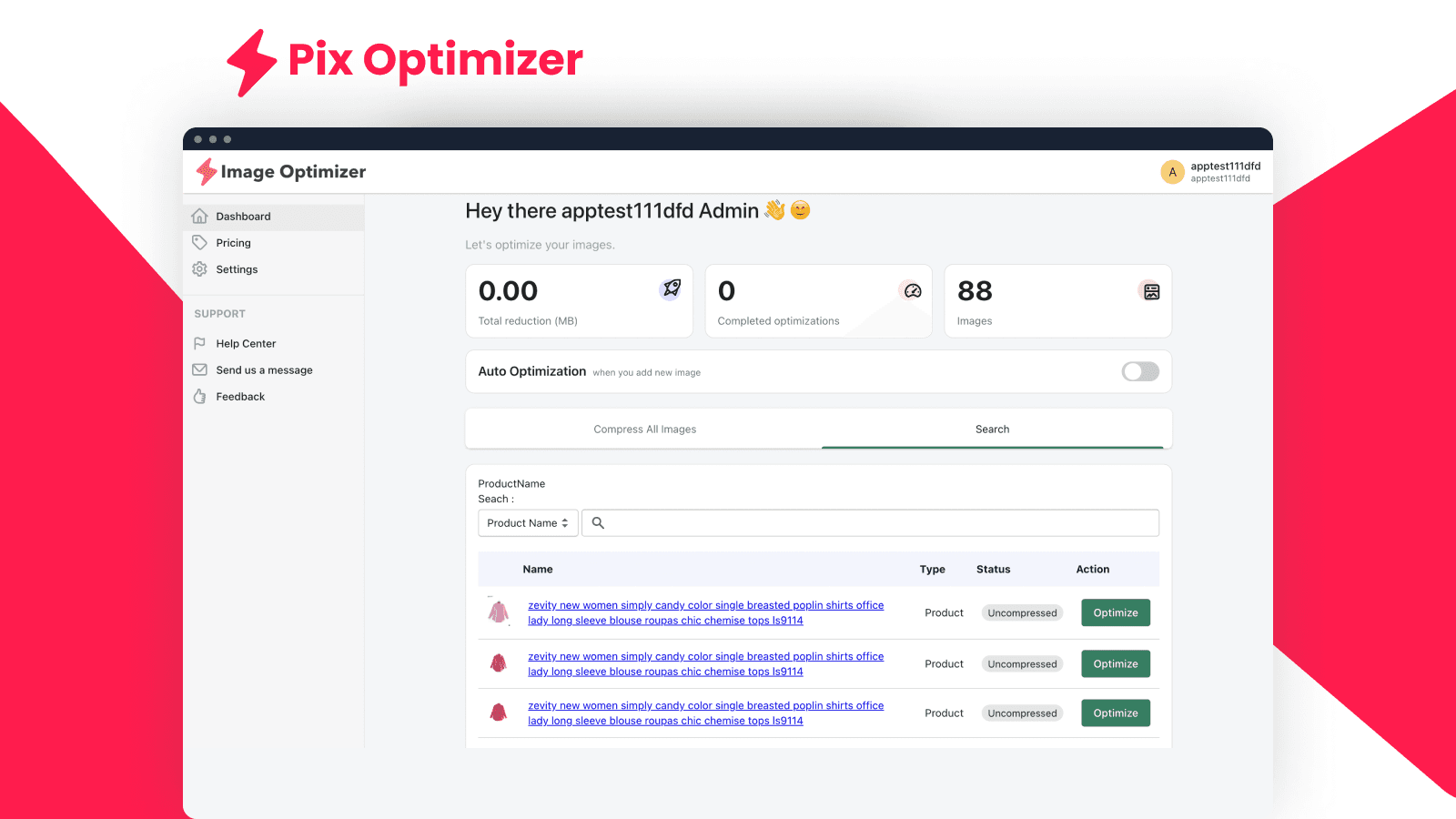
Installation Steps
How to install PIX ‑ Image Optimizer on your Shopify store
Find your app
Use filters like pricing, availability, and features to find the perfect match for your store's needs.
Get a personalized setup plan
Our team will create an installation plan based on your current store setup, goals, and requirements.
Install at your own pace
Perfect your store's functionality without the pressure to move on until you're ready.
Install in your Shopify Store
PIX ‑ Image Optimizer FAQ's
How do I install the PIX ‑ Image Optimizer Shopify app?
To install PIX ‑ Image Optimizer app on your Shopify store, click on the PIX ‑ Image Optimizer installation link. Login to the Shopify store on which you want to install the app and follow the onboarding process.
If you need our expert guidance to help you install PIX ‑ Image Optimizer on your Shopify store, then contact us now.
What are the key features of PIX ‑ Image Optimizer?
The key features offered by PIX ‑ Image Optimizer to Shopify store owners are:
- ✅With lighter images you will gain in speed, user experience and even in SEO.
- ✅Stop fine-tuning your images, they are now automatically optimized.
- ✅Reduce the weight of your images without sacrificing their quality.
Does PIX ‑ Image Optimizer integrate with other Shopify apps or tools?
Yes, PIX ‑ Image Optimizer seamlessly integrates with other Shopify apps or tools, such as Using lighter images can improve speed, user experience, and even SEO., No need to adjust your images, they are now automatically optimized., Lower your images' size without losing their quality..
Is there a free trial available for PIX ‑ Image Optimizer?
Yes, PIX ‑ Image Optimizer offers 3 days free trial on all its paid plans.
What are the pricing plans for PIX ‑ Image Optimizer?
The app has 4 pricing plans: 1 free and 3 paid. The paid plans cost $7.99/month, $8.99/month, $2.2399999999999998/month, and come with a 3-day free trial period.
How does billing work for PIX ‑ Image Optimizer?
PIX ‑ Image Optimizer uses USD for billing, with recurring and usage-based charges invoiced usually every 30 days.
Can I cancel or upgrade my subscription plan at any time?
Yes, PIX ‑ Image Optimizer allows its subscribers to cancel or upgrade their subscription plan at any time.
Does PIX ‑ Image Optimizer offer customer support? How can I get assistance?
Yes, PIX ‑ Image Optimizer offers a dedicated support team for any kind of app-related assistance. To reach out to the support team, users can send an email to [email protected].
Is PIX ‑ Image Optimizer compatible with my Shopify theme?
Please reach out to their support team at [email protected] to confirm its compatibility with your specific Shopify theme.
Alternatives
See all Alternatives to PIX ‑ Image Optimizer Shopify App.






Most Popular
Most popular Shopify apps on the market




