
Pixc: AI Photo Resize Shopify App
by PixcAuto-adjust and swap your product images to make your website look more professional. Automatically adjusts and updates all your product images.
4.2
(513)
Kelemata, Italy
We had an excellent experience with Pixc.We used the service to optimize and standardize a large number of images across our Shopify store, and the results exceeded our expectations.A special thank you goes to Emyle, who supported us throughout the entire process with great professionalism, availability, and attention to detail. She did much more than simply provide support for the app: she worked closely with us to find the best solutions, review the results, and address specific needs related to image formats, dimensions, filenames, and overall organization.Communication was always quick, clear, and highly collaborative. We especially appreciated her willingness to carry out additional checks and make adjustments until the final result was exactly what we needed.Pixc proved to be not only an excellent solution for improving and professionalizing image management for an e-commerce store, but also a service backed by people who genuinely care about their customers.Highly recommended for anyone running a Shopify store who wants to optimize their images efficiently, professionally, and without spending countless hours on manual work.Thank you again to Emyle and the entire Pixc team for the outstanding support!
Install in your Shopify Store

Pixc: AI Photo Resize Charts
Track Pixc: AI Photo Resize's ranking, reviews, and performance over time with interactive charts. See how it compares to similar apps in the same category.
Pros and Cons
Pros and Cons of Pixc: AI Photo Resize
Pros
Efficiency in Resizing: The app quickly and effectively resizes images, saving significant time for users.
Ease of Use: The intuitive interface allows users to resize images with minimal effort.
Uniform Image Sizing: Ensures consistency in image dimensions, enhancing the professional look of websites.
Free Plan Availability: Many users appreciate the option to use the app for free with basic features.
Cons
Inconsistent Resizing: Some users report uneven resizing, with images not matching desired dimensions.
Poor Image Quality: A few users experienced blurry or distorted images post-resizing.
Screenshots
About the App
Automatically adjusts and updates all your product images.
- Time-saving image resizer: Save time with our multiple image resizer.
- Product Photo Enhancement: Automatically review, enhance and swap out your product images.
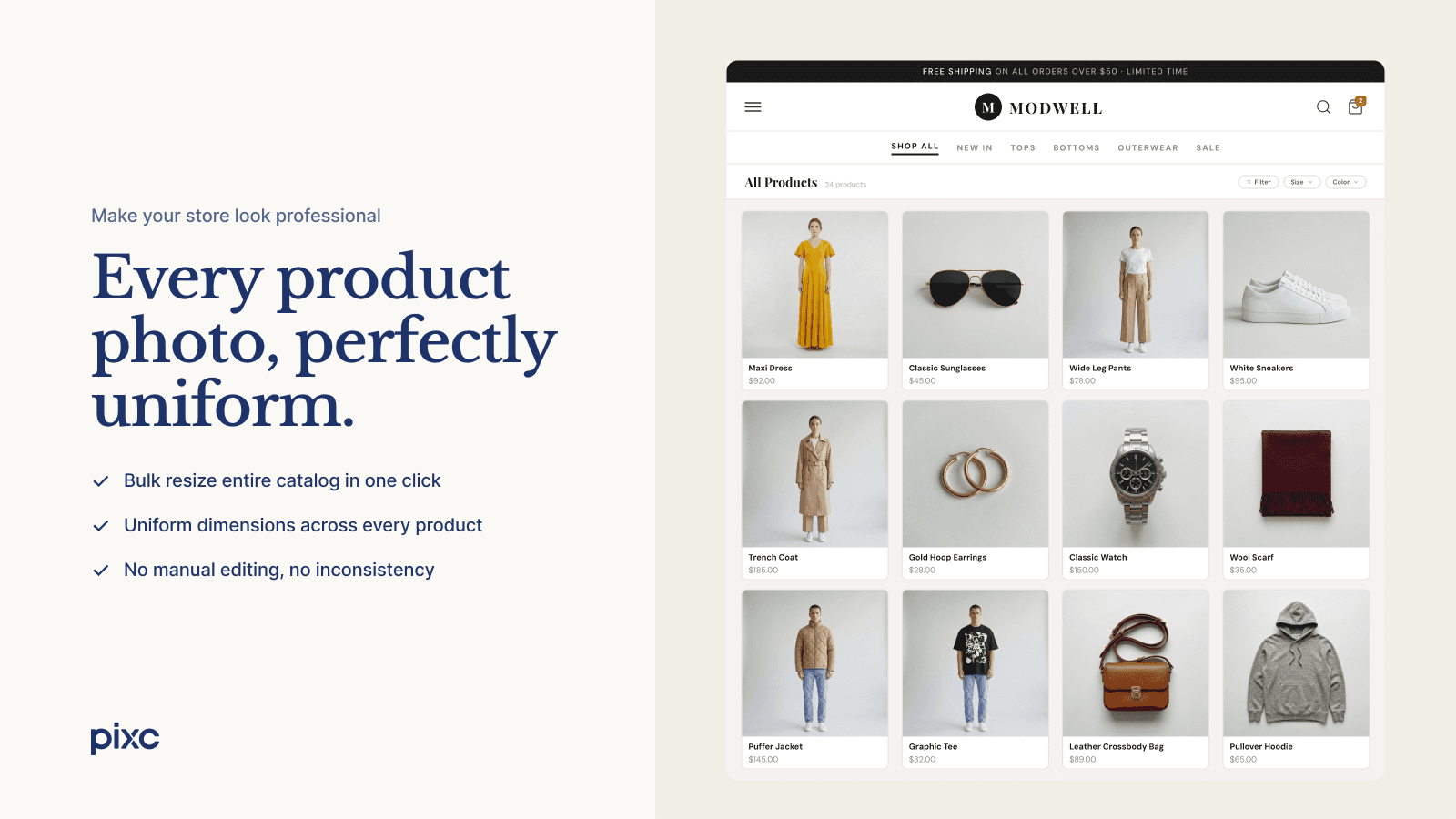
- Professional Photography: Standardize all your photos to give your store a more professional and cohesive appearance.
- Aspect Ratio Options: Select from three settings of aspect ratio - square, portrait, and landscape.
- Photo Restoration: Depending on your plan, you can restore your photos at any time.
Keywords
Key Features
- Automatically resize and optimize product images with zero manual effort.
- Customize image framing or cropping to match your store’s aesthetic.
- Improve page speed and SEO with optimized, fast-loading images.
Pricing
Pixc: AI Photo Resize Pricing Plans
Pay-as-you-go
$0/month
Start free with 50 images included
Resize Options: Crop or Add Frame
AI-Extend to fill frames naturally
Automatic image optimization
7-day original image backup
Basic
$5/month
100 images/month, $0.06 per extra
Resize Options: Crop or Add Frame
AI-Extend to fill frames naturally
Auto-resize new uploads in background
Automatic image optimization
Pro
$25/month
1000 images/month, $0.06 per extra image
Resize Options: Crop or Add Frame
25 AI Extend images included
Auto-resize new uploads in background
Automatic image optimization
Unlimited
$90/month
Unlimited images
Resize Options: Crop or Add Frame
75 AI Extend images included
Auto-resize new uploads in background
Automatic image optimization
Not sure which plan to pick? Discuss Pay-as-you-go or Basic plans with us, learn about custom pricing, or get a demo.
Here's an overview of Pixc: AI Photo Resize costs for each of the plan(s):
The app has 4 pricing plans: 1 free and 3 paid. The free plan(s) offered by Pixc: AI Photo Resize: (Pay-as-you-go). The paid plan(s) offered by Pixc: AI Photo Resize: (Basic, Pro, Unlimited).
The details of the plan(s) are outlined below:
Pay-as-you-go: This plan is free forever, incurring no subscription costs. It offers a wide range of features like Start free with 50 images included, Resize Options: Crop or Add Frame, AI-Extend to fill frames naturally, Automatic image optimization, 7-day original image backup.
Basic: The Basic plan costs $5 and has no free trial period. The plan offers a host of features, including 100 images/month, $0.06 per extra, Resize Options: Crop or Add Frame, AI-Extend to fill frames naturally, Auto-resize new uploads in background, Automatic image optimization, 30-day original image backup.
Pro: The Pro plan costs $25 and has no free trial period. The plan offers a host of features, including 1000 images/month, $0.06 per extra image, Resize Options: Crop or Add Frame, 25 AI Extend images included, Auto-resize new uploads in background, Automatic image optimization, 30-day image backup.
Unlimited: The Unlimited plan costs $90 and has no free trial period. The plan offers a host of features, including Unlimited images, Resize Options: Crop or Add Frame, 75 AI Extend images included, Auto-resize new uploads in background, Automatic image optimization, 30-day image backup.
Pixc: AI Photo Resize Price Summary
| Pricing summary | Free to install |
| Total Pricing Plan(s) | 4 |
| Number of free plan(s) | 1 |
| Number of paid plan(s) | 3 |
| Cost of Paid Plan(s) | $5, $25, $90 |
| Free trial available | No |
For further information regarding Pixc: AI Photo Resize app pricing plans, see the official website.
Pixc: AI Photo Resize Shopify App Discounts
If you are looking for discounts on Pixc: AI Photo Resize app pricing plans, feel free to contact our team - we'd be happy to help! Additionally, if you are an agency or a shop merchant with multiple Shopify stores, we can work directly with Pixc to secure better deals on the Pixc: AI Photo Resize app exclusively for you.
*Disclaimer: Please note that ShopDigest doesn't guarantee discounts on apps as any changes to the pricing plans are ultimately up to the discretion of the developer.
Testimonials
What our users say about Pixc: AI Photo Resize
“We had an excellent experience with Pixc.We used the service to optimize and standardize a large number of images across our Shopify store, and the results exceeded our expectations.A special thank you goes to Emyle, who supported us throughout the entire process with great professionalism, availability, and attention to detail. She did much more than simply provide support for the app: she worked closely with us to find the best solutions, review the results, and address specific needs related to image formats, dimensions, filenames, and overall organization.Communication was always quick, clear, and highly collaborative. We especially appreciated her willingness to carry out additional checks and make adjustments until the final result was exactly what we needed.Pixc proved to be not only an excellent solution for improving and professionalizing image management for an e-commerce store, but also a service backed by people who genuinely care about their customers.Highly recommended for anyone running a Shopify store who wants to optimize their images efficiently, professionally, and without spending countless hours on manual work.Thank you again to Emyle and the entire Pixc team for the outstanding support!”
“First time Shopify creator/seller. After adding my items, I showed a friend my page and he said "All of your items are different sizes." This was something I was aware of, and it wasn't sure how to go in and change all sizes of the pics to make them equal. I found this app, and it was SO EASY to do. After downloading, the section was added to my Shopify page and the question basically asked "Would you like to Resize your images?" I clicked yes and it did it within 1 minute. I had to pay less than 5 bucks to get it done, but it was worth it. My storefront looks so much better now. Thanks Pixc.”
“Just a few clicks and suddenly my whole store looked like it was designed by a pro. I’ve even noticed customers browsing longer and my store feels more trustworthy.A big thank you to the team behind this app, it has truly made a difference in my business!”
Trusted By
Trusted by the best Shopify stores
Kelemata
Italy
Scents and Sillage
United States
Postura Fit US
United States
SoleComfort.shoes
United States
Hiptique
United States
Splashback Kingdom
Australia
Cherry Tree Lane Toys
Canada
High Brands
Portugal
Auto-adjust and swap your product images to make your website look more professional.
Save valuable time
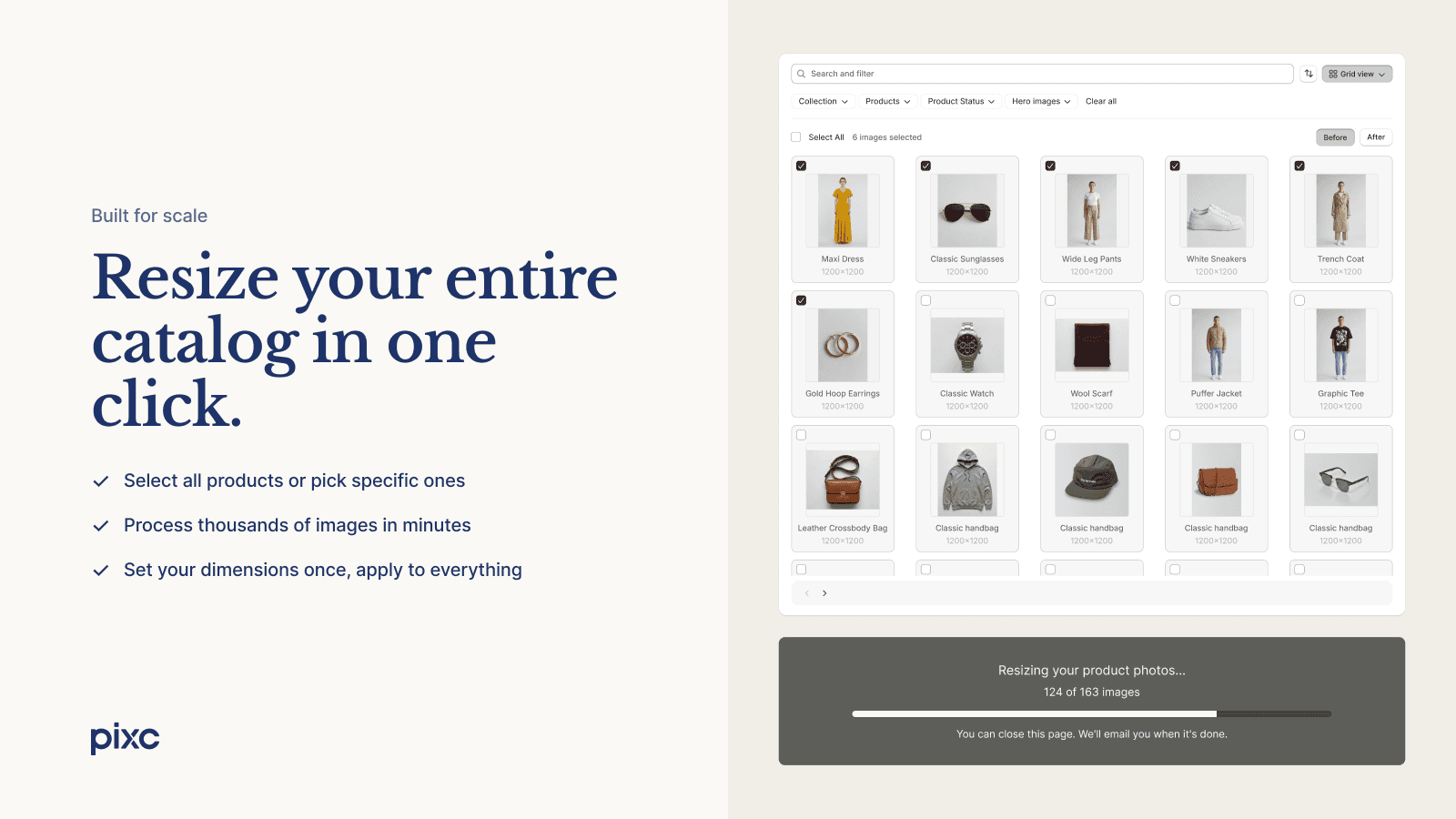
Use our bulk image resizer to save you and your team hours. Say goodbye to manual photo editing and resizing.
Appear more polished
Make sure all product images in your store are the same size and uniform to maintain a professional look.
No Manual Efforts Required
This app will scan your pictures, identify those needing resize, and do it automatically for you.
Comparison
Top Pixc: AI Photo Resize Alternatives Detailed Comparison
The table below highlights the crucial differences between Pixc: AI Photo Resize and similar other Shopify apps based on parameters like ratings, reviews, features, pricing, etc.
Add App | |||
|---|---|---|---|
| General Information | |||
| Ratings | 4.2(402 reviews) | 4.9(852 reviews) | |
| Developed by | Pixc | Sherpas Design | |
| Launch Date | 2/22/2017 | 8/6/2015 | |
| Pricing | Free, $5/month, $25/month, $90/month | Free, $14.99/month, $24.99/month, $49.99/month | |
| Objective | Automatically adjusts and updates all your product images. | Get 30% off on SEO, Page Speed, Image Optimization, and JSON-LD this Christmas! | |
| Categories | Image editor, SEO | SEO, Image editor | |
| Key Features & Highlights | |||
| Purpose | Auto-adjust and swap your product images to make your website look more professional. | Improve your SEO, increase your rankings, get more traffic, and raise your sales. | |
| Features List |
|
| |
| Highlights | - | - | |
| User Reviews and Ratings | |||
| Recommended % | 91.1% | 99.0% | |
| Pros |
|
| |
| Cons |
|
| |
| Pricing and Plans | |||
| Total Pricing Plans | 4 | 4 | |
| Free Plan | Available | Available | |
| Free Trial | No | Yes, for 7 day(s) | |
| Technical Information | |||
| Rating | 4.2 | 4.9 | |
| Total Reviews | 513 | 909 | |
| Launch Date | 2/22/2017 | 8/6/2015 | |
| SD Points | 8 | 292 | |
More Details About Pixc: AI Photo Resize
Product Description
Pixc: Photo Resize is an app that uniformly resizes and replaces product images, enhancing the professionalism of your online store. It saves time and effort by automating the photo resizing process, allowing you to set preferred image settings and operate in the background.
AI Summary
This Shopify app specializes in bulk image resizing, enabling merchants to standardize product photo dimensions for a uniform, professional store appearance. It efficiently processes large batches of images, saving significant manual effort, and offers a straightforward interface with quick results. The app performs best with white-background images, centering content and filling blank spaces uniformly. A restore feature allows reverting changes if needed. However, inconsistencies arise with non-uniform image dimensions, occasionally producing mismatched results (e.g., squares alongside rectangles). Some users report unclear customization options, such as predefined resizing parameters or selective editing of adjusted images. While the free tier is praised for smaller stores, limitations include processing the entire store for updates rather than targeting new images individually. Customer support receives positive mentions for responsiveness. The app significantly streamlines image management but may require manual adjustments for complex cases.
Support
For any questions, concerns, or assistance with Pixc: AI Photo Resize, the dedicated support team is readily available to help.To reach out to the support team, users can send an email to [email protected].
Pixc: AI Photo Resize Support Information In A Nutshell:
| Support Email: | [email protected] |
| Contact Number(s): | Not available |
| FAQ Page: | Not available |
| Privacy Policy: | Privacy details |
| Language Support: | English |
Integration
The list of top Shopify apps or features or software tools that Pixc: AI Photo Resize seamlessly integrates are given below:
Developer
Looking to install Pixc: AI Photo Resize app on your store?
ShopDigest helps businesses upgrade their Shopify stores by offering easy app installation services.
Why Choose ShopDigest?
- Highly experienced and vetted team for successful app installation
- Assured support and guidance throughout the installation and beyond
- Customized services to meet unique business needs
- 30-day no questions asked refund policy
- Lowest pricing guaranteed (starts at just $10/hour)
Customer Reviews
Pixc: AI Photo Resize has an overall rating of 4.6 stars from a total of 513 reviews on the Shopify app store. Of these, 470 (91.6%) are positive, 3 (0.6%) are neutral, and 40 (7.8%) are negative*.
*Ratings above four stars fall under positive review, three stars reviews fall under neutral, and anything less than two stars falls under negative.
We had an excellent experience with Pixc.We used the service to optimize and standardize a large number of images across our Shopify store, and the results exceeded our expectations.A special thank you goes to Emyle, who supported us throughout the entire process with great professionalism, availability, and attention to detail. She did much more than simply provide support for the app: she worked closely with us to find the best solutions, review the results, and address specific needs related to image formats, dimensions, filenames, and overall organization.Communication was always quick, clear, and highly collaborative. We especially appreciated her willingness to carry out additional checks and make adjustments until the final result was exactly what we needed.Pixc proved to be not only an excellent solution for improving and professionalizing image management for an e-commerce store, but also a service backed by people who genuinely care about their customers.Highly recommended for anyone running a Shopify store who wants to optimize their images efficiently, professionally, and without spending countless hours on manual work.Thank you again to Emyle and the entire Pixc team for the outstanding support!
First time Shopify creator/seller. After adding my items, I showed a friend my page and he said "All of your items are different sizes." This was something I was aware of, and it wasn't sure how to go in and change all sizes of the pics to make them equal. I found this app, and it was SO EASY to do. After downloading, the section was added to my Shopify page and the question basically asked "Would you like to Resize your images?" I clicked yes and it did it within 1 minute. I had to pay less than 5 bucks to get it done, but it was worth it. My storefront looks so much better now. Thanks Pixc.
First time Shopify creator/seller. After adding my items, I showed a friend my page and he said "All of your items are different sizes." This was something I was aware of, and it wasn't sure how to go in and change all sizes of the pics to make them equal. I found this app, and it was SO EASY to do. After downloading, the section was added to my Shopify page and the question basically asked "Would you like to Resize your images?" I clicked yes and it did it within 1 minute. I had to pay less than 5 bucks to get it done, but it was worth it. My storefront looks so much better now. Thanks Pixc.
Just a few clicks and suddenly my whole store looked like it was designed by a pro. I’ve even noticed customers browsing longer and my store feels more trustworthy.A big thank you to the team behind this app, it has truly made a difference in my business!
Fantastic app. I have been battling the website to make it look consistent. Now I know, I wasn't doing it correctly. I wasn't using this app. Now I can breathe easier. I took the picture sizing off my list. Nice...
Fantastic app. I have been battling the website to make it look consistent. Now I know, I wasn't doing it correctly. I wasn't using this app. Now I can breathe easier. I took the picture sizing off my list. Nice...
Initially left a different review and the App contact me right away. I can not believe how Incredibly helpful they were - above and beyond service! It took several days to resolve my issues but they answered every questioned and kept going until my issues were resolved. I never expected that much assistance from an App. Highly recommend. Thank you so much!(original review)The app was easy to use. However I am very upset that I wanted to downgrade my service before the next billing period to avoid additional charges and immediately took away my service... that I already paid in full for using??! How is this possible? It should downgrade at the end of the billing cycle that I already paid for in full. I hope that we receive a credit to our card or our service is reinstated.
Initially left a different review and the App contact me right away. I can not believe how Incredibly helpful they were - above and beyond service! It took several days to resolve my issues but they answered every questioned and kept going until my issues were resolved. I never expected that much assistance from an App. Highly recommend. Thank you so much!(original review)The app was easy to use. However I am very upset that I wanted to downgrade my service before the next billing period to avoid additional charges and immediately took away my service... that I already paid in full for using??! How is this possible? It should downgrade at the end of the billing cycle that I already paid for in full. I hope that we receive a credit to our card or our service is reinstated.
Video Demo and Screenshots
Product Video

Product Screenshots
Installation Steps
How to install Pixc: AI Photo Resize on your Shopify store
Find your app
Use filters like pricing, availability, and features to find the perfect match for your store's needs.
Get a personalized setup plan
Our team will create an installation plan based on your current store setup, goals, and requirements.
Install at your own pace
Perfect your store's functionality without the pressure to move on until you're ready.
Install in your Shopify Store
Pixc: AI Photo Resize FAQ's
How do I install the Pixc: AI Photo Resize Shopify app?
To install Pixc: AI Photo Resize app on your Shopify store, click on the Pixc: AI Photo Resize installation link. Login to the Shopify store on which you want to install the app and follow the onboarding process.
If you need our expert guidance to help you install Pixc: AI Photo Resize on your Shopify store, then contact us now.
What are the key features of Pixc: AI Photo Resize?
The key features offered by Pixc: AI Photo Resize to Shopify store owners are:
- ✅Resize all product photos automatically in just a few clicks.
- ✅AI-Extend: Naturally expand product photos to fill the frame, no cropping needed
- ✅Crop or Frame: Choose how images are adjusted to match your store's visual style
- ✅Auto Resize: New product images are resized in the background automatically
- ✅Original Image Backup: Restore any image to its original version whenever needed
Does Pixc: AI Photo Resize integrate with other Shopify apps or tools?
Yes, Pixc: AI Photo Resize seamlessly integrates with other Shopify apps or tools, such as Save time with our multiple image resizer., Automatically review, enhance and swap out your product images., Standardize all your photos to give your store a more professional and cohesive appearance..
Is there a free trial available for Pixc: AI Photo Resize?
No, Pixc: AI Photo Resize does not offer any free trial.
What are the pricing plans for Pixc: AI Photo Resize?
The app has 4 pricing plans: 1 free and 3 paid. The paid plans cost $5/month, $25/month, $90/month and have no free trial period.
How does billing work for Pixc: AI Photo Resize?
Pixc: AI Photo Resize uses USD for billing, with recurring and usage-based charges invoiced usually every 30 days.
Can I cancel or upgrade my subscription plan at any time?
Yes, Pixc: AI Photo Resize allows its subscribers to cancel or upgrade their subscription plan at any time.
Does Pixc: AI Photo Resize offer customer support? How can I get assistance?
Yes, Pixc: AI Photo Resize offers a dedicated support team for any kind of app-related assistance. To reach out to the support team, users can send an email to [email protected].
Is Pixc: AI Photo Resize compatible with my Shopify theme?
Please reach out to their support team at [email protected] to confirm its compatibility with your specific Shopify theme.
Alternatives
See all Alternatives to Pixc: AI Photo Resize Shopify App.






Most Popular
Most popular Shopify apps on the market




