
Mixtable Spreadsheet Editor Shopify App
by MixtableAn online spreadsheet for easy bulk editing of products, metadata, inventory, prices, tags, orders and more! Edit products, metafields, inventory, price and more all at once.
4.6
(36)
Balling Hockey EU, Spain
Is very good with all the changes they have implemented recently. You are able to extract all your product data, even shopify images url in columns for each and every single product. As well they have good support.I fully recommend it.
Install in your Shopify Store

Mixtable Spreadsheet Editor Charts
Track Mixtable Spreadsheet Editor's ranking, reviews, and performance over time with interactive charts. See how it compares to similar apps in the same category.
Pros and Cons
Pros and Cons of Mixtable Spreadsheet Editor
Pros
Efficient Bulk Editing: Streamlines bulk updates for products, metafields, and inventory with spreadsheet-like functionality.
Real-Time Sync: Changes made in the app instantly reflect in Shopify, ensuring data accuracy.
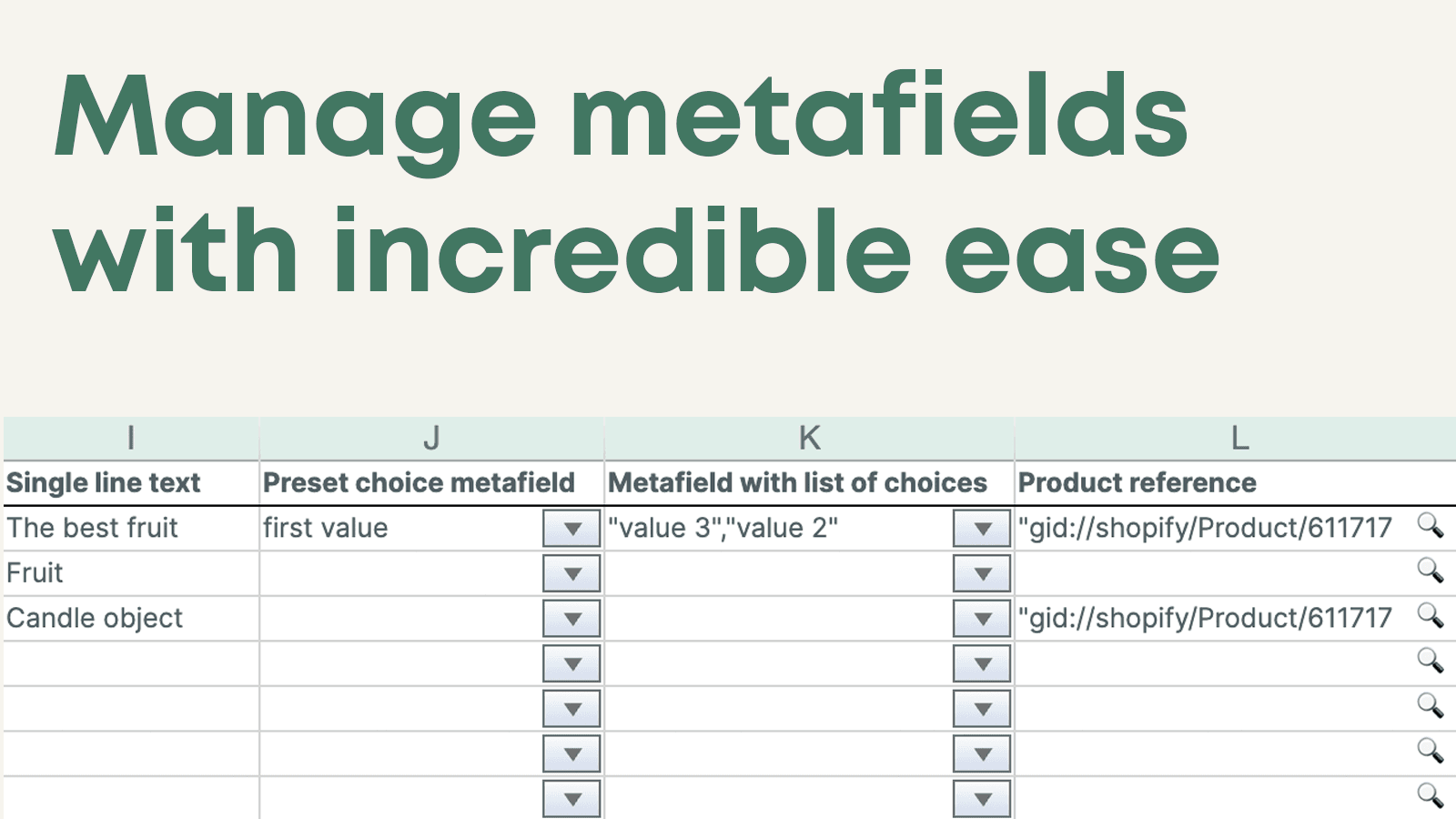
Metafield Management: Simplifies handling and bulk editing of metafields, a feature lacking in Shopify.
Responsive Customer Support: Quick and helpful assistance from the support team, often resolving issues promptly.
Cons
Technical Issues: Some users reported inconsistent loading, syncing delays, or data corruption during updates.
Limited Error Handling: No undo feature for mistakes, leading to potential data mismanagement.
Screenshots
About the App
Edit products, metafields, inventory, price and more all at once.
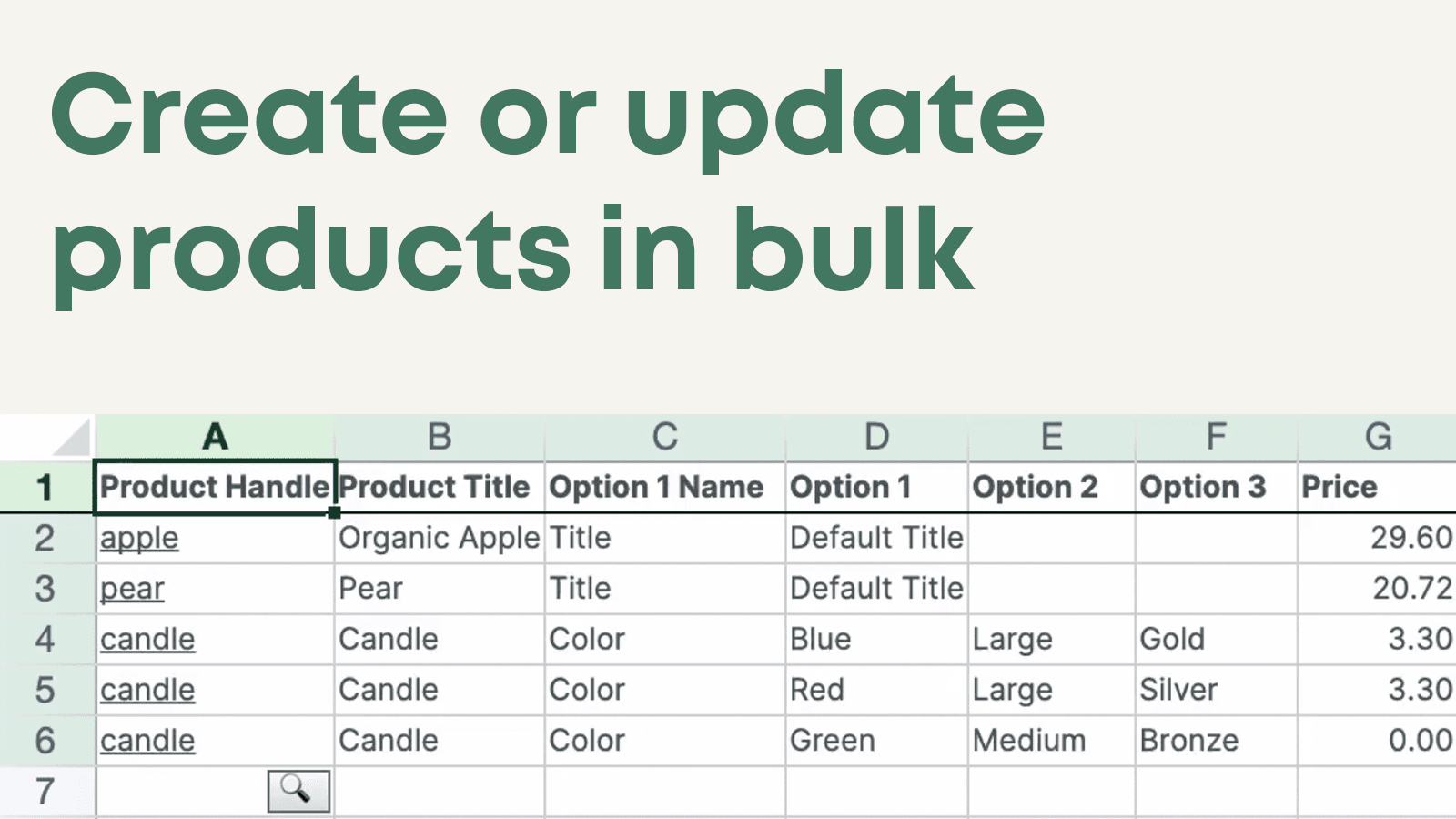
- Spreadsheet Management: A bulk editing tool for products, metafields, inventory, prices, tags, and more on spreadsheets.
- Automatic Syncing: Changes in the store automatically update in Mixtable, keeping your workbooks current.
- Bulk Edit Tools: Find and replace in bulk, edit prices in bulk, change tags in bulk, and upload images.
Keywords
Key Features
- Bulk edit products, metafields, inventory, prices, and tags in a spreadsheet interface.
- Sync changes between your store and workbook automatically with one click.
- Use Excel-like formulas and functions directly in your browser.
Pricing
Mixtable Spreadsheet Editor Pricing Plans
Free
$0/month
Free export to CSV
Free export to Excel (.xlsx)
Basic Shopify
$15/month
For stores on the Basic Shopify plan
All Mixtable bulk editing features
Shopify
$35/month
For Shopify and Advanced Shopify plans
All Mixtable bulk editing features
Shopify Plus
$49/month
For Shopify Plus stores
All Mixtable bulk editing features
Not sure which plan to pick? Discuss Free or Basic Shopify plans with us, learn about custom pricing, or get a demo.
Here's an overview of Mixtable Spreadsheet Editor costs for each of the plan(s):
The app has 4 pricing plans: 1 free and 3 paid. The free plan(s) offered by Mixtable Spreadsheet Editor: (Free). The paid plan(s) offered by Mixtable Spreadsheet Editor: (Basic Shopify, Shopify, Shopify Plus).
The details of the plan(s) are outlined below:
Free: This plan is free forever, incurring no subscription costs. It offers a wide range of features like Free export to CSV, Free export to Excel (.xlsx).
Basic Shopify: The Basic Shopify plan costs $15 and comes with a 7-day free trial period. The plan offers a host of features, including For stores on the Basic Shopify plan, All Mixtable bulk editing features.
Shopify: The Shopify plan costs $35 and comes with a 7-day free trial period. The plan offers a host of features, including For Shopify and Advanced Shopify plans, All Mixtable bulk editing features.
Shopify Plus: The Shopify Plus plan costs $49 and comes with a 7-day free trial period. The plan offers a host of features, including For Shopify Plus stores, All Mixtable bulk editing features.
Mixtable Spreadsheet Editor Price Summary
| Pricing summary | Free plan available. Free trial available. |
| Total Pricing Plan(s) | 4 |
| Number of free plan(s) | 1 |
| Number of paid plan(s) | 3 |
| Cost of Paid Plan(s) | $15, $35, $49 |
| Free trial available | Yes, for 7 day(s) |
Mixtable Spreadsheet Editor Shopify App Discounts
If you are looking for discounts on Mixtable Spreadsheet Editor app pricing plans, feel free to contact our team - we'd be happy to help! Additionally, if you are an agency or a shop merchant with multiple Shopify stores, we can work directly with Mixtable to secure better deals on the Mixtable Spreadsheet Editor app exclusively for you.
*Disclaimer: Please note that ShopDigest doesn't guarantee discounts on apps as any changes to the pricing plans are ultimately up to the discretion of the developer.
Testimonials
What our users say about Mixtable Spreadsheet Editor
“Is very good with all the changes they have implemented recently. You are able to extract all your product data, even shopify images url in columns for each and every single product. As well they have good support.I fully recommend it.”
“We're new to Mixtable. But this is proving to be a perfect addition to our workflow. So glad this app exists! Here's why... In the past I have messed up Shopify’s product variants by doing an export of our products to make bulk edits via spreadsheet, and then re-import the product list back to Shopify. However, Mixtable takes a different approach. It's a direct Two-Way Sync (No File Juggling): Instead of downloading a file, editing it on our desktop, and then hoping that during the re-import it doesn't mess up anything (Mixtable insulates you from all that). It opens live store data in an Excel/Google Sheets style interface inside the app. The changes we make go directly into cells, and when we click "Sync to Shopify" it all gets updated to the store. No chance for an error. This is a simple solution that makes spreadsheet style editing a breeze. :-) ”
“We are getting upwards of 10,000 products now and in moving from Woocommerce to Shopify I was on the hunt a year a go for a live/sync'd excel style method to handle our data day to day. I work with it daily and could simply not operate without it (as I also find the bulk native Shopify method quite clunky and for whatever reason error prone). Having multiple tabs set up for my different operational views and edits makes life so much simpler. Highly recommend for handling large data sets. Have at it folks :)”
Trusted By
Trusted by the best Shopify stores
Balling Hockey EU
Spain
ExcellentSupply.com
United States
The Vinyl Store
Australia
L'ARCO Shop
Belgium
StayClothed
United Kingdom
Aid Station
Australia
Extra Butter
United States
Envy Bathrooms Ltd
United Kingdom
An online spreadsheet for easy bulk editing of products, metadata, inventory, prices, tags, orders and more!
Bulk editing tool for spreadsheets
Work like you're using Google Sheets. Handle products, metafields, inventory, costs, tags, orders, Google shopping aspects, and lots more!
Sync immediately
Your store updates sync automatically to your workbook. You can also sync changes back to Shopify with just one click.
High-tech integrated tools
Tools that speed up your work are included. These include batch find and replace, batch price updates, batch tag addition/removal, batch image uploads, and more!
Comparison
Top Mixtable Spreadsheet Editor Alternatives Detailed Comparison
The table below highlights the crucial differences between Mixtable Spreadsheet Editor and similar other Shopify apps based on parameters like ratings, reviews, features, pricing, etc.
Add App | |||
|---|---|---|---|
| General Information | |||
| Ratings | 4.6(36 reviews) | 4.9(1,704 reviews) | |
| Developed by | Mixtable | ITissible | |
| Launch Date | 12/16/2020 | 7/7/2017 | |
| Pricing | Free, $15/month, $35/month, $49/month | Free, $20/month, $50/month, $200/month | |
| Objective | Edit products, metafields, inventory, price and more all at once. | Easily transfer, update or move large data amounts. | |
| Categories | Bulk editor | Bulk editor, Store data importer | |
| Key Features & Highlights | |||
| Purpose | An online spreadsheet for easy bulk editing of products, metadata, inventory, prices, tags, orders and more! | The Matrixify app lets you handle large amounts of store data by allowing you to import, export, update, and transfer it. | |
| Features List |
|
| |
| Highlights | - |
| |
| User Reviews and Ratings | |||
| Recommended % | 77.8% | 97.3% | |
| Pros |
|
| |
| Cons |
|
| |
| Pricing and Plans | |||
| Total Pricing Plans | 4 | 4 | |
| Free Plan | Available | Available | |
| Free Trial | Yes, for 7 day(s) | No | |
| Technical Information | |||
| Rating | 4.6 | 4.9 | |
| Total Reviews | 36 | 1,750 | |
| Launch Date | 12/16/2020 | 7/7/2017 | |
| SD Points | 6 | 1421 | |
More Details About Mixtable Spreadsheet Editor
Product Description
Mixtable is a web-based spreadsheet that integrates with Shopify and allows for bulk editing of products, metafields, orders, inventory, and more. It emulates the functionality of Excel and offers two-way syncing between the store and the workbook in just one click.
AI Summary
Mixtable is a Shopify app designed to streamline bulk editing and management of store data through a spreadsheet-like interface. It enables real-time, two-way synchronization with Shopify, allowing users to efficiently update product details, prices, inventory, metafields, and SEO attributes in bulk. The app supports advanced functionalities such as formula-based calculations, custom column creation, and bulk editing of complex product catalogs, making it particularly useful for stores with large inventories. Key strengths include its intuitive spreadsheet layout, seamless integration with Shopify’s backend, and robust support for metafield management, which simplifies tasks like feed preparation for external platforms. However, some limitations have been noted, including occasional syncing delays, data inconsistencies during updates, and sporadic loading issues across browsers. While customer support is frequently praised for responsiveness, there have been isolated reports of unresolved technical glitches. Despite these challenges, Mixtable is widely regarded as a powerful tool for merchants needing scalable, spreadsheet-driven product management within Shopify.
Support
For any questions, concerns, or assistance with Mixtable Spreadsheet Editor, the dedicated support team is readily available to help.To reach out to the support team, users can send an email to [email protected]. Additionally, Mixtable Spreadsheet Editor offers a comprehensive FAQ section to address common inquiries and provide self-help resources in their app FAQ section.
Mixtable Spreadsheet Editor Support Information In A Nutshell:
| Support Email: | [email protected] |
| Contact Number(s): | Not available |
| FAQ Page: | FAQ details |
| Privacy Policy: | Privacy details |
| Language Support: | English |
Integration
The list of top Shopify apps or features or software tools that Mixtable Spreadsheet Editor seamlessly integrates are given below:
Developer
Name: Mixtable
Website: /partners/mixtable
Address: 183 Dovercourt Road, Apt 409, Toronto, ON, M6J 3C1
Looking to install Mixtable Spreadsheet Editor app on your store?
ShopDigest helps businesses upgrade their Shopify stores by offering easy app installation services.
Why Choose ShopDigest?
- Highly experienced and vetted team for successful app installation
- Assured support and guidance throughout the installation and beyond
- Customized services to meet unique business needs
- 30-day no questions asked refund policy
- Lowest pricing guaranteed (starts at just $10/hour)
Customer Reviews
Mixtable Spreadsheet Editor has an overall rating of 4.1 stars from a total of 36 reviews on the Shopify app store. Of these, 28 (77.8%) are positive, 0 (0.0%) are neutral, and 8 (22.2%) are negative*.
*Ratings above four stars fall under positive review, three stars reviews fall under neutral, and anything less than two stars falls under negative.
Is very good with all the changes they have implemented recently. You are able to extract all your product data, even shopify images url in columns for each and every single product. As well they have good support.I fully recommend it.
We're new to Mixtable. But this is proving to be a perfect addition to our workflow. So glad this app exists! Here's why... In the past I have messed up Shopify’s product variants by doing an export of our products to make bulk edits via spreadsheet, and then re-import the product list back to Shopify. However, Mixtable takes a different approach. It's a direct Two-Way Sync (No File Juggling): Instead of downloading a file, editing it on our desktop, and then hoping that during the re-import it doesn't mess up anything (Mixtable insulates you from all that). It opens live store data in an Excel/Google Sheets style interface inside the app. The changes we make go directly into cells, and when we click "Sync to Shopify" it all gets updated to the store. No chance for an error. This is a simple solution that makes spreadsheet style editing a breeze. :-)
We're new to Mixtable. But this is proving to be a perfect addition to our workflow. So glad this app exists! Here's why... In the past I have messed up Shopify’s product variants by doing an export of our products to make bulk edits via spreadsheet, and then re-import the product list back to Shopify. However, Mixtable takes a different approach. It's a direct Two-Way Sync (No File Juggling): Instead of downloading a file, editing it on our desktop, and then hoping that during the re-import it doesn't mess up anything (Mixtable insulates you from all that). It opens live store data in an Excel/Google Sheets style interface inside the app. The changes we make go directly into cells, and when we click "Sync to Shopify" it all gets updated to the store. No chance for an error. This is a simple solution that makes spreadsheet style editing a breeze. :-)
We are getting upwards of 10,000 products now and in moving from Woocommerce to Shopify I was on the hunt a year a go for a live/sync'd excel style method to handle our data day to day. I work with it daily and could simply not operate without it (as I also find the bulk native Shopify method quite clunky and for whatever reason error prone). Having multiple tabs set up for my different operational views and edits makes life so much simpler. Highly recommend for handling large data sets. Have at it folks :)
I rarely write reviews, but Mixtable absolutely deserves one. The app itself is powerful and incredibly useful for managing large Shopify catalogs — but what truly sets Mixtable apart is their support team. They are on another level.Recently, I made a mistake and accidentally deleted the wrong rows in one of my worksheets. Undo didn’t bring them back, and even a full re-sync with Shopify didn’t restore the missing rows. The products still existed in Shopify (thankfully), but the worksheet entries were gone. I reached out to Mixtable support hoping for a workaround.What happened next honestly blew me away.Within two days, they built and released a brand‑new feature: Fill Missing Worksheet Data — a function that magically pulls back the missing rows and restores everything exactly as it was. Problem solved, stress gone, and workflow saved.I’ve worked with many apps and many support teams, but I’ve rarely seen this level of dedication, speed, and genuine care for users. Mixtable doesn’t just support their app — they improve it in real time based on real user needs.If I could give 6 stars, I absolutely would.Top! Top! Top!
I rarely write reviews, but Mixtable absolutely deserves one. The app itself is powerful and incredibly useful for managing large Shopify catalogs — but what truly sets Mixtable apart is their support team. They are on another level.Recently, I made a mistake and accidentally deleted the wrong rows in one of my worksheets. Undo didn’t bring them back, and even a full re-sync with Shopify didn’t restore the missing rows. The products still existed in Shopify (thankfully), but the worksheet entries were gone. I reached out to Mixtable support hoping for a workaround.What happened next honestly blew me away.Within two days, they built and released a brand‑new feature: Fill Missing Worksheet Data — a function that magically pulls back the missing rows and restores everything exactly as it was. Problem solved, stress gone, and workflow saved.I’ve worked with many apps and many support teams, but I’ve rarely seen this level of dedication, speed, and genuine care for users. Mixtable doesn’t just support their app — they improve it in real time based on real user needs.If I could give 6 stars, I absolutely would.Top! Top! Top!
OK, so... i have used many apps from the app store, and most I've had issues with, and just an overall messy, complicated experience, until now.So far so good. This app is simple to understand, everything is obvious and feels natural to use. This is my only review i have left for an app, and this one deserves it! Oh, and another BIG issue with apps is the pricing.. but again, this app ticks all the boxes and is reasonably priced. Thank you :)
OK, so... i have used many apps from the app store, and most I've had issues with, and just an overall messy, complicated experience, until now.So far so good. This app is simple to understand, everything is obvious and feels natural to use. This is my only review i have left for an app, and this one deserves it! Oh, and another BIG issue with apps is the pricing.. but again, this app ticks all the boxes and is reasonably priced. Thank you :)
Video Demo and Screenshots
Product Video

Product Screenshots
Installation Steps
How to install Mixtable Spreadsheet Editor on your Shopify store
Find your app
Use filters like pricing, availability, and features to find the perfect match for your store's needs.
Get a personalized setup plan
Our team will create an installation plan based on your current store setup, goals, and requirements.
Install at your own pace
Perfect your store's functionality without the pressure to move on until you're ready.
Install in your Shopify Store
Mixtable Spreadsheet Editor FAQ's
How do I install the Mixtable Spreadsheet Editor Shopify app?
To install Mixtable Spreadsheet Editor app on your Shopify store, click on the Mixtable Spreadsheet Editor installation link. Login to the Shopify store on which you want to install the app and follow the onboarding process.
If you need our expert guidance to help you install Mixtable Spreadsheet Editor on your Shopify store, then contact us now.
What are the key features of Mixtable Spreadsheet Editor?
The key features offered by Mixtable Spreadsheet Editor to Shopify store owners are:
- ✅A full Excel and Google Sheets-like spreadsheet, built to sync with Shopify
- ✅Bulk edit products, variants, prices, inventory, metafields, orders, and more
- ✅Store data loads automatically. Make changes, review them, then sync to Shopify
- ✅Filter your store data into focused worksheets to browse, audit, and bulk edit
- ✅Import and export CSV files, or export your spreadsheet data to Excel anytime
Does Mixtable Spreadsheet Editor integrate with other Shopify apps or tools?
Yes, Mixtable Spreadsheet Editor seamlessly integrates with other Shopify apps or tools, such as A bulk editing tool for products, metafields, inventory, prices, tags, and more on spreadsheets., Changes in the store automatically update in Mixtable, keeping your workbooks current., Find and replace in bulk, edit prices in bulk, change tags in bulk, and upload images..
Is there a free trial available for Mixtable Spreadsheet Editor?
Yes, Mixtable Spreadsheet Editor offers 7 days free trial on all its paid plans.
What are the pricing plans for Mixtable Spreadsheet Editor?
The app has 4 pricing plans: 1 free and 3 paid. The paid plans cost $15/month, $35/month, $49/month, and come with a 7-day free trial period.
How does billing work for Mixtable Spreadsheet Editor?
Mixtable Spreadsheet Editor uses USD for billing, with recurring and usage-based charges invoiced usually every 30 days.
Can I cancel or upgrade my subscription plan at any time?
Yes, Mixtable Spreadsheet Editor allows its subscribers to cancel or upgrade their subscription plan at any time.
Does Mixtable Spreadsheet Editor offer customer support? How can I get assistance?
Yes, Mixtable Spreadsheet Editor offers a dedicated support team for any kind of app-related assistance. To reach out to the support team, users can send an email to [email protected].
Additionally, Mixtable Spreadsheet Editor offers a comprehensive FAQ section to address common inquiries and provide self-help resources.
Is Mixtable Spreadsheet Editor compatible with my Shopify theme?
Please reach out to their support team at [email protected] to confirm its compatibility with your specific Shopify theme.
Alternatives
See all Alternatives to Mixtable Spreadsheet Editor Shopify App.






Most Popular
Most popular Shopify apps on the market




