
Madgic Order Limits Quantity Shopify App
by MadgicControl order limits to protect stock, prevent bulk buying, and guide customers before checkout Set minimum order quantity and order limits to protect stock
4.9
(177)
Trop Flavor Company, United States
Ryan helped me out by making a custom rule to help with order minimums! Thank you so much.
Install in your Shopify Store

Madgic Order Limits Quantity Charts
Track Madgic Order Limits Quantity's ranking, reviews, and performance over time with interactive charts. See how it compares to similar apps in the same category.
Pros and Cons
Pros and Cons of Madgic Order Limits Quantity
Pros
Ease of Use: The app is frequently described as simple, intuitive, and easy to set up.
Customization: Offers flexibility to tailor order limits and rules to specific needs.
Effective Problem-Solving: Successfully addresses inventory and order limit challenges for users.
Responsive Support: Customer service is praised for being quick, helpful, and attentive.
Cons
Inconsistent Functionality: Some users report the app not working as promised, particularly on cart pages.
Buggy Behavior: Occasional glitches, such as needing page refreshes to reflect changes, are noted.
Screenshots
About the App
Set minimum order quantity and order limits to protect stock
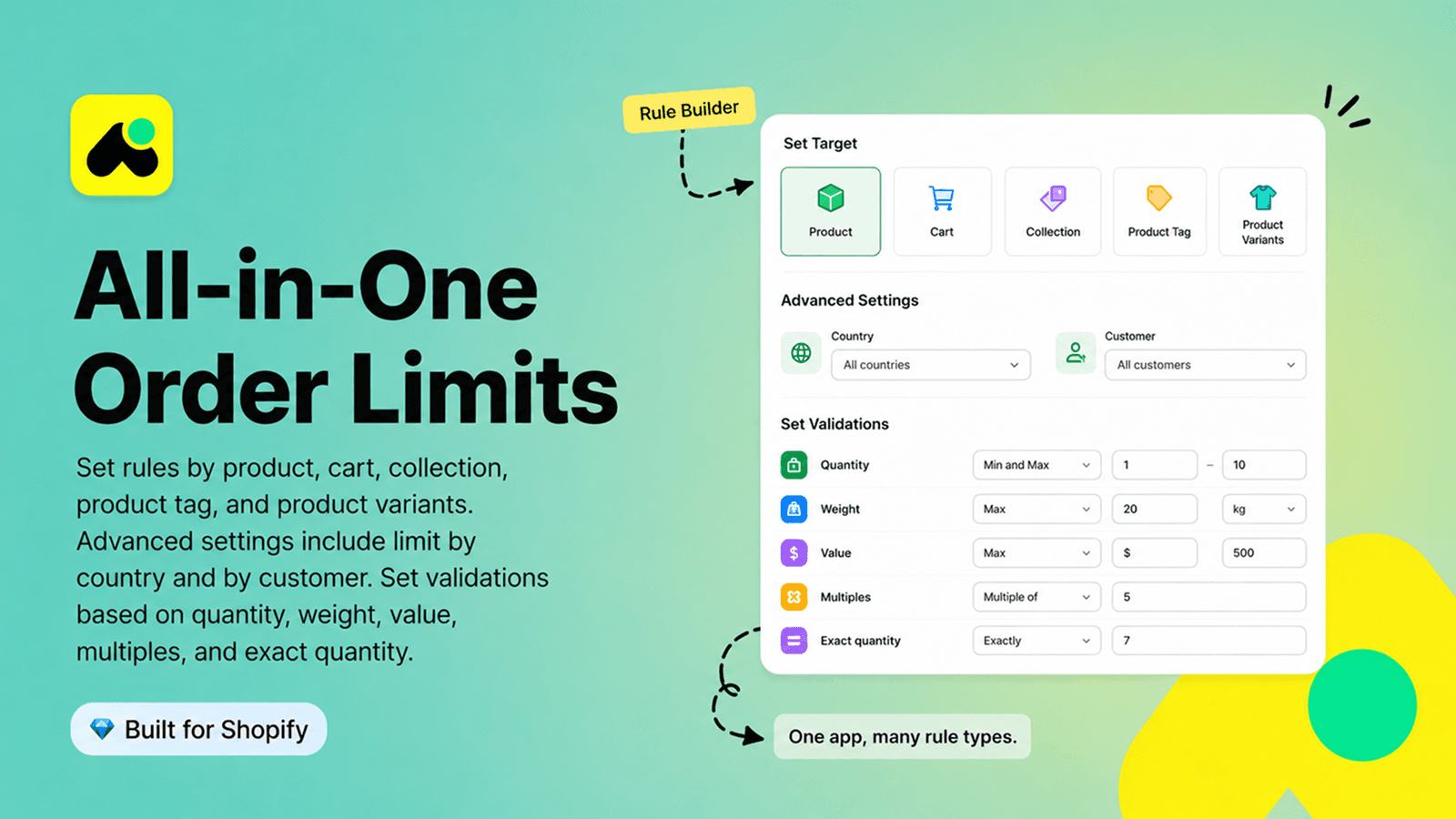
- Set limit order rules (MOQ) by product, variant, collection, tag, or cart
- Limit purchases once or every number of days, weeks, or months
- Auto-adjust maximum quantities while low stock
- Require exact quantities, multiples, value limits, or weight limits
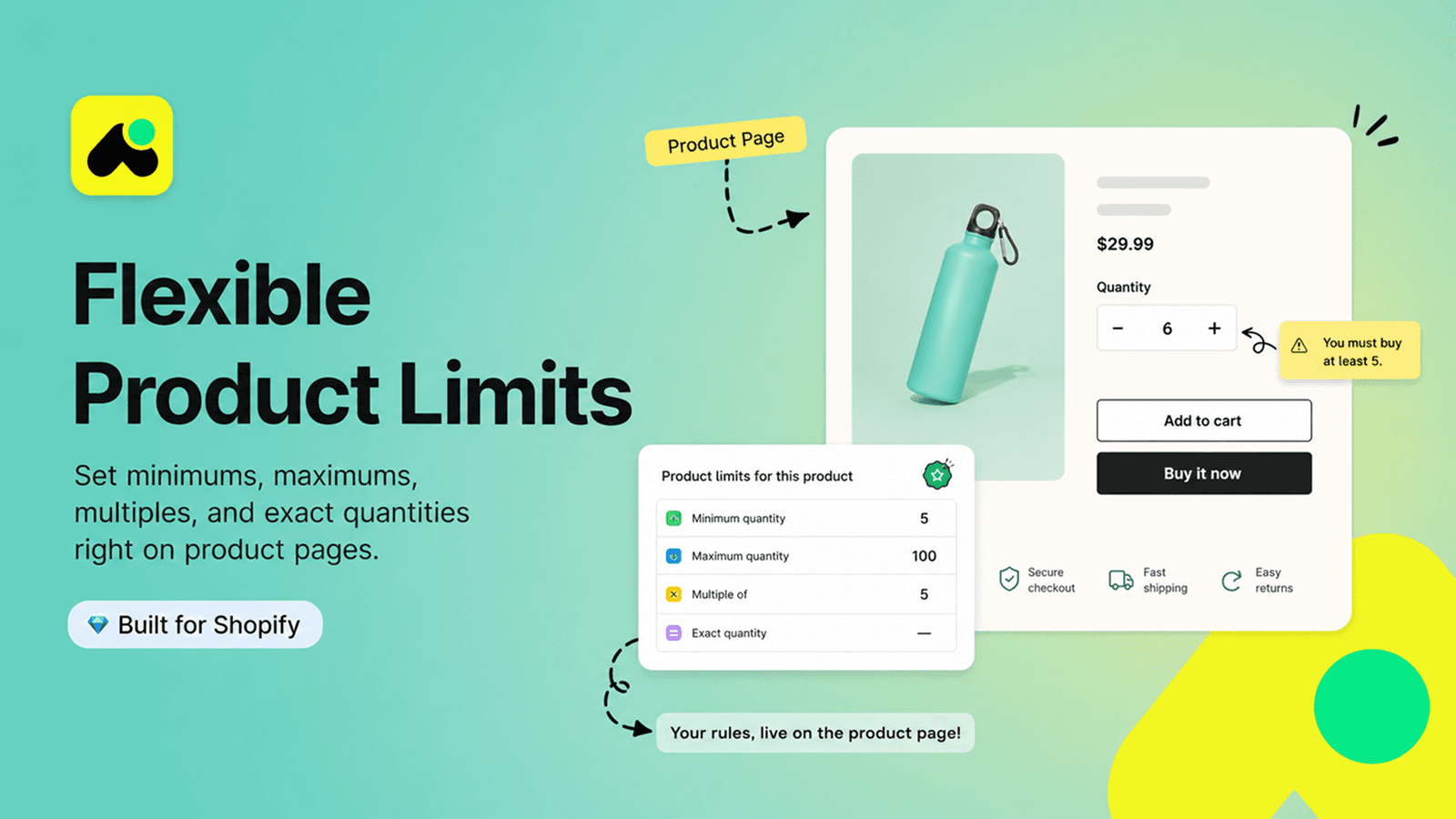
- Customize messages on product pages, cart page, and checkout button
Keywords
Key Features
- Set minimum and maximum order quantities for any product or variant.
- Restrict purchases to logged-in customers or specific user groups.
- Create custom checkout rules based on cart, collection, or product details.
Pricing
Madgic Order Limits Quantity Pricing Plans
Free
$0/month
Limited number of rules
All target options for limit purchase
Block purchase in all page
Customize message
Live Chat & Technical Support
Standard
$4.99/month
Unlimited number of rules
All target options for limit purchase
Block purchase in all page
Customize message
Live Chat 24/7 & Technical Support
Not sure which plan to pick? Discuss Free or Standard plans with us, learn about custom pricing, or get a demo.
Here's an overview of Madgic Order Limits Quantity costs for each of the plan(s):
The app has 2 pricing plans: 1 free and 1 paid. The free plan(s) offered by Madgic Order Limits Quantity: (Free). The paid plan(s) offered by Madgic Order Limits Quantity: (Standard).
The details of the plan(s) are outlined below:
Free: This plan is free forever, incurring no subscription costs. It offers a wide range of features like Limited number of rules, All target options for limit purchase, Block purchase in all page, Customize message, Live Chat & Technical Support.
Standard: The Standard plan costs $4.99 and comes with a 7-day free trial period. The plan offers a host of features, including Unlimited number of rules, All target options for limit purchase, Block purchase in all page, Customize message, Live Chat 24/7 & Technical Support.
Madgic Order Limits Quantity Price Summary
| Pricing summary | Free plan available. Free trial available. |
| Total Pricing Plan(s) | 2 |
| Number of free plan(s) | 1 |
| Number of paid plan(s) | 1 |
| Cost of Paid Plan(s) | $4.99 |
| Free trial available | Yes, for 7 day(s) |
Madgic Order Limits Quantity Shopify App Discounts
If you are looking for discounts on Madgic Order Limits Quantity app pricing plans, feel free to contact our team - we'd be happy to help! Additionally, if you are an agency or a shop merchant with multiple Shopify stores, we can work directly with Madgic to secure better deals on the Madgic Order Limits Quantity app exclusively for you.
*Disclaimer: Please note that ShopDigest doesn't guarantee discounts on apps as any changes to the pricing plans are ultimately up to the discretion of the developer.
Testimonials
What our users say about Madgic Order Limits Quantity
“Ryan helped me out by making a custom rule to help with order minimums! Thank you so much.”
“The app works great for minimum and maximum quantity rules for our SKUs. Set up was easy and support was very prompt: Ryan was great and helped in setting up the offer. ”
“Buen servicio y claridad en la respuesta. El problema es que no tienen operación con el POS de Shopify y eso nos limita mucho.”
Trusted By
Trusted by the best Shopify stores
Trop Flavor Company
United States
Influxious Inc
United States
Tienda Dipak-Upak
Mexico
Karbon2
Canada
1 Of A Kind Designs
United States
Sora Fashion Jewelry
India
ScatterMats Rugs & Runners
Australia
PAPEL&CA
Portugal
Comparison
Top Madgic Order Limits Quantity Alternatives Detailed Comparison
The table below highlights the crucial differences between Madgic Order Limits Quantity and similar other Shopify apps based on parameters like ratings, reviews, features, pricing, etc.
Add App | |||
|---|---|---|---|
| General Information | |||
| Ratings | 4.9(174 reviews) | 5.0(274 reviews) | |
| Developed by | Madgic | Avada | |
| Launch Date | 8/9/2024 | 6/27/2024 | |
| Pricing | Free, $4.99/month | Free, $9.99/month, $19.99/month, $24.99/month | |
| Objective | Set minimum order quantity and order limits to protect stock | - | |
| Categories | Order limits, Wholesale | Order limits, Wholesale | |
| Key Features & Highlights | |||
| Purpose | Control order limits to protect stock, prevent bulk buying, and guide customers before checkout | Stop resellers and stockouts with order limits, minimum order quantity, and quantity rules. | |
| Features List |
|
| |
| Highlights | - |
| |
| User Reviews and Ratings | |||
| Recommended % | 97.7% | 99.6% | |
| Pros |
|
| |
| Cons |
|
| |
| Pricing and Plans | |||
| Total Pricing Plans | 2 | 4 | |
| Free Plan | Available | Available | |
| Free Trial | Yes, for 7 day(s) | Yes, for 7 day(s) | |
| Technical Information | |||
| Rating | 4.9 | 5.0 | |
| Total Reviews | 177 | 275 | |
| Launch Date | 8/9/2024 | 6/27/2024 | |
| SD Points | 108 | 215 | |
More Details About Madgic Order Limits Quantity
Product Description
Madgic Order Limits Quantity helps you set minimum order quantity (MOQ), maximum quantity, cart limit value, weight, multiples, and exact quantity rules for products, variants, collections,... for B2B stores. Customize messages on product pages, cart page, checkout button, then strictly validate orders at checkout. Allow each customer to buy once in a lifetime or every days, weeks, or months, prevent selected products from being bought together, and automatically adjust limits as inventory
AI Summary
This Shopify app enables merchants to set minimum or maximum order quantity limits for products or collections, helping prevent overselling and manage inventory effectively. It offers customization options, allowing rules to target specific products or collections, with messages displayed on product pages, carts, or checkout. The app is praised for its ease of setup, user-friendly interface, and flexibility in applying rules through filters. A notable strength is its responsive and helpful customer support, which assists in troubleshooting and optimizing configurations. However, some limitations include occasional delays in rule updates for product variants, requiring manual page refreshes, and inconsistent functionality in cart pages for certain users. While the app is free and generally reliable, a few instances of rule-saving failures or incomplete feature delivery have been reported. Overall, it provides a practical solution for inventory control, though minor technical refinements could enhance consistency.
Support
For any questions, concerns, or assistance with Madgic Order Limits Quantity, the dedicated support team is readily available to help.To reach out to the support team, users can send an email to [email protected].
Madgic Order Limits Quantity Support Information In A Nutshell:
| Support Email: | [email protected] |
| Contact Number(s): | Not available |
| FAQ Page: | Not available |
| Privacy Policy: | Privacy details |
| Language Support: | English |
Integration
The list of top Shopify apps or features or software tools that Madgic Order Limits Quantity seamlessly integrates are given below:
Developer
Looking to install Madgic Order Limits Quantity app on your store?
ShopDigest helps businesses upgrade their Shopify stores by offering easy app installation services.
Why Choose ShopDigest?
- Highly experienced and vetted team for successful app installation
- Assured support and guidance throughout the installation and beyond
- Customized services to meet unique business needs
- 30-day no questions asked refund policy
- Lowest pricing guaranteed (starts at just $10/hour)
Madgic Order Limits Quantity Q&A
How does this app help manage order limits?
It lets you set custom rules for min/max order quantities, cart limits, or product-specific restrictions, ensuring customers meet your sales conditions before checkout.
Can I restrict products to logged-in users?
Yes, you can limit product availability to registered customers only, helping you create exclusive offers or membership-based purchasing rules.
Does it support variant-specific quantity limits?
Absolutely, you can set different min/max purchase rules for product variants, giving you granular control over inventory and sales strategies.
What happens if a customer violates order rules?
Custom error messages pop up during checkout or on product pages, clearly explaining restrictions like minimum quantities or purchase limits.
Can I apply limits to entire collections?
Yes, rules can target collections, carts, or individual products, allowing bulk restrictions or promotions across grouped items.
Is there support for troubleshooting setup issues?
Free customer support assists with customizing rules or fixing configuration errors, ensuring smooth implementation for your store.
Does it work with subscription-based products?
Yes, you can limit purchases to subscribers only, ideal for memberships or loyalty-program exclusives.
Can I set different limits for different customers?
Rules can be tailored to customer groups, like wholesale vs. retail buyers, enabling tiered purchasing policies.
How does it prevent overselling limited stock?
By enforcing max order quantities per product or variant, you avoid stockouts and allocate inventory fairly.
Are checkout alerts customizable?
Yes, you can design pop-ups or alerts with tailored messaging when customers don’t meet order requirements.
Customer Reviews
Madgic Order Limits Quantity has an overall rating of 4.9 stars from a total of 177 reviews on the Shopify app store. Of these, 173 (97.7%) are positive, 1 (0.6%) are neutral, and 3 (1.7%) are negative*.
*Ratings above four stars fall under positive review, three stars reviews fall under neutral, and anything less than two stars falls under negative.
Ryan helped me out by making a custom rule to help with order minimums! Thank you so much.
The app works great for minimum and maximum quantity rules for our SKUs. Set up was easy and support was very prompt: Ryan was great and helped in setting up the offer.
Buen servicio y claridad en la respuesta. El problema es que no tienen operación con el POS de Shopify y eso nos limita mucho.
The support team is so helpful and the app is easy to use.
This app works great for what I am using it for (Minimum order quantities) And when I reached out for help, Ryan was very quick and responsive.
Video Demo and Screenshots
Product Screenshots
Installation Steps
How to install Madgic Order Limits Quantity on your Shopify store
Find your app
Use filters like pricing, availability, and features to find the perfect match for your store's needs.
Get a personalized setup plan
Our team will create an installation plan based on your current store setup, goals, and requirements.
Install at your own pace
Perfect your store's functionality without the pressure to move on until you're ready.
Install in your Shopify Store
Madgic Order Limits Quantity FAQ's
How do I install the Madgic Order Limits Quantity Shopify app?
To install Madgic Order Limits Quantity app on your Shopify store, click on the Madgic Order Limits Quantity installation link. Login to the Shopify store on which you want to install the app and follow the onboarding process.
If you need our expert guidance to help you install Madgic Order Limits Quantity on your Shopify store, then contact us now.
What are the key features of Madgic Order Limits Quantity?
The key features offered by Madgic Order Limits Quantity to Shopify store owners are:
- ✅Set limit order rules (MOQ) by product, variant, collection, tag, or cart
- ✅Limit purchases once or every number of days, weeks, or months
- ✅Auto-adjust maximum quantities while low stock
- ✅Require exact quantities, multiples, value limits, or weight limits
- ✅Customize messages on product pages, cart page, and checkout button
Does Madgic Order Limits Quantity integrate with other Shopify apps or tools?
Madgic Order Limits Quantity has not made any official mention of integrating with other Shopify apps or tools. To obtain further information, kindly reach out to their support team or consult your Shopify developer.
Is there a free trial available for Madgic Order Limits Quantity?
Yes, Madgic Order Limits Quantity offers 7 days free trial on all its paid plans.
What are the pricing plans for Madgic Order Limits Quantity?
The app has 2 pricing plans: 1 free and 1 paid. The paid plan costs $4.99/month, and comes with a 7-day free trial period.
How does billing work for Madgic Order Limits Quantity?
Madgic Order Limits Quantity uses USD for billing, with recurring and usage-based charges invoiced usually every 30 days.
Can I cancel or upgrade my subscription plan at any time?
Yes, Madgic Order Limits Quantity allows its subscribers to cancel or upgrade their subscription plan at any time.
Does Madgic Order Limits Quantity offer customer support? How can I get assistance?
Yes, Madgic Order Limits Quantity offers a dedicated support team for any kind of app-related assistance. To reach out to the support team, users can send an email to [email protected].
Is Madgic Order Limits Quantity compatible with my Shopify theme?
Please reach out to their support team at [email protected] to confirm its compatibility with your specific Shopify theme.
Alternatives
See all Alternatives to Madgic Order Limits Quantity Shopify App.






Most Popular
Most popular Shopify apps on the market




