
DataChamp Excel & CSV Export Shopify App
by KickdataEasy to customize CSV/Excel exports. Send orders, products, and more to FTP, Dropbox, Email, or Google.
4.9
(84)
STORE STORE, Netherlands
Great app, super helpful support. Only tool that worked for us to filter and export all our orders with Variant Metafield Definitions, which we were not able to with default Shopify.
Install in your Shopify Store

DataChamp Excel & CSV Export Charts
Track DataChamp Excel & CSV Export's ranking, reviews, and performance over time with interactive charts. See how it compares to similar apps in the same category.
Pros and Cons
Pros and Cons of DataChamp Excel & CSV Export
Pros
Exceptional Customer Support: Rapid, expert assistance with customization and issue resolution, often exceeding expectations.
High Customization Capabilities: Extensive flexibility in data exports, including complex and unique business requirements.
User-Friendly Interface: Intuitive setup and navigation, making advanced data export tasks accessible.
Reliable Performance: Consistent functionality for automating and scheduling data exports without errors.
Cons
Server Errors: Occasional technical issues disrupt functionality, particularly in urgent scenarios.
Screenshots
About the App
Send orders, products, and more to FTP, Dropbox, Email, or Google.
- Intuitive Report Editor: The easy-to-use report editor helps you find data and create custom layouts.
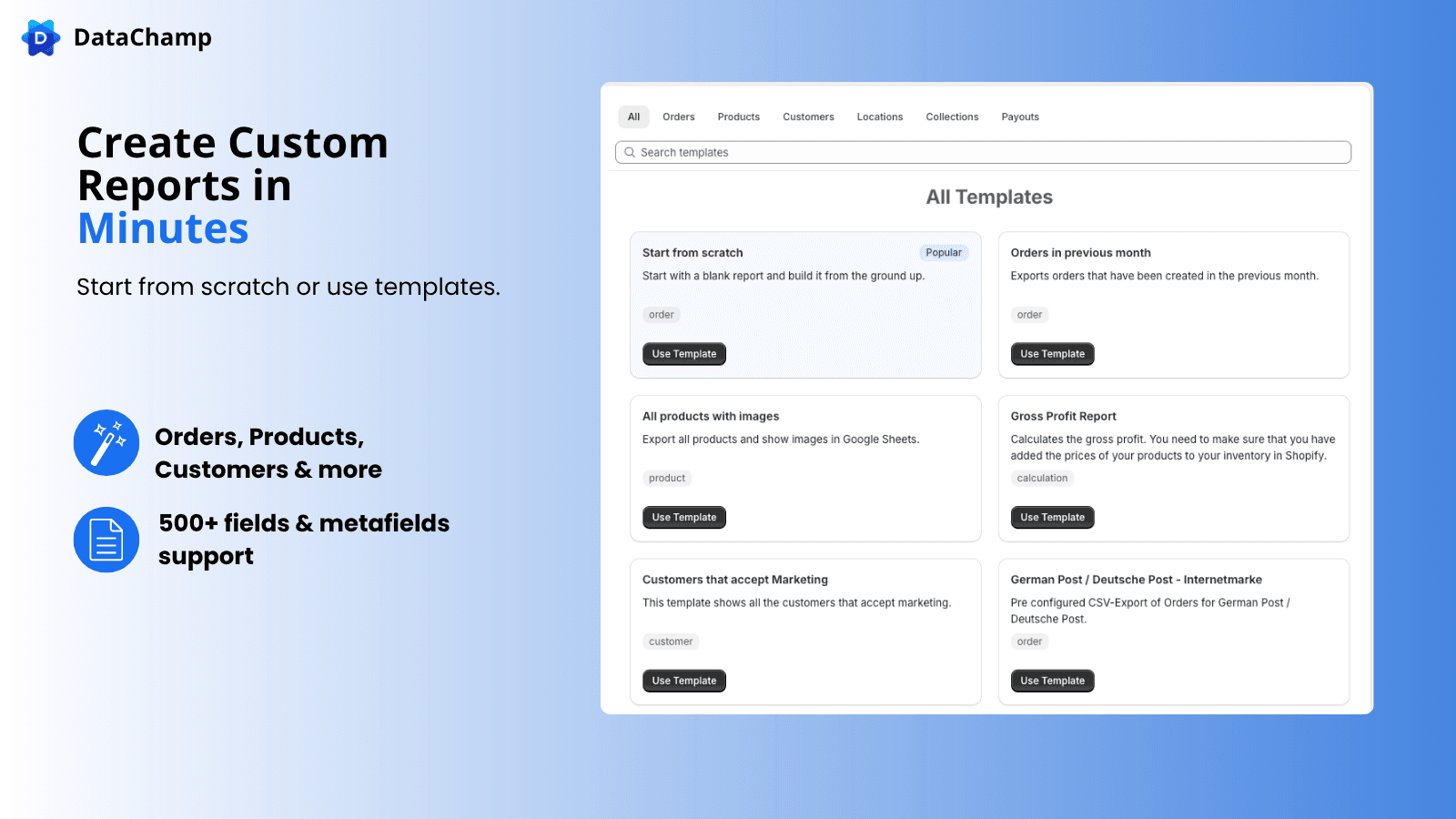
- Customizable templates: Lots of customizable templates to choose from.
- Cloud Scheduling: Schedule and save to locations such as Google, FTP, email, Dropbox.
- Metafield Support: We fully support metafields and line item properties.
- Encoding Types: Options for encoding: UTF-8, BOM UTF-8, ASCII, Win-1252, ISO-8859, Shift JIS.
Keywords
Key Features
- Export orders, products, customers, and metafields in CSV/Excel formats.
- Customize reports by selecting from 500+ available fields.
- Automate scheduled exports to Google Drive, FTP, Email, or Dropbox.
Pricing
DataChamp Excel & CSV Export Pricing Plans
Free
$0/month
Up to 100 Items per Export
Up to 3 Reports
Export to Dropbox, FTP, and more
Format: Excel, CSV, and more
Export Orders, Products, and more
Basic
$15/month
All from Free
Up to 1.000 lines per Export
Unlimited Reports
Unlimited schedulers
Incremental export
Professional
$49/month
All from "Basic"
Up to 10.000 lines per Export
Enterprise
$99/month
All from "Professional"
Unlimited Rows
Premium Priority Support
Custom feature development
Not sure which plan to pick? Discuss Free or Basic plans with us, learn about custom pricing, or get a demo.
Here's an overview of DataChamp Excel & CSV Export costs for each of the plan(s):
The app has 4 pricing plans: 1 free and 3 paid. The free plan(s) offered by DataChamp Excel & CSV Export: (Free). The paid plan(s) offered by DataChamp Excel & CSV Export: (Basic, Professional, Enterprise).
The details of the plan(s) are outlined below:
Free: This plan is free forever, incurring no subscription costs. It offers a wide range of features like Up to 100 Items per Export, Up to 3 Reports, Export to Dropbox, FTP, and more, Format: Excel, CSV, and more, Export Orders, Products, and more, Custom Filters, Atributes & Metafields, Custom (calculated) fields, if … then .. mappings.
Basic: The Basic plan costs $15 and has no free trial period. The plan offers a host of features, including All from Free, Up to 1.000 lines per Export, Unlimited Reports, Unlimited schedulers, Incremental export.
Professional: The Professional plan costs $49 and has no free trial period. The plan offers a host of features, including All from "Basic", Up to 10.000 lines per Export.
Enterprise: The Enterprise plan costs $99 and has no free trial period. The plan offers a host of features, including All from "Professional", Unlimited Rows, Premium Priority Support, Custom feature development.
DataChamp Excel & CSV Export Price Summary
| Pricing summary | Free plan available |
| Total Pricing Plan(s) | 4 |
| Number of free plan(s) | 1 |
| Number of paid plan(s) | 3 |
| Cost of Paid Plan(s) | $15, $49, $99 |
| Free trial available | No |
For further information regarding DataChamp Excel & CSV Export app pricing plans, see the official website.
DataChamp Excel & CSV Export Shopify App Discounts
If you are looking for discounts on DataChamp Excel & CSV Export app pricing plans, feel free to contact our team - we'd be happy to help! Additionally, if you are an agency or a shop merchant with multiple Shopify stores, we can work directly with Kickdata to secure better deals on the DataChamp Excel & CSV Export app exclusively for you.
*Disclaimer: Please note that ShopDigest doesn't guarantee discounts on apps as any changes to the pricing plans are ultimately up to the discretion of the developer.
Testimonials
What our users say about DataChamp Excel & CSV Export
“Great app, super helpful support. Only tool that worked for us to filter and export all our orders with Variant Metafield Definitions, which we were not able to with default Shopify. ”
“This app is a great help in setting up automation because it can export order data collected by other apps that does not appear in default Shopify exports. Not only does this app work well in doing what honestly should be a default Shopify export feature, its support team has been super helpful and instrumental in helping us get set up properly. This is a super powerful tool that actually works - we are grateful!”
“Preis-Leistung der App ist mega und der Support hilft innerhalb weniger Minuten mit custom solutions”
Trusted By
Trusted by the best Shopify stores
STORE STORE
Netherlands
Allison McClean Daughtry dba Ephemera Events Co
United States
ClipnShade GmbH
Germany
K Stars
United Kingdom
MAWI
Chile
Coogee Bikes
Australia
ぽぽねこ公式オンラインショップ
Japan
Aqua Assainissement
France
Easy to customize CSV/Excel exports.
Export with One Click
Interface is simple to use. You can export things like orders, products, customers, metafields, etc. to Google Sheets, Dropbox, FTP, or email them.
Personalizable
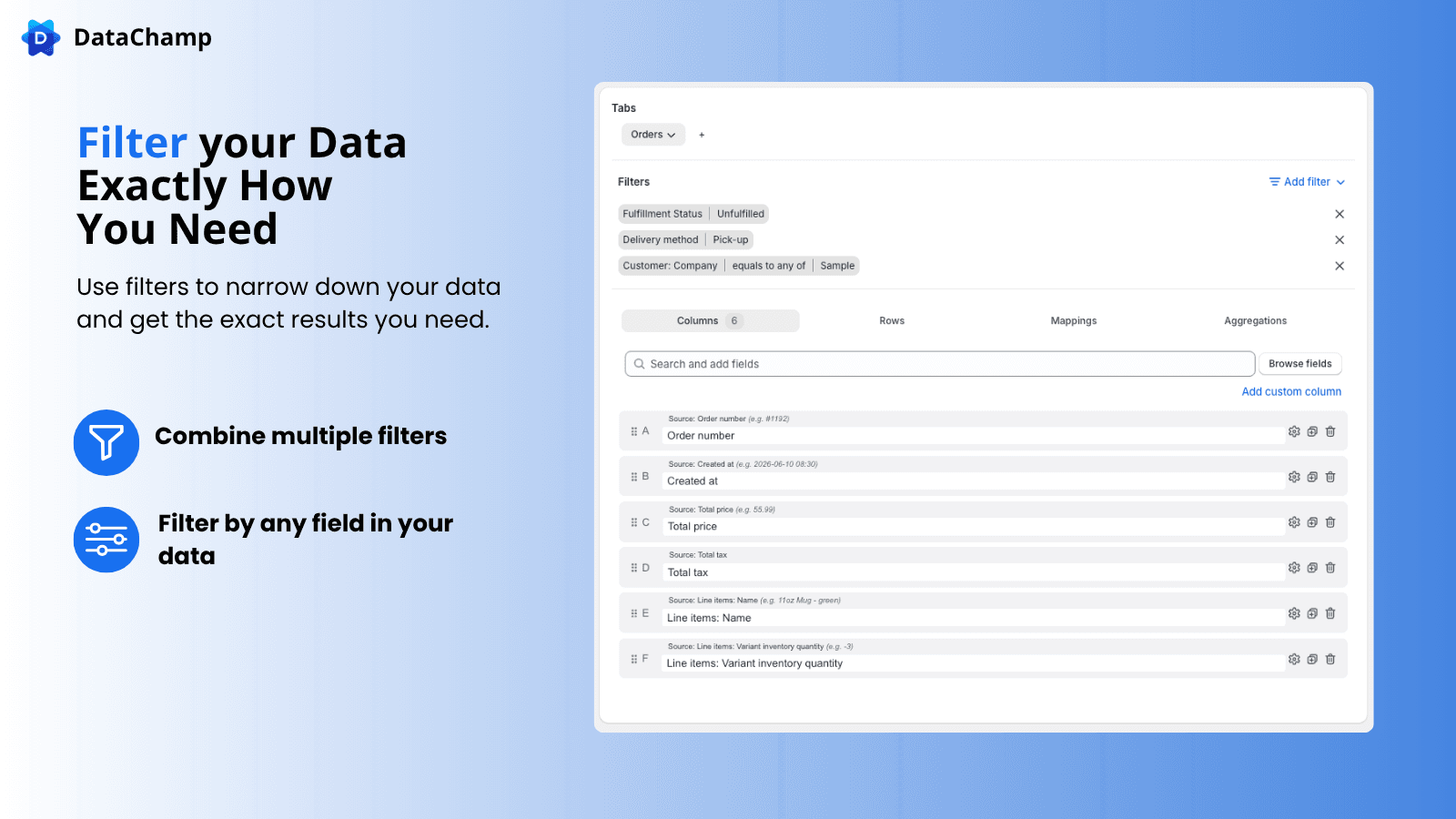
Select any field from Shopify. Customize your export according to your supplier, IT system, or team requirements. Use formulas, filters, and conditions.
Make automatic
The scheduler can automatically handle exports for you on a daily, hourly basis, or any other time interval. It can also deal with incremental and conditional exports.
Comparison
Top DataChamp Excel & CSV Export Alternatives Detailed Comparison
The table below highlights the crucial differences between DataChamp Excel & CSV Export and similar other Shopify apps based on parameters like ratings, reviews, features, pricing, etc.
Add App | |||
|---|---|---|---|
| General Information | |||
| Ratings | 4.9(84 reviews) | 4.8(58 reviews) | |
| Developed by | Kickdata | bookkeep.com Inc. | |
| Launch Date | 11/7/2019 | 9/5/2019 | |
| Pricing | Free, $15/month, $49/month, $99/month | $19/month, $49/month, $99/month, $199/month | |
| Objective | Send orders, products, and more to FTP, Dropbox, Email, or Google. | Automate your transactions to QuickBooks and stop manual entry. | |
| Categories | Accounting, ERP | Accounting, ERP | |
| Key Features & Highlights | |||
| Purpose | Easy to customize CSV/Excel exports. | Bookkeep connects with many sales channels and payment platforms to remove the need for manual data entry. | |
| Features List |
|
| |
| Highlights | - |
| |
| User Reviews and Ratings | |||
| Recommended % | 98.8% | 96.6% | |
| Pros |
|
| |
| Cons |
|
| |
| Pricing and Plans | |||
| Total Pricing Plans | 4 | 4 | |
| Free Plan | Available | Not available | |
| Free Trial | No | Yes, for 14 day(s) | |
| Technical Information | |||
| Rating | 4.9 | 4.8 | |
| Total Reviews | 84 | 49 | |
| Launch Date | 11/7/2019 | 9/5/2019 | |
| SD Points | 2 | 7 | |
More Details About DataChamp Excel & CSV Export
Product Description
DataChamp provides customizable data exports, allowing you to filter and format your data, including metafields and custom attributes, from Shopify according to your needs. Furthermore, it facilitates automated data sharing with stakeholders through Google Drive, FTP, Email, Dropbox, or secure in-app saving.
AI Summary
Datachamp is a powerful Shopify app designed for advanced data export and reporting, offering extensive customization for orders, inventory, fulfillment, and other complex datasets. It excels in flexibility, allowing tailored exports with custom columns, formulas, and mappings, including support for metafields and SAP integration. The app features a user-friendly interface, scheduled exports, and seamless integration with external systems like FTP servers and cloud storage. Its standout strength is the highly responsive and knowledgeable support team, which quickly addresses issues and implements custom features upon request. However, occasional server errors have been noted, potentially disrupting operations. The app is particularly valued for automating workflows, reducing manual errors, and saving time, making it a robust solution for businesses requiring precise and efficient data management. Pricing is considered fair, with a free tier available for lighter usage.
Support
For any questions, concerns, or assistance with DataChamp Excel & CSV Export, the dedicated support team is readily available to help.To reach out to the support team, users can send an email to [email protected]. Additionally, DataChamp Excel & CSV Export offers a comprehensive FAQ section to address common inquiries and provide self-help resources in their app FAQ section.
Language Support
Details of the DataChamp Excel & CSV Export app are available in various languages on the Shopify app store, including French, German, Spanish, and Japanese.
DataChamp Excel & CSV Export Support Information In A Nutshell:
| Support Email: | [email protected] |
| Contact Number(s): | Not available |
| FAQ Page: | FAQ details |
| Privacy Policy: | Privacy details |
| Language Support: | English, French, German, Spanish, and Japanese |
Integration
The list of top Shopify apps or features or software tools that DataChamp Excel & CSV Export seamlessly integrates are given below:
Developer
Looking to install DataChamp Excel & CSV Export app on your store?
ShopDigest helps businesses upgrade their Shopify stores by offering easy app installation services.
Why Choose ShopDigest?
- Highly experienced and vetted team for successful app installation
- Assured support and guidance throughout the installation and beyond
- Customized services to meet unique business needs
- 30-day no questions asked refund policy
- Lowest pricing guaranteed (starts at just $10/hour)
DataChamp Excel & CSV Export Q&A
What data can I export with this app?
You can export orders, products, customers, metafields, and more from Shopify, with 500+ customizable fields to tailor reports for accounting, ERP, or analysis.
How does automated scheduling work?
Schedule exports to run hourly, daily, or weekly, delivering files automatically to Google Drive, FTP, email, or Dropbox—ideal for syncing with external systems.
Can I filter or modify exported data?
Yes, apply advanced filters, custom calculations, and conditional mappings to refine exports, ensuring only relevant data is shared with vendors or teams.
Is metafield data supported in exports?
Absolutely. The app fully supports metafields and custom attributes, letting you include specialized Shopify data in reports for deeper insights.
Who benefits most from this app?
Stores needing automated, tailored data feeds for accounting, ERP integration, or fulfillment—saving time on manual exports and reducing errors.
What encoding options are available?
Choose from UTF-8, ASCII, Win-1252, and more to ensure compatibility with legacy systems or regional formatting requirements.
Can I export only new or updated orders?
Yes, incremental exports let you send just updated data, minimizing redundancy and keeping external systems in sync efficiently.
Are there pre-built report templates?
Yes, customizable templates simplify report creation, whether for tax summaries, inventory updates, or supplier-ready order lists.
How does pricing scale with business needs?
Plans range from 100 to 100,000 export lines/month, with advanced features like unlimited schedulers in higher tiers for growing businesses.
Can exports integrate with accounting software?
Yes, formatted exports sync seamlessly with tools like QuickBooks or Xero via scheduled deliveries to cloud storage or email.
Customer Reviews
DataChamp Excel & CSV Export has an overall rating of 5.0 stars from a total of 84 reviews on the Shopify app store. Of these, 83 (98.8%) are positive, 0 (0.0%) are neutral, and 1 (1.2%) are negative*.
*Ratings above four stars fall under positive review, three stars reviews fall under neutral, and anything less than two stars falls under negative.
Great app, super helpful support. Only tool that worked for us to filter and export all our orders with Variant Metafield Definitions, which we were not able to with default Shopify.
This app is a great help in setting up automation because it can export order data collected by other apps that does not appear in default Shopify exports. Not only does this app work well in doing what honestly should be a default Shopify export feature, its support team has been super helpful and instrumental in helping us get set up properly. This is a super powerful tool that actually works - we are grateful!
Preis-Leistung der App ist mega und der Support hilft innerhalb weniger Minuten mit custom solutions
incredibly quick customer service helped with my issue straight away, and made my data collection easy
Excelente aplicación, cumple con creces su objetivo y funciona de manera muy estable. El soporte también es destacado, especialmente el de Andreas, quien ha sido muy atento y resolutivo. ¡Felicitaciones al equipo!
Video Demo and Screenshots
Product Screenshots
Installation Steps
How to install DataChamp Excel & CSV Export on your Shopify store
Find your app
Use filters like pricing, availability, and features to find the perfect match for your store's needs.
Get a personalized setup plan
Our team will create an installation plan based on your current store setup, goals, and requirements.
Install at your own pace
Perfect your store's functionality without the pressure to move on until you're ready.
Install in your Shopify Store
DataChamp Excel & CSV Export FAQ's
How do I install the DataChamp Excel & CSV Export Shopify app?
To install DataChamp Excel & CSV Export app on your Shopify store, click on the DataChamp Excel & CSV Export installation link. Login to the Shopify store on which you want to install the app and follow the onboarding process.
If you need our expert guidance to help you install DataChamp Excel & CSV Export on your Shopify store, then contact us now.
What are the key features of DataChamp Excel & CSV Export?
The key features offered by DataChamp Excel & CSV Export to Shopify store owners are:
- ✅Export orders, products, customers & inventory to Excel or CSV in one click.
- ✅Scheduled exports delivered automatically via email, Sheets or FTP.
- ✅Works with Shopify Basic to Plus — handles stores with 100K+ orders.
- ✅Bulk export with variants, metafields & line item details.
- ✅Encoding options: UTF-8, BOM UTF-8, ASCII, Win-1252, ISO-8859, Shift JIS.
Does DataChamp Excel & CSV Export integrate with other Shopify apps or tools?
Yes, DataChamp Excel & CSV Export seamlessly integrates with other Shopify apps or tools, such as The easy-to-use report editor helps you find data and create custom layouts., Lots of customizable templates to choose from., Schedule and save to locations such as Google, FTP, email, Dropbox..
Is there a free trial available for DataChamp Excel & CSV Export?
No, DataChamp Excel & CSV Export does not offer any free trial.
What are the pricing plans for DataChamp Excel & CSV Export?
The app has 4 pricing plans: 1 free and 3 paid. The paid plans cost $15/month, $49/month, $99/month and have no free trial period.
How does billing work for DataChamp Excel & CSV Export?
DataChamp Excel & CSV Export uses USD for billing, with recurring and usage-based charges invoiced usually every 30 days.
Can I cancel or upgrade my subscription plan at any time?
Yes, DataChamp Excel & CSV Export allows its subscribers to cancel or upgrade their subscription plan at any time.
Does DataChamp Excel & CSV Export offer customer support? How can I get assistance?
Yes, DataChamp Excel & CSV Export offers a dedicated support team for any kind of app-related assistance. To reach out to the support team, users can send an email to [email protected].
Additionally, DataChamp Excel & CSV Export offers a comprehensive FAQ section to address common inquiries and provide self-help resources.
Is DataChamp Excel & CSV Export compatible with my Shopify theme?
Please reach out to their support team at [email protected] to confirm its compatibility with your specific Shopify theme.
Alternatives
See all Alternatives to DataChamp Excel & CSV Export Shopify App.






Most Popular
Most popular Shopify apps on the market




