
Jedi ‑ Stock Counter Shopify App
by Jedi AppsShow the "Stock Counter" widget on the products page to make the product seem more urgent.
4.8
(116)
SaafSoul, Pakistan
Mate this is class just use it for heavens sake and see a boost in sales
Install in your Shopify Store

Jedi ‑ Stock Counter Charts
Track Jedi ‑ Stock Counter's ranking, reviews, and performance over time with interactive charts. See how it compares to similar apps in the same category.
Pros and Cons
Pros and Cons of Jedi ‑ Stock Counter
Pros
Ease of Use: Intuitive interface and straightforward setup make the app accessible without requiring technical expertise.
Quick Installation: Fast and simple installation process allows users to get started with minimal effort.
Effective Core Functionality: Reliably displays stock levels and delivers on promised features without unnecessary complexity.
Free Version Offers Value: The free tier provides key features, making it accessible for users with limited budgets.
Cons
Limited Advanced Features: Some users express the need for additional features or find the free version basic for more complex requirements.
Display for Out-of-Stock Items: Instances where messaging remains visible for out-of-stock variants, leading to possible confusion or urgency where not appropriate.
Screenshots
About the App
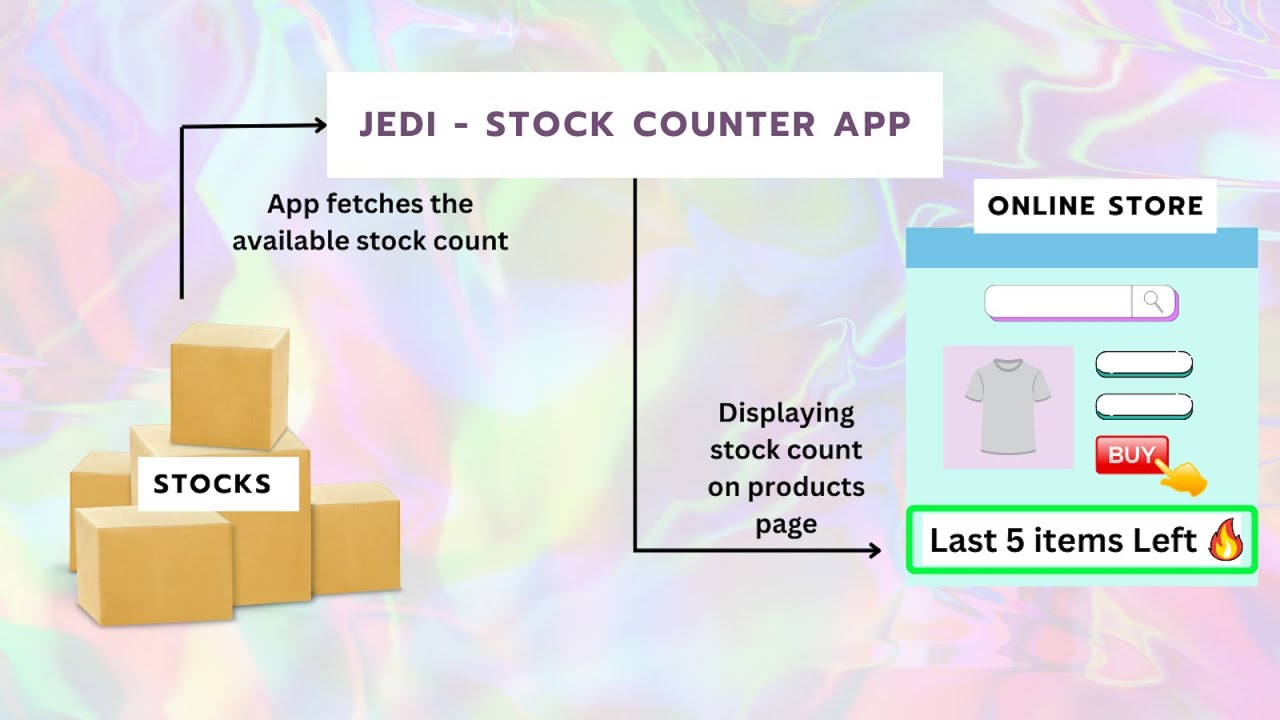
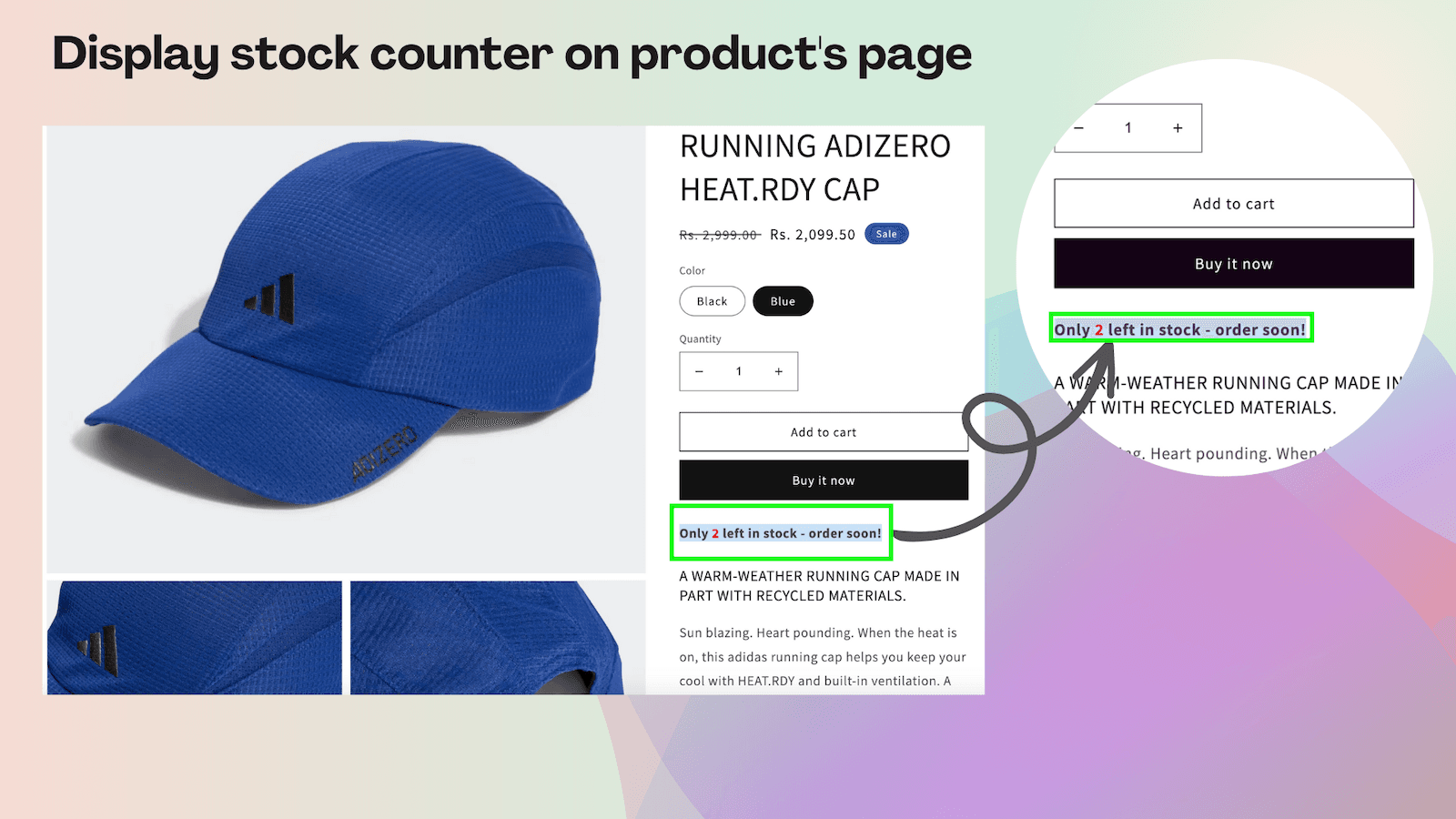
- Stock Management: Show the inventory count based on the amount of products or their variations.
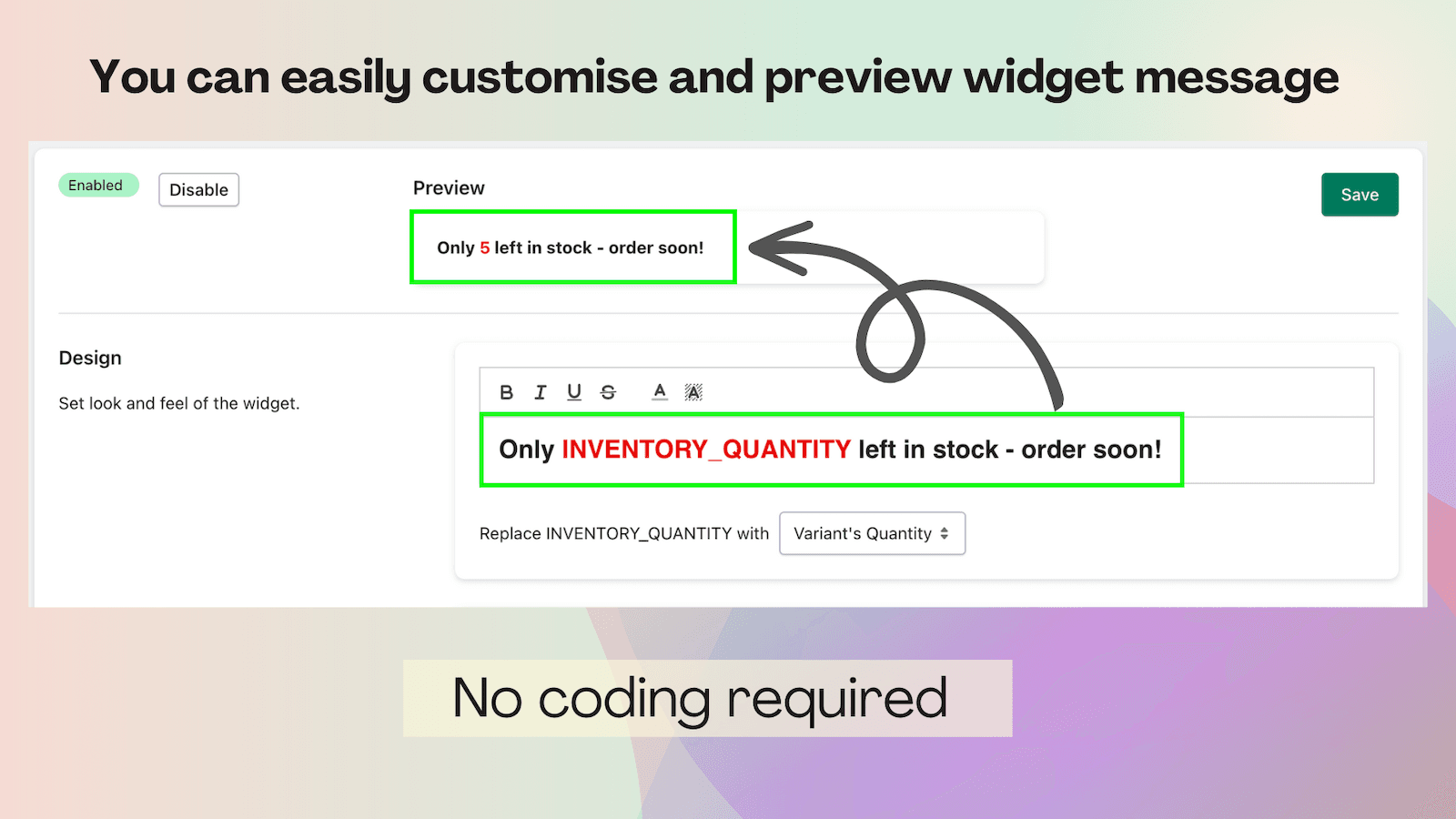
- "Configuring Stock Counter": Simply set the rule to show the stock counter widget.
- Inventory Widget: The stock count widget shows based on the maximum and minimum range of inventory quantity.
- Enable/disable stock counter: Conveniently turn the stock counter on or off whenever you want.
- User-friendly customization.: Simple to customize, quick to set up, and zero coding needed.
Keywords
Key Features
- Display real-time stock levels for products and their variations directly on product pages.
- Customize when and how the stock counter widget appears using flexible display rules.
- Show stock counters based on specific minimum and maximum inventory thresholds.
Pricing
Jedi ‑ Stock Counter Pricing Plans
Free
$0/month
Unlimited Widgets
Unlimited Impressions
Premium
$2.99/month
Unlimited Widgets
Unlimited impressions
Advance widget design
Advance widget display rules (Filters)
Not sure which plan to pick? Discuss Free or Premium plans with us, learn about custom pricing, or get a demo.
Here's an overview of Jedi ‑ Stock Counter costs for each of the plan(s):
The app has 2 pricing plans: 1 free and 1 paid. The free plan(s) offered by Jedi ‑ Stock Counter: (Free). The paid plan(s) offered by Jedi ‑ Stock Counter: (Premium).
The details of the plan(s) are outlined below:
Free: This plan is free forever, incurring no subscription costs. It offers a wide range of features like Unlimited Widgets, Unlimited Impressions.
Premium: The Premium plan costs $2.99 and comes with a 3-day free trial period. The plan offers a host of features, including Unlimited Widgets, Unlimited impressions, Advance widget design, Advance widget display rules (Filters).
Jedi ‑ Stock Counter Price Summary
| Pricing summary | Free plan available. Free trial available. |
| Total Pricing Plan(s) | 2 |
| Number of free plan(s) | 1 |
| Number of paid plan(s) | 1 |
| Cost of Paid Plan(s) | $2.99 |
| Free trial available | Yes, for 3 day(s) |
Jedi ‑ Stock Counter Shopify App Discounts
If you are looking for discounts on Jedi ‑ Stock Counter app pricing plans, feel free to contact our team - we'd be happy to help! Additionally, if you are an agency or a shop merchant with multiple Shopify stores, we can work directly with Jedi Apps to secure better deals on the Jedi ‑ Stock Counter app exclusively for you.
*Disclaimer: Please note that ShopDigest doesn't guarantee discounts on apps as any changes to the pricing plans are ultimately up to the discretion of the developer.
Testimonials
What our users say about Jedi ‑ Stock Counter
“Mate this is class just use it for heavens sake and see a boost in sales ”
“This is exactly what I was looking for. All I needed was a simple count of stock available for customers to view and this provides it perfectly.”
“It is really an easy app to work with plus i got what i have asking my developer to do and this app did the job in a minute.”
Trusted By
Trusted by the best Shopify stores
SaafSoul
Pakistan
Slay the Day Crafts
United States
Damati Foods
India
Dibleys
United Kingdom
MONADE
United Kingdom
Arrowhead Imports LLC
United States
Fetch and Cove
United Kingdom
Astronomy Haven
United States
Comparison
Top Jedi ‑ Stock Counter Alternatives Detailed Comparison
The table below highlights the crucial differences between Jedi ‑ Stock Counter and similar other Shopify apps based on parameters like ratings, reviews, features, pricing, etc.
Add App | |||
|---|---|---|---|
| General Information | |||
| Ratings | 4.8(82 reviews) | 4.8(97 reviews) | |
| Developed by | Jedi Apps | Xeon Apps | |
| Launch Date | 7/13/2023 | 3/28/2019 | |
| Pricing | Free, $2.99/month | Free, $2.99/month, $4.99/month, $9.99/month | |
| Objective | - | Get inventory alerts through email or Slack, with rules you can set yourself. | |
| Categories | Stock alerts, Inventory optimization | Inventory optimization, Stock alerts | |
| Key Features & Highlights | |||
| Purpose | Show the "Stock Counter" widget on the products page to make the product seem more urgent. | Set up automatic email or slack notifications for low stock of products or variants. | |
| Features List |
|
| |
| Highlights | - | - | |
| User Reviews and Ratings | |||
| Recommended % | 96.4% | 97.9% | |
| Pros |
|
| |
| Cons |
|
| |
| Pricing and Plans | |||
| Total Pricing Plans | 2 | 4 | |
| Free Plan | Available | Available | |
| Free Trial | Yes, for 3 day(s) | Yes, for 14 day(s) | |
| Technical Information | |||
| Rating | 4.8 | 4.8 | |
| Total Reviews | 116 | 78 | |
| Launch Date | 7/13/2023 | 3/28/2019 | |
| SD Points | 34 | 21 | |
More Details About Jedi ‑ Stock Counter
Product Description
The "Stock Counter" app shows live inventory counts on product pages to motivate customers to buy quickly. This not only boosts sales but also builds customers' trust and confidence in your online store.
AI Summary
This Shopify app provides a straightforward solution for displaying product stock levels directly on store pages, including variant-specific inventory counts. It features an intuitive interface that allows for rapid installation, seamless integration, and effortless setup, making it accessible to users with varying levels of technical experience. The free version covers essential stock counter functionality, supporting manual adjustment of inventory numbers and customization of display messaging and threshold settings. The app is designed to be mobile-friendly and presents a clean, simple display suitable for a wide range of store themes. Its value is enhanced for those with limited budgets or in need of a no-cost option. However, the app may display out-of-stock messages even when inventory is depleted, which could be seen as a limitation in certain merchandising strategies. Advanced features are available through a paid version. Overall, the app delivers effective and reliable stock visibility with minimal complexity, though customization options for out-of-stock scenarios may be limited.
Support
For any questions, concerns, or assistance with Jedi ‑ Stock Counter, the dedicated support team is readily available to help.To reach out to the support team, users can send an email to [email protected].
Jedi ‑ Stock Counter Support Information In A Nutshell:
| Support Email: | [email protected] |
| Contact Number(s): | Not available |
| FAQ Page: | Not available |
| Privacy Policy: | Privacy details |
| Language Support: | English |
Integration
The list of top Shopify apps or features or software tools that Jedi ‑ Stock Counter seamlessly integrates are given below:
Developer
Looking to install Jedi ‑ Stock Counter app on your store?
ShopDigest helps businesses upgrade their Shopify stores by offering easy app installation services.
Why Choose ShopDigest?
- Highly experienced and vetted team for successful app installation
- Assured support and guidance throughout the installation and beyond
- Customized services to meet unique business needs
- 30-day no questions asked refund policy
- Lowest pricing guaranteed (starts at just $10/hour)
Jedi ‑ Stock Counter Q&A
How does showing inventory levels boost my sales?
Displaying real-time inventory on product pages creates urgency for shoppers, encouraging them to complete purchases before items run out. This psychological trigger can significantly increase your conversion rates and reduce abandoned carts.
Can this app help me manage low stock situations?
Absolutely. The app provides alerts and notifications for low or out-of-stock items, allowing you to react quickly and keep your product offerings up-to-date, helping you avoid missed sales opportunities.
Is it easy to customize how the stock counter looks?
Yes, the app is designed with user-friendly customization in mind. You can quickly adjust the appearance and rules for showing the stock counter, all without any coding knowledge required.
What type of merchants benefit most from this app?
Online store owners using Shopify who want to boost sales through urgency and build customer trust will find this app valuable, especially those managing inventory in real-time or with fast-selling products.
Does the app work with product variants?
The app supports inventory tracking for both products and their variants. This means each variation's specific stock level can be displayed, giving shoppers clear, accurate information for their selection.
Will adding a stock counter make my store more trustworthy?
Showing authentic, real-time inventory counts signals transparency to shoppers, increasing their confidence in your store and reinforcing the credibility of your products.
How quickly can I set up the stock counter feature?
Setup is very straightforward and can be completed in minutes. There are simple configuration options, and everything is designed so you don’t need technical knowledge to get started.
Can I turn the stock counter on or off anytime?
Yes, you have full control to enable or disable the stock counter whenever you wish, providing flexibility to adapt to sales campaigns, inventory changes, or specific product strategies.
Are there different pricing options for different needs?
The app offers both a free plan with unlimited widgets and impressions, and a premium plan with advanced display rules and widget designs, so you can choose what best fits your store’s requirements.
Customer Reviews
Jedi ‑ Stock Counter has an overall rating of 4.9 stars from a total of 116 reviews on the Shopify app store. Of these, 115 (99.1%) are positive, 0 (0.0%) are neutral, and 1 (0.9%) are negative*.
*Ratings above four stars fall under positive review, three stars reviews fall under neutral, and anything less than two stars falls under negative.
Mate this is class just use it for heavens sake and see a boost in sales
This is exactly what I was looking for. All I needed was a simple count of stock available for customers to view and this provides it perfectly.
It is really an easy app to work with plus i got what i have asking my developer to do and this app did the job in a minute.
Had this running for over a year now. Very useful and works perfectly. Thank you!
Exactly what I needed — simple, clean, and effective!
Video Demo and Screenshots
Product Video
Product Screenshots
Installation Steps
How to install Jedi ‑ Stock Counter on your Shopify store
Find your app
Use filters like pricing, availability, and features to find the perfect match for your store's needs.
Get a personalized setup plan
Our team will create an installation plan based on your current store setup, goals, and requirements.
Install at your own pace
Perfect your store's functionality without the pressure to move on until you're ready.
Install in your Shopify Store
Jedi ‑ Stock Counter FAQ's
How do I install the Jedi ‑ Stock Counter Shopify app?
To install Jedi ‑ Stock Counter app on your Shopify store, click on the Jedi ‑ Stock Counter installation link. Login to the Shopify store on which you want to install the app and follow the onboarding process.
If you need our expert guidance to help you install Jedi ‑ Stock Counter on your Shopify store, then contact us now.
What are the key features of Jedi ‑ Stock Counter?
The key features offered by Jedi ‑ Stock Counter to Shopify store owners are:
- ✅Display the stock counter based on the quantity of the products or its variants.
- ✅Easily configure the rule for displaying the stock counter widget.
- ✅Stock count widget displays based on Max and Min inventory quantity range.
- ✅Easily enable or disable the stock counter at any time with convenience.
- ✅Works on store 2.0 only
Does Jedi ‑ Stock Counter integrate with other Shopify apps or tools?
Yes, Jedi ‑ Stock Counter seamlessly integrates with other Shopify apps or tools, such as Show the inventory count based on the amount of products or their variations., Simply set the rule to show the stock counter widget., The stock count widget shows based on the maximum and minimum range of inventory quantity..
Is there a free trial available for Jedi ‑ Stock Counter?
Yes, Jedi ‑ Stock Counter offers 3 days free trial on all its paid plans.
What are the pricing plans for Jedi ‑ Stock Counter?
The app has 2 pricing plans: 1 free and 1 paid. The paid plan costs $2.99/month, and comes with a 3-day free trial period.
How does billing work for Jedi ‑ Stock Counter?
Jedi ‑ Stock Counter uses USD for billing, with recurring and usage-based charges invoiced usually every 30 days.
Can I cancel or upgrade my subscription plan at any time?
Yes, Jedi ‑ Stock Counter allows its subscribers to cancel or upgrade their subscription plan at any time.
Does Jedi ‑ Stock Counter offer customer support? How can I get assistance?
Yes, Jedi ‑ Stock Counter offers a dedicated support team for any kind of app-related assistance. To reach out to the support team, users can send an email to [email protected].
Is Jedi ‑ Stock Counter compatible with my Shopify theme?
Please reach out to their support team at [email protected] to confirm its compatibility with your specific Shopify theme.
Alternatives
See all Alternatives to Jedi ‑ Stock Counter Shopify App.






Most Popular
Most popular Shopify apps on the market




