
Filey ‑ Files Backup & Export Shopify App
by INSO.codesEasily manage your store data by exporting files, images, and videos with just one click. Click once to export store files, product images, and videos.
4.8
(234)
EarBuddies, United Kingdom
Excellent - Alex & the Filey Support Team were very helpful.
Install in your Shopify Store

Filey ‑ Files Backup & Export Charts
Track Filey ‑ Files Backup & Export's ranking, reviews, and performance over time with interactive charts. See how it compares to similar apps in the same category.
Pros and Cons
Pros and Cons of Filey ‑ Files Backup & Export
Pros
Ease of Use: The app is consistently praised for its simplicity and one-click functionality.
Fast Performance: Users highlight the quick download speeds and efficient file handling.
Free Plan Value: The free version is frequently noted for offering unrestricted, useful features.
Bulk Download Capability: The ability to download all files in one go is a major highlight.
Cons
Incomplete Downloads: A few users report missing files during bulk downloads.
Limited File Type Support: Some note the app only backs up PDFs and images, excluding other formats.
Screenshots
About the App
Click once to export store files, product images, and videos.
- File Migration: Move your store files
- Brand Exportation: Send out your brand materials and papers.
- Product Media Export: Export images, videos, and 3D models of your products.
- Store file backup: Create a copy of your store files.
Keywords
Key Features
- Export all store files in one click as a zip archive.
- Transfer files to a new store without modifying themes.
- Backup product images, videos, and 3D models effortlessly.
Pricing
Filey ‑ Files Backup & Export Pricing Plans
Basic
$0/month
Export all Content → Files as ZIP
Store content dashboard
Pro
$4.99/month
Export & import store content
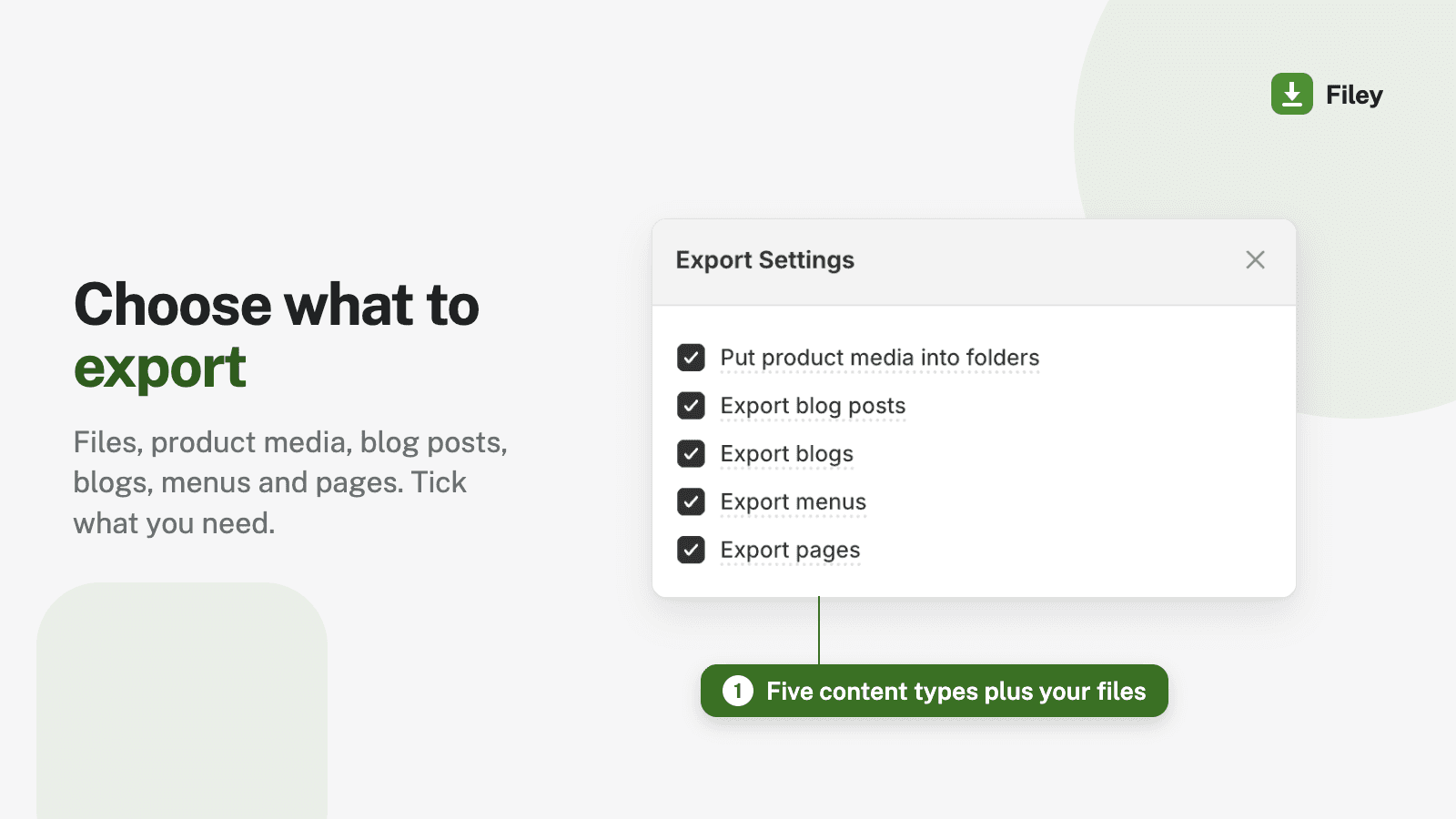
Files, product media, blogs & pages
Auto-match product media on import
Replace or keep existing content
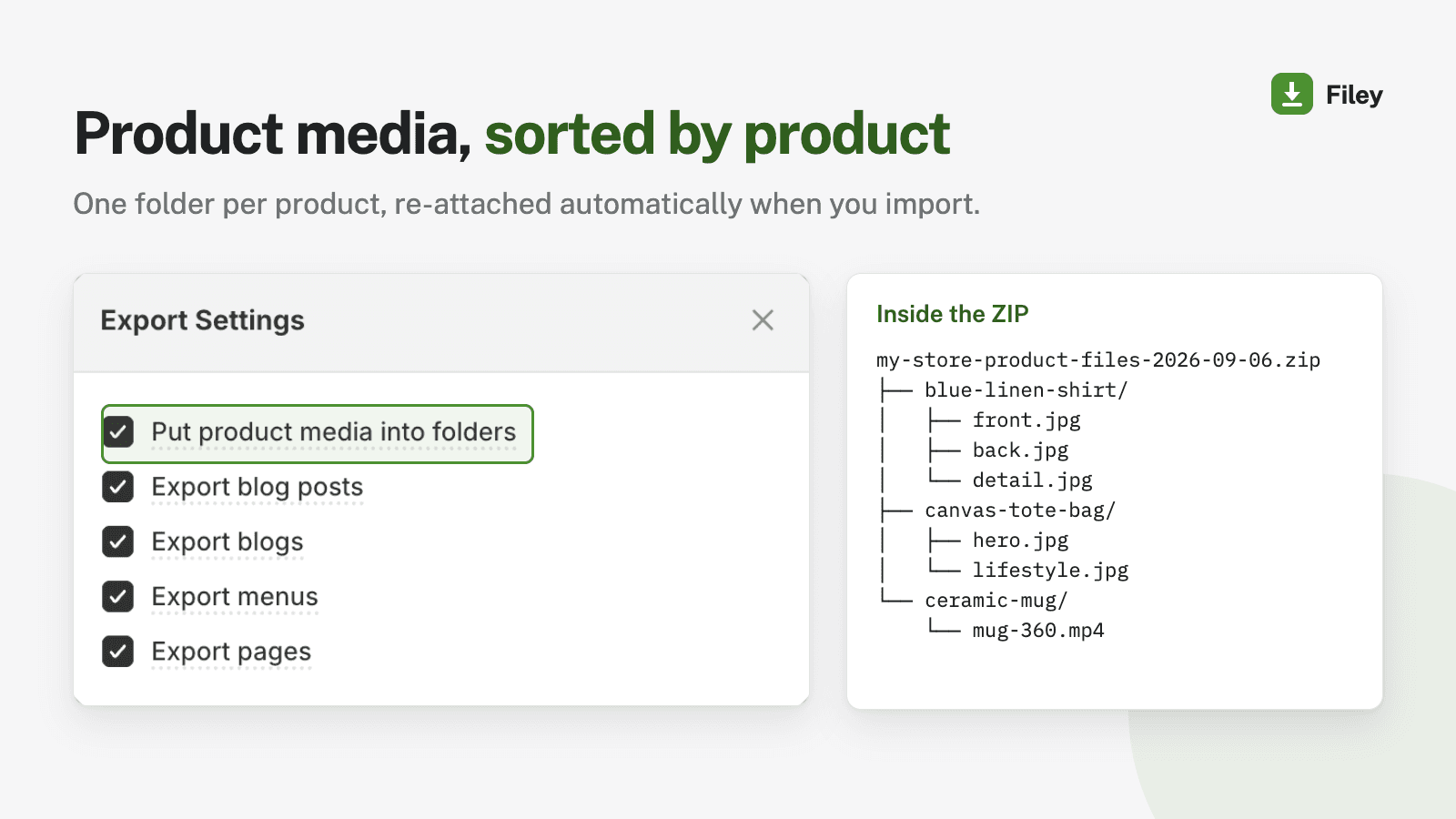
Product media sorted into folders
Not sure which plan to pick? Discuss Basic or Pro plans with us, learn about custom pricing, or get a demo.
Here's an overview of Filey ‑ Files Backup & Export costs for each of the plan(s):
The app has 2 pricing plans: 1 free and 1 paid. The free plan(s) offered by Filey ‑ Files Backup & Export: (Basic). The paid plan(s) offered by Filey ‑ Files Backup & Export: (Pro).
The details of the plan(s) are outlined below:
Basic: This plan is free forever, incurring no subscription costs. It offers a wide range of features like Export all Content → Files as ZIP, Store content dashboard.
Pro: The Pro plan costs $4.99 and has no free trial period. The plan offers a host of features, including Export & import store content, Files, product media, blogs & pages, Auto-match product media on import, Replace or keep existing content, Product media sorted into folders.
Filey ‑ Files Backup & Export Price Summary
| Pricing summary | Free plan available |
| Total Pricing Plan(s) | 2 |
| Number of free plan(s) | 1 |
| Number of paid plan(s) | 1 |
| Cost of Paid Plan(s) | $4.99 |
| Free trial available | No |
Filey ‑ Files Backup & Export Shopify App Discounts
If you are looking for discounts on Filey ‑ Files Backup & Export app pricing plans, feel free to contact our team - we'd be happy to help! Additionally, if you are an agency or a shop merchant with multiple Shopify stores, we can work directly with INSO.codes to secure better deals on the Filey ‑ Files Backup & Export app exclusively for you.
*Disclaimer: Please note that ShopDigest doesn't guarantee discounts on apps as any changes to the pricing plans are ultimately up to the discretion of the developer.
Testimonials
What our users say about Filey ‑ Files Backup & Export
“Excellent - Alex & the Filey Support Team were very helpful.”
“You literally saved me hours of my life. wow. Thank you!”
“App does exactly what you want it to! Download all your files with ease”
Trusted By
Trusted by the best Shopify stores
EarBuddies
United Kingdom
BuyYourFriendsArt
United States
Familytree
United States
Organica Candle Company
United States
Earthquip
New Zealand
Venge Fitness
United States
Kabayare
United States
ASC
United States
Easily manage your store data by exporting files, images, and videos with just one click.
No setup
Download all your Shopify files with one click.
Quick, dependable and secure
We don't keep any data about your files. Shopify servers handle all operations.
Simple theme change
The app retains all file names, enabling you to move your files to a new store without having to reset your theme.
Comparison
Top Filey ‑ Files Backup & Export Alternatives Detailed Comparison
The table below highlights the crucial differences between Filey ‑ Files Backup & Export and similar other Shopify apps based on parameters like ratings, reviews, features, pricing, etc.
Add App | |||
|---|---|---|---|
| General Information | |||
| Ratings | 4.8(229 reviews) | 4.1(2,115 reviews) | |
| Developed by | INSO.codes | Shopify | |
| Launch Date | 6/14/2022 | 9/19/2017 | |
| Pricing | Free, $4.99/month | Free | |
| Objective | Click once to export store files, product images, and videos. | A single app for top-selling platforms worldwide. | |
| Categories | Store data importer, Content - Other | Marketplaces, Store data importer | |
| Key Features & Highlights | |||
| Purpose | Easily manage your store data by exporting files, images, and videos with just one click. | Sell on the largest marketplaces. Handle and complete all orders within Shopify. | |
| Features List |
|
| |
| Highlights | - | - | |
| User Reviews and Ratings | |||
| Recommended % | 97.4% | 81.7% | |
| Pros |
|
| |
| Cons |
|
| |
| Pricing and Plans | |||
| Total Pricing Plans | 2 | 1 | |
| Free Plan | Available | Available | |
| Free Trial | No | No | |
| Technical Information | |||
| Rating | 4.8 | 4.1 | |
| Total Reviews | 234 | 2,123 | |
| Launch Date | 6/14/2022 | 9/19/2017 | |
| SD Points | 76 | 1113 | |
More Details About Filey ‑ Files Backup & Export
Product Description
Filey allows you to download all your Shopify store data stored in the "Settings -> Files" section in one click. It compiles all files into a zip archive which can be uploaded directly to a new store without any modifications needed to your theme.
AI Summary
The app provides a simple, efficient solution for bulk downloading files from Shopify stores, addressing a notable gap in Shopify's native functionality. Its primary feature enables users to export all store files—including product images and media—into downloadable zip files with minimal effort, often requiring just a single click. The app is fast, reliable, and offers a free plan with unrestricted access to core features, making it accessible for users of all sizes. Strengths include its ease of use, speed, and seamless integration without complex configuration. However, some limitations exist, such as occasional incomplete downloads for large file sets and the lack of file renaming or metadata retention (e.g., product titles). While the app excels at bulk exports, it does not support selective file downloads or non-media content like product descriptions or blog posts. A few instances mention technical issues, such as download errors or frozen processes, though these appear infrequent. Overall, the app delivers a highly valued, no-frills solution for file backups and bulk downloads, particularly praised for its simplicity and cost-free accessibility.
Support
For any questions, concerns, or assistance with Filey ‑ Files Backup & Export, the dedicated support team is readily available to help.To reach out to the support team, users can send an email to [email protected]. Additionally, Filey ‑ Files Backup & Export offers a comprehensive FAQ section to address common inquiries and provide self-help resources in their app FAQ section.
Filey ‑ Files Backup & Export Support Information In A Nutshell:
| Support Email: | [email protected] |
| Contact Number(s): | Not available |
| FAQ Page: | FAQ details |
| Privacy Policy: | Privacy details |
| Language Support: | English |
Integration
The list of top Shopify apps or features or software tools that Filey ‑ Files Backup & Export seamlessly integrates are given below:
Developer
Looking to install Filey ‑ Files Backup & Export app on your store?
ShopDigest helps businesses upgrade their Shopify stores by offering easy app installation services.
Why Choose ShopDigest?
- Highly experienced and vetted team for successful app installation
- Assured support and guidance throughout the installation and beyond
- Customized services to meet unique business needs
- 30-day no questions asked refund policy
- Lowest pricing guaranteed (starts at just $10/hour)
Filey ‑ Files Backup & Export Q&A
How does this app simplify file management?
It lets you export all store files (images, videos, etc.) in one click as a zip archive, making backups, migrations, or transfers effortless without manual downloads.
Can I transfer files to a new store?
Yes, the app preserves original filenames in a zip, so you can seamlessly upload them to a new store without theme reconfiguration.
Is my data secure during exports?
Absolutely. The app doesn’t store your files; all operations are processed directly through Shopify’s servers for reliability and safety.
Does it support bulk imports and exports?
Yes, you can bulk export or import files, including product media like images and videos, saving time during store setup or migration.
What’s the difference between free and paid plans?
The free plan allows file downloads, while the paid plan adds uploads and organizes product files into folders for better management.
Can I export 3D models of products?
Yes, the app supports exporting 3D models along with images and videos, ensuring all product media is backed up or transferred.
Who is this app best suited for?
Ideal for merchants migrating stores, backing up content, or duplicating themes, as it eliminates manual file handling with one-click exports.
Does it work with theme files?
While focused on media/files from the "Content" section, it simplifies theme transfers by keeping filenames intact for easy re-uploading.
Are there file size limits for exports?
The app supports large files, making it suitable for stores with extensive media libraries or high-resolution product assets.
Customer Reviews
Filey ‑ Files Backup & Export has an overall rating of 4.9 stars from a total of 234 reviews on the Shopify app store. Of these, 228 (97.4%) are positive, 2 (0.9%) are neutral, and 4 (1.7%) are negative*.
*Ratings above four stars fall under positive review, three stars reviews fall under neutral, and anything less than two stars falls under negative.
Excellent - Alex & the Filey Support Team were very helpful.
You literally saved me hours of my life. wow. Thank you!
App does exactly what you want it to! Download all your files with ease
Super fast and super easy! I downloaded 540 product images in about 5 minutes -- from app install to downloaded zip file.
Seems to be good for what it is. I only wish it handled full backups.
Video Demo and Screenshots
Product Video

Product Screenshots
Installation Steps
How to install Filey ‑ Files Backup & Export on your Shopify store
Find your app
Use filters like pricing, availability, and features to find the perfect match for your store's needs.
Get a personalized setup plan
Our team will create an installation plan based on your current store setup, goals, and requirements.
Install at your own pace
Perfect your store's functionality without the pressure to move on until you're ready.
Install in your Shopify Store
Filey ‑ Files Backup & Export FAQ's
How do I install the Filey ‑ Files Backup & Export Shopify app?
To install Filey ‑ Files Backup & Export app on your Shopify store, click on the Filey ‑ Files Backup & Export installation link. Login to the Shopify store on which you want to install the app and follow the onboarding process.
If you need our expert guidance to help you install Filey ‑ Files Backup & Export on your Shopify store, then contact us now.
What are the key features of Filey ‑ Files Backup & Export?
The key features offered by Filey ‑ Files Backup & Export to Shopify store owners are:
- ✅Export and import files, product media, blog posts, pages, and menus
- ✅Product photos automatically organized by product — and re-attached on import
- ✅Replace or keep existing content when importing — you choose
- ✅Works with stores of any size — large exports split automatically
- ✅Keep an offline backup of your store content and restore it in one click
Does Filey ‑ Files Backup & Export integrate with other Shopify apps or tools?
Yes, Filey ‑ Files Backup & Export seamlessly integrates with other Shopify apps or tools, such as Move your store files, Send out your brand materials and papers., Export images, videos, and 3D models of your products..
Is there a free trial available for Filey ‑ Files Backup & Export?
No, Filey ‑ Files Backup & Export does not offer any free trial.
What are the pricing plans for Filey ‑ Files Backup & Export?
The app has 2 pricing plans: 1 free and 1 paid. The paid plan costs $4.99/month and has no free trial period.
How does billing work for Filey ‑ Files Backup & Export?
Filey ‑ Files Backup & Export uses USD for billing, with recurring and usage-based charges invoiced usually every 30 days.
Can I cancel or upgrade my subscription plan at any time?
Yes, Filey ‑ Files Backup & Export allows its subscribers to cancel or upgrade their subscription plan at any time.
Does Filey ‑ Files Backup & Export offer customer support? How can I get assistance?
Yes, Filey ‑ Files Backup & Export offers a dedicated support team for any kind of app-related assistance. To reach out to the support team, users can send an email to [email protected].
Additionally, Filey ‑ Files Backup & Export offers a comprehensive FAQ section to address common inquiries and provide self-help resources.
Is Filey ‑ Files Backup & Export compatible with my Shopify theme?
Please reach out to their support team at [email protected] to confirm its compatibility with your specific Shopify theme.
Alternatives
See all Alternatives to Filey ‑ Files Backup & Export Shopify App.






Most Popular
Most popular Shopify apps on the market




