
File Upload & Image ‑ Uploadly Shopify App
by Inspon TechUploadly - File Upload allows you to include robust upload fields on your product pages. Allow customers to upload images and files related to their orders.
4.8
(176)
Madi Creations Studio, United States
I have a print shop and it works great for customers to send their designs. Pretty easy and great tool!
Install in your Shopify Store

File Upload & Image ‑ Uploadly Charts
Track File Upload & Image ‑ Uploadly's ranking, reviews, and performance over time with interactive charts. See how it compares to similar apps in the same category.
Pros and Cons
Pros and Cons of File Upload & Image ‑ Uploadly
Pros
Excellent Customer Support: Highly responsive and knowledgeable support team, often resolving issues quickly and going above expectations.
User-Friendly Setup: Easy installation and configuration, with clear guidance for new users.
Customization Options: Flexibility in adjusting features like button shapes and upload limits to fit specific needs.
Reliable Performance: The app functions smoothly, with minimal technical issues reported during use.
Cons
Pricing Transparency Issues: Discrepancies between advertised free plan storage (60 days) and actual storage (7 days) caused confusion.
Limited Free Plan Functionality: Users reported abrupt feature restrictions without clear notifications when exceeding free limits.
Screenshots
About the App
Allow customers to upload images and files related to their orders.
- Customizable File Uploads: Easily make customizable file uploads for your products.
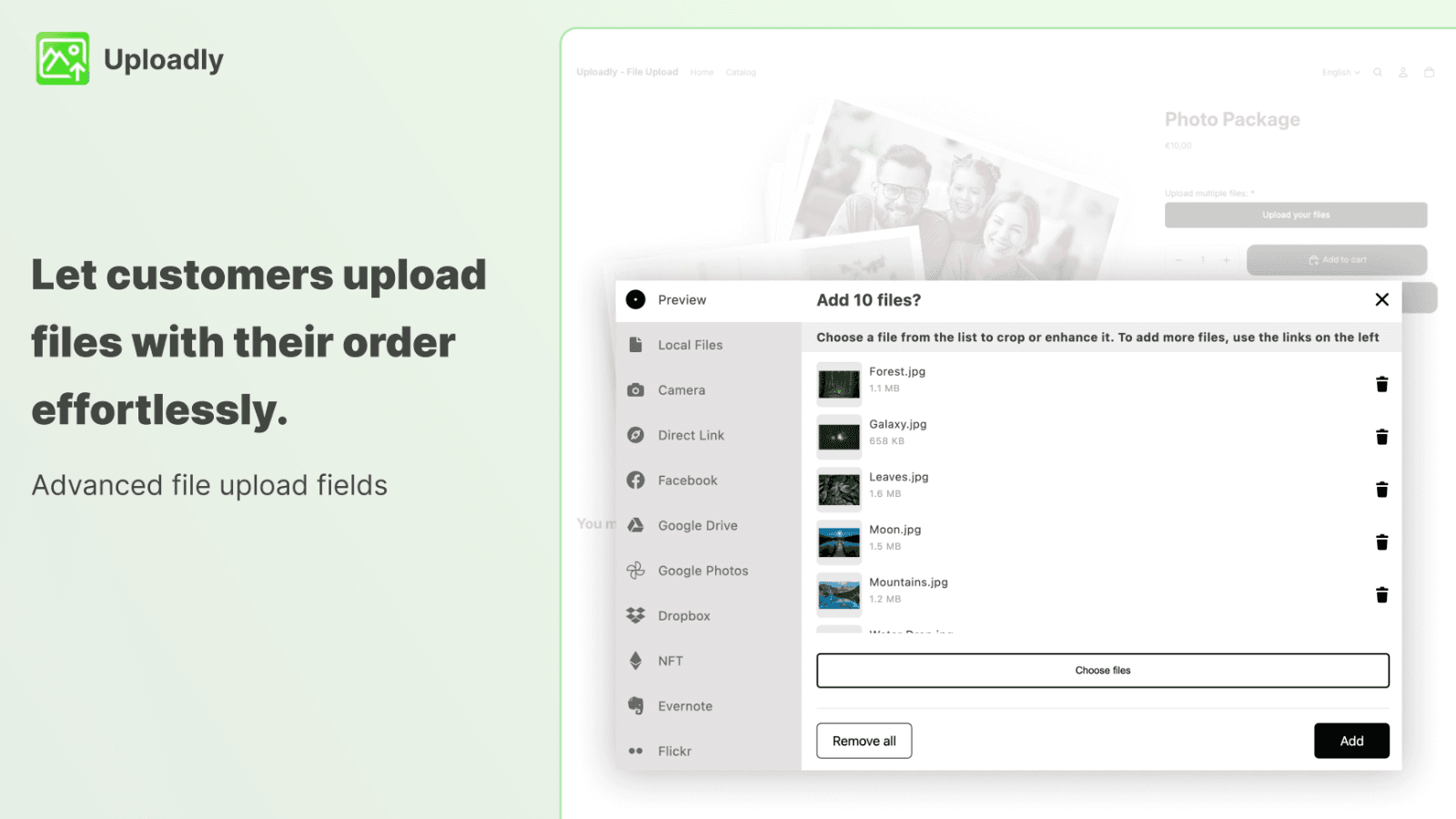
- Multiple Account Integration: Allow customers to upload from their computer, mobile, Instagram, and other accounts.
- File Customization: Allow customers to edit and adjust their files before they upload them.
- Language Localization: Support multiple languages. Show the upload button in various languages.
- Customer Downloads: Download the files directly from your customers into the related order.
Keywords
Key Features
- Customize file upload fields to match your product page design.
- Upload files from computers, mobile devices, or cloud services like Dropbox.
- Edit and crop files directly before uploading for better customization.
Pricing
File Upload & Image ‑ Uploadly Pricing Plans
Free
$0/month
Unlimited file uploads
Fully customizable
Upload boost
Malware protection
20 uploads linked to orders
Basic
$7.99/month
Unlimited file uploads
500 uploads linked to orders
Speed optimized
All file types
Fully customizable
Unlimited
$17.99/month
Unlimited file uploads (fair usage)
Sync files to Google Drive
Speed optimized
Max. 500MB/File
All file types
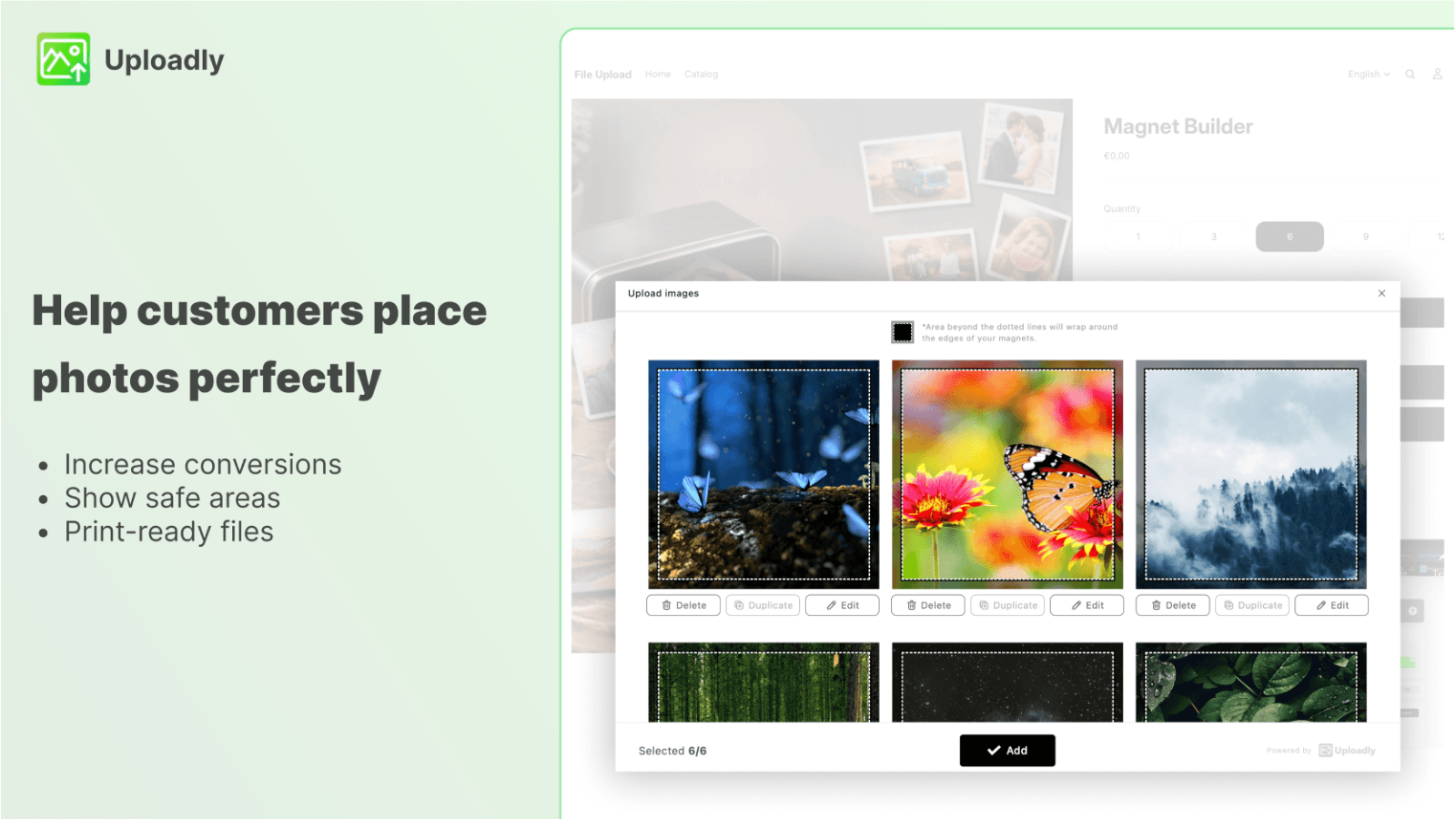
Magnet Builder
$39.99/month
Sell personalized photos & magnets
Intuitive interface for online shoppers
Unlimited file uploads
Upload print templates
Print-ready file generation
Not sure which plan to pick? Discuss Free or Basic plans with us, learn about custom pricing, or get a demo.
Here's an overview of File Upload & Image ‑ Uploadly costs for each of the plan(s):
The app has 4 pricing plans: 1 free and 3 paid. The free plan(s) offered by File Upload & Image ‑ Uploadly: (Free). The paid plan(s) offered by File Upload & Image ‑ Uploadly: (Basic, Unlimited, Magnet Builder).
The details of the plan(s) are outlined below:
Free: This plan is free forever, incurring no subscription costs. It offers a wide range of features like Unlimited file uploads, Fully customizable, Upload boost, Malware protection, 20 uploads linked to orders, 60 days storage.
Basic: The Basic plan costs $7.99 and comes with a 3-day free trial period. The plan offers a host of features, including Unlimited file uploads, 500 uploads linked to orders, Speed optimized, All file types, Fully customizable, Translatable, 60 days storage.
Unlimited: The Unlimited plan costs $17.99 and comes with a 3-day free trial period. The plan offers a host of features, including Unlimited file uploads (fair usage), Sync files to Google Drive, Speed optimized, Max. 500MB/File, All file types, Multilanguage, 90 days storage.
Magnet Builder: The Magnet Builder plan costs $39.99 and comes with a 3-day free trial period. The plan offers a host of features, including Sell personalized photos & magnets, Intuitive interface for online shoppers, Unlimited file uploads, Upload print templates, Print-ready file generation, Bleed & Wrap around preview.
File Upload & Image ‑ Uploadly Price Summary
| Pricing summary | Free plan available. Free trial available. |
| Total Pricing Plan(s) | 4 |
| Number of free plan(s) | 1 |
| Number of paid plan(s) | 3 |
| Cost of Paid Plan(s) | $7.99, $17.99, $39.99 |
| Free trial available | Yes, for 3 day(s) |
File Upload & Image ‑ Uploadly Shopify App Discounts
If you are looking for discounts on File Upload & Image ‑ Uploadly app pricing plans, feel free to contact our team - we'd be happy to help! Additionally, if you are an agency or a shop merchant with multiple Shopify stores, we can work directly with Inspon Tech to secure better deals on the File Upload & Image ‑ Uploadly app exclusively for you.
*Disclaimer: Please note that ShopDigest doesn't guarantee discounts on apps as any changes to the pricing plans are ultimately up to the discretion of the developer.
Testimonials
What our users say about File Upload & Image ‑ Uploadly
“I have a print shop and it works great for customers to send their designs. Pretty easy and great tool!”
“Uploadly has been very easy to set up and customize, and the file upload workflow works smoothly for my Shopify store. I especially appreciate the flexibility of the settings and the responsive support team. Whenever I’ve needed help or had a specific request, they’ve been very helpful and solution-oriented. Great app for collecting client files.”
“Works beautifully, exactly as expected and streamlines my process. ”
Trusted By
Trusted by the best Shopify stores
Madi Creations Studio
United States
MORO DESIGN STUDIO
United States
JAKS Bakehouse
United States
The Broken Plank Photo Boards & more
United States
My Training Shop
United Kingdom
Batbagtags
United States
Edible Print
United Kingdom
K9 Graphics
United States
Uploadly - File Upload allows you to include robust upload fields on your product pages.
Customizing upload field
Easily set up strong file uploads for products that you can tailor to your liking. This includes the design, placement, functionality, and language.
Upload any kind of file, no matter its size.
Customers can conveniently upload files from their computer or phone. Any file type or size is acceptable. There's a textbox for uploads. We also have a new feature for NFT uploads.
Files attached to the order are uploaded.
Files uploaded by the customer are attached to their order. They can be downloaded from the order dashboard. They include the Upload field, Product Personalizer, and Text box.
Comparison
Top File Upload & Image ‑ Uploadly Alternatives Detailed Comparison
The table below highlights the crucial differences between File Upload & Image ‑ Uploadly and similar other Shopify apps based on parameters like ratings, reviews, features, pricing, etc.
Add App | |||
|---|---|---|---|
| General Information | |||
| Ratings | 4.8(169 reviews) | 4.9(273 reviews) | |
| Developed by | Inspon Tech | Customily | |
| Launch Date | 3/22/2021 | 4/29/2020 | |
| Pricing | Free, $7.99/month, $17.99/month, $39.99/month | Free, $49/month | |
| Objective | Allow customers to upload images and files related to their orders. | #1 Ranked Customizer, Interactive Preview, Print-Ready File, Print on Demand. | |
| Categories | Custom file upload | Print on demand (POD), Custom file upload | |
| Key Features & Highlights | |||
| Purpose | Uploadly - File Upload allows you to include robust upload fields on your product pages. | Design and sell custom print-on-demand products! Automate your delivery process! | |
| Features List |
|
| |
| Highlights |
| - | |
| User Reviews and Ratings | |||
| Recommended % | 93.2% | 93.8% | |
| Pros |
|
| |
| Cons |
|
| |
| Pricing and Plans | |||
| Total Pricing Plans | 4 | 2 | |
| Free Plan | Available | Available | |
| Free Trial | Yes, for 3 day(s) | Yes, for 9 day(s) | |
| Technical Information | |||
| Rating | 4.8 | 4.9 | |
| Total Reviews | 176 | 275 | |
| Launch Date | 3/22/2021 | 4/29/2020 | |
| SD Points | 24 | 114 | |
More Details About File Upload & Image ‑ Uploadly
Product Description
Uploadly - File Upload allows customers to conveniently choose and upload photos or files from various sources such as their computers, mobile devices, and social media accounts directly to product pages. The tool is secure, reliable, allows file editing and integrates seamlessly with orders for easy downloading.
AI Summary
The app enables file uploads on Shopify product pages, allowing customers to attach images or documents to orders, with customization options for upload limits and button design. Its strengths include reliable functionality, intuitive setup, and highly responsive support that often resolves issues quickly, including theme integration challenges. The app performs well on the unlimited plan, though some users report discrepancies between advertised and actual free plan storage limits (e.g., 60 days vs. 7 days). A notable weakness is the lack of notifications when free plan limits are reached, potentially disrupting store operations without warning. Pricing flexibility is limited, with some users expressing frustration over abrupt cost increases or inability to match previous rates. Mobile usability may require refinement, as some reports indicate upload buttons on mobile devices require double-tapping. Despite these limitations, the app is widely praised for its seamless file handling and exceptional customer service.
Support
For any questions, concerns, or assistance with File Upload & Image ‑ Uploadly, the dedicated support team is readily available to help.To reach out to the support team, users can send an email to [email protected]. Additionally, File Upload & Image ‑ Uploadly offers a comprehensive FAQ section to address common inquiries and provide self-help resources in their app FAQ section.
File Upload & Image ‑ Uploadly Support Information In A Nutshell:
| Support Email: | [email protected] |
| Contact Number(s): | Not available |
| FAQ Page: | FAQ details |
| Privacy Policy: | Privacy details |
| Language Support: | English |
Integration
The list of top Shopify apps or features or software tools that File Upload & Image ‑ Uploadly seamlessly integrates are given below:
Developer
Name: Inspon Tech
Website: /partners/inspon
Address: Themistokle Dervi 48,, Floor 3, Flat/Office 306,, Nicosia, 1066
Looking to install File Upload & Image ‑ Uploadly app on your store?
ShopDigest helps businesses upgrade their Shopify stores by offering easy app installation services.
Why Choose ShopDigest?
- Highly experienced and vetted team for successful app installation
- Assured support and guidance throughout the installation and beyond
- Customized services to meet unique business needs
- 30-day no questions asked refund policy
- Lowest pricing guaranteed (starts at just $10/hour)
File Upload & Image ‑ Uploadly Q&A
How does the upload feature work for customers?
Customers can upload files from their devices, social media, or cloud storage directly to product pages. Files are securely linked to their orders for easy access.
Can customers edit files before uploading?
Yes, they can crop, rotate, or add text to images before submission, ensuring the files meet their preferences or requirements.
Is there support for multiple languages?
The upload button and interface can be displayed in various languages, making it accessible to a global customer base.
Where are uploaded files stored?
Files are securely stored and linked to the respective order, allowing merchants to download them directly from the order dashboard.
What file types can customers upload?
Supported formats include images (PNG, JPEG), documents (PDF, Excel), videos, ZIP files, and even NFTs, with customizable rules.
Are there storage limits for uploaded files?
Free plans include 60-day storage, while paid tiers extend retention and offer larger file size limits (up to 500MB per file).
Can files sync with Google Drive?
Yes, the Unlimited plan includes Google Drive integration, automatically syncing uploaded files for backup and organization.
Is there malware protection for uploads?
Yes, all uploaded files are scanned for malware, ensuring security for both merchants and customers.
Customer Reviews
File Upload & Image ‑ Uploadly has an overall rating of 4.7 stars from a total of 176 reviews on the Shopify app store. Of these, 164 (93.2%) are positive, 2 (1.1%) are neutral, and 10 (5.7%) are negative*.
*Ratings above four stars fall under positive review, three stars reviews fall under neutral, and anything less than two stars falls under negative.
I have a print shop and it works great for customers to send their designs. Pretty easy and great tool!
Uploadly has been very easy to set up and customize, and the file upload workflow works smoothly for my Shopify store. I especially appreciate the flexibility of the settings and the responsive support team. Whenever I’ve needed help or had a specific request, they’ve been very helpful and solution-oriented. Great app for collecting client files.
Works beautifully, exactly as expected and streamlines my process.
Absolutely love it! Works perfectly on our website.
This has been the app i was waiting for - thank you so much
Video Demo and Screenshots
Product Video

Product Screenshots
Installation Steps
How to install File Upload & Image ‑ Uploadly on your Shopify store
Find your app
Use filters like pricing, availability, and features to find the perfect match for your store's needs.
Get a personalized setup plan
Our team will create an installation plan based on your current store setup, goals, and requirements.
Install at your own pace
Perfect your store's functionality without the pressure to move on until you're ready.
Install in your Shopify Store
File Upload & Image ‑ Uploadly FAQ's
How do I install the File Upload & Image ‑ Uploadly Shopify app?
To install File Upload & Image ‑ Uploadly app on your Shopify store, click on the File Upload & Image ‑ Uploadly installation link. Login to the Shopify store on which you want to install the app and follow the onboarding process.
If you need our expert guidance to help you install File Upload & Image ‑ Uploadly on your Shopify store, then contact us now.
What are the key features of File Upload & Image ‑ Uploadly?
The key features offered by File Upload & Image ‑ Uploadly to Shopify store owners are:
- ✅Simply create powerful file uploads for products which you can customize.
- ✅Let customers upload from computer, mobile, Instagram and many more accounts.
- ✅Let customers crop and edit their files and use textbox to receive notes.
- ✅Multi-language support. Display the upload button in different languages.
- ✅Download the files from your customers directly inside the respective order.
Does File Upload & Image ‑ Uploadly integrate with other Shopify apps or tools?
Yes, File Upload & Image ‑ Uploadly seamlessly integrates with other Shopify apps or tools, such as Easily make customizable file uploads for your products., Allow customers to upload from their computer, mobile, Instagram, and other accounts., Allow customers to edit and adjust their files before they upload them..
Is there a free trial available for File Upload & Image ‑ Uploadly?
Yes, File Upload & Image ‑ Uploadly offers 3 days free trial on all its paid plans.
What are the pricing plans for File Upload & Image ‑ Uploadly?
The app has 4 pricing plans: 1 free and 3 paid. The paid plans cost $7.99/month, $17.99/month, $39.99/month, and come with a 3-day free trial period.
How does billing work for File Upload & Image ‑ Uploadly?
File Upload & Image ‑ Uploadly uses USD for billing, with recurring and usage-based charges invoiced usually every 30 days.
Can I cancel or upgrade my subscription plan at any time?
Yes, File Upload & Image ‑ Uploadly allows its subscribers to cancel or upgrade their subscription plan at any time.
Does File Upload & Image ‑ Uploadly offer customer support? How can I get assistance?
Yes, File Upload & Image ‑ Uploadly offers a dedicated support team for any kind of app-related assistance. To reach out to the support team, users can send an email to [email protected].
Additionally, File Upload & Image ‑ Uploadly offers a comprehensive FAQ section to address common inquiries and provide self-help resources.
Is File Upload & Image ‑ Uploadly compatible with my Shopify theme?
Please reach out to their support team at [email protected] to confirm its compatibility with your specific Shopify theme.
Alternatives
See all Alternatives to File Upload & Image ‑ Uploadly Shopify App.






Most Popular
Most popular Shopify apps on the market




