
InlightLabs ‑ Events Calendar Shopify App
by inlight labsEasily add a stunning calendar to your website to keep your audience updated about future events. Add or import events to your shop with RSVP, images and more
4.6
(52)
Crow and Baubles, United States
Really easy to use and set up. The features for creating recurring events are awesome.
Install in your Shopify Store

InlightLabs ‑ Events Calendar Charts
Track InlightLabs ‑ Events Calendar's ranking, reviews, and performance over time with interactive charts. See how it compares to similar apps in the same category.
Pros and Cons
Pros and Cons of InlightLabs ‑ Events Calendar
Pros
Ease of Use: The app is frequently praised for its straightforward setup and intuitive interface.
Customer Support: Many users highlight responsive and helpful assistance from the support team.
Customization: Positive feedback on the ability to tailor the app’s appearance and features to fit brand needs.
Reliable Performance: Several reviews note the app works as expected without major issues.
Cons
Mobile Compatibility Issues: Multiple users report poor performance or display problems on mobile devices.
Misleading Event Limits: Frustration over unclear restrictions on the number of events in the free version.
Screenshots
About the App
Add or import events to your shop with RSVP, images and more
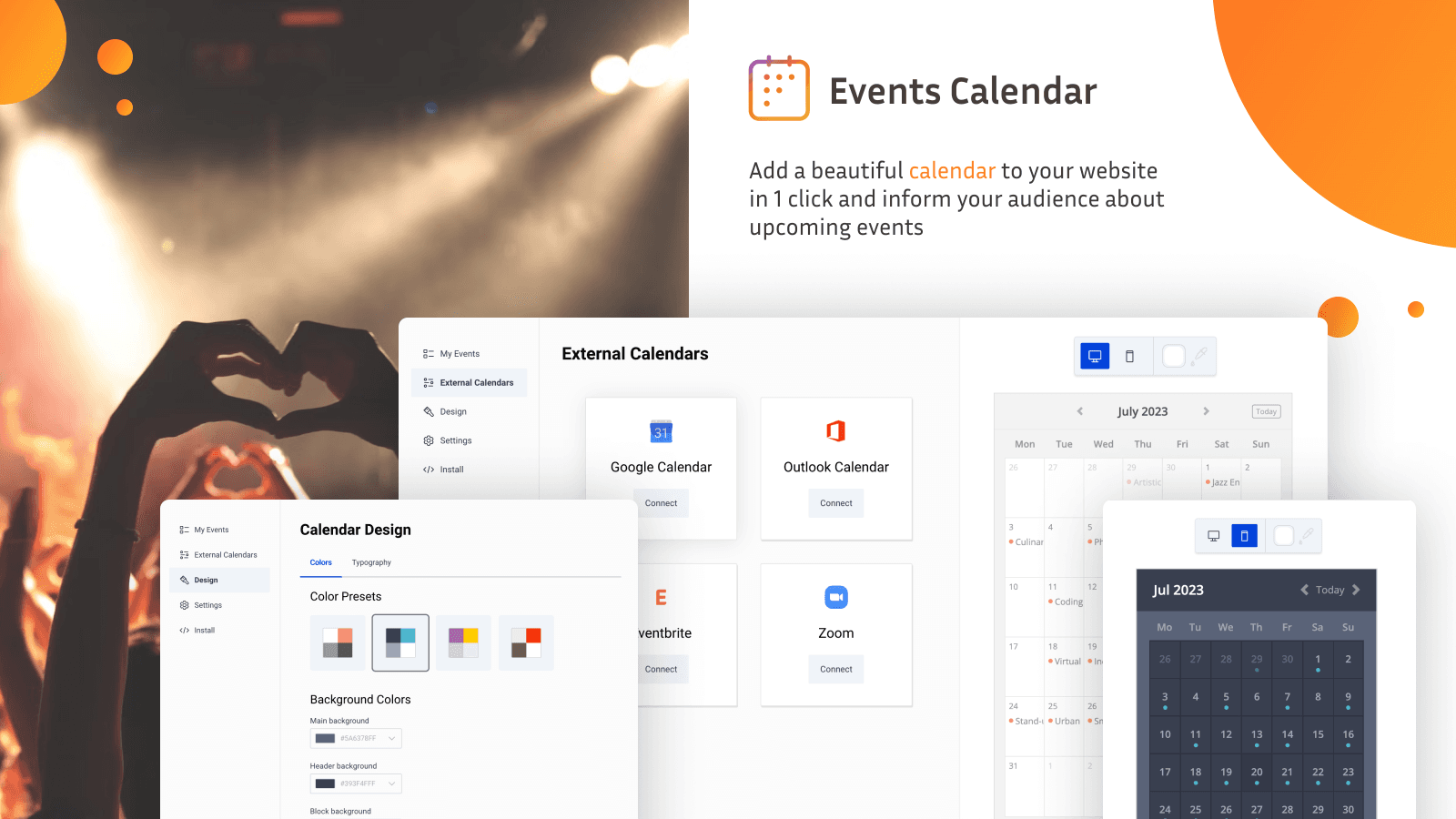
- Calendar Integration: Connect with various Google, Outlook, Eventbrite calendars, or your Zoom account.
- Event Scheduling: Add events to your calendar by hand.
- Event Customization: Include pictures, URLs, a "save event" button, and more.
Keywords
Key Features
- Sync events automatically with Google Calendar, Outlook, Eventbrite, or Zoom.
- Create recurring events with daily, weekly, or monthly patterns.
- Customize calendar colors, fonts, and layouts to match your store.
Pricing
InlightLabs ‑ Events Calendar Pricing Plans
Free
$0/month
All customization and design options.
Limited to 1 calendar per store.
Limited to up to 10 events.
Manual sync with external calendars.
Professional
$10/month
Up to 3 calendars.
Unlimited events.
Auto-sync with 2 external calendars.
Set custom start date.
50 RSVPs per event.
Business
$25/month
Up to 8 calendars.
Unlimited events.
Auto-sync with 5 external calendars.
200 RSVPs per event.
100 guest events per month.
Business+
$50/month
Up to 25 calendars.
Unlimited events.
Auto-sync with 15 external calendars.
1,000 RSVPs per event
500 guest events per month.
Not sure which plan to pick? Discuss Free or Professional plans with us, learn about custom pricing, or get a demo.
Here's an overview of InlightLabs ‑ Events Calendar costs for each of the plan(s):
The app has 4 pricing plans: 1 free and 3 paid. The free plan(s) offered by InlightLabs ‑ Events Calendar: (Free). The paid plan(s) offered by InlightLabs ‑ Events Calendar: (Professional, Business, Business+).
The details of the plan(s) are outlined below:
Free: This plan is free forever, incurring no subscription costs. It offers a wide range of features like All customization and design options., Limited to 1 calendar per store., Limited to up to 10 events., Manual sync with external calendars..
Professional: The Professional plan costs $10 and has no free trial period. The plan offers a host of features, including Up to 3 calendars., Unlimited events., Auto-sync with 2 external calendars., Set custom start date., 50 RSVPs per event., Remove branding..
Business: The Business plan costs $25 and has no free trial period. The plan offers a host of features, including Up to 8 calendars., Unlimited events., Auto-sync with 5 external calendars., 200 RSVPs per event., 100 guest events per month., 3 customizations per calendar., Timezone controls..
Business+: The Business+ plan costs $50 and has no free trial period. The plan offers a host of features, including Up to 25 calendars., Unlimited events., Auto-sync with 15 external calendars., 1,000 RSVPs per event, 500 guest events per month., 10 customizations per calendar..
InlightLabs ‑ Events Calendar Price Summary
| Pricing summary | Free plan available |
| Total Pricing Plan(s) | 4 |
| Number of free plan(s) | 1 |
| Number of paid plan(s) | 3 |
| Cost of Paid Plan(s) | $10, $25, $50 |
| Free trial available | No |
For further information regarding InlightLabs ‑ Events Calendar app pricing plans, see the official website.
InlightLabs ‑ Events Calendar Shopify App Discounts
If you are looking for discounts on InlightLabs ‑ Events Calendar app pricing plans, feel free to contact our team - we'd be happy to help! Additionally, if you are an agency or a shop merchant with multiple Shopify stores, we can work directly with inlight labs to secure better deals on the InlightLabs ‑ Events Calendar app exclusively for you.
*Disclaimer: Please note that ShopDigest doesn't guarantee discounts on apps as any changes to the pricing plans are ultimately up to the discretion of the developer.
Testimonials
What our users say about InlightLabs ‑ Events Calendar
“Really easy to use and set up. The features for creating recurring events are awesome.”
“Be Sew Creative has been using this app for over a year now. It is easy to use and allows our customers a quick way to see what is going on at our store. ”
“I've been using the free tier for several months now and it's very easy to install and update. Customer service is super fast and friendly (thank you, Sasha!) and when my needs expand I know I'll be upgrading to paid with InlightLabs :)”
Trusted By
Trusted by the best Shopify stores
Crow and Baubles
United States
besewcreative-nm
United States
Sylverra Crystals Etc.
United States
Shiloh Woods Official
United States
Vroom Vroom Industries
United States
Oak Folk Studio
United States
groenstil
Germany
Smoke - Fumetteria
Italy
Comparison
Top InlightLabs ‑ Events Calendar Alternatives Detailed Comparison
The table below highlights the crucial differences between InlightLabs ‑ Events Calendar and similar other Shopify apps based on parameters like ratings, reviews, features, pricing, etc.
Add App | |||
|---|---|---|---|
| General Information | |||
| Ratings | 4.6(42 reviews) | 5.0(1,628 reviews) | |
| Developed by | inlight labs | Appointly | |
| Launch Date | 8/7/2014 | 9/1/2021 | |
| Pricing | Free, $10/month, $25/month, $50/month | Free, $5/month, $9/month | |
| Objective | Add or import events to your shop with RSVP, images and more | Schedule & Meetings | Assistance | Occasions | Dates | |
| Categories | Event booking | Event booking, Digital products | |
| Key Features & Highlights | |||
| Purpose | Easily add a stunning calendar to your website to keep your audience updated about future events. | App for scheduling appointments, physical or virtual meetings, services, events, and more. | |
| Features List |
|
| |
| Highlights |
|
| |
| User Reviews and Ratings | |||
| Recommended % | 71.1% | 99.8% | |
| Pros |
|
| |
| Cons |
|
| |
| Pricing and Plans | |||
| Total Pricing Plans | 4 | 3 | |
| Free Plan | Available | Available | |
| Free Trial | No | Yes, for 14 day(s) | |
| Technical Information | |||
| Rating | 4.6 | 5.0 | |
| Total Reviews | 52 | 1,258 | |
| Launch Date | 8/7/2014 | 9/1/2021 | |
| SD Points | 4 | 557 | |
More Details About InlightLabs ‑ Events Calendar
Product Description
The app allows you to add events with images, links and a 'save event' button. It also enables you to connect your Google, Outlook, Eventbrite and Zoom calendars, displaying all your events in one location.
AI Summary
The app is a Shopify-integrated events calendar designed for displaying and managing events, with features such as Google Maps integration, customizable colors, and options to display events as a list or traditional calendar. It supports linking to external ticketing or sales pages and allows customers to add events to their personal calendars. The free version permits up to five events, with a paid upgrade for unlimited entries. Strengths include ease of setup, intuitive interface, and responsive customer support. However, limitations include restricted customization, particularly in font styling and mobile responsiveness, with some reports of text truncation in event titles. Performance issues, such as slow loading times or occasional malfunctions, have been noted, along with inconsistencies in event retention and upgrade prompts. While the app suits basic event display needs, it lacks advanced features like native ticketing or seamless theme integration, and some users find the pricing model restrictive for small businesses.
Support
For any questions, concerns, or assistance with InlightLabs ‑ Events Calendar, the dedicated support team is readily available to help.To reach out to the support team, users can send an email to [email protected]. Additionally, InlightLabs ‑ Events Calendar offers a comprehensive FAQ section to address common inquiries and provide self-help resources in their app FAQ section.
InlightLabs ‑ Events Calendar Support Information In A Nutshell:
| Support Email: | [email protected] |
| Contact Number(s): | Not available |
| FAQ Page: | FAQ details |
| Privacy Policy: | Privacy details |
| Language Support: | English |
Integration
The list of top Shopify apps or features or software tools that InlightLabs ‑ Events Calendar seamlessly integrates are given below:
Developer
Looking to install InlightLabs ‑ Events Calendar app on your store?
ShopDigest helps businesses upgrade their Shopify stores by offering easy app installation services.
Why Choose ShopDigest?
- Highly experienced and vetted team for successful app installation
- Assured support and guidance throughout the installation and beyond
- Customized services to meet unique business needs
- 30-day no questions asked refund policy
- Lowest pricing guaranteed (starts at just $10/hour)
InlightLabs ‑ Events Calendar Q&A
How does the calendar help my Shopify store?
It displays events like sales, classes, or pop-ups directly on your store, keeping customers informed and engaged while boosting participation and sales.
Can I sync external calendars with this app?
Yes, it automatically syncs with Google Calendar, Outlook, Eventbrite, or Zoom, so all your events stay updated in one place without manual entry.
Is the calendar mobile-friendly?
Absolutely! The calendar is fully responsive, ensuring customers can view and interact with events seamlessly on any device.
Can customers submit their own events?
Yes, visitors can submit events for approval, helping you build a community-driven calendar for promotions, workshops, or local collaborations.
Are recurring events supported?
Yes, you can set daily, weekly, or monthly recurring events—ideal for regular promotions, classes, or membership updates.
How customizable is the calendar’s design?
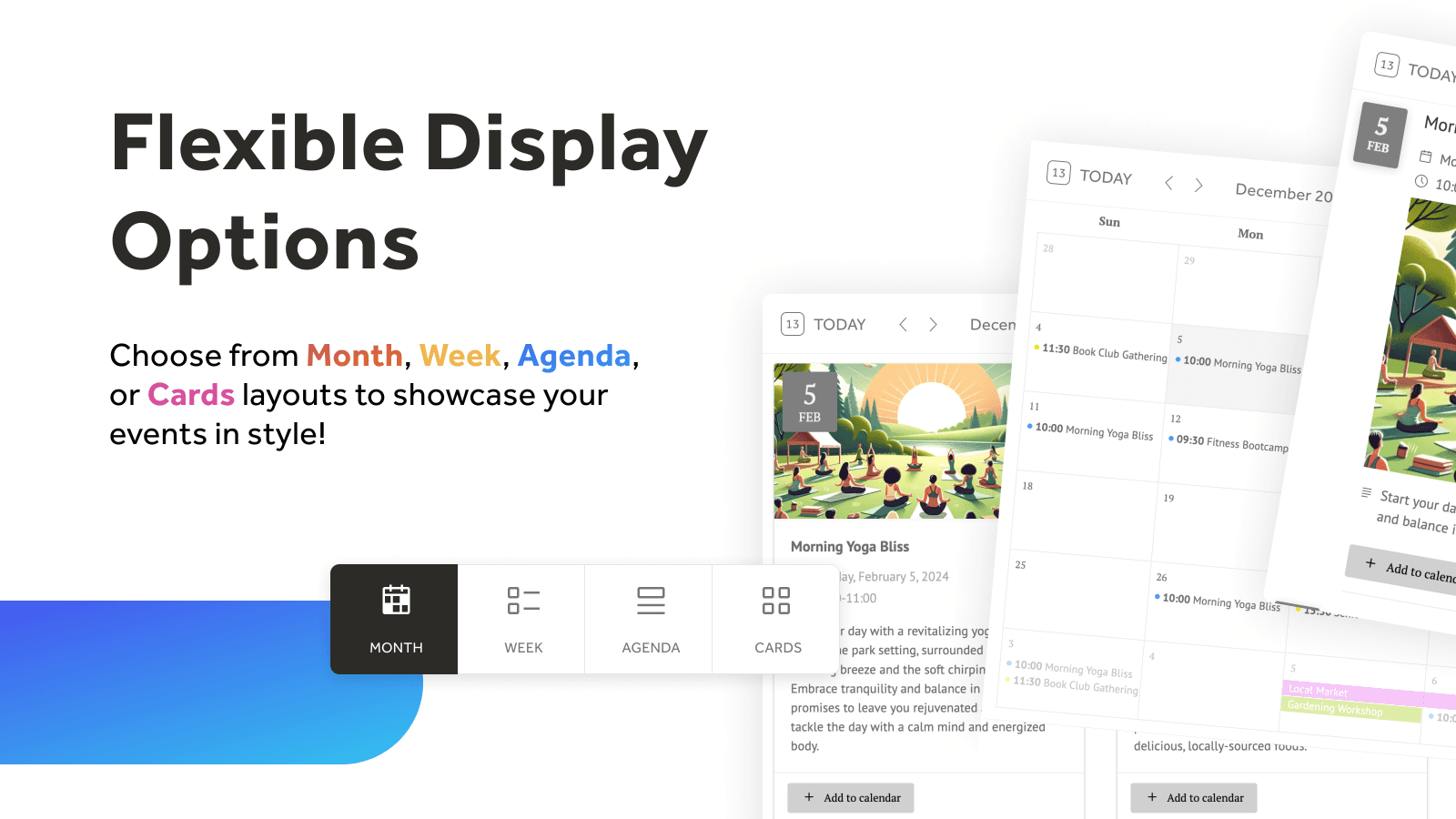
You can adjust colors, fonts, layouts, and views (month/week/agenda) to match your store’s branding for a cohesive look.
Does the app support multiple time zones?
Higher-tier plans include timezone controls, ensuring events display correctly for customers worldwide.
Can customers save events for later?
Yes, events include a "save" button, letting customers bookmark them or add to personal calendars for reminders.
Is there a free plan available?
Yes, the free plan offers basic features, including customization and manual sync, with limits on events and calendars.
How does the app handle event reminders?
Customers can subscribe to updates, ensuring they never miss important events like flash sales or exclusive webinars.
Customer Reviews
InlightLabs ‑ Events Calendar has an overall rating of 3.8 stars from a total of 52 reviews on the Shopify app store. Of these, 36 (69.2%) are positive, 3 (5.8%) are neutral, and 13 (25.0%) are negative*.
*Ratings above four stars fall under positive review, three stars reviews fall under neutral, and anything less than two stars falls under negative.
Really easy to use and set up. The features for creating recurring events are awesome.
Be Sew Creative has been using this app for over a year now. It is easy to use and allows our customers a quick way to see what is going on at our store.
I've been using the free tier for several months now and it's very easy to install and update. Customer service is super fast and friendly (thank you, Sasha!) and when my needs expand I know I'll be upgrading to paid with InlightLabs :)
We are currently using the free option as an independent artist. We find the app easy to use and it fits all our needs. As we grow, we will most likely upgrade and keep using as it's simple and straight forward to add events.
Absolutely love this app! I was using Events Calendar on WooCommerce but this surpasses it by far! Worth every penny!
Video Demo and Screenshots
Product Screenshots
Installation Steps
How to install InlightLabs ‑ Events Calendar on your Shopify store
Find your app
Use filters like pricing, availability, and features to find the perfect match for your store's needs.
Get a personalized setup plan
Our team will create an installation plan based on your current store setup, goals, and requirements.
Install at your own pace
Perfect your store's functionality without the pressure to move on until you're ready.
Install in your Shopify Store
InlightLabs ‑ Events Calendar FAQ's
How do I install the InlightLabs ‑ Events Calendar Shopify app?
To install InlightLabs ‑ Events Calendar app on your Shopify store, click on the InlightLabs ‑ Events Calendar installation link. Login to the Shopify store on which you want to install the app and follow the onboarding process.
If you need our expert guidance to help you install InlightLabs ‑ Events Calendar on your Shopify store, then contact us now.
What are the key features of InlightLabs ‑ Events Calendar?
The key features offered by InlightLabs ‑ Events Calendar to Shopify store owners are:
- ✅Add one-time or recurring events (daily, weekly, or monthly)
- ✅Import from Google, Outlook, Eventbrite, Zoom, or ICS feeds
- ✅Let visitors RSVP, subscribe, and add events to their calendars
- ✅Customize layout, colors, fonts, language, time format, and more
- ✅Enable event submissions with review and approval workflow
Does InlightLabs ‑ Events Calendar integrate with other Shopify apps or tools?
Yes, InlightLabs ‑ Events Calendar seamlessly integrates with other Shopify apps or tools, such as Connect with various Google, Outlook, Eventbrite calendars, or your Zoom account., Add events to your calendar by hand., Include pictures, URLs, a "save event" button, and more..
Is there a free trial available for InlightLabs ‑ Events Calendar?
No, InlightLabs ‑ Events Calendar does not offer any free trial.
What are the pricing plans for InlightLabs ‑ Events Calendar?
The app has 4 pricing plans: 1 free and 3 paid. The paid plans cost $10/month, $25/month, $50/month and have no free trial period.
How does billing work for InlightLabs ‑ Events Calendar?
InlightLabs ‑ Events Calendar uses USD for billing, with recurring and usage-based charges invoiced usually every 30 days.
Can I cancel or upgrade my subscription plan at any time?
Yes, InlightLabs ‑ Events Calendar allows its subscribers to cancel or upgrade their subscription plan at any time.
Does InlightLabs ‑ Events Calendar offer customer support? How can I get assistance?
Yes, InlightLabs ‑ Events Calendar offers a dedicated support team for any kind of app-related assistance. To reach out to the support team, users can send an email to [email protected].
Additionally, InlightLabs ‑ Events Calendar offers a comprehensive FAQ section to address common inquiries and provide self-help resources.
Is InlightLabs ‑ Events Calendar compatible with my Shopify theme?
Please reach out to their support team at [email protected] to confirm its compatibility with your specific Shopify theme.
Alternatives
See all Alternatives to InlightLabs ‑ Events Calendar Shopify App.






Most Popular
Most popular Shopify apps on the market




