
Webgility x QuickBooks Desktop Shopify App
by WebgilityWebgility saves your time and money by connecting your stores data with QuickBooks Desktop. Automate bookkeeping, stock tracking and item listing.
4.9
(452)
Shift Products, Canada
Faizan has been helping us install Webgility to automate the sales process through multiple ecommerce platforms. He has been great so far in this ongoing process! Thanks for your continued patience and support.
Install in your Shopify Store

Webgility x QuickBooks Desktop Charts
Track Webgility x QuickBooks Desktop's ranking, reviews, and performance over time with interactive charts. See how it compares to similar apps in the same category.
Pros and Cons
Pros and Cons of Webgility x QuickBooks Desktop
Pros
Seamless Integration: The app effectively syncs Shopify and QuickBooks, automating inventory and order management.
Time-Saving Automation: Users highlight significant reductions in manual data entry and improved efficiency.
Exceptional Customer Support: Frequent praise for responsive, knowledgeable, and helpful support staff.
User-Friendly Onboarding: Smooth setup process with clear guidance and personalized assistance.
Cons
Billing Issues: Multiple reports of unexpected charges, unclear renewal policies, and refund difficulties.
Limited Transparency: Complaints about lack of advance notifications for subscription renewals.
Screenshots
About the App
Automate bookkeeping, stock tracking and item listing.
- Ecommerce Automation: Control and simplify product listings, prices, stock, and orders automatically.
- AI-driven profitability and forecasts: Get a complete picture of profit and performance along with forecasts supported by artificial intelligence.
- Scalable business growth: Grow your business effortlessly with features and plans designed for expansion.
- Sync Sales Data: Sync your sales and financial data from multiple channels to QuickBooks automatically.
- Automated sales tax filing: Make sales tax filing easier by automatically tracking tax from multiple stores.
Keywords
Key Features
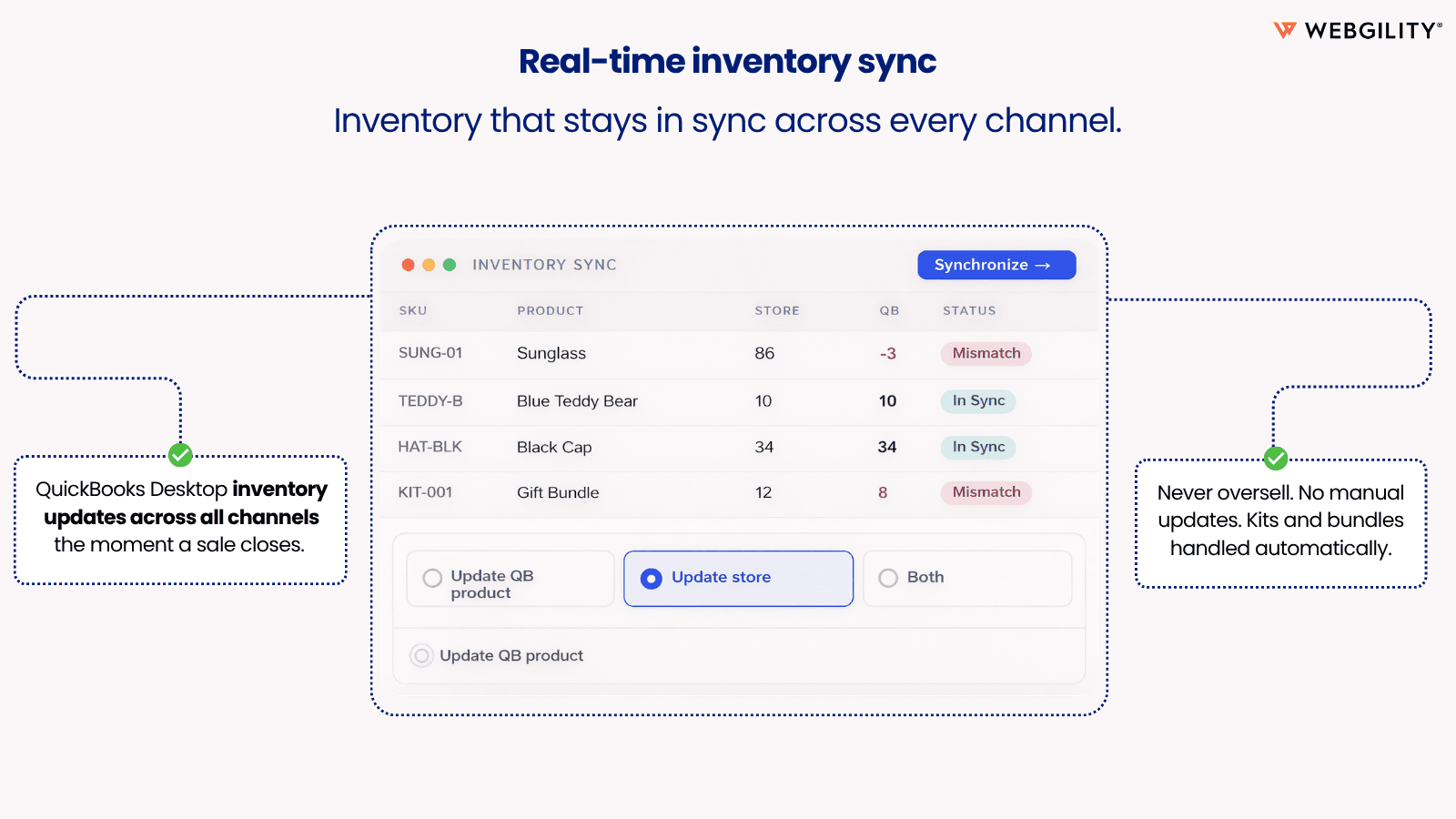
- Automatically syncs orders, inventory, and pricing across multiple sales channels.
- Reconciles bank deposits and payouts with Shopify transactions accurately.
- Eliminates manual bookkeeping errors with real-time accounting automation.
Pricing
Webgility x QuickBooks Desktop Pricing Plans
Plus
$139/month
500 orders per month
1 Sales Channels
3 months historical data
Advanced
$249/month
1000 orders per month
3 months historical data
2 sales channels
Premium
$499/month
Everything in Advanced plan, plus:
3000 orders per month
3 Sales Channels
Quarterly review by accounting partner
Ecommerce reconciliation audit
Complete
$749/month
5,000 orders per month
3 months historical data
5 sales channels
Guaranteed Monthly Reconciliation
Monthly Accountant Review
Not sure which plan to pick? Discuss Plus or Advanced plans with us, learn about custom pricing, or get a demo.
Here's an overview of Webgility x QuickBooks Desktop costs for each of the plan(s):
The app offers 4 paid plan(s). The paid plan(s) offered by Webgility x QuickBooks Desktop: (Plus, Advanced, Premium, Complete).
The details of the plan(s) are outlined below:
Plus: The Plus plan costs $139 and comes with a 15-day free trial period. The plan offers a host of features, including 500 orders per month, 1 Sales Channels, 3 months historical data.
Advanced: The Advanced plan costs $249 and comes with a 15-day free trial period. The plan offers a host of features, including 1000 orders per month, 3 months historical data, 2 sales channels.
Premium: The Premium plan costs $499 and comes with a 15-day free trial period. The plan offers a host of features, including Everything in Advanced plan, plus:, 3000 orders per month, 3 Sales Channels, Quarterly review by accounting partner, Ecommerce reconciliation audit, Findings report with recommendation.
Complete: The Complete plan costs $749 and comes with a 15-day free trial period. The plan offers a host of features, including 5,000 orders per month, 3 months historical data, 5 sales channels, Guaranteed Monthly Reconciliation, Monthly Accountant Review, Monthly Ecommerce Report.
Webgility x QuickBooks Desktop Price Summary
| Pricing summary | From $139/month. Free trial available. |
| Total Pricing Plan(s) | 4 |
| Number of free plan(s) | 0 |
| Number of paid plan(s) | 4 |
| Cost of Paid Plan(s) | $139, $249, $499, $749 |
| Free trial available | Yes, for 15 day(s) |
For further information regarding Webgility x QuickBooks Desktop app pricing plans, see the official website.
Webgility x QuickBooks Desktop Shopify App Discounts
If you are looking for discounts on Webgility x QuickBooks Desktop app pricing plans, feel free to contact our team - we'd be happy to help! Additionally, if you are an agency or a shop merchant with multiple Shopify stores, we can work directly with Webgility to secure better deals on the Webgility x QuickBooks Desktop app exclusively for you.
*Disclaimer: Please note that ShopDigest doesn't guarantee discounts on apps as any changes to the pricing plans are ultimately up to the discretion of the developer.
Testimonials
What our users say about Webgility x QuickBooks Desktop
“Faizan has been helping us install Webgility to automate the sales process through multiple ecommerce platforms. He has been great so far in this ongoing process! Thanks for your continued patience and support.”
“Arun was very helpful with the setup of Webgility but as well with the synching of QuickBooks. ”
“Faizan has been fantastic to work with during the implementation period with Webgility. His knowledge of the Webgility product and the ability to tailor the settings to our needs should greatly increase our productivity.”
Trusted By
Trusted by the best Shopify stores
Shift Products
Canada
The Hose Monster Company
United States
Twin Creeks Log Home Supply
United States
SanRe Organic Skinfood
United States
Dr Woow
United States
C3 Beef
United States
Karen Pryor Clicker Training
United States
Vossen
United States
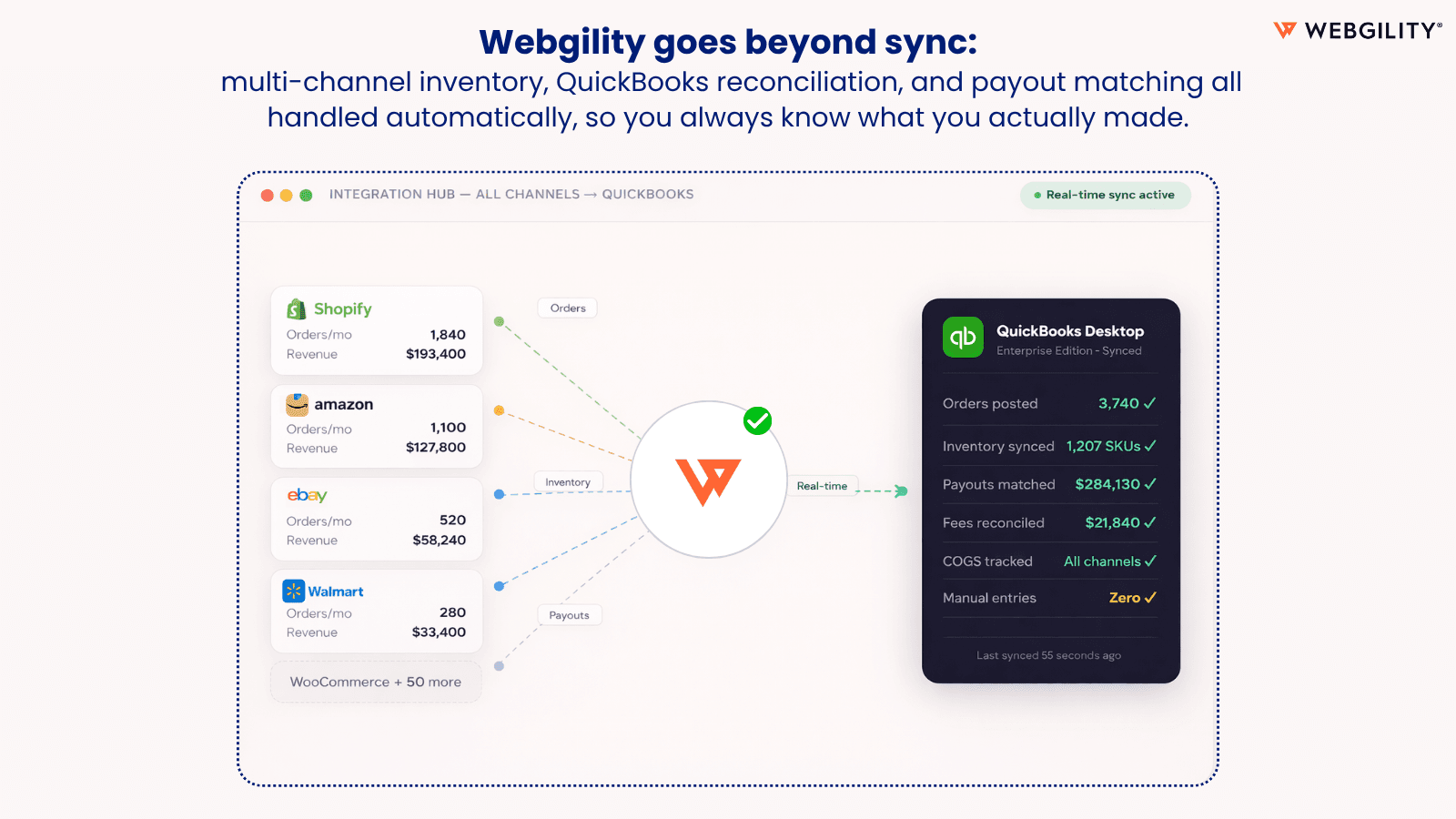
Webgility saves your time and money by connecting your stores data with QuickBooks Desktop.
Simplify accounting
Post Shopify orders, taxes, fees, and payouts to QuickBooks automatically. Also, keep inventory levels and prices updated together.
Grow online business
Add new product listings and combine management of Amazon, Walmart, and other marketplaces all in one place.
Increase Your Earnings
Get useful information on business profits and narrow down your earnings at the sales channel and product level.
Comparison
Top Webgility x QuickBooks Desktop Alternatives Detailed Comparison
The table below highlights the crucial differences between Webgility x QuickBooks Desktop and similar other Shopify apps based on parameters like ratings, reviews, features, pricing, etc.
Add App | |||
|---|---|---|---|
| General Information | |||
| Ratings | 4.9(485 reviews) | 4.6(53 reviews) | |
| Developed by | Webgility | MyWorks | |
| Launch Date | 5/30/2013 | 11/24/2023 | |
| Pricing | $139/month, $249/month, $499/month, $749/month | Free, $24/month, $49/month, $89/month | |
| Objective | Automate bookkeeping, stock tracking and item listing. | - | |
| Categories | Accounting, Inventory sync | Accounting, Inventory sync | |
| Key Features & Highlights | |||
| Purpose | Webgility saves your time and money by connecting your stores data with QuickBooks Desktop. | Effortlessly automate ecommerce accounting. Sync data accurately, both ways with QuickBooks. | |
| Features List |
|
| |
| Highlights | - | - | |
| User Reviews and Ratings | |||
| Recommended % | 98.0% | 96.5% | |
| Pros |
| - | |
| Cons |
| - | |
| Pricing and Plans | |||
| Total Pricing Plans | 4 | 4 | |
| Free Plan | Not available | Available | |
| Free Trial | Yes, for 15 day(s) | No | |
| Technical Information | |||
| Rating | 4.9 | 4.6 | |
| Total Reviews | 452 | 51 | |
| Launch Date | 5/30/2013 | 11/24/2023 | |
| SD Points | 62 | 30 | |
More Details About Webgility x QuickBooks Desktop
Product Description
Webgility Desktop is a top-tier software for QuickBooks Desktop, designed to automate ecommerce accounting and inventory tasks. It helps businesses grow by minimizing manual data entry and providing seamless management of orders, inventory, pricing and product listings across all sales channels and QuickBooks.
AI Summary
WebGility is a Shopify app designed to automate and streamline integration between Shopify stores and QuickBooks (both Desktop and Online versions). Its core functionality includes two-way synchronization of orders, inventory, and fulfillment data, eliminating manual data entry and reducing errors. The app supports real-time updates, multi-store inventory management, and customizable automation settings to align with specific business workflows. Key strengths include robust customer support, with onboarding specialists providing hands-on guidance and troubleshooting, often resolving issues promptly via live assistance. The platform is noted for its user-friendly interface, time-saving automation, and reliable syncing capabilities, making it particularly valuable for high-volume sellers. However, some limitations include occasional billing disputes, with reports of unexpected charges or rigid refund policies. While the app generally performs well, a few users have experienced technical glitches or delays in syncing, though these issues are typically resolved with support intervention. Overall, WebGility is a scalable solution for businesses seeking seamless Shopify-QuickBooks integration, provided they are mindful of subscription terms and potential onboarding time investments.
Support
For any questions, concerns, or assistance with Webgility x QuickBooks Desktop, the dedicated support team is readily available to help.To reach out to the support team, users can send an email to [email protected].
Webgility x QuickBooks Desktop Support Information In A Nutshell:
| Support Email: | [email protected] |
| Contact Number(s): | Not available |
| FAQ Page: | Not available |
| Privacy Policy: | Privacy details |
| Language Support: | English |
Integration
The list of top Shopify apps or features or software tools that Webgility x QuickBooks Desktop seamlessly integrates are given below:
Developer
Looking to install Webgility x QuickBooks Desktop app on your store?
ShopDigest helps businesses upgrade their Shopify stores by offering easy app installation services.
Why Choose ShopDigest?
- Highly experienced and vetted team for successful app installation
- Assured support and guidance throughout the installation and beyond
- Customized services to meet unique business needs
- 30-day no questions asked refund policy
- Lowest pricing guaranteed (starts at just $10/hour)
Customer Reviews
Webgility x QuickBooks Desktop has an overall rating of 4.9 stars from a total of 452 reviews on the Shopify app store. Of these, 439 (97.1%) are positive, 2 (0.4%) are neutral, and 11 (2.4%) are negative*.
*Ratings above four stars fall under positive review, three stars reviews fall under neutral, and anything less than two stars falls under negative.
Faizan has been helping us install Webgility to automate the sales process through multiple ecommerce platforms. He has been great so far in this ongoing process! Thanks for your continued patience and support.
Arun was very helpful with the setup of Webgility but as well with the synching of QuickBooks.
Faizan has been fantastic to work with during the implementation period with Webgility. His knowledge of the Webgility product and the ability to tailor the settings to our needs should greatly increase our productivity.
15 years using Webgility for QuickBooks/Shopify/Amazon integration and couldn't be happier! Recently changed computer systems and had to setup anew... But, with such professional assistance from Webgility (Aniket and Faizan were both so intelligent and helpful with all aspects) the transition was smooth and easy! Highly recommend Webgility.
Webgility, the entire team, and especially Faizan, have been truly knowledgeable, amazing, and patient throughout this entire process. They have been incredibly helpful and supportive every step of the way. We truly recommend Webgility and their team!
Video Demo and Screenshots
Product Screenshots
Installation Steps
How to install Webgility x QuickBooks Desktop on your Shopify store
Find your app
Use filters like pricing, availability, and features to find the perfect match for your store's needs.
Get a personalized setup plan
Our team will create an installation plan based on your current store setup, goals, and requirements.
Install at your own pace
Perfect your store's functionality without the pressure to move on until you're ready.
Install in your Shopify Store
Webgility x QuickBooks Desktop FAQ's
How do I install the Webgility x QuickBooks Desktop Shopify app?
To install Webgility x QuickBooks Desktop app on your Shopify store, click on the Webgility x QuickBooks Desktop installation link. Login to the Shopify store on which you want to install the app and follow the onboarding process.
If you need our expert guidance to help you install Webgility x QuickBooks Desktop on your Shopify store, then contact us now.
What are the key features of Webgility x QuickBooks Desktop?
The key features offered by Webgility x QuickBooks Desktop to Shopify store owners are:
- ✅Every order, refund & fee posts to QuickBooks : exactly as your accountant needs
- ✅Match Shopify payouts to QuickBooks automatically : no more reconciliation chaos
- ✅Zero manual entry into QuickBooks : one fat-finger mistake breaks your whole P&L
- ✅Sell across Shopify, Amazon & eBay : inventory updates the instant a sale closes
- ✅POs, net terms & two-way payment sync : B2B and DTC running clean from one place
Does Webgility x QuickBooks Desktop integrate with other Shopify apps or tools?
Yes, Webgility x QuickBooks Desktop seamlessly integrates with other Shopify apps or tools, such as Control and simplify product listings, prices, stock, and orders automatically., Get a complete picture of profit and performance along with forecasts supported by artificial intelligence., Grow your business effortlessly with features and plans designed for expansion..
Is there a free trial available for Webgility x QuickBooks Desktop?
Yes, Webgility x QuickBooks Desktop offers 15 days free trial on all its paid plans.
What are the pricing plans for Webgility x QuickBooks Desktop?
The app offers 4 paid plans, which cost $139/month, $249/month, $499/month, $749/month. The paid plans also come with a 15-day free trial period.
How does billing work for Webgility x QuickBooks Desktop?
Webgility x QuickBooks Desktop uses USD for billing, with recurring and usage-based charges invoiced usually every 30 days.
Can I cancel or upgrade my subscription plan at any time?
Yes, Webgility x QuickBooks Desktop allows its subscribers to cancel or upgrade their subscription plan at any time.
Does Webgility x QuickBooks Desktop offer customer support? How can I get assistance?
Yes, Webgility x QuickBooks Desktop offers a dedicated support team for any kind of app-related assistance. To reach out to the support team, users can send an email to [email protected].
Is Webgility x QuickBooks Desktop compatible with my Shopify theme?
Please reach out to their support team at [email protected] to confirm its compatibility with your specific Shopify theme.
Alternatives
See all Alternatives to Webgility x QuickBooks Desktop Shopify App.






Most Popular
Most popular Shopify apps on the market




