
Beast Currency Converter Shopify App
by Grizzly Apps SRLBEST Currency Converter changes prices to your customers' local currency, simplifying their shopping experience. Display prices in the local currency of the customers to simplify their shopping experience.
4.5
(1,113)
1000 Stickers, India
A clean and convenient app with quick currency conversions. Perfect for travel and international business.
Install in your Shopify Store

Beast Currency Converter Charts
Track Beast Currency Converter's ranking, reviews, and performance over time with interactive charts. See how it compares to similar apps in the same category.
Pros and Cons
Pros and Cons of Beast Currency Converter
Pros
Easy Installation: The app is frequently praised for its straightforward and quick setup process.
Excellent Customer Support: Many users highlight responsive and helpful support, often resolving issues promptly.
Free Version Value: The free plan is widely appreciated for offering essential features without cost.
User-Friendly Interface: The app is noted for its intuitive and simple design, making it accessible to all users.
Cons
Limited Checkout Currency: Some users find it confusing that the currency reverts to the store’s default at checkout.
Paid Version Pricing: A few users mention the ongoing monthly cost for premium features as a drawback.
Screenshots
About the App
Display prices in the local currency of the customers to simplify their shopping experience.
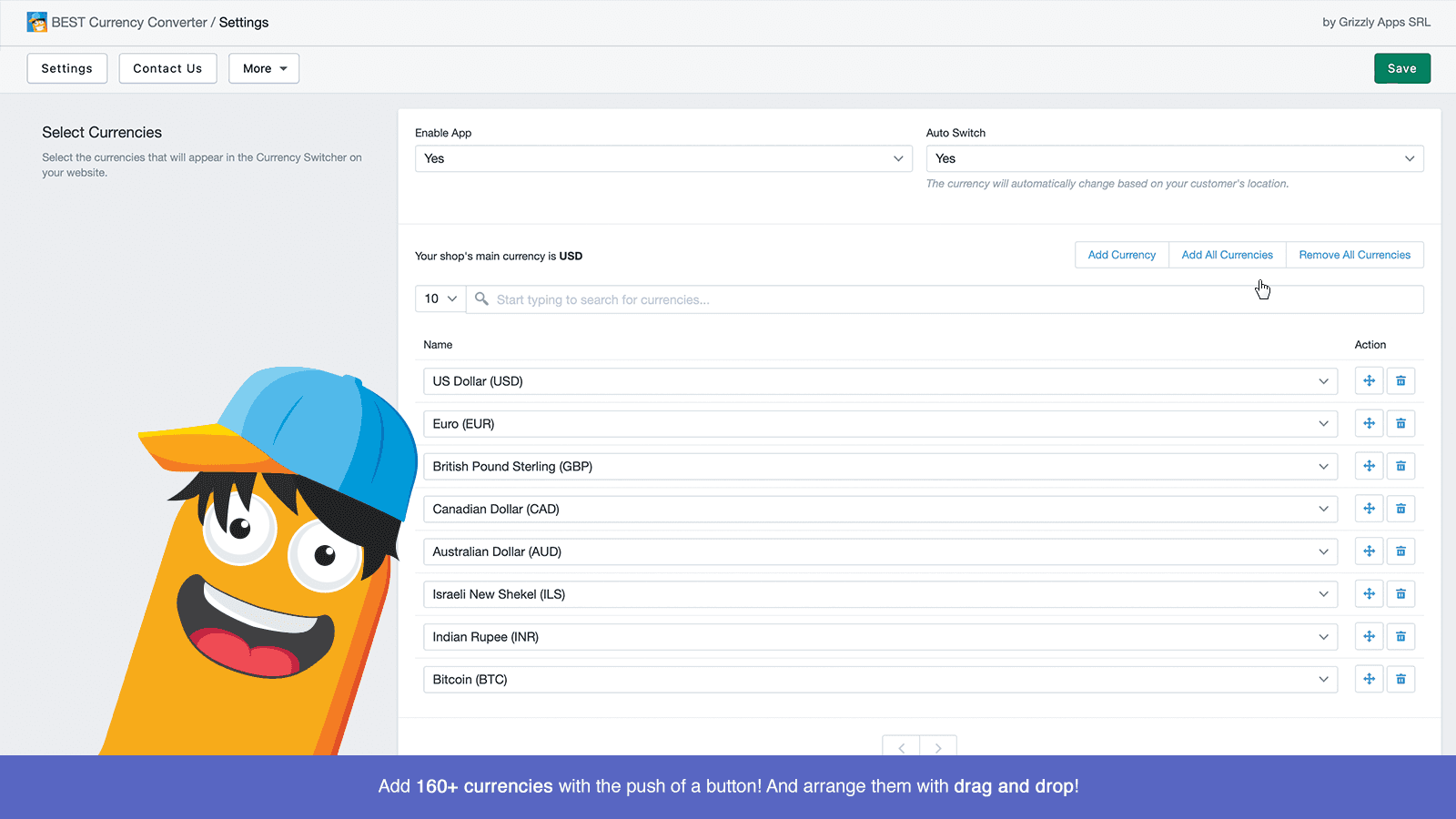
- Currency Addition: Add any currency at the click of a button.
- Automatic Price Conversion: Prices change automatically according to where your customers are located.
- Currency Localization: Lets your customers shop using their local currency, reducing the chance of them leaving their cart.
- Automatic placement of converter in Shopify header.: The converter is automatically added to the header section of all Shopify themes.
Keywords
Key Features
- Automatically converts prices based on the customer's location for seamless shopping.
- Supports 160+ currencies with just one click for global sales.
- Reduces cart abandonment by displaying prices in local currency.
Pricing
Beast Currency Converter Pricing Plans
Free plan
$0/month
FREE for life
Unlimited Currencies
Change the currency converter design
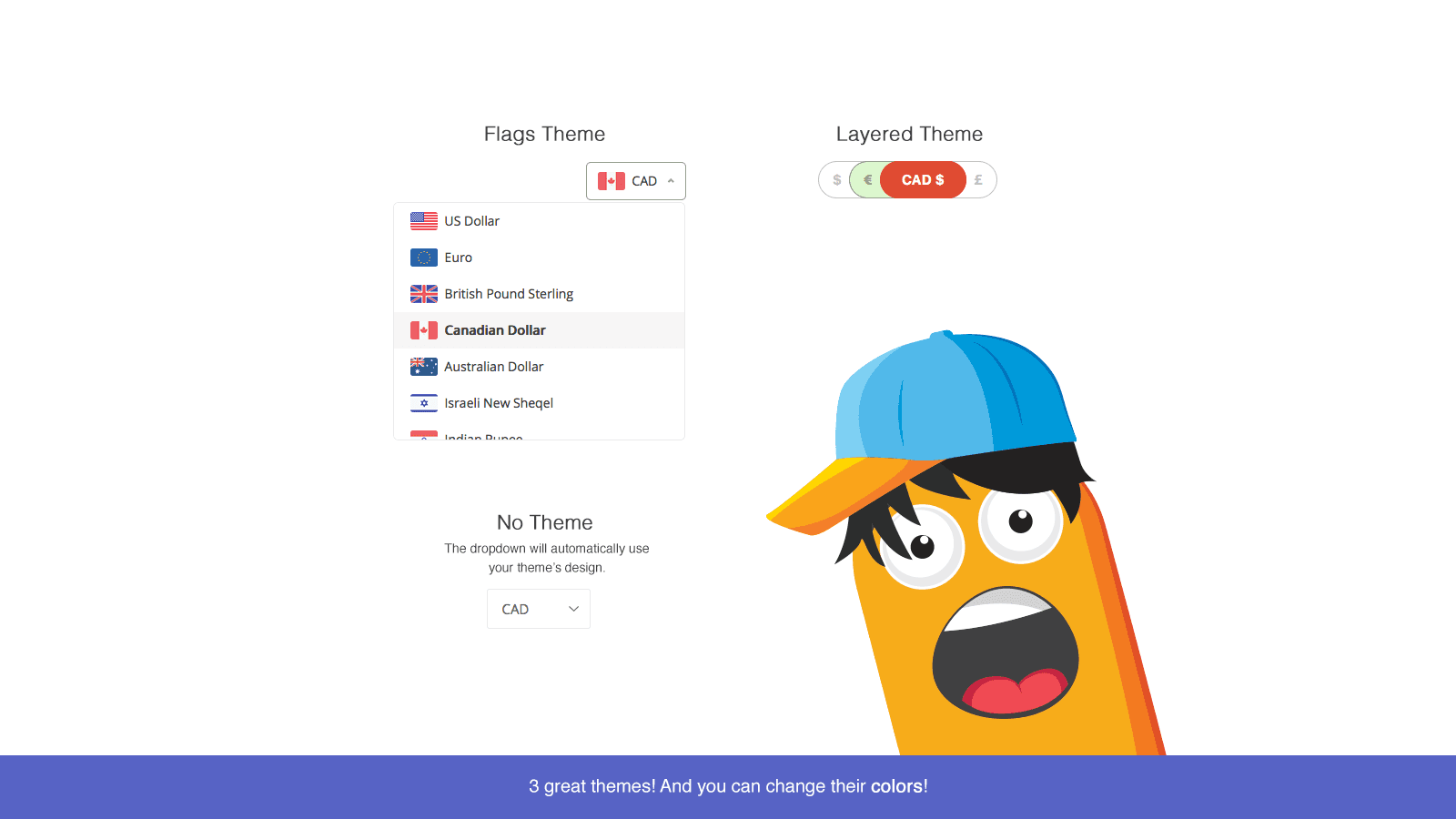
Flags and Layered themes
Premium support
Elite plan
$9.95/month
All free features
Unlimited Currencies
Auto-select currency based on location
Custom Positioning
Match design with your store
Elite yearly
$7.96/month
All free features
Unlimited Currencies
Auto-select currency based on location
Custom Positioning
Match design with your store
Not sure which plan to pick? Discuss Free plan or Elite plan plans with us, learn about custom pricing, or get a demo.
Here's an overview of Beast Currency Converter costs for each of the plan(s):
The app has 3 pricing plans: 1 free and 2 paid. The free plan(s) offered by Beast Currency Converter: (Free plan). The paid plan(s) offered by Beast Currency Converter: (Elite plan, Elite yearly).
The details of the plan(s) are outlined below:
Free plan: This plan is free forever, incurring no subscription costs. It offers a wide range of features like FREE for life, Unlimited Currencies, Change the currency converter design, Flags and Layered themes, Premium support.
Elite plan: The Elite plan plan costs $9.95 and comes with a 30-day free trial period. The plan offers a host of features, including All free features, Unlimited Currencies, Auto-select currency based on location, Custom Positioning, Match design with your store, Customize how Prices Display, Checkout currency notification, Third-party apps support.
Elite yearly: The Elite yearly plan costs $7.96 and comes with a 30-day free trial period. The plan offers a host of features, including All free features, Unlimited Currencies, Auto-select currency based on location, Custom Positioning, Match design with your store, Customize how Prices Display, Checkout currency notification, Third-party apps support.
Beast Currency Converter Price Summary
| Pricing summary | Free plan available. Free trial available. |
| Total Pricing Plan(s) | 3 |
| Number of free plan(s) | 1 |
| Number of paid plan(s) | 2 |
| Cost of Paid Plan(s) | $7.96, $9.95 |
| Free trial available | Yes, for 30 day(s) |
For further information regarding Beast Currency Converter app pricing plans, see the official website.
Beast Currency Converter Shopify App Discounts
If you are looking for discounts on Beast Currency Converter app pricing plans, feel free to contact our team - we'd be happy to help! Additionally, if you are an agency or a shop merchant with multiple Shopify stores, we can work directly with Grizzly Apps SRL to secure better deals on the Beast Currency Converter app exclusively for you.
*Disclaimer: Please note that ShopDigest doesn't guarantee discounts on apps as any changes to the pricing plans are ultimately up to the discretion of the developer.
Testimonials
What our users say about Beast Currency Converter
“A clean and convenient app with quick currency conversions. Perfect for travel and international business.”
“Essential for Indian stores selling globally: fixes PayPal INR errors and lets customers pay in USD/EUR while you receive INR.”
“Support team always on time, i got sorted on my issue and i was happy. i highly recommend this converter for shopify. GOod Job Guys”
Trusted By
Trusted by the best Shopify stores
1000 Stickers
India
Velo Mart
India
onewaykenya
United States
Flove.ae
United Arab Emirates
OREVABEAUTY
South Africa
Flamingo Divina
United Arab Emirates
Tweenology
South Africa
Elija's Nature
Canada
BEST Currency Converter changes prices to your customers' local currency, simplifying their shopping experience.
Effortlessly include various currencies.
Add over 160 currencies with one click. Begin international sales and motivate your customers to purchase.
Instantly Change Costs
Prices automatically adjust according to your customer's location, making shopping more convenient and enjoyable for them.
Boost your sales
When you assist customers to shop in their local currency, it reduces their frustration and they're less likely to abandon their carts. This results in higher sales.
Comparison
Top Beast Currency Converter Alternatives Detailed Comparison
The table below highlights the crucial differences between Beast Currency Converter and similar other Shopify apps based on parameters like ratings, reviews, features, pricing, etc.
Add App | |||
|---|---|---|---|
| General Information | |||
| Ratings | 4.5(1,115 reviews) | 4.4(1,414 reviews) | |
| Developed by | Grizzly Apps SRL | Shopify | |
| Launch Date | 1/25/2016 | 8/16/2022 | |
| Pricing | Free, $9.95/month, $7.96/month | Free | |
| Objective | Display prices in the local currency of the customers to simplify their shopping experience. | Change your store content so it fits every market. | |
| Categories | Currency and translation | Currency and translation | |
| Key Features & Highlights | |||
| Purpose | BEST Currency Converter changes prices to your customers' local currency, simplifying their shopping experience. | Communicate with customers in their language. Easily change your store content for any market. | |
| Features List |
|
| |
| Highlights | - |
| |
| User Reviews and Ratings | |||
| Recommended % | 91.5% | 89.2% | |
| Pros |
|
| |
| Cons |
|
| |
| Pricing and Plans | |||
| Total Pricing Plans | 3 | 0 | |
| Free Plan | Available | Not available | |
| Free Trial | Yes, for 30 day(s) | No | |
| Technical Information | |||
| Rating | 4.5 | 4.4 | |
| Total Reviews | 1,113 | 1,410 | |
| Launch Date | 1/25/2016 | 8/16/2022 | |
| SD Points | 167 | 579 | |
More Details About Beast Currency Converter
Product Description
The product is compatible with any theme and allows for easy addition of various currencies. It converts prices instantly on all devices, either automatically or manually. However, due to Shopify's limitations, customers are informed of the inability to convert prices on the checkout page through a custom message or by hovering over the converted prices to see the original ones.
AI Summary
This Shopify app is a currency converter designed to help stores display product prices in multiple currencies, catering to international customers. Its key features include easy installation, customizable display options (such as color adjustments), and compatibility with both desktop and mobile themes. The free version supports up to five currencies and includes essential conversion functionality, while the paid tier offers advanced features. Strengths include intuitive setup, responsive customer support that assists with customization and troubleshooting, and seamless integration with existing store themes. A notable limitation is that converted currencies do not persist through checkout, reverting to the store’s default currency—a Shopify platform constraint rather than an app issue. Some users find the paid version’s pricing model steep for ongoing use. The app is particularly valued for its reliability, professional appearance, and ability to enhance cross-border sales transparency.
Support
For any questions, concerns, or assistance with Beast Currency Converter, the dedicated support team is readily available to help.To reach out to the support team, users can send an email to [email protected].
Beast Currency Converter Support Information In A Nutshell:
| Support Email: | [email protected] |
| Contact Number(s): | Not available |
| FAQ Page: | Not available |
| Privacy Policy: | Privacy details |
| Language Support: | English |
Integration
The list of top Shopify apps or features or software tools that Beast Currency Converter seamlessly integrates are given below:
Developer
Name: Grizzly Apps SRL
Website: /partners/grizzlyapps
Address: Muresului 7, Bl.E23, Sc.B, Ap.15, VAT ID: RO35962474, Brasov, BV, 500284
Looking to install Beast Currency Converter app on your store?
ShopDigest helps businesses upgrade their Shopify stores by offering easy app installation services.
Why Choose ShopDigest?
- Highly experienced and vetted team for successful app installation
- Assured support and guidance throughout the installation and beyond
- Customized services to meet unique business needs
- 30-day no questions asked refund policy
- Lowest pricing guaranteed (starts at just $10/hour)
Beast Currency Converter Q&A
How does the currency converter work?
It automatically detects a customer's location and displays prices in their local currency, simplifying international shopping. Manual switching is also available for flexibility.
Can I customize the currency switcher design?
Yes, the app offers three beautiful pre-designed currency switchers that seamlessly integrate with any Shopify theme for a professional look.
Does it support multiple currencies?
Absolutely! You can add up to 160+ currencies with a single click, making it easy to sell globally without manual adjustments.
Will customers see converted prices at checkout?
Due to Shopify restrictions, checkout prices remain in the store's default currency, but customers are notified via cart messages or hover tooltips.
How does this app reduce cart abandonment?
By displaying prices in a shopper's local currency, it eliminates confusion and builds trust, encouraging them to complete their purchase.
Is there a free plan available?
Yes, the free plan supports up to 5 currencies, while paid plans unlock 160+ currencies and advanced features like geolocation-based switching.
Does it work on mobile devices?
Yes, prices convert instantly across all devices, ensuring a seamless shopping experience whether on desktop, tablet, or smartphone.
How are exchange rates updated?
The app uses real-time rates to ensure accurate conversions, keeping prices up-to-date for international customers.
Can I notify customers about checkout currency limits?
Yes, you can add a custom message on the cart page or enable hover tooltips to show original prices for transparency.
Is installation difficult?
Not at all—the currency switcher integrates automatically with any Shopify theme, requiring no coding or complex setup.
Customer Reviews
Beast Currency Converter has an overall rating of 4.6 stars from a total of 1113 reviews on the Shopify app store. Of these, 1018 (91.5%) are positive, 29 (2.6%) are neutral, and 66 (5.9%) are negative*.
*Ratings above four stars fall under positive review, three stars reviews fall under neutral, and anything less than two stars falls under negative.
A clean and convenient app with quick currency conversions. Perfect for travel and international business.
A clean and convenient app with quick currency conversions. Perfect for travel and international business.
Essential for Indian stores selling globally: fixes PayPal INR errors and lets customers pay in USD/EUR while you receive INR.
Support team always on time, i got sorted on my issue and i was happy. i highly recommend this converter for shopify. GOod Job Guys
Support team always on time, i got sorted on my issue and i was happy. i highly recommend this converter for shopify. GOod Job Guys
We have been using the app since the 1st day. The support is very fast and helpful.
We have been using the app since the 1st day. The support is very fast and helpful.
just trying out for the first time I think its great
Video Demo and Screenshots
Product Video

Product Screenshots
Installation Steps
How to install Beast Currency Converter on your Shopify store
Find your app
Use filters like pricing, availability, and features to find the perfect match for your store's needs.
Get a personalized setup plan
Our team will create an installation plan based on your current store setup, goals, and requirements.
Install at your own pace
Perfect your store's functionality without the pressure to move on until you're ready.
Install in your Shopify Store
Beast Currency Converter FAQ's
How do I install the Beast Currency Converter Shopify app?
To install Beast Currency Converter app on your Shopify store, click on the Beast Currency Converter installation link. Login to the Shopify store on which you want to install the app and follow the onboarding process.
If you need our expert guidance to help you install Beast Currency Converter on your Shopify store, then contact us now.
What are the key features of Beast Currency Converter?
The key features offered by Beast Currency Converter to Shopify store owners are:
- ✅Easily add all currencies with the push of a button.
- ✅Prices convert automatically based on your customers location.
- ✅Helps your customers shop in their local currency, decreasing cart abandonment.
- ✅The converter is placed automatically in the header of any Shopify theme.
Does Beast Currency Converter integrate with other Shopify apps or tools?
Yes, Beast Currency Converter seamlessly integrates with other Shopify apps or tools, such as Add any currency at the click of a button., Prices change automatically according to where your customers are located., Lets your customers shop using their local currency, reducing the chance of them leaving their cart..
Is there a free trial available for Beast Currency Converter?
Yes, Beast Currency Converter offers 30 days free trial on all its paid plans.
What are the pricing plans for Beast Currency Converter?
The app has 3 pricing plans: 1 free and 2 paid. The paid plans cost $9.95/month, $7.96/month, and come with a 30-day free trial period.
How does billing work for Beast Currency Converter?
Beast Currency Converter uses USD for billing, with recurring and usage-based charges invoiced usually every 30 days.
Can I cancel or upgrade my subscription plan at any time?
Yes, Beast Currency Converter allows its subscribers to cancel or upgrade their subscription plan at any time.
Does Beast Currency Converter offer customer support? How can I get assistance?
Yes, Beast Currency Converter offers a dedicated support team for any kind of app-related assistance. To reach out to the support team, users can send an email to [email protected].
Is Beast Currency Converter compatible with my Shopify theme?
Please reach out to their support team at [email protected] to confirm its compatibility with your specific Shopify theme.
Alternatives
See all Alternatives to Beast Currency Converter Shopify App.






Most Popular
Most popular Shopify apps on the market




