
Mini:Custom Fields Personalize Shopify App
by Minimate AppsCustom product fields,personalization, customer field, product configurator, personalisation,textbox Custom fields, options and uploads for product personalization
5.0
(145)
Engraving Arts, South Africa
This is simple, easy to use app. You can do many variation options. Perfect for those in the engraving business.
Install in your Shopify Store

Mini:Custom Fields Personalize Charts
Track Mini:Custom Fields Personalize's ranking, reviews, and performance over time with interactive charts. See how it compares to similar apps in the same category.
Pros and Cons
Pros and Cons of Mini:Custom Fields Personalize
Pros
Excellent Customer Support: Highly responsive and helpful support team, often resolving issues quickly.
Ease of Use: Simple and intuitive interface, making setup and customization straightforward.
Customization Features: Robust options for adding custom fields and dropdowns to products.
Fast Performance: App runs smoothly without noticeable lag or delays.
Cons
Limited Functionality with Large Inventories: Struggles with stores having over 1000+ items.
Billing Concerns: A few users reported unexpected charges after uninstalling the app.
Screenshots
About the App
Custom fields, options and uploads for product personalization
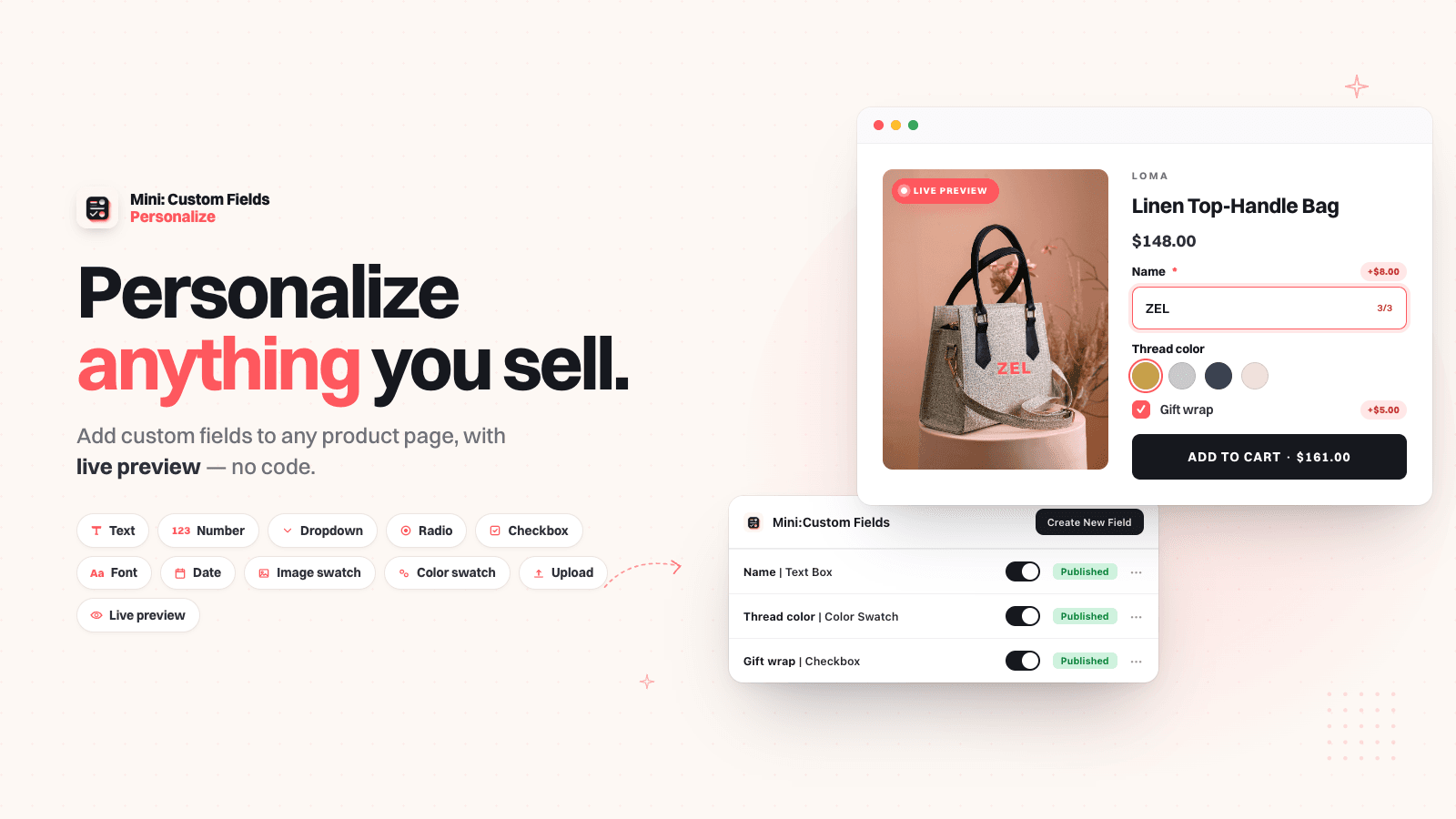
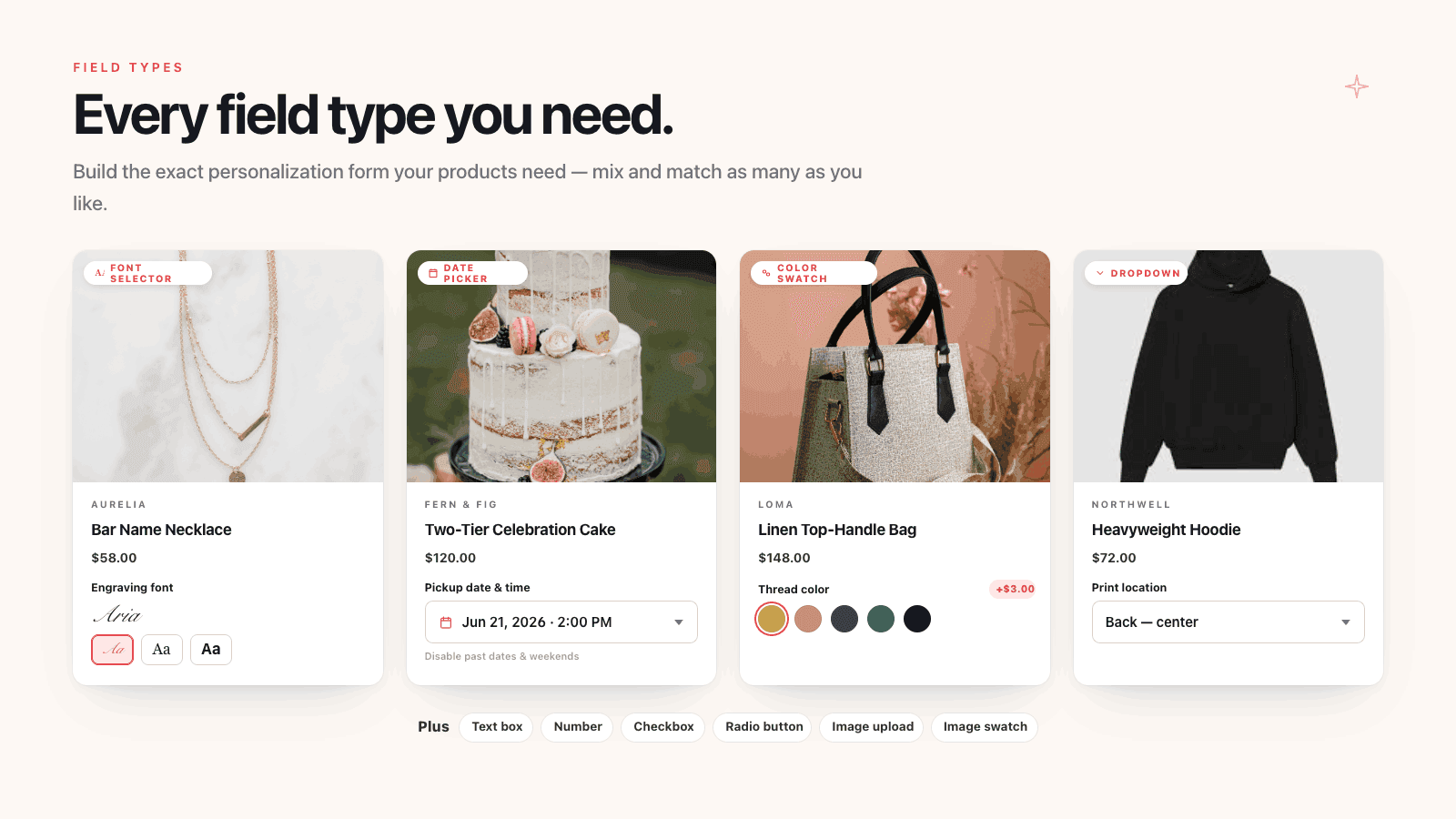
- Add text box,textfield, dropdown,checkbox, date picker, upload to product pages
- Add notes, datepicker, upload file, image swatch, custom fields in order form
- Custom product, custom notes, engraving, product customization, personalizer
- Customers input for customization, product customizer, upload image, uploadery
- Price add on image upload, file upload,text field, upload image, upload file
Keywords
Key Features
- Add text boxes, dropdowns, and checkboxes for product customization.
- Enable file and image uploads for personalized orders.
- Charge extra fees for customizations to increase order value.
Pricing
Mini:Custom Fields Personalize Pricing Plans
Free Plan
$0/month
Create only 1 custom field total
Textbox, Checkbox, Radio Button,Dropdown
Styling customization options
No Watermark
Monthly Basic Plan
$5.99/month
Everything in Free Plan
Unlimited custom fields
Datepicker field type
Advanced styling options
Tooltip and required validation
Monthly Premium
$9.99/month
Everything in Basic Plan
Upload Image/File field type
Image Swatch field type
Additional charges (Product Add On)
Visibility control for variants
Not sure which plan to pick? Discuss Free Plan or Monthly Basic Plan plans with us, learn about custom pricing, or get a demo.
Here's an overview of Mini:Custom Fields Personalize costs for each of the plan(s):
The app has 3 pricing plans: 1 free and 2 paid. The free plan(s) offered by Mini:Custom Fields Personalize: (Free Plan). The paid plan(s) offered by Mini:Custom Fields Personalize: (Monthly Basic Plan, Monthly Premium).
The details of the plan(s) are outlined below:
Free Plan: This plan is free forever, incurring no subscription costs. It offers a wide range of features like Create only 1 custom field total, Textbox, Checkbox, Radio Button,Dropdown, Styling customization options, No Watermark.
Monthly Basic Plan: The Monthly Basic Plan plan costs $5.99 and comes with a 7-day free trial period. The plan offers a host of features, including Everything in Free Plan, Unlimited custom fields, Datepicker field type, Advanced styling options, Tooltip and required validation, Conditional logic for fields, Translation support.
Monthly Premium: The Monthly Premium plan costs $9.99 and comes with a 7-day free trial period. The plan offers a host of features, including Everything in Basic Plan, Upload Image/File field type, Image Swatch field type, Additional charges (Product Add On), Visibility control for variants, Advanced date picker settings, Image/File Size up to 200mb, Upload Retention for 3 months.
Mini:Custom Fields Personalize Price Summary
| Pricing summary | Free plan available. Free trial available. |
| Total Pricing Plan(s) | 3 |
| Number of free plan(s) | 1 |
| Number of paid plan(s) | 2 |
| Cost of Paid Plan(s) | $5.99, $9.99 |
| Free trial available | Yes, for 7 day(s) |
Mini:Custom Fields Personalize Shopify App Discounts
If you are looking for discounts on Mini:Custom Fields Personalize app pricing plans, feel free to contact our team - we'd be happy to help! Additionally, if you are an agency or a shop merchant with multiple Shopify stores, we can work directly with Minimate Apps to secure better deals on the Mini:Custom Fields Personalize app exclusively for you.
*Disclaimer: Please note that ShopDigest doesn't guarantee discounts on apps as any changes to the pricing plans are ultimately up to the discretion of the developer.
Testimonials
What our users say about Mini:Custom Fields Personalize
“This is simple, easy to use app. You can do many variation options. Perfect for those in the engraving business. ”
“Easy to handle and works beautifully. And the customer service is great!”
“Mini Fields Personalize is a very useful and easy-to-use app for adding custom fields and personalization options to products. The setup is simple, the customization options work smoothly, and it makes it much easier for customers to add their personal details while placing an order. The app has been reliable and works well with our store. Highly recommended for anyone looking for a simple and effective product personalization solution!”
Trusted By
Trusted by the best Shopify stores
Engraving Arts
South Africa
Fancypawstore
Canada
MONTEXOO
India
Country School Lunch Boxes
United States
EIN-TOPF
Germany
De Lekkerste Brownies
Netherlands
Nero Illusion
United States
Onyxe®
France
Comparison
Top Mini:Custom Fields Personalize Alternatives Detailed Comparison
The table below highlights the crucial differences between Mini:Custom Fields Personalize and similar other Shopify apps based on parameters like ratings, reviews, features, pricing, etc.
Add App | |||
|---|---|---|---|
| General Information | |||
| Ratings | 5.0(142 reviews) | 4.8(1,212 reviews) | |
| Developed by | Minimate Apps | HulkApps | |
| Launch Date | 9/19/2023 | 3/1/2018 | |
| Pricing | Free, $5.99/month, $9.99/month | Free, $10/month, $20/month, $49.90/month | |
| Objective | Custom fields, options and uploads for product personalization | Create option sets and apply them to all your products in a batch. | |
| Categories | Product variants, Custom file upload | Product variants, Custom file upload | |
| Key Features & Highlights | |||
| Purpose | Custom product fields,personalization, customer field, product configurator, personalisation,textbox | The Product Options app will help all businesses by offering more ways to customize products. | |
| Features List |
|
| |
| Highlights |
| - | |
| User Reviews and Ratings | |||
| Recommended % | 98.6% | 92.2% | |
| Pros |
|
| |
| Cons |
|
| |
| Pricing and Plans | |||
| Total Pricing Plans | 3 | 4 | |
| Free Plan | Available | Available | |
| Free Trial | Yes, for 7 day(s) | Yes, for 7 day(s) | |
| Technical Information | |||
| Rating | 5.0 | 4.8 | |
| Total Reviews | 145 | 1,210 | |
| Launch Date | 9/19/2023 | 3/1/2018 | |
| SD Points | 37 | 152 | |
More Details About Mini:Custom Fields Personalize
Product Description
Set customization fields at the variant level on product page for personalized customer input. Customize products with text box, custom text field, dropdown, checkbox, file upload, date picker for personalise order notes, engraving, uploadery. Leave a note as product personalizer, custom product, customer fields. Gather custom notes with textbox, order form, checkout fields, checkout custom fields. Charge surcharge for custom fields, personalization, product customization to boost AOV!
AI Summary
This Shopify app enables merchants to add customizable fields to product pages, allowing customers to personalize items with text, dropdown selections, or file uploads. It supports various input options, integrates seamlessly with the cart for confirmation, and includes inventory tracking features. The app is praised for its intuitive setup, clear interface, and extensive customization capabilities without requiring coding knowledge. A key strength is its responsive and highly effective customer support, which quickly resolves theme-specific issues and provides tailored solutions. The free version meets basic needs, while the paid subscription offers advanced functionality. However, limitations include occasional compatibility issues with certain themes and constraints when handling large product catalogs (over 1,000 items). Some users report billing discrepancies post-uninstallation, though support typically addresses such concerns promptly. Overall, the app is a robust solution for stores requiring straightforward yet flexible product personalization.
Support
For any questions, concerns, or assistance with Mini:Custom Fields Personalize, the dedicated support team is readily available to help.To reach out to the support team, users can send an email to [email protected]. Additionally, Mini:Custom Fields Personalize offers a comprehensive FAQ section to address common inquiries and provide self-help resources in their app FAQ section.
Language Support
Details of the Mini:Custom Fields Personalize app are available in various languages on the Shopify app store, including Spanish, German, French, Portuguese (Brazil), and Italian.
Mini:Custom Fields Personalize Support Information In A Nutshell:
| Support Email: | [email protected] |
| Contact Number(s): | Not available |
| FAQ Page: | FAQ details |
| Privacy Policy: | Privacy details |
| Language Support: | English, Spanish, German, French, Portuguese (Brazil), and Italian |
Integration
The list of top Shopify apps or features or software tools that Mini:Custom Fields Personalize seamlessly integrates are given below:
Developer
Looking to install Mini:Custom Fields Personalize app on your store?
ShopDigest helps businesses upgrade their Shopify stores by offering easy app installation services.
Why Choose ShopDigest?
- Highly experienced and vetted team for successful app installation
- Assured support and guidance throughout the installation and beyond
- Customized services to meet unique business needs
- 30-day no questions asked refund policy
- Lowest pricing guaranteed (starts at just $10/hour)
Mini:Custom Fields Personalize Q&A
How can I add custom fields to my products?
You can add text boxes, dropdowns, checkboxes, file uploads, and more to product pages, allowing customers to personalize items like engravings or gift notes.
Can I charge extra for customizations?
Yes, you can apply surcharges or price add-ons for personalized options like file uploads or text engravings, helping increase average order value.
What file types can customers upload?
Customers can upload various files, including images (PNG, JPEG), documents (PDF, Excel), videos, and ZIP archives, depending on your plan’s settings.
Is there a free plan available?
The free plan supports one product with unlimited fields and 20MB file uploads, ideal for testing basic customization features before upgrading.
Who is this app best suited for?
It’s perfect for stores selling customizable products like engraved jewelry, personalized gifts, or made-to-order items requiring customer input.
How long are uploaded files stored?
Files are stored for 1 month on the free plan and up to 12 months on premium plans, ensuring flexibility for order fulfillment.
Can I make custom fields mandatory?
Yes, conditional logic lets you require specific fields, ensuring customers provide necessary details like engraving text or file uploads.
Does the app support bulk product customization?
While it focuses on variant-level fields, unlimited products are supported on paid plans, enabling scalability for diverse inventories.
What’s the max file size for uploads?
Free plans allow 20MB per file, while premium plans support up to 200MB, accommodating high-quality images or large documents.
How does this app improve customer experience?
It streamlines personalization with intuitive input options, letting shoppers easily add custom notes, uploads, or selections during checkout.
Customer Reviews
Mini:Custom Fields Personalize has an overall rating of 4.9 stars from a total of 145 reviews on the Shopify app store. Of these, 143 (98.6%) are positive, 0 (0.0%) are neutral, and 2 (1.4%) are negative*.
*Ratings above four stars fall under positive review, three stars reviews fall under neutral, and anything less than two stars falls under negative.
This is simple, easy to use app. You can do many variation options. Perfect for those in the engraving business.
This is simple, easy to use app. You can do many variation options. Perfect for those in the engraving business.
Easy to handle and works beautifully. And the customer service is great!
Easy to handle and works beautifully. And the customer service is great!
Mini Fields Personalize is a very useful and easy-to-use app for adding custom fields and personalization options to products. The setup is simple, the customization options work smoothly, and it makes it much easier for customers to add their personal details while placing an order. The app has been reliable and works well with our store. Highly recommended for anyone looking for a simple and effective product personalization solution!
Mini Fields Personalize is a very useful and easy-to-use app for adding custom fields and personalization options to products. The setup is simple, the customization options work smoothly, and it makes it much easier for customers to add their personal details while placing an order. The app has been reliable and works well with our store. Highly recommended for anyone looking for a simple and effective product personalization solution!
The support on this app goes above and beyond! It is a pleasure to have this app on our ordering site! Thank you for offering such a user friendly experience for our clients.
The support on this app goes above and beyond! It is a pleasure to have this app on our ordering site! Thank you for offering such a user friendly experience for our clients.
Der Service ist super. Mir wurde sofort geholfen mit einem Videocall wo er mir genau gezeigt hat was ich einstellen musste.
Video Demo and Screenshots
Product Screenshots
Installation Steps
How to install Mini:Custom Fields Personalize on your Shopify store
Find your app
Use filters like pricing, availability, and features to find the perfect match for your store's needs.
Get a personalized setup plan
Our team will create an installation plan based on your current store setup, goals, and requirements.
Install at your own pace
Perfect your store's functionality without the pressure to move on until you're ready.
Install in your Shopify Store
Mini:Custom Fields Personalize FAQ's
How do I install the Mini:Custom Fields Personalize Shopify app?
To install Mini:Custom Fields Personalize app on your Shopify store, click on the Mini:Custom Fields Personalize installation link. Login to the Shopify store on which you want to install the app and follow the onboarding process.
If you need our expert guidance to help you install Mini:Custom Fields Personalize on your Shopify store, then contact us now.
What are the key features of Mini:Custom Fields Personalize?
The key features offered by Mini:Custom Fields Personalize to Shopify store owners are:
- ✅Add text box,textfield, dropdown,checkbox, date picker, upload to product pages
- ✅Add notes, datepicker, upload file, image swatch, custom fields in order form
- ✅Custom product, custom notes, engraving, product customization, personalizer
- ✅Customers input for customization, product customizer, upload image, uploadery
- ✅Price add on image upload, file upload,text field, upload image, upload file
Does Mini:Custom Fields Personalize integrate with other Shopify apps or tools?
Mini:Custom Fields Personalize has not made any official mention of integrating with other Shopify apps or tools. To obtain further information, kindly reach out to their support team or consult your Shopify developer.
Is there a free trial available for Mini:Custom Fields Personalize?
Yes, Mini:Custom Fields Personalize offers 7 days free trial on all its paid plans.
What are the pricing plans for Mini:Custom Fields Personalize?
The app has 3 pricing plans: 1 free and 2 paid. The paid plans cost $5.99/month, $9.99/month, and come with a 7-day free trial period.
How does billing work for Mini:Custom Fields Personalize?
Mini:Custom Fields Personalize uses USD for billing, with recurring and usage-based charges invoiced usually every 30 days.
Can I cancel or upgrade my subscription plan at any time?
Yes, Mini:Custom Fields Personalize allows its subscribers to cancel or upgrade their subscription plan at any time.
Does Mini:Custom Fields Personalize offer customer support? How can I get assistance?
Yes, Mini:Custom Fields Personalize offers a dedicated support team for any kind of app-related assistance. To reach out to the support team, users can send an email to [email protected].
Additionally, Mini:Custom Fields Personalize offers a comprehensive FAQ section to address common inquiries and provide self-help resources.
Is Mini:Custom Fields Personalize compatible with my Shopify theme?
Please reach out to their support team at [email protected] to confirm its compatibility with your specific Shopify theme.
Alternatives
See all Alternatives to Mini:Custom Fields Personalize Shopify App.






Most Popular
Most popular Shopify apps on the market




