
Buddha Mega Menu & Navigation Shopify App
by Buddha Apps (Zero Carbon)Create a stunning dropdown menu quickly. Easily browse through Products, Collections, and Pages. Mega Menu: stylish layout, simple to make a dropdown menu.
4.8
(656)
AMANDA KELLY, United Kingdom
We have been using the app for 5 years with no issues and loving it! Then it went wrong and stopped working, but Zero Carbon support was excellent and got the app up and running again ASAP :-)This Megamenu is exactly what we need to drive customers to the right product collection on our site (we have 50,000+ SKUs and over 200 Collections).
Install in your Shopify Store

Buddha Mega Menu & Navigation Charts
Track Buddha Mega Menu & Navigation's ranking, reviews, and performance over time with interactive charts. See how it compares to similar apps in the same category.
Pros and Cons
Pros and Cons of Buddha Mega Menu & Navigation
Pros
Easy to Use: The app is consistently described as intuitive and straightforward, with quick setup and minimal learning curve.
Excellent Customer Support: Support teams are praised for their responsiveness, professionalism, and ability to resolve issues promptly.
Customization Options: Users highlight the flexibility to personalize menus and settings to fit their specific needs.
Reliable Performance: The app functions smoothly and as advertised, with minimal technical issues.
Cons
Limited Free Features: Some users express a desire for additional features (e.g., image support) in the free version.
Occasional Glitches: A few reports of minor bugs or compatibility issues, though quickly resolved.
Screenshots
About the App
Mega Menu: stylish layout, simple to make a dropdown menu.
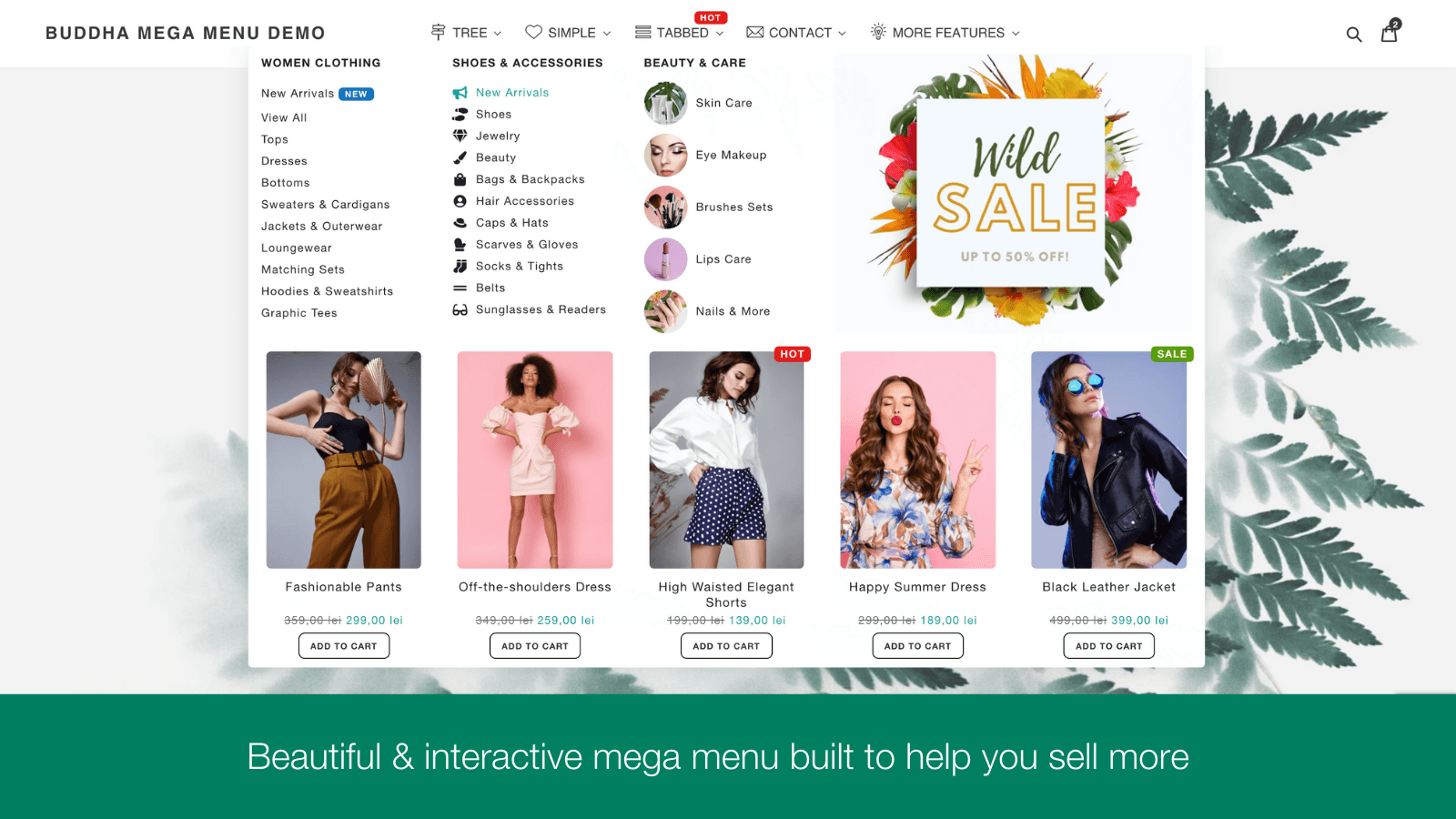
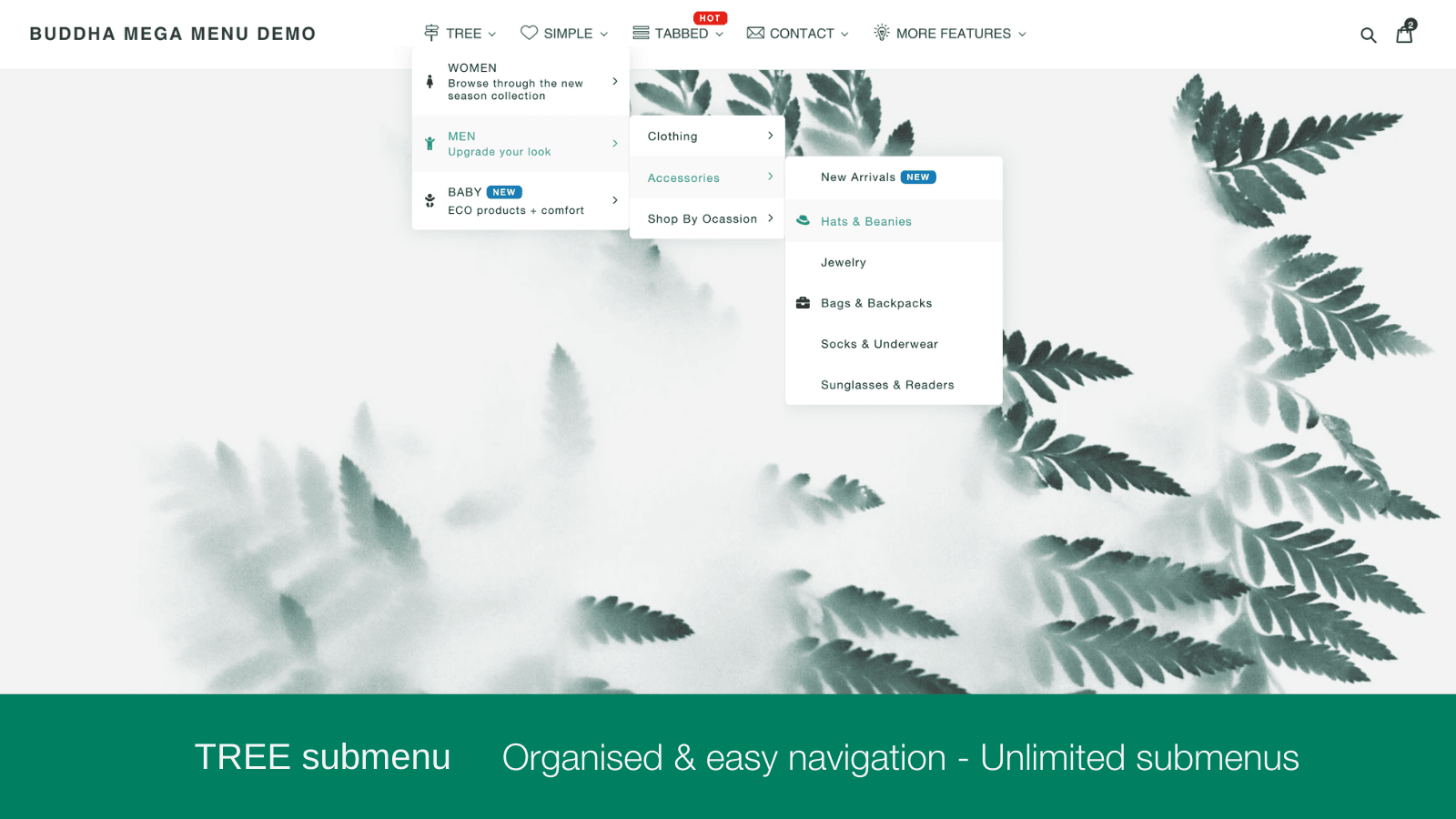
- Submenu Designs: 4 types of submenu designs: Tree, Simple, Tabbed, and Contact.
- Convenient Store Menus: Basic menu options or lists connected to any item, group, or page of your shop.
- Categorized Images: Collections, Products, Blogs, Pages, Custom Images, Banners
- Promotional Multimedia Toolkit: Timer, tags, badges, symbols, and videos to display your deals.
- One-click menu translation: Multi-language: Click once to translate your shop's menu into any language.
Keywords
Key Features
- Create stylish mega menus with customizable designs in minutes.
- Add product images, banners, and videos directly to menus.
- Include countdown timers and badges to highlight promotions.
Pricing
Buddha Mega Menu & Navigation Pricing Plans
Free
$0/month
2 Mega Menu types Tree (Flyout) · Simple
Unlimited Mega Menus
Unlimited menu items & Link Lists
5 Featured Collections
5 Featured Products
Mega Zen
$9.95/month
Everything in Free + Tabbed · Contact
Featured Images & Add-to-cart buttons
FREE for dev. stores
Embed videos directly in menus
Animated Icons Library + Labels / Badges
Not sure which plan to pick? Discuss Free or Mega Zen plans with us, learn about custom pricing, or get a demo.
Here's an overview of Buddha Mega Menu & Navigation costs for each of the plan(s):
The app has 2 pricing plans: 1 free and 1 paid. The free plan(s) offered by Buddha Mega Menu & Navigation: (Free). The paid plan(s) offered by Buddha Mega Menu & Navigation: (Mega Zen).
The details of the plan(s) are outlined below:
Free: This plan is free forever, incurring no subscription costs. It offers a wide range of features like 2 Mega Menu types Tree (Flyout) · Simple, Unlimited Mega Menus, Unlimited menu items & Link Lists, 5 Featured Collections, 5 Featured Products, Icons Library, Customizable Mobile / Desktop Design, No watermark & FREE Tech Support.
Mega Zen: The Mega Zen plan costs $9.95 and comes with a 14-day free trial period. The plan offers a host of features, including Everything in Free + Tabbed · Contact, Featured Images & Add-to-cart buttons, FREE for dev. stores, Embed videos directly in menus, Animated Icons Library + Labels / Badges, Sales Banners & Promotional blocks, Countdown timers for promotions, 1-Click Menu translation.
Buddha Mega Menu & Navigation Price Summary
| Pricing summary | Free plan available. Free trial available. |
| Total Pricing Plan(s) | 2 |
| Number of free plan(s) | 1 |
| Number of paid plan(s) | 1 |
| Cost of Paid Plan(s) | $9.95 |
| Free trial available | Yes, for 14 day(s) |
For further information regarding Buddha Mega Menu & Navigation app pricing plans, see the official website.
Buddha Mega Menu & Navigation Shopify App Discounts
If you are looking for discounts on Buddha Mega Menu & Navigation app pricing plans, feel free to contact our team - we'd be happy to help! Additionally, if you are an agency or a shop merchant with multiple Shopify stores, we can work directly with Buddha Apps (Zero Carbon) to secure better deals on the Buddha Mega Menu & Navigation app exclusively for you.
*Disclaimer: Please note that ShopDigest doesn't guarantee discounts on apps as any changes to the pricing plans are ultimately up to the discretion of the developer.
Testimonials
What our users say about Buddha Mega Menu & Navigation
“We have been using the app for 5 years with no issues and loving it! Then it went wrong and stopped working, but Zero Carbon support was excellent and got the app up and running again ASAP :-)This Megamenu is exactly what we need to drive customers to the right product collection on our site (we have 50,000+ SKUs and over 200 Collections).”
“The app works great. Furthermore, the customer service is very helpful with questions! I would definitely recommend dowloading the app.”
“Huge thanks to the support team for their incredibly fast response and assistance! The Buddha Mega Menu app is super easy to implement and brings real value to any Shopify store. Highly recommended!”
Trusted By
Trusted by the best Shopify stores
AMANDA KELLY
United Kingdom
ClickyBlox
Netherlands
art-zen.shop
Romania
Angelocal
United States
AllSupermoto AS
Norway
diarrablu
United States
ESMA Outdoor
Latvia
Japanese Green Tea Shops
United States
Create a stunning dropdown menu quickly. Easily browse through Products, Collections, and Pages.
Quick and impressive Menu
The Mega Menu app is the most downloaded on Shopify. It's easy to add menus, fully customizable design, and has a preview option. No coding required.
Increase sales
Add product 'Add to Cart' buttons - Use countdown and badges for promotions - Use banners to highlight your sales - Showcase your featured products, collections and more.
Advanced Shop Layout
Newest design styles - Easily browse through products, collections, and pages - Works with all devices and Shopify themes.
Comparison
Top Buddha Mega Menu & Navigation Alternatives Detailed Comparison
The table below highlights the crucial differences between Buddha Mega Menu & Navigation and similar other Shopify apps based on parameters like ratings, reviews, features, pricing, etc.
Add App | |||
|---|---|---|---|
| General Information | |||
| Ratings | 4.8(613 reviews) | 4.9(1,077 reviews) | |
| Developed by | Buddha Apps (Zero Carbon) | Qikify Design | |
| Launch Date | 8/19/2016 | 9/26/2018 | |
| Pricing | Free, $9.95/month | Free, $9.99/month, $19.99/month | |
| Objective | Mega Menu: stylish layout, simple to make a dropdown menu. | Easily make a large menu or tab menu for navigating your store. | |
| Categories | Navigation and menus, Search and navigation - Other | Navigation and menus, Search and navigation - Other | |
| Key Features & Highlights | |||
| Purpose | Create a stunning dropdown menu quickly. Easily browse through Products, Collections, and Pages. | You can easily make a large menu for your store without coding. We offer ready-made templates. | |
| Features List |
|
| |
| Highlights | - |
| |
| User Reviews and Ratings | |||
| Recommended % | 94.8% | 97.9% | |
| Pros |
|
| |
| Cons |
|
| |
| Pricing and Plans | |||
| Total Pricing Plans | 2 | 3 | |
| Free Plan | Available | Available | |
| Free Trial | Yes, for 14 day(s) | Yes, for 7 day(s) | |
| Technical Information | |||
| Rating | 4.8 | 4.9 | |
| Total Reviews | 656 | 857 | |
| Launch Date | 8/19/2016 | 9/26/2018 | |
| SD Points | 37 | 431 | |
More Details About Buddha Mega Menu & Navigation
Product Description
This app allows you to generate a stylish and advanced mega menu swiftly, contributing to a better store aesthetic. It further enhances customer convenience by enabling them to directly add products to their cart and navigate through different categories from the menu.
AI Summary
The app is a Shopify menu customization tool designed to enhance website navigation with features like drag-and-drop organization, submenus, dropdowns, and extensive design customization options. It offers both free and paid versions, with the free version providing robust functionality while paid upgrades unlock advanced features. Strengths include an intuitive interface, quick setup, and a high degree of flexibility in menu design, making it suitable for stores with complex product catalogs. The app is noted for its reliable performance, seamless integration with Shopify themes, and the ability to resolve compatibility issues with other apps or themes. A standout aspect is the responsive and knowledgeable customer support team, which promptly addresses technical issues and provides customization assistance. However, some limitations include occasional minor glitches, such as display inconsistencies on mobile or homepage layouts, though these are typically resolved quickly. While the free version is well-regarded, a few users express a desire for expanded features, such as image support, in the free tier. Overall, the app is a versatile solution for improving site navigation and user experience, particularly for stores seeking professional, customizable menus without extensive technical overhead.
Support
For any questions, concerns, or assistance with Buddha Mega Menu & Navigation, the dedicated support team is readily available to help.To reach out to the support team, users can send an email to [email protected]. Additionally, Buddha Mega Menu & Navigation offers a comprehensive FAQ section to address common inquiries and provide self-help resources in their app FAQ section.
Buddha Mega Menu & Navigation Support Information In A Nutshell:
| Support Email: | [email protected] |
| Contact Number(s): | Not available |
| FAQ Page: | FAQ details |
| Privacy Policy: | Privacy details |
| Language Support: | English |
Integration
The list of top Shopify apps or features or software tools that Buddha Mega Menu & Navigation seamlessly integrates are given below:
Developer
Name: Buddha Apps (Zero Carbon)
Website: /partners/buddhaapps
Address: Zero Carbon SRL Str Stefan Baciu, nr 7, bl 7, et 7, ap 55, VAT ID RO 33047042, Brasov, BV, 500170
Looking to install Buddha Mega Menu & Navigation app on your store?
ShopDigest helps businesses upgrade their Shopify stores by offering easy app installation services.
Why Choose ShopDigest?
- Highly experienced and vetted team for successful app installation
- Assured support and guidance throughout the installation and beyond
- Customized services to meet unique business needs
- 30-day no questions asked refund policy
- Lowest pricing guaranteed (starts at just $10/hour)
Buddha Mega Menu & Navigation Q&A
How does this app improve my store’s navigation?
It creates visually appealing mega menus with dropdowns, images, and quick links, helping customers easily browse products, collections, and pages while boosting engagement.
Can I customize the menu’s appearance?
Yes, you can choose from multiple designs, add images, badges, countdown timers, and adjust colors/fonts to match your store’s branding without coding.
Does it support multiple languages?
Absolutely! The app offers one-click translation, allowing your menu to adapt to any language your store supports for a seamless customer experience.
Can customers add products to cart from the menu?
Yes, the menu includes "Add to Cart" buttons, letting shoppers quickly purchase featured products without navigating away from the page.
Is the menu mobile-friendly?
Yes, it’s fully responsive and works on all devices, ensuring smooth navigation whether customers shop on desktop, tablet, or phone.
Are there promotional tools included?
You can showcase deals using countdown timers, badges, banners, and videos directly in the menu to highlight discounts and boost sales.
How quickly can I set up a mega menu?
The intuitive interface lets you create and customize a professional-looking menu in minutes, with a preview option for real-time adjustments.
Does the free plan have limitations?
The free version includes unlimited menus and basic features, while paid plans unlock advanced options like videos, unlimited images, and translations.
Will it work with my Shopify theme?
Yes, it’s compatible with all Shopify themes, ensuring seamless integration without disrupting your store’s existing design.
Customer Reviews
Buddha Mega Menu & Navigation has an overall rating of 4.8 stars from a total of 656 reviews on the Shopify app store. Of these, 619 (94.4%) are positive, 9 (1.4%) are neutral, and 28 (4.3%) are negative*.
*Ratings above four stars fall under positive review, three stars reviews fall under neutral, and anything less than two stars falls under negative.
We have been using the app for 5 years with no issues and loving it! Then it went wrong and stopped working, but Zero Carbon support was excellent and got the app up and running again ASAP :-)This Megamenu is exactly what we need to drive customers to the right product collection on our site (we have 50,000+ SKUs and over 200 Collections).
We have been using the app for 5 years with no issues and loving it! Then it went wrong and stopped working, but Zero Carbon support was excellent and got the app up and running again ASAP :-)This Megamenu is exactly what we need to drive customers to the right product collection on our site (we have 50,000+ SKUs and over 200 Collections).
The app works great. Furthermore, the customer service is very helpful with questions! I would definitely recommend dowloading the app.
The app works great. Furthermore, the customer service is very helpful with questions! I would definitely recommend dowloading the app.
Huge thanks to the support team for their incredibly fast response and assistance! The Buddha Mega Menu app is super easy to implement and brings real value to any Shopify store. Highly recommended!
Huge thanks to the support team for their incredibly fast response and assistance! The Buddha Mega Menu app is super easy to implement and brings real value to any Shopify store. Highly recommended!
This has been my go-to navigations pp in both corporate ecommerce management roles and my own personal endeavors as an entrepreneur. It's an accessible price and gives an elevated look/feel.The team is quick to reply and answer any questions, too, so 10/10 customer service.Highly recommend!
This has been my go-to navigations pp in both corporate ecommerce management roles and my own personal endeavors as an entrepreneur. It's an accessible price and gives an elevated look/feel.The team is quick to reply and answer any questions, too, so 10/10 customer service.Highly recommend!
Used this app since 2018 and very happy with it over the default menu.
Used this app since 2018 and very happy with it over the default menu.
Video Demo and Screenshots
Product Video

Product Screenshots
Installation Steps
How to install Buddha Mega Menu & Navigation on your Shopify store
Find your app
Use filters like pricing, availability, and features to find the perfect match for your store's needs.
Get a personalized setup plan
Our team will create an installation plan based on your current store setup, goals, and requirements.
Install at your own pace
Perfect your store's functionality without the pressure to move on until you're ready.
Install in your Shopify Store
Buddha Mega Menu & Navigation FAQ's
How do I install the Buddha Mega Menu & Navigation Shopify app?
To install Buddha Mega Menu & Navigation app on your Shopify store, click on the Buddha Mega Menu & Navigation installation link. Login to the Shopify store on which you want to install the app and follow the onboarding process.
If you need our expert guidance to help you install Buddha Mega Menu & Navigation on your Shopify store, then contact us now.
What are the key features of Buddha Mega Menu & Navigation?
The key features offered by Buddha Mega Menu & Navigation to Shopify store owners are:
- ✅Choose from 4 submenu layouts: Tree, Simple, Tabbed & Contact Form
- ✅Display featured images for collections, products, blogs, pages, banners & lists
- ✅Show featured products with Add to Cart buttons directly in the menu
- ✅SALES: Banners & Promotional blocks + Countdown timers for promotions
- ✅GLOBAL: 1-Click Menu translation
Does Buddha Mega Menu & Navigation integrate with other Shopify apps or tools?
Yes, Buddha Mega Menu & Navigation seamlessly integrates with other Shopify apps or tools, such as 4 types of submenu designs: Tree, Simple, Tabbed, and Contact., Basic menu options or lists connected to any item, group, or page of your shop., Collections, Products, Blogs, Pages, Custom Images, Banners.
Is there a free trial available for Buddha Mega Menu & Navigation?
Yes, Buddha Mega Menu & Navigation offers 14 days free trial on all its paid plans.
What are the pricing plans for Buddha Mega Menu & Navigation?
The app has 2 pricing plans: 1 free and 1 paid. The paid plan costs $9.95/month, and comes with a 14-day free trial period.
How does billing work for Buddha Mega Menu & Navigation?
Buddha Mega Menu & Navigation uses USD for billing, with recurring and usage-based charges invoiced usually every 30 days.
Can I cancel or upgrade my subscription plan at any time?
Yes, Buddha Mega Menu & Navigation allows its subscribers to cancel or upgrade their subscription plan at any time.
Does Buddha Mega Menu & Navigation offer customer support? How can I get assistance?
Yes, Buddha Mega Menu & Navigation offers a dedicated support team for any kind of app-related assistance. To reach out to the support team, users can send an email to [email protected].
Additionally, Buddha Mega Menu & Navigation offers a comprehensive FAQ section to address common inquiries and provide self-help resources.
Is Buddha Mega Menu & Navigation compatible with my Shopify theme?
Please reach out to their support team at [email protected] to confirm its compatibility with your specific Shopify theme.
Alternatives
See all Alternatives to Buddha Mega Menu & Navigation Shopify App.






Most Popular
Most popular Shopify apps on the market




